1. Mihoatraview
The waveshare FT232RNL USB to RS232/485/422/TTL Interface Converter is an industrial-grade isolated converter designed for reliable and stable communication across various serial interfaces. It leverages an original FT232RNL chip for superior performance and compatibility. This device is engineered with multiple protection features to ensure safe and durable operation in diverse environments.

Figure 1: waveshare FT232RNL USB to RS232/485/422/TTL Interface Converter
2. endri-javatra
- Original FT232RNL Chip: Ensures fast, stable, and reliable communication with enhanced compatibility.
- Multi-Interface Conversion: Supports USB to RS232, USB to RS485, USB to RS422, and USB to TTL.
- Unibody Power Supply Isolation: Provides stable isolated voltage without requiring external power for the isolated terminal.
- Unibody Digital Isolation: Allows signal isolation, offering high reliability, strong anti-interference, and low power consumption.
- TVS (Transient Voltage Suppressor): Effectively suppresses surge voltage sy transient spike voltage, providing lightningproof and ESD protection.
- Self-Recovery Fuse & Protection Diodes: Ensures stable current/voltage outputs, offering over-current/over-voltage proof and improved shock resistance.
- Automatic Transceiver Circuit: Fully automatic, no-delay transceiver circuit for fast and stable communication without interference.
- TTL Serial 3.3V/5V Voltage Translator: Configurable TTL level via switch.
- LED famantarana: Three LEDs indicate power (PWR) and transceiver status (TXD, RXD).
- High-Quality Connectors: Durable USB-B and RS232 connectors for smooth plug/pull.
- Industrial-Grade Metal Case: Supports wall-mount and rail-mount installations, providing a solid and aesthetically pleasinendrika g.

Figure 2: Internal Design and Protection Features
3. Votoatin'ny fonosana
Ireto manaraka ireto no mazàna tafiditra ao anatin'ny fonosan'ny vokatra:
- waveshare FT232RNL USB to RS232/485/422/TTL Interface Converter
- USB-A mankany USB-B Cable
- Screwdriver
- Fonosana fametrahana (efa miraikitra na misaraka)

Sary 3: Ny votoatin'ny fonosana
4. Fametrahana
To set up your waveshare FT232RNL converter, follow these general steps:
- Mifandraisa amin'ny mpampiantrano: Use the provided USB-A to USB-B cable to connect the converter's USB-B port to a USB port on your computer (PC, Mac, Linux, Android device).
- Fametrahana mpamily: For most modern operating systems (Windows, Linux, Mac, Android), the necessary drivers for the FT232RNL chip should install automatically upon connection. If not, drivers can be obtained from the FTDI website or waveshare's official support page.
- Select TTL Level (if applicable): If using the TTL interface, adjust the 3.3V/5V voltage translator switch on the converter to match the voltage level of your target device.
- Ampifandraiso amin'ny fitaovana serial: Connect your RS232, RS485, RS422, or TTL serial device to the corresponding screw terminals or DB9 connector on the converter. Ensure correct pin assignments (refer to Section 6: Interface Introduction).
- Hamarino ny fifandraisana: The PWR LED on the converter should illuminate when connected to a powered USB port. The TXD and RXD LEDs will flash during data transmission.
Video 1: Demonstrates the connection and various interface conversions of the waveshare USB to RS232/485/422/TTL converter.
5. Fiasana
Once the converter is set up and connected, it operates as a transparent bridge between your USB host and the connected serial device. The onboard automatic transceiver circuit manages data flow without manual intervention.
LED famantarana:
- PWR (Red): Indicates power. Lights up when the USB connection is established and voltage dia hita.
- TXD (Green): Transmit Data Indicator. Lights up when the USB port sends data.
- RXD (Green): Receive Data Indicator. Lights up when the device ports send data back.
To communicate with your serial device, use appropriate serial communication software on your computer. Configure the software with the correct COM port (assigned by your operating system), baud rate, data bits, parity, and stop bits to match your serial device's settings.
6. Fampidirana Interface
The converter provides multiple interfaces for versatile connectivity:

Sary 4: Tapitraview of Converter Interfaces
RS232 Pinout (DB9 Male):
| PIN | Description |
|---|---|
| 2 | Receiving data (RXD) |
| 3 | Sending data (TXD) |
| 5 | GND tany |
| 1, 4, 6, 7, 8, 9 | N/C (Not Connected) |
RS485/RS422 Pinout (Screw Terminal):
| Screw Terminal (PIN) | Description |
|---|---|
| PE | 485/422 signal ground |
| TA | RS422 send differential signal positive / RS485 differential signal positive A+ |
| TB | RS422 send differential signal negative / RS485 differential signal negative B- |
| RA | RS422 receive differential signal positive |
| RB | RS422 receive differential signal negative |
TTL (UART) Pinout (Screw Terminal):
| Screw Terminal (PIN) | Description |
|---|---|
| TXD | TTL transmit data pin, connect to MCU.RXD |
| RXD | TTL receive data pin, connect to MCU.TXD |
| GND | Mifandraisa amin'ny GND |
| VCC | 5V / 3.3V power supply output, configurable via 5V/3.3V level switch |

Figure 5: Detailed Pinouts
7. Famaritana
| Sokajy | famaritana |
|---|---|
| Karazana vokatra | Industrial grade digital isolated converter |
| Operating Voltage | 5V (USB) / 3.3V / 5V (TTL) |
| USB Connector | USB-B |
| Fiarovana USB | 200mA tena fanarenana fuse, mitoka-monina Output |
| Ireo singa mifandraika amin'ny RS232 | DB9 lahy |
| RS232 Fiarovana | TVS diode, surge protection & ESD protection |
| RS232 Transmission Mode | Point-to-point |
| RS232 Baud tahan'ny | 300bps ~ 921600bps |
| Ireo singa mifandraika amin'ny RS485/422 | terminal visy |
| RS485/422 Direction Control | Hardware automatic control |
| RS485/422 Protection | 600W lightningproof and surge-suppress, 15KV ESD protection (reserved two 120R balancing resistors, enabled/disabled via jumper) |
| RS485/422 Transmission Mode | Point-to-multipoints (485 mode: up to 32 nodes, repeaters recommended for 16+ nodes; 422 mode: up to 256 nodes, repeaters recommended for 16+ nodes) |
| RS485/422 Baud Rate | 300bps ~ 2Mbps |
| TTL (UART) Connector | terminal visy |
| TTL (UART) Pins | TXD, RXD, GND, 5V/3.3V |
| TTL (UART) Protection | Clamp diode fiarovana, over-voltage/negative-voltage porofo, fanoherana fahatairana |
| TTL (UART) Transmission Mode | Point-to-point |
| TTL (UART) Baud Rate | 300bps ~ 2Mbps |
| Temperature miasa | -40°C ~ 85°C |
| Hamandoana miasa | 5% RH ~ 95% RH |
| Rafitra fandidiana tohanana | Mac, Linux, Android, Windows 11 / 10 / 8.1 / 8 / 7 |
| Ny haben'ny fonosana | 6.14 x 4.33 x 1.26 santimetatra |
| Lanja entana | 1.76 oz |
| mpanamboatra | Waveshare |
| Daty misy voalohany | Febroary 6, 2023 |
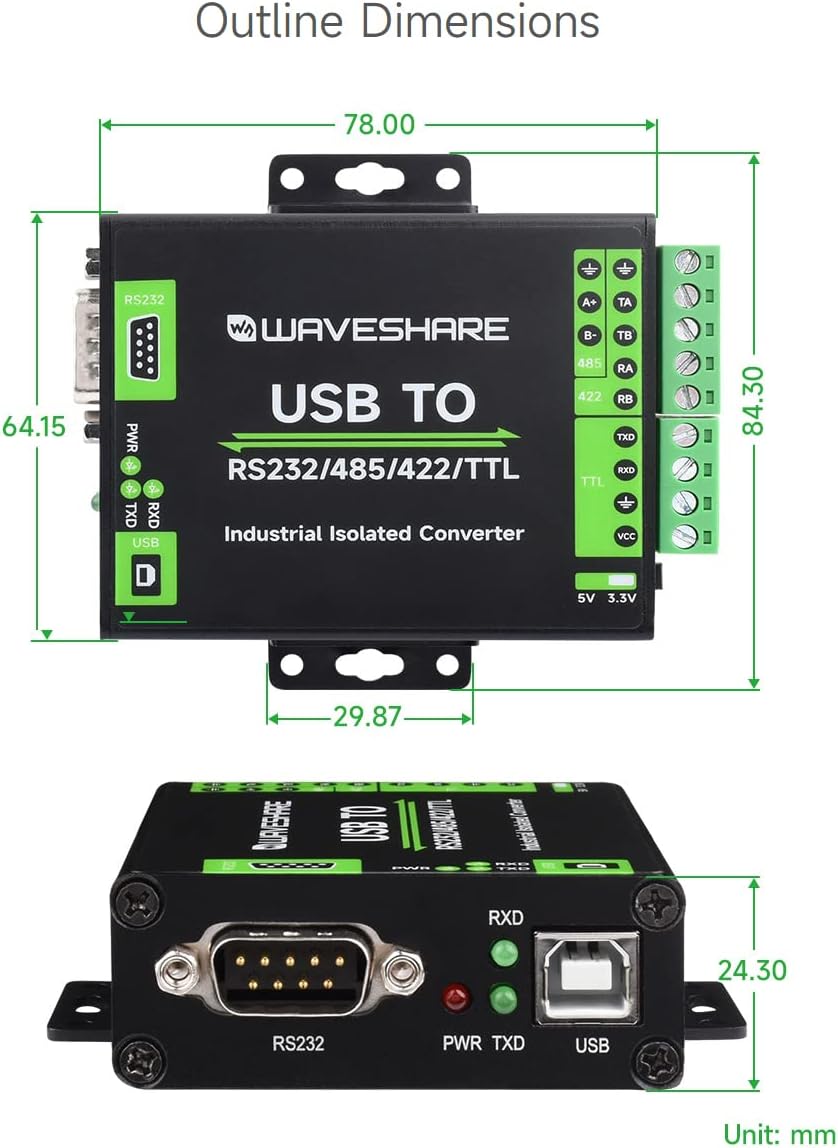
Sary 6: Refy amin'ny endrika (Vondrona: mm)
8. Fikojakojana
To ensure the longevity and optimal performance of your waveshare FT232RNL converter, follow these maintenance guidelines:
- Fanadiovana: Use a soft, dry cloth to clean the exterior of the device. Avoid using liquid cleaners or solvents, which may damage the casing na singa anatiny.
- Tontolo iainana: Operate and store the converter in a clean, dry environment, away from excessive dust, moisture, and extreme temperatures. Refer to the operating temperature and humidity specifications.
- Fikarakarana: Handle the device with care. Avoid dropping it or subjecting it to strong impacts, which could damage the internal circuitry.
- Fifandraisana: Ensure all cable connections are secure and free from strain. Periodically check screw terminals for tightness.
9. Famahana olana
If you encounter issues with your waveshare FT232RNL converter, consider the following troubleshooting steps:
- Tsy misy herinaratra (PWR LED maty):
- Ensure the USB cable is securely connected to both the converter and the host computer.
- Manandrama seranan-tsambo USB hafa amin'ny solosainao.
- Verify that your computer's USB port is providing power.
- No Data Transmission (TXD/RXD LEDs not flashing):
- Check all serial connections (RS232, RS485, RS422, TTL) for correct wiring and secure connections.
- Verify that the serial communication software on your computer is correctly configured (COM port, baud rate, data bits, parity, stop bits).
- Ensure the TTL level switch is set correctly for your TTL device (3.3V or 5V).
- Confirm that the connected serial device is powered on and functioning correctly.
- Olan'ny mpamily:
- If the device is not recognized by your operating system, try reinstalling the FTDI drivers. These can typically be found on the FTDI website.
- Check your device manager (Windows) or equivalent system information (Linux/Mac) to see if the device is listed without errors.
- fitsabahana:
- While the device has strong anti-interference capabilities, ensure it is not placed near strong electromagnetic interference sources.
10. Warranty sy fanohanana
For warranty information, technical support, or further assistance with your waveshare FT232RNL USB to RS232/485/422/TTL Interface Converter, please contact waveshare directly through their official webtranokala na ny mpivarotra nividiananao ny vokatra.
An official user guide in PDF format is also available for download: Torolàlana ho an'ny mpampiasa (PDF)


