1. Fampidirana
The Maxcom MM724 is a simple mobile phone designed for ease of use, featuring straightforward software and practical functions. It is particularly suitable for users who prefer a device without complicated menus. Key features include an emergency SOS button, a built-in flashlight, and Bluetooth connectivity for hearing aid compatibility.
2. Ny votoatin'ny fonosana
Azafady, jereo ny boaty ho an'ireto zavatra manaraka ireto:
- 1 Maxcom MM724 Mobile Phone
- 1 Desktop Charger
- 1 Matching Cords (for charger)
- Boky Torolalana ho an'ny Mpampiasa 1 (ity antontan-taratasy ity)
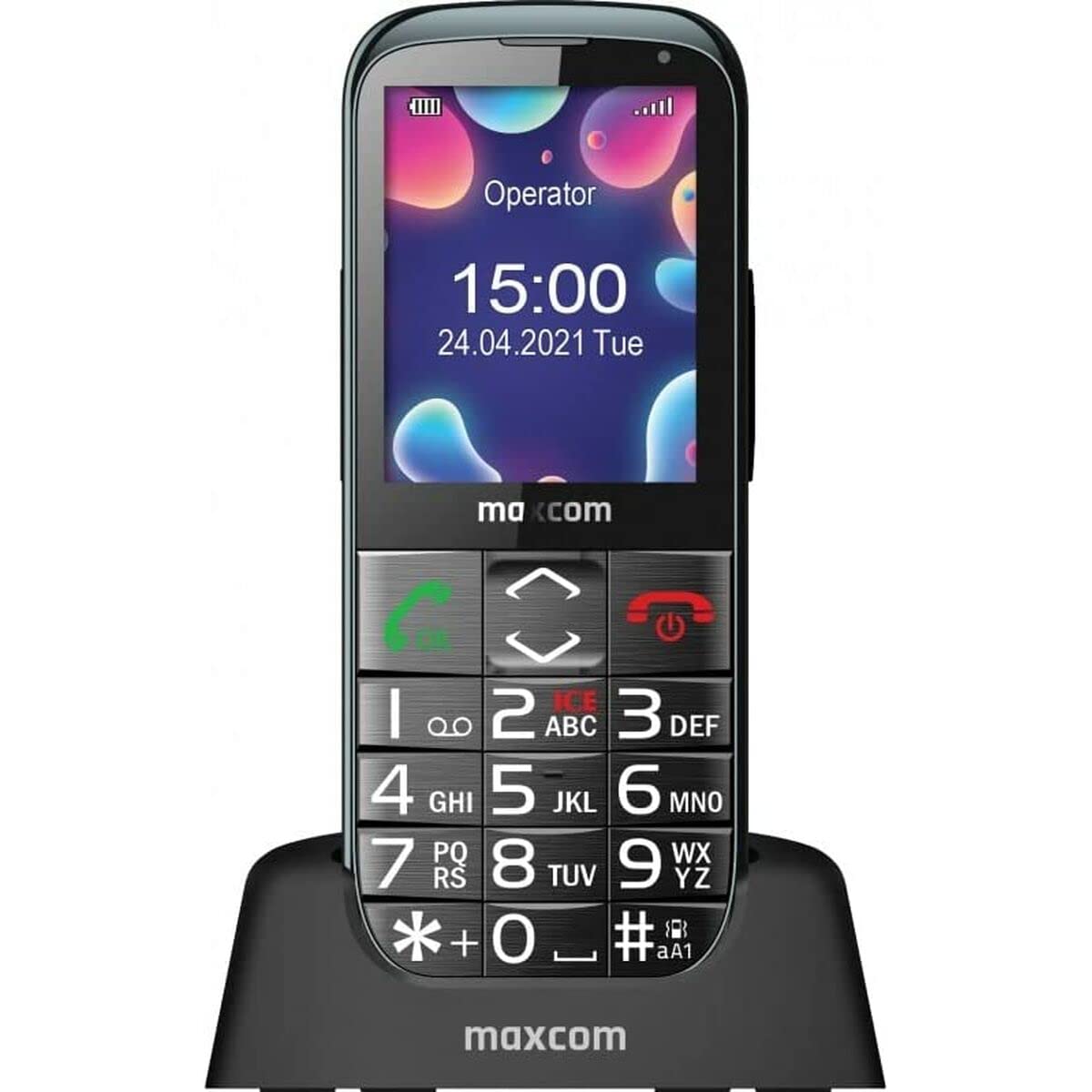
Image: The Maxcom MM724 simple mobile phone, typically black, with a clear display and large buttons.
3. Fametrahana
3.1. Fampidirana ny karatra SIM sy ny bateria
- Esory tsara ny fonony ao aorian'ny finday.
- Ampidiro ao amin'ny toerana voatondro ny karatra SIM-nao, ary mitodika midina ireo tariby volamena.
- Ampidiro ny bateria, ary ataovy izay hahazoana antoka fa mifanaraka tsara ireo fifandraisana.
- Avereno apetraka amin'ny toerany ny fonony aoriana mandra-pikitikitika tsara azy.
3.2. Fametrahana ny fitaovana
The Maxcom MM724 uses a convenient desktop charger. To charge your phone:
- Connect the charger cord to a power outlet.
- Place the phone upright into the desktop charging cradle.
- Ensure the charging indicator on the phone or cradle illuminates, indicating that charging has begun.
- For optimal battery life, keep the phone in the cradle when not in use to ensure it is always charged.
4. Torolàlana miasa
4.1. Mamelona/Mamono
- Hamelona: Tsindrio ary hazòny ny bokotra Power/End Call (matetika mena) mandra-pahazavan'ny efijery.
- Mamono: Press and hold the Power/End Call button until the power-off options appear, then confirm.
4.2. Fanaovana sy fandraisana antso
- Hanao antso: Dial the number using the keypad and press the Call button (usually green).
- Raha handray antso: Press the Call button when the phone rings. The phone is designed to ring very loudly to ensure calls are not missed.
- Hamarana ny antso: Press the Power/End Call button.
4.3. Fandefasana sy Fandraisana Hafatra
Navigate to the 'Messages' menu to compose new SMS messages or read incoming ones. Use the keypad to type your message.
4.4. Using the SOS Button
The SOS button is located on the back of the phone and is designed for emergencies.
- Hametraka: Access the phone's settings to pre-define a list of emergency contacts.
- Fampahavitrihana: In an emergency, press and hold the SOS button. The phone will automatically call the pre-defined contacts in sequence until one answers.
4.5. Activating the Flashlight
The phone features a dedicated button for the flashlight, making it easy to activate when needed. Refer to your phone's specific button layout for its location.
4.6. Bluetooth and Hearing Aid Compatibility
The Maxcom MM724 supports Bluetooth connectivity, allowing it to pair with compatible devices, including certain hearing aids. This enables hands-free calling.
- mampiaraka: Go to the Bluetooth settings on your phone and enable Bluetooth. Put your hearing aid into pairing mode (consult your hearing aid's manual). Select your hearing aid from the list of available devices on the phone to pair.
- Fanamarihana: Compatibility with hearing aids depends on the hearing aid's features. Consult your audiologist for specific compatibility information. The phone also features a ring line and additional gain for improved audio performance with or without hearing aids.
5. Fikojakojana
- Fanadiovana: Mampiasà lamba malefaka sy maina hanadiovana ny efijerin'ny finday sy ny vatany. Aza mampiasa ranoka fanadiovana na fitaovana manimba.
- Fikarakarana bateria: Keep the battery charged regularly. Avoid extreme temperatures, which can affect battery performance and lifespan.
- fitahirizana: Tehirizo ao amin'ny toerana mangatsiaka sy maina ny finday rehefa tsy ampiasaina mandritra ny fotoana maharitra.
6. Famahana olana
- Tsy mandeha ny finday: Ensure the battery is correctly inserted and charged. Connect the phone to the charger and try again.
- Tsy misy famantarana ny tambajotra: Check if the SIM card is properly inserted. Move to an area with better network coverage. Contact your service provider if the issue persists.
- Tsy afaka mandray/manao antso an-tariby: Verify that you have sufficient credit or an active plan. Check network signal strength.
- Olana amin'ny fampifandraisana Bluetooth: Ensure both devices are in pairing mode and within range. Try restarting both the phone and the Bluetooth device.
7. Famaritana
| Marika | Maxcom |
| Anarana modely | MM724 |
| Rafitra fikirakirana | Android |
| Haben'ny efijery | 3 santimetatra |
| Teknolojia fifandraisana | Bluetooth |
| Teknolojia finday | 4G |
| Wireless Network Technology | GSM |
| loko | Mainty |
| Lanja entana | 85g ny |
| Wireless Carrier | nanokatra |
8. Warranty sy fanohanana
Warranty information for the Maxcom MM724 mobile phone is typically provided with your purchase documentation or can be found on the official Maxcom website. For technical support or service inquiries, please refer to the contact information provided by your retailer or the manufacturer.


