Sava lalana
This manual provides detailed instructions for the setup, operation, and maintenance of your LOYALHEARTDY Electronic Cash Register POS System. Please read this manual thoroughly before using the device to ensure proper function and longevity. This system is designed for small businesses, retail, and restaurant environments, offering features such as profit analysis and logo printing.
1. Fametrahana sy fametrahana
1.1 Ny votoatin'ny fonosana
Before beginning, verify that all items listed below are present in the package:
- 1 x Cash Register Unit
- 1 x Tariby angona (USB)
- 6 x Shift Keys
- 2 x Cashbox Keys
- 1 Roll x Cash Register Paper
- 1 x CD mpamily
- 1 x Boky Torolalana Anglisy (ity antontan-taratasy ity)

Image 1.1: Contents of the LOYALHEARTDY Electronic Cash Register package, including the main unit, keys, cables, paper roll, and manual.
1.2 Initial Power-On and Connection
- Place the cash register on a stable, flat surface.
- Connect the power cable to the cash register and a suitable power outlet (100V-240V, 50-60Hz).
- Insert the cash register paper roll into the printer compartment as shown in the maintenance section.
- Ampidiro ny milina faktiora amin'ny fampiasana ny bokotra herinaratra.
- To connect to a computer for data management, use the provided USB data cable. Install drivers from the included CD if necessary.
2. Torolàlana miasa
2.1 Keyboard Layout and Basic Functions
The cash register features a 48-key keyboard for various operations. Familiarize yourself with the key functions for efficient use.
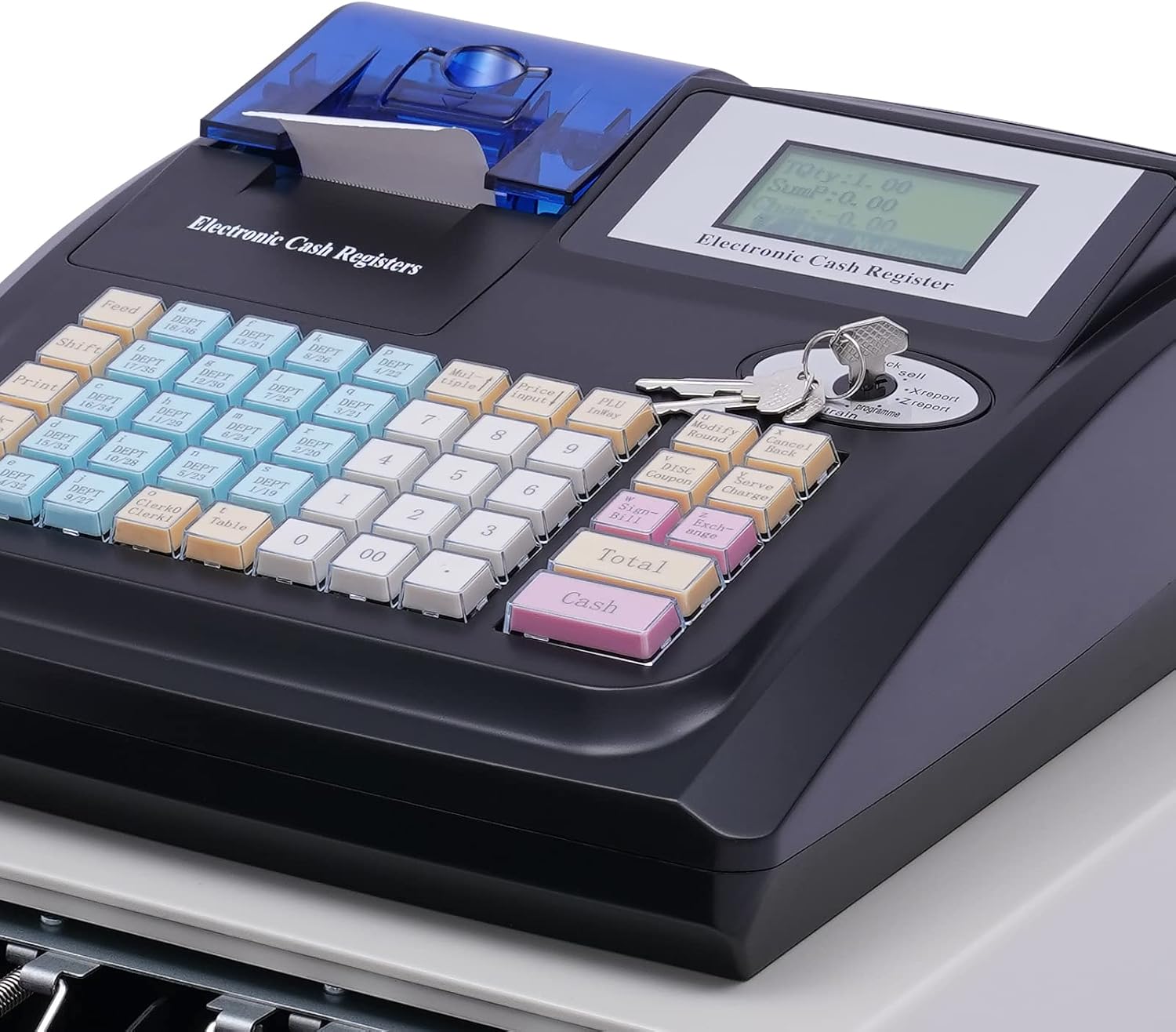
Sary 2.1: Misy antsipiriany view of the cash register keyboard, showing various function keys and numerical input.
2.2 Department and PLU Management
The system supports up to 36 departments and 10,000 PLUs (Price Look-Ups) for comprehensive product categorization and pricing. Refer to the software manual on the driver CD for detailed programming instructions.
2.3 Transaction Processing and Payment Methods
The cash register supports seven payment methods:
- Vola
- Bookkeeping
- Jereo
- Credit Card 1
- Credit Card 2
- Foreign Currency 1
- Foreign Currency 2
Customers can select one or multiple payment methods for each transaction. Use the dedicated keys on the keyboard to select the appropriate payment type.

Image 2.2: The cash register in a typical retail setting, demonstrating its use for transactions.
2.4 Electronic Log and Report Generation
The system maintains an electronic log of daily sales, returns, and discounts. It can generate various reports for business analysis, including:
- Cashier Reports
- Department Reports
- Combined Daily Reports
- Tatitra isam-bolana
These reports provide clear financial data for tracking business performance. Access report functions via the dedicated keys or through the connected PC software.
2.5 Logo Printing
The cash register supports logo printing on receipts. Configuration for logo printing is typically done through the PC software provided on the driver CD. Consult the software manual for detailed instructions on uploading and setting up your business logo.
3. Fikojakojana
3.1 Fanadiovana ny Unit
To ensure optimal performance and longevity, regularly clean the cash register. Use a soft, dry cloth to wipe down the exterior. For stubborn dirt, a slightly damp cloth with mild detergent can be used, ensuring no liquid enters the internal components. Avoid abrasive cleaners or solvents.
3.2 Replacing the Paper Roll
When the paper roll runs out or is low, replace it promptly to avoid interruptions in service.
- Open the printer cover located at the top of the unit.
- Remove the empty paper roll core.
- Insert a new thermal paper roll, ensuring the paper feeds out from the bottom of the roll towards the front of the printer.
- Pull a small length of paper out past the cutting edge.
- Close the printer cover firmly until it clicks into place.

Sary 3.1: View of the printer compartment, showing the paper roll mechanism and how to insert new paper.
3.3 Cash Drawer Maintenance
Periodically inspect the cash drawer for any obstructions or debris. Ensure the coin and bill compartments are clean and free of foreign objects that could impede smooth operation.

Image 3.2: The interior of the cash drawer, showing compartments for bills and coins.
4. Famahana olana
This section addresses common issues you might encounter with your cash register. If the problem persists after following these steps, please contact customer support.
| OLANA | Antony mety hitranga | vahaolana |
|---|---|---|
| Cash Register does not power on. | Power cable not connected; power outlet malfunction; power switch off. | Ensure power cable is securely connected. Test the power outlet with another device. Verify the power switch is in the 'ON' position. |
| Printer tsy manonta. | No paper; paper incorrectly loaded; printer cover not closed; thermal paper loaded incorrectly. | Check and replace paper roll (refer to Section 3.2). Ensure paper is thermal side up. Close printer cover firmly. |
| Cash drawer does not open. | Drawer lock engaged; mechanical obstruction; electronic malfunction. | Ensure the cashbox keys are not locking the drawer. Check for any objects obstructing the drawer. If using electronic opening, verify transaction completion. |
| Data transfer to PC fails. | USB cable disconnected; drivers not installed; software error. | Verify USB cable connection. Install drivers from the provided CD. Restart both the cash register and the PC. |
5. Famaritana
Detailed technical specifications for the LOYALHEARTDY Electronic Cash Register POS System:
- Fitaovana: Hardware, Plastic
- Material of Footpad: fingotra
- loko: Black+ White
- endrika: mahitsizoro
- Plug: US Standard
- BOKYtage: 100V-240V, 50-60Hz
- Hery: 40W
- Number of Departments: 36
- Number of PLUs: 10000
- Clerks: 50
- Temperature environnement: 0-+40°C / 32-104°F
- Hamandoana Relative: <90%
- Kitendry: 48 Keys
- Lanja tsy afa-karatsaka: 7.65kg / 16.87lbs
- Lanja afa-karatsaka: 7kg / 15.43lbs
- Size of Cashbox: 32.7 x 35.8 x 8.8cm / 13 x 14 x 3.5inch (L*W*H)
- Size of Drawer: 29(L) x 5.2(H)cm / 11.4 x 2.05inch
- Size of Main Body: 33.2 x 27.8 x 12cm / 13 x 11 x 4.7inch (L*W*H)
- Haben'ny fonosana: 41.2 x 36 x 39.3 sm / 16.22 x 14.17 x 15.47 santimetatra

Image 5.1: Diagram illustrating the key dimensions of the LOYALHEARTDY Electronic Cash Register and its cash drawer.
6. Warranty sy fanohanana
6.1 Warranty amin'ny vokatra
This LOYALHEARTDY product is covered by a standard manufacturer's warranty against defects in materials and workmanship. Please retain your proof of purchase for warranty claims. The warranty period typically begins from the date of purchase. For specific warranty terms and conditions, please refer to the documentation included with your purchase or contact customer support.
6.2 Fanohanana ny mpanjifa
For technical assistance, troubleshooting not covered in this manual, or warranty inquiries, please contact LOYALHEARTDY customer support. Contact information can typically be found on the product packaging, the official LOYALHEARTDY webtranokala, na amin'ny alàlan'ny mpivarotra anao.
Fanohanana an-tserasera: Visit the LOYALHEARTDY Store on Amazon