Sava lalana
This manual provides detailed instructions for the EasySMX KW75 75% Mechanical Gaming Keyboard. It covers setup, operation, maintenance, and technical specifications to ensure optimal performance and user experience. Please read this manual thoroughly before using the product.

Image: The EasySMX KW75 mechanical keyboard, showcasing its compact 75% layout with RGB backlighting.
Endri-javatra fototra
- 75% Layout: An 81-key design that balances functionality with a space-saving form factor.
- Fifandraisana amin'ny fomba telo sosona: Supports Bluetooth 5.0, 2.4GHz wireless, and wired (Type-C) connections for versatile use across multiple devices.
- Hot-Swappable PCB: Compatible with most 3-pin and 5-pin MX-style mechanical switches, allowing for easy customization without soldering.
- Rafitra miraikitra amin'ny gasket: Provides a softer typing feel and a cleaner sound profile by cushioning keypresses.
- RGB backlighting: Customizable RGB lighting effects for personalized aesthetics.
- Multimedia Rotary Knob: A dedicated knob for convenient volume control and play/pause functions.
- Fiainana maharitra bateria: Equipped with a 4000mAh battery, offering extended usage in wireless modes.
- Mifanaraka amin'ny sehatra: Supports both Windows and Mac operating systems.

Sary: Vitaview highlighting the 81-key 75% compact layout and key features such as 3 modes connection, hot-swappable switches, RGB backlight, gasket mounted structure, Windows/Mac support, and multimedia rotary knob.
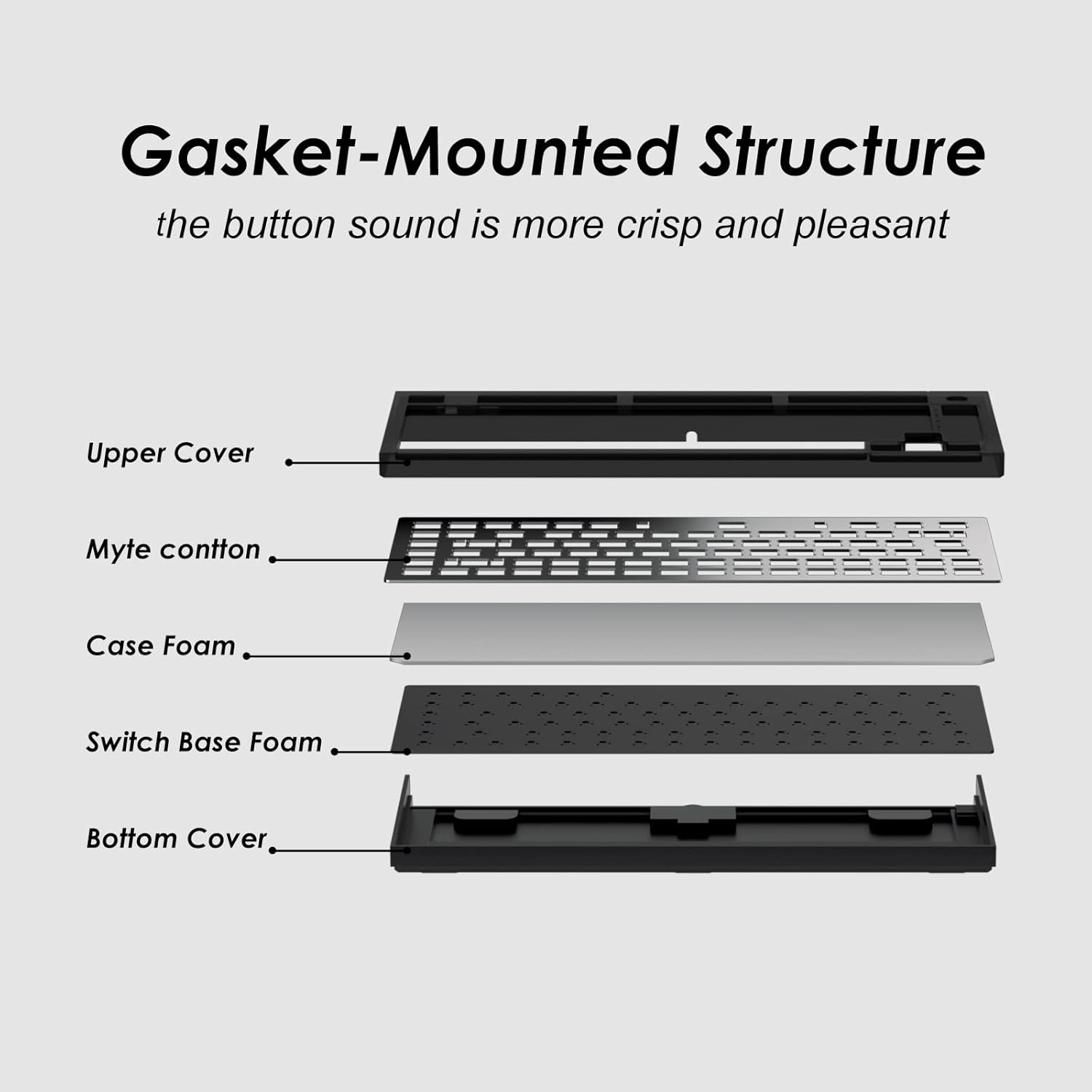
Image: An exploded diagram illustrating the components of the gasket-mounted structure, including the upper cover, Myte cotton, case foam, switch base foam, and bottom cover, designed for improved sound and feel.

Image: A graphic indicating the 4000mAh battery capacity, suggesting over 30 days of continuous use on a full charge.
Torolàlana fametrahana
Fametrahana voalohany
Before first use, connect the keyboard to a USB power source using the provided Type-C cable to fully charge the internal battery. The charging indicator will show the charging status.
Mampifandray ny Keyboard
The EasySMX KW75 supports three connection modes:
- Mode mandeha tariby: Connect the keyboard directly to your computer using the supplied USB Type-C cable. The keyboard will automatically switch to wired mode.
- 2.4GHz Wireless Mode:
- Locate the 2.4GHz USB receiver, usually stored in a compartment on the keyboard.
- Ampidiro amin'ny seranana USB misy eo amin'ny solosainao ny mpandray USB.
- Switch the keyboard to 2.4GHz mode (refer to the keyboard's physical switch or key combination for mode selection). The keyboard should connect automatically.
- Mode Bluetooth:
- Avereno amin'ny maody Bluetooth ny klavier.
- Activate Bluetooth on your device (computer, tablet, etc.).
- On your device, search for new Bluetooth devices. The keyboard should appear as "EasySMX KW75" or similar.
- Select the keyboard to pair. If prompted, enter the pairing code displayed on your screen.

Image: A diagram illustrating the wireless 2.4G, Bluetooth, and wired Type-C connection options, along with compatibility icons for Windows and Mac devices.
Torolàlana miasa
Switching Operating Systems
The keyboard supports both Windows and Mac layouts. Use the designated key combination (e.g., Fn + A for Windows, Fn + S for Mac) to switch between operating system modes. Refer to the keyboard's specific keycap legends or included quick start guide for exact combinations.
Fanaraha-maso RGB Backlighting
The keyboard features customizable RGB backlighting. Use the Fn key in combination with other keys (e.g., Fn + \ for lighting modes, Fn + arrow keys for brightness/speed) to adjust lighting effects, colors, and intensity. Specific key combinations may vary; consult the quick start guide.
Multimedia Rotary Knob
The rotary knob located on the top right of the keyboard provides convenient multimedia control:
- Fihodinana manaraka ny famantaranandro: Mampitombo ny volume.
- Counter-Clockwise Rotation: Mampihena ny feo.
- Pressing the Knob: Toggles play/pause for media.

Sary: akaiky view of the rotary knob, illustrating its functions: clockwise rotation for volume increase, counter-clockwise for volume decrease, and pressing the knob for play/pause.
Programmable Keys and Macros
The EasySMX KW75 keyboard supports programmable keys and macros. Utilize the dedicated software (available for download from the EasySMX official website) to customize key assignments, create macros, and further personalize RGB lighting effects.
fikarakarana
Manadio ny Keyboard
- Esory ny fitendry amin'ny loharanon-jiro rehetra alohan'ny hanadiovana.
- Mampiasà lamba malefaka sy maina mba hamafana ny velaran'ny fitendry.
- Ho an'ny loto mafy loha dia kely damp Azo ampiasaina ny lamba misy savony malefaka, mba hahazoana antoka fa tsy misy rano miditra ao amin'ny fitendry.
- Ampiasao rivotra voaporitra mba hanesorana ny vovoka sy ny poti-javatra eo anelanelan'ny fonosan-kitendry.
- Fadio ny mampiasa akora simika mahery vaika na akora abrasive.
Hot-Swapping Switches
The KW75 features a hot-swappable PCB, allowing you to change mechanical switches without soldering.
- Esory moramora ny sarom-pejy fanalahidy amin'ny alalan'ny fanesorana ny sarom-pejy fanalahidy.
- Use a switch puller to carefully extract the switch from the PCB. Apply even pressure to avoid bending the pins.
- Align the pins of the new 3-pin or 5-pin MX-style switch with the holes on the PCB.
- Press the new switch firmly into place until it clicks. Ensure it is seated correctly and functions properly before replacing the keycap.

Sary: akaiky view demonstrating the hot-swappable switch feature, showing a switch being inserted into the PCB, compatible with both 3-pin and 5-pin switches for easy customization.
Fanamboarana
- Tsy mamaly ny fitendry:
- Ataovy azo antoka fa voaloa ny klavier.
- Jereo ny fomba fifandraisana (tariby, 2.4GHz, Bluetooth) ary ataovy azo antoka fa mifanaraka amin'ny fifandraisan'ny fitaovanao izany.
- For 2.4GHz, ensure the USB receiver is securely plugged in.
- For Bluetooth, ensure the keyboard is paired and selected on your device. Try re-pairing if necessary.
- Try connecting via the USB-C cable to rule out wireless issues.
- Tsy voasoratra anarana ny fanalahidy na manoratra indroa:
- This could indicate a faulty switch. Due to the hot-swappable design, try replacing the problematic switch.
- Ataovy azo antoka fa tafapetraka tsara ao anaty PCB ny switch.
- Clean around the keycap and switch to remove any debris.
- Tsy mandeha ny jiro RGB:
- Check if the lighting is turned off or set to minimum brightness using the Fn key combinations.
- Ensure the keyboard firmware is up to date via the official software.
- Olana amin'ny fanapahana Bluetooth:
- Ataovy azo antoka fa ao anatin'ny elanelan'ny fitaovanao ny fitendry.
- Jereo ny fanelingelenana avy amin'ny fitaovana tsy misy tariby hafa.
- Re-pair the keyboard with your device.
- Hamarino tsara fa ampy tsara ny bateria-n'ny fitendry.
fepetra arahana
| Marika | EasySMX |
| Laharana modely | KW75 |
| fisehon'ny | 75% (Lakile 81) |
| fifandraisana | Bluetooth 5.0, 2.4GHz Wireless, USB Type-C Wired |
| Switch Compatibility | 3-pin/5-pin MX-style Hot-Swappable |
| Backlighting | RGB |
| Fahaizana bateria | 4000mAh |
| Fanohanana ny rafitra fandidiana | Windows, Mac |
| KEVITRA | plastika |
| Anisan'ny singa | USB Cable |
| Dimensions (eo ho eo) | 36.19 x 17.7 x 5.21 cm |
| Lanja (eo ho eo) | 880 g |
Warranty sy fanohanana
Raha mila fanazavana momba ny antoka sy ny fanohanana ara-teknika, jereo azafady ny EasySMX ofisialy. webtranokala na mifandray mivantana amin'ny serivisy mpanjifany. Tehirizo ny tapakila fividiananao ho porofon'ny fividianana.


