Sava lalana
This manual provides comprehensive instructions for the MAUL M112 calculator. It covers setup, basic operations, advanced functions, maintenance, and troubleshooting to ensure optimal performance and longevity of your device. Please read this manual thoroughly before using the calculator.
Vita ny vokatraview

Sary 1: anoloana view of the MAUL M112 calculator, showcasing its 12-digit display and key layout. The calculator features a silver front panel and black keys with colored function buttons.
The MAUL M112 is a compact, 12-digit display calculator designed for office, home, and school use. It features both solar and battery power for reliable operation in various lighting conditions. Key functions include percentage and tax calculations, memory functions, and an automatic shutdown feature to conserve energy.

Sary 2: The MAUL M112 calculator held in a hand, illustrating its compact size (approximately 11.9 cm x 7.0 cm x 1.0 cm). This image highlights its portability and ergonomic design.
Hametraka
Loharanon-kery
The MAUL M112 calculator operates on a dual power system: solar and battery. This ensures continuous functionality even in low-light environments.
- Herin'ny masoandro: The calculator primarily uses solar energy when sufficient light is available. Ensure the solar panel, located above the display, is exposed to light for optimal performance.
- Herin'ny bateria: For use in dark conditions or when solar power is insufficient, the calculator automatically switches to battery power. One LR1130 battery is included with the device.
Fampiasana voalohany
Upon first use, the calculator should be ready for operation. If the display does not activate, ensure it is exposed to light or check the battery compartment.

Sary 3: aoriana view of the MAUL M112 calculator, displaying the battery compartment cover. This is where the LR1130 battery is housed and can be accessed for replacement.
Torolàlana miasa
Fampandehanana fototra
- Famelomana/Famafana: mpanao gazety ON C·CE to turn on the calculator or clear the current entry.
- All Clear: mpanao gazety AC to clear all calculations and memory.
- Fidirana isa: Use the number keys (0-9) and the decimal point (.) to enter values.
- Hetsika arithmetika: Ampiasao + (addition), - (subtraction), x (fampitomboana), ary ÷ (division) for calculations.
- mitovy: mpanao gazety = hampisehoana ny vokatry ny kajy.
- Double Zero: ny 00 button allows for quick entry of two zeros.
- Delete Last Digit: Tsindrio ny → (backspace) button to delete the last entered digit.
Fahatsiarovana Functions
The calculator includes a 3-button memory function:
- M+: Manampy ny sanda aseho ao amin'ny fahatsiarovana.
- M-: Manala ny sanda aseho amin'ny fahatsiarovana.
- MRC: Recalls the memory content (first press) or clears the memory (second press).
Asa manokana
- % (Persentage): Kajy isan-jatotages.
- Example (Add Percentage): Enter value, press +, enter percentage, ny press %.
- Example (Discount): Enter value, press -, enter percentage, ny press %.
- TAX+ / TAX- (Tax Calculation): These buttons are used for calculations involving tax rates.
- Fametrahana ny tahan'ny hetra: mpanao gazety SET, then enter the tax rate (e.g., 5 for 5%), then press HETRA+. The tax rate is now stored.
- Add Tax: Enter original price, press HETRA+.
- Subtract Tax: Enter price including tax, press HETRA-.
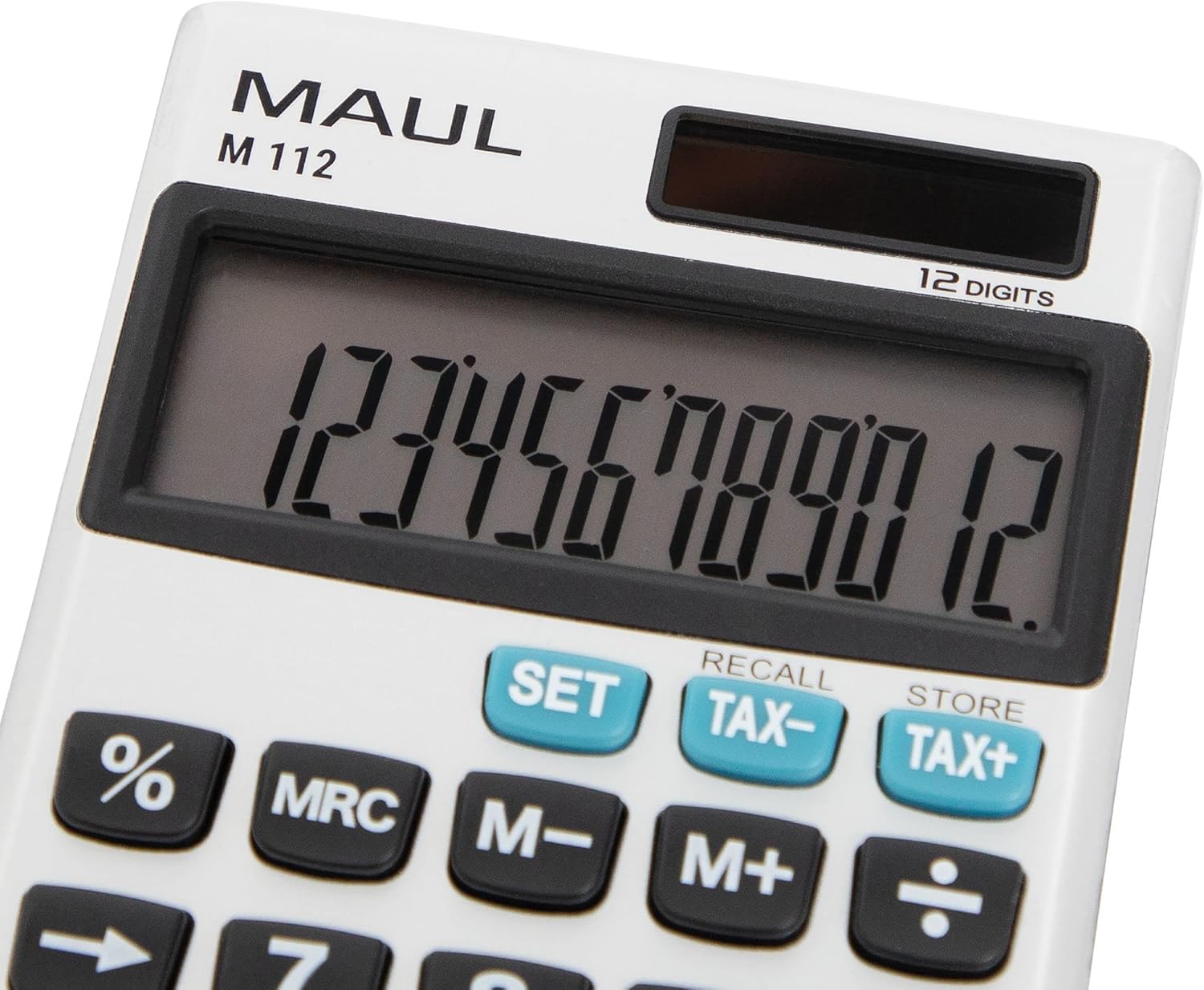
Sary 4: A antsipirihany view of the MAUL M112 calculator's 12-digit LCD display and the function keys, including SET, TAX-, TAX+, %, MRC, M-, M+, and the arithmetic operators. This image highlights the clear labeling and distinct coloring of important keys.
fikarakarana
FANADIOVANA
Mba hitazonana ny endrika sy ny fiasan'ny kajy:
- Fafao amin'ny lamba malefaka sy maina ny kajy.
- Ho an'ny loto mafy loha dia kely dampen ny lamba misy rano. Fadio ny mampiasa akora simika mahery vaika na mpanadio abrasive.
- Ensure no liquid enters the calculator's internal components.
Fanoloana bateria
When the display becomes dim or unresponsive in low light, the LR1130 battery may need replacement.
- Turn the calculator over.
- Locate the battery compartment cover (refer to Image 3).
- Carefully open the cover using a small screwdriver or coin.
- Remove the old LR1130 battery.
- Insert a new LR1130 battery, ensuring correct polarity (+/-).
- Soloy tsara ny fonon'ny efitrefitra bateria.
Fanamarihana: Ario ny bateria efa nampiasaina araka ny fitsipika eo an-toerana.
Fanamboarana
- banga ny fampisehoana:
- Ensure the calculator is exposed to sufficient light for solar power.
- Check if the battery needs replacement (refer to Battery Replacement section).
- mpanao gazety ON C·CE hampandeha ny fitaovana.
- Diso kajy:
- mpanao gazety AC to clear all previous entries and memory.
- Hamarino indray mandeha ny sanda nampidirinao sy ny filaharan'ny asa natao.
- Tsy mamaly ireo fanalahidy:
- Ensure the keys are clean and free from debris.
- If the issue persists, try replacing the battery.
fepetra arahana
| Anarana modely | M112 |
| miseho | 12-digit LCD, 1-line display |
| Loharanon-kery | Solar powered and battery operated (LR1130) |
| refy (L x W x H) | 11.9 x 7.0 x 1.0 cm |
| KEVITRA | Plastic (front made of aluminium) |
| Fahatsiarovana Functions | 3-button memory (M+, M-, MRC) |
| Asa manokana | Persentage (%), Tax Calculation (TAX+, TAX-), Double Zero (00), Delete Last Digit (→) |
| Fanakatonana mandeha ho azy | ENY |
| mpanamboatra | Jakob Maul GmbH |
Garantie
The MAUL M112 calculator comes with a Warranty 5 taona from the date of purchase. This warranty covers manufacturing defects under normal use. Please retain your proof of purchase for warranty claims. For detailed warranty terms and conditions, please refer to the official MAUL webtranokala na mifandray amin'ny fanohanan'ny mpanjifa.
MANAMPY
For further assistance, technical support, or inquiries regarding your MAUL M112 calculator, please visit the official MAUL webtranokala na mifandray amin'ny departemantan'ny serivisy mpanjifany. Ny fampahalalana momba ny fifandraisana dia matetika hita ao amin'ny fonosana vokatra na ny mpanamboatra website.
Mpanamboatra: Jakob Maul GmbH


