1. Fampidirana
Thank you for choosing the ICON Morpheus GX 66 Wired Gaming Mouse. This manual provides essential information for setting up, operating, and maintaining your new gaming mouse. Please read this guide thoroughly to ensure optimal performance and longevity of your device.
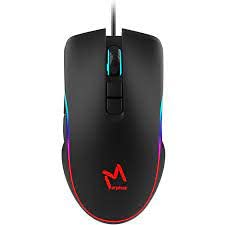
The ICON Morpheus GX 66 is a high-performance wired gaming mouse featuring customizable LED lighting and a precise 7200 DPI optical sensor, designed for an optimal gaming experience. It offers a modern style and ambidextrous design, compatible with Windows 7, Windows XP, and Linux operating systems.
2. Toetran'ny vokatra
- High Precision Sensor: Equipped with a 7200 DPI optical sensor for accurate tracking and responsiveness.
- Jiro LED azo namboarina: Dynamic LED illumination enhances your gaming setup.
- Bokotra 7 azo zahana: Offers extensive customization for various gaming commands.
- Fifandraisana an-tariby: Ensures a stable and lag-free connection.
- Ambidextrous Design: Comfortable for both left and right-handed users.
- Fanorenana maharitra: Designed for long-lasting use in intense gaming sessions.
- Wide Compatibility: Supports Windows 7, Windows XP, and Linux operating systems.

3. Fametrahana
- Esory ny totozy: Carefully remove the ICON Morpheus GX 66 mouse from its packaging.
- Mifandray amin'ny solosaina: Locate an available USB port on your computer. Plug the USB connector of the mouse firmly into the USB port.
- Fametrahana mpamily: The mouse is plug-and-play. Your operating system (Windows 7, Windows XP, or Linux) should automatically detect and install the necessary drivers. This process may take a few moments.
- Fampiasana fitsapana: Once installed, move the mouse and click the buttons to ensure it is working correctly.
4. Torolàlana miasa
4.1 Asa fototra
- Tsindrio havia: Primary action, selection, activation.
- Tsindrio havanana: Context menu, secondary actions.
- Kodiaran'ny horonam-boky: Scroll up/down, middle click for specific functions.
4.2 DPI fanitsiana
The mouse features a dedicated DPI button (often located behind the scroll wheel) to cycle through different sensitivity levels. Press this button to adjust the DPI (Dots Per Inch) to your preferred setting for various tasks or games. The LED lighting may change color to indicate the current DPI level.
4.3 jiro LED
The ICON Morpheus GX 66 features dynamic LED lighting. The lighting patterns and colors are typically pre-programmed and may change based on the selected DPI setting or cycle automatically. There are no user-configurable software controls for the LED lighting on this model.

5. Fikojakojana
- Fanadiovana: Ampiasao lamba malefaka sy maina mba hamafa ny velaran'ny totozy. Ho an'ny loto mafy loha, dia asio kelyampen ny lamba misy rano. Fadio ny mampiasa akora simika masiaka na akora abrasive.
- Fanadiovana sensor: Occasionally, dust or debris may accumulate around the optical sensor. Use a cotton swab or compressed air to gently clean the sensor area on the underside of the mouse.
- Cable Care: Avoid sharp bends or excessive pulling on the mouse cable to prevent damage. Store the cable neatly when not in use.
- fitahirizana: Rehefa tsy ampiasaina mandritra ny fotoana maharitra dia tehirizo ao amin'ny toerana madio sy maina ny totozy, lavitry ny tara-masoandro mivantana sy ny mari-pana tafahoatra.

6. Famahana olana
- Tsy mamaly ny totozy:
- Ensure the USB cable is securely plugged into the computer's USB port.
- Andramo ampidirina amin'ny seranana USB hafa ny totozy.
- Avereno indray ny solosainao.
- Hetsika tsy mety amin'ny cursor:
- Diovy ny sensor optika eo ambanin'ny totozy.
- Ataovy azo antoka fa mampiasa ny totozy amin'ny toerana madio, tsy misy tara-pahazavana ary mitovitovy. Halaviro ny fitaratra na ny taratra mirefarefa be.
- LED Lighting Not Working:
- Jereo ny fifandraisana USB.
- The LED lighting is typically powered directly via USB. If the mouse functions but LEDs do not, contact support.
- Tsy miasa ireo bokotra:
- Hamarino tsara fa mifandray tsara ny totozy.
- Andramo amin'ny solosaina hafa ny totozy mba hamantarana raha misy olana amin'ny rindrambaiko.
7. Famaritana
| mpanamboatra | matoanteny |
| MODELY | Morpheus GX 66 |
| ASIN | B0B5PLWQXC |
| Endri-javatra manokana | Jiro LED |
| Movement Detection Technology | Optical |
| DPI | 7200 |
| Orientation tanana | Ambidextrous |
| Fampiasana soso-kevitra | lalao |
| Fifanarahana amin'ny rafitra fandidiana | Linux, Windows 7, Windows XP |
| Style | ANKEHITRINY |
| Karazana vita | Matte |
| Loharanon-kery | Corded Electric (USB) |
| loko | maro-loko |
8. Warranty sy fanohanana
The ICON Morpheus GX 66 Wired Gaming Mouse comes with a standard manufacturer's warranty. For specific warranty terms and conditions, please refer to the warranty card included with your product or visit the official ICON website.
For technical support, troubleshooting assistance, or to inquire about replacement parts, please contact ICON customer service through their official support channels. Keep your purchase receipt and product model information (GX 66) handy when contacting support.