1. Fampidirana
Welcome to the user manual for your new Avtex W195TS Smart TV. This television is specifically designed for mobile living, offering versatile power options (12V, 24V, and 240V) and a range of smart features, including Wi-Fi, Bluetooth, and an integrated Freesat satellite decoder. This manual provides essential information for setting up, operating, maintaining, and troubleshooting your device to ensure optimal performance and enjoyment.
2. Information momba ny fiarovana
Please read all safety instructions carefully before using the television. Keep this manual for future reference.
- Herin'aratra: Hamarino tsara ny voltage is used (12V, 24V DC or 240V AC). Do not overload power outlets.
- rivotra: Aza sakanana ny fisokafan'ny rivotra. Omeo toerana sahaza manodidina ny fahitalavitra mba hisian'ny fikorianan'ny rivotra.
- Rano sy hamandoana: Aza atao amin'ny orana na hamandoana ny fahitalavitra. Aza mametraka zavatra feno ranon-javatra eo amin'ny fahitalavitra.
- Fanadiovana: Esory ny herinaratra amin'ny fahitalavitra alohan'ny hanadiovana azy. Mampiasà lamba malefaka sy maina. Aza mampiasa ranoka fanadiovana na aerosol.
- Fametrahana: Place the TV on a stable, flat surface or mount securely to a wall/bracket. Avoid direct sunlight or heat sources.
- Serivisy: Aza manandrana manompo an'ity vokatra ity ny tenanao. Ampidiro amin'ireo mpiasan'ny serivisy mahay ny fanompoana rehetra.
3. Ny votoatin'ny fonosana
Before setup, please check that all items are present in the box:
- Avtex W195TS Smart TV
- Fanaraha-maso lavitra miaraka amin'ny Batterie
- 12V/24V DC Power Cable
- Adaptatera herinaratra 240V AC
- Table Stand (if applicable)
- User Manual (ity antontan-taratasy ity)
4. Vokatra mihoatraview
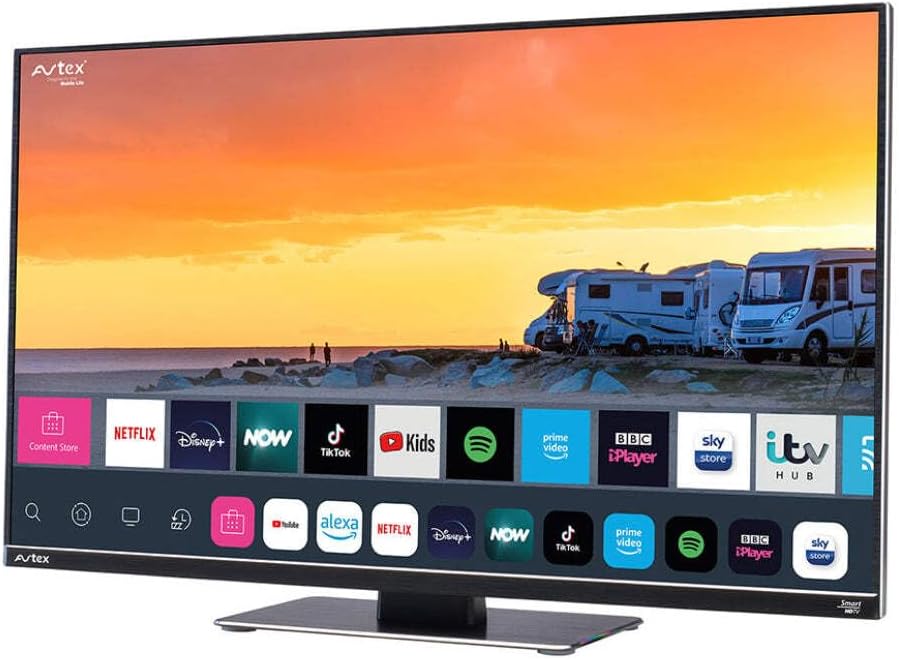
Figure 4.1: Avtex W195TS Smart TV Front View
This image shows the Avtex W195TS Smart TV from a slight angle, highlighting its slim design and the vibrant display. The screen shows a user interface with icons for popular streaming services like Netflix, Disney+, Now, TikTok, Kids, Spotify, Prime Video, BBC iPlayer, Sky Store, and ITV Hub. The background on the screen depicts a scenic view of motorhomes parked near a beach at sunset. The Avtex logo is visible on the top left and bottom left of the TV frame.
4.1. Seranana sy Fifandraisana
- Ports HDMI: For connecting external devices like Blu-ray players, game consoles, or set-top boxes.
- Port USB (2): Ho an'ny fandefasana rakitra multimedia avy amin'ny kapila USB na ho an'ny fampifandraisana ireo kojakoja USB.
- Antenna fampidirana: For connecting a terrestrial TV antenna.
- Fampidirana zanabolana: For connecting a satellite dish for Freesat or other satellite services.
- Fampidirana herinaratra DC: For 12V/24V DC power connection.
- Fampidirana herinaratra AC: For 240V AC power connection via adapter.
- Seranan-tsambo Ethernet: Ho an'ny fifandraisana tariby.
- Audio Output: Ho an'ny fampifandraisana ireo rafitra audio ivelany na écouteur.
5. Fametrahana
5.1. Installing the Stand (Optional)
- Apetraho tsara eo amin'ny toerana malefaka sy madio ny fahitalavitra mba hisorohana ny fahasimban'ny efijery.
- Ampifanaraho amin'ny lavaka fametrahana eo amin'ny faran'ny fahitalavitra ny fitoeran-jiro.
- Arovy ny fijoroana amin'ny fampiasana ny visy nomena.
5.2. Fampifandraisana herinaratra
The Avtex W195TS supports multiple power inputs:
- 12V/24V DC: Connect the supplied 12V/24V DC power cable to the DC input on the TV and to your vehicle's 12V or 24V power outlet.
- 240V AC: Connect the supplied 240V AC power adapter to the AC input on the TV, then plug the adapter into a standard 240V AC wall socket.
Fanamarihana: Do not connect both DC and AC power simultaneously.
5.3. Antenna/Satellite Connection
- Terrestrial TV: Connect your aerial cable to the 'ANTENNA IN' port.
- Satellite TV (Freesat): Connect your satellite dish cable to the 'SATELLITE IN' port.
5.4. Fahefana voalohany sy Fametrahana fotoana voalohany
- Connect the TV to power and press the power button on the remote control or TV.
- The First-Time Setup Wizard will appear. Follow the on-screen prompts to select your language, country, and time zone.
- Perform an automatic channel scan for both terrestrial and satellite channels.
- Mifandraisa amin'ny tambajotra Wi-Fi-nao amin'ny alàlan'ny fisafidianana ny anaran'ny tambajotrao sy ny fampidirana ny tenimiafina.
6. Fiasana
6.1. Fifehezana lavitra
Familiarize yourself with the remote control buttons for easy navigation and control of your TV's features.
- Bokotra hery: Mamono ny TV.
- Bokotra loharano: Selects input sources (HDMI, USB, TV, Satellite).
- Volume +/-: Manitsy ny haavon'ny feo.
- Fantsona +/-: Manova fantsona fahitalavitra.
- Bokotra Fitetezana (Miakatra/Midina/Havia/Ankavanana/OK): Ho an'ny navigateur menu sy fifantenana.
- Smart Hub/Home Button: Accesses the Smart TV interface.
- Bokotra fampiharana: Dedicated buttons for popular streaming apps (if available).
6.2. Smart TV Features
Your Avtex W195TS is equipped with smart TV capabilities:
- App Store: Download and install various applications for streaming, news, and entertainment.
- Serivisy streaming: Access pre-installed or downloaded apps like Netflix, Disney+, Prime Video, BBC iPlayer, etc. (subscription may be required).
- Web Browser: Mikaroka mivantana amin'ny fahitalavitra amin'ny Internet.
- Fijery fitaratra: Connect your smartphone or tablet to display content on the TV screen (compatibility may vary).
6.3. Bluetooth Connectivity
Pair Bluetooth devices such as headphones or external speakers for enhanced audio experience.
- Mandehana any amin'ny menio firafitry ny fahitalavitra.
- Select 'Bluetooth' or 'Connected Devices'.
- Enable Bluetooth and put your device into pairing mode.
- Fidio ny fitaovanao ao amin'ny lisitra mba hampiarahana.
6.4. Media Playback via USB
Insert a USB drive into one of the USB ports to view sary, milalao video, na mihaino mozika.
- The TV will usually prompt you to open the media player.
- Mandehana amin'ny findainao files using the remote control.
7. Fikojakojana
7.1. Manadio ny fahitalavitra
- Ecran: Fafao moramora amin'ny lamba malefaka tsy misy loko ny efijery. Ho an'ny marika mafy loha, kely dampen ilay lamba misy rano na vahaolana fanadiovana manokana amin'ny écran (aza apetaho mivantana amin'ny écran).
- Casing: Mampiasà lamba malefaka sy maina mba hamafana ny fahitalavitra.asing. Halaviro ny mpanadio na solvents.
7.2. Fanavaozana rindrambaiko
Periodically check for software updates to ensure your TV has the latest features and bug fixes. Updates can usually be found in the TV's settings menu under 'System' or 'Software Update'.
8. Famahana olana
If you encounter issues with your Avtex W195TS, refer to the following common problems and solutions:
| OLANA | Antony mety hitranga | vahaolana |
|---|---|---|
| Tsisy Hery | Power cable not connected; no power from outlet. | Check power cable connection; test outlet with another device; ensure correct voltage (12V/24V/240V). |
| Tsy misy sary, fa misy feo | Loharano fampidirana diso nofantenana; tariby diso. | Press the 'Source' button on the remote to select the correct input; check HDMI/antenna cables. |
| Tsy misy feo, fa misy sary | Ny feo mangina na ambany loatra; olan'ny rafitra audio ivelany. | Unmute volume or increase level; check connections to external audio devices. |
| Tsy afaka mifandray amin'ny Wi-Fi | Diso tenimiafina; olana ny router; TV lavitra loatra ny router. | Re-enter Wi-Fi password; restart router; move TV closer to router or use an extender. |
| Remote Control Tsy mandeha | Batterie maty; sakana; olana amin'ny fampifandraisana. | Replace batteries; remove obstructions; re-pair remote if it's a Bluetooth remote. |
9. Famaritana
| endri-javatra | famaritana |
|---|---|
| Marika | Avtex |
| Laharana modely | AVTEX W195TS |
| Haben'ny efijery | 19.5 santimetatra |
| vahaolana | 1080p (Full HD) |
| Aspect ratio | 16:9 |
| Teknolojia fifandraisana | Bluetooth, HDMI, Wi-Fi |
| Total seranan-tsambo USB | 2 |
| BOKYtage | 12 Volts, 24 Volts, 240 Volts |
| Lanja entana | 2.5 kg |
| Taona modely | 2018 |
10. Warranty sy fanohanana
Your Avtex W195TS Smart TV comes with a manufacturer's warranty. Please refer to the warranty card included in your product packaging for specific terms and conditions, including warranty period and coverage details. Keep your proof of purchase for warranty claims.
For technical support, troubleshooting assistance beyond this manual, or warranty inquiries, please contact Avtex customer service through their official website or the contact information provided with your product. When contacting support, please have your model number (AVTEX W195TS) and serial number ready.


