Sava lalana
Thank you for choosing the HTC Neckband Headphones. These headphones are designed to provide a superior audio experience with advanced features such as Bluetooth 5.0 connectivity, Active Noise Cancellation (ANC), and Environmental Noise Cancellation (ENC) for clear calls. With an IPX5 waterproof rating and up to 16 hours of playtime, they are suitable for various activities, from daily commutes to intense workouts.

Image: The HTC Neckband Headphones in red, showcasing their ergonomic design and in-ear earbuds.
Information momba ny fiarovana
- Fadio ny mihaino amin'ny feo avo be mandritra ny fotoana maharitra mba hisorohana ny fahasimban'ny fandrenesana.
- Aza mampiasa ny écouteur amin'ny toe-javatra izay mety hampidi-doza ny tsy fandrenesana feo manodidina (ohatra, mitondra fiara, mitaingina bisikileta, mandeha an-tongotra eny amin'ny fitohanan'ny fifamoivoizana).
- Keep the headphones dry. Do not expose them to extreme temperatures or humidity.
- Ampiasao fotsiny ny tariby famandrihana nomena na ny mitovy aminy voamarina.
- Ario am-pahamendrehana ny vokatra araka ny lalàna eo an-toerana.
Fonosana fonosana
- HTC Neckband Headphones
- Cable USB Type-C Charging
- Sofin-tsofina maro habe
- User Manual
Vita ny vokatraview
The HTC Neckband Headphones feature a flexible neckband design with integrated controls and magnetic earbuds for secure storage. The earbuds are designed for comfortable in-ear fit, and the neckband rests lightly around your neck.
Fanaraha-maso sy famantarana

Sary: Detailed view of the control panel on the neckband, indicating buttons for On/Off, Volume +, Volume -, ANC Noise Reduction, Type-C charging port, and LED indicator.
- bokotra on/off: Mampandeha na mamono ny écouteur.
- Boky + Boky: Increases volume, next track (long press).
- Bokotra fanamafisam-peo: Decreases volume, previous track (long press).
- bokotra ANC: Mampandeha na manafoana ny Fanafoanana Tabataba Mavitrika.
- Type-C seranan-tsambo: Mba hamenoana ny fitaovana.
- LED famantarana: Shows power status, charging status, and pairing mode.
Hametraka
1. Fametrahana ny écouteur
Before first use, fully charge your headphones. Connect the provided USB Type-C charging cable to the charging port on the neckband and the other end to a USB power source. The LED indicator will show charging status. A full charge takes approximately 1 hour and 50 minutes, providing up to 16 hours of playtime.
2. Pairing Bluetooth
- Ataovy azo antoka fa maty ny écouteur.
- Press and hold the On/Off button until the LED indicator flashes rapidly (usually blue and red), indicating pairing mode.
- Amin'ny fitaovanao (smartphone, tablette, sns.), avelao ny Bluetooth ary tadiavo ireo fitaovana misy.
- Select "HTC Neckband Headphones" from the list of devices.
- Rehefa mifandray, ny famantarana LED dia matetika mampiseho mazava manga mafy na tselatra miadana.
Torolàlana miasa
Power On/off
- Hamelona: Press and hold the On/Off button for approximately 3 seconds until the LED indicator lights up.
- Mamono: Press and hold the On/Off button for approximately 5 seconds until the LED indicator turns off.
Famerenana mozika
- Play/Pause: Tsindrio indray mandeha ny bokotra On/Off.
- Fiakaram-peo: Tsindrio ny bokotra Volume +.
- Mihena ny feo: Tsindrio ny bokotra Volume -.
- Track manaraka: Tsindrio ela ny bokotra Volume +.
- Làlana teo aloha: Tsindrio ela ny bokotra Volume -.
Call Management
- Valio/Atsaharo ny antso: Tsindrio indray mandeha ny bokotra On/Off.
- Mandà ny antso: Long press the On/Off button.
- Avereno antsoy ny isa farany: Double-press the On/Off button.
Fanafoanana ny tabataba mavitrika (ANC)
The ANC feature reduces ambient noise, allowing for a more immersive audio experience. The headphones also feature Environmental Noise Cancellation (ENC) for clearer voice calls.

Image: HTC Neckband Headphones with visual representation of sound waves, highlighting the ANC + ENC Noise Reduction feature for pure music enjoyment.
- Ampandehano/Atsaharo ny ANC: Press the ANC button once. The LED indicator may change to confirm activation/deactivation.
Mitafy ny écouteur
For optimal comfort and sound quality, ensure the earbuds fit snugly in your ears. The neckband is designed to rest comfortably around your neck. The magnetic design of the earbuds allows them to securely attach to each other when not in use, preventing tangling and ensuring they stay in place around your neck.

Image: A woman wearing the red HTC Neckband Headphones comfortably around her neck and in her ears while exercising, demonstrating the secure fit.

Image: A man and a woman wearing HTC Neckband Headphones, illustrating the comfortable and secure fit. Inset shows different ear tip sizes (L and S) for customization.
Fikojakojana sy fikarakarana
- Fanadiovana: Gently wipe the headphones with a soft, damp lamba. Aza mampiasa akora simika mahery vaika na akora abrasive.
- fitahirizana: When not in use, store the headphones in a cool, dry place, away from direct sunlight and extreme temperatures. The magnetic earbuds help keep them tidy.
- fanoherana ny rano: The headphones are IPX5 waterproof, meaning they are resistant to sweat and light splashes of water. Do not submerge them in water or expose them to heavy rain.

Image: A man exercising, wearing the HTC Neckband Headphones, with an overlay indicating IPX5 Waterproof Design, suitable for sweat and light rain.
Fanamboarana
- Tsy mandeha ny écouteur: Ataovy azo antoka fa feno ny écouteur.
- Tsy misy feo: Check if the headphones are paired correctly and the volume is turned up on both the headphones and your device.
- Olana mampiaraka: Make sure the headphones are in pairing mode (flashing LED). Turn off Bluetooth on other nearby devices to avoid interference. Try unpairing and re-pairing.
- Ratsy kalitaon'ny antso: Ensure the microphone is not obstructed. Check for strong Bluetooth signal.
fepetra arahana
| endri-javatra | famaritana |
|---|---|
| Marika | HTC |
| Anarana modely | Neckband Headphones Bluetooth 5.0 ANC |
| Wireless Communication Technology | Bluetooth |
| Ny haavon'ny fanoherana ny rano | IPX5 (tsy tantera-drano) |
| Fahaizana bateria | 130mAh (approximate, inferred from image) |
| Fotoam-pilalaovana mozika | Up to 16 hours (inferred from product title and image) |
| Call Duration Time | Up to 10 hours (inferred from image) |
| Fotoana mijoro | Up to 180 days (inferred from image) |
| Time Charging | Approx. 1 hour 50 minutes (inferred from video) |
| KEVITRA | Fingotra, Silicone |
| Lanja entana | 9.1 oz |
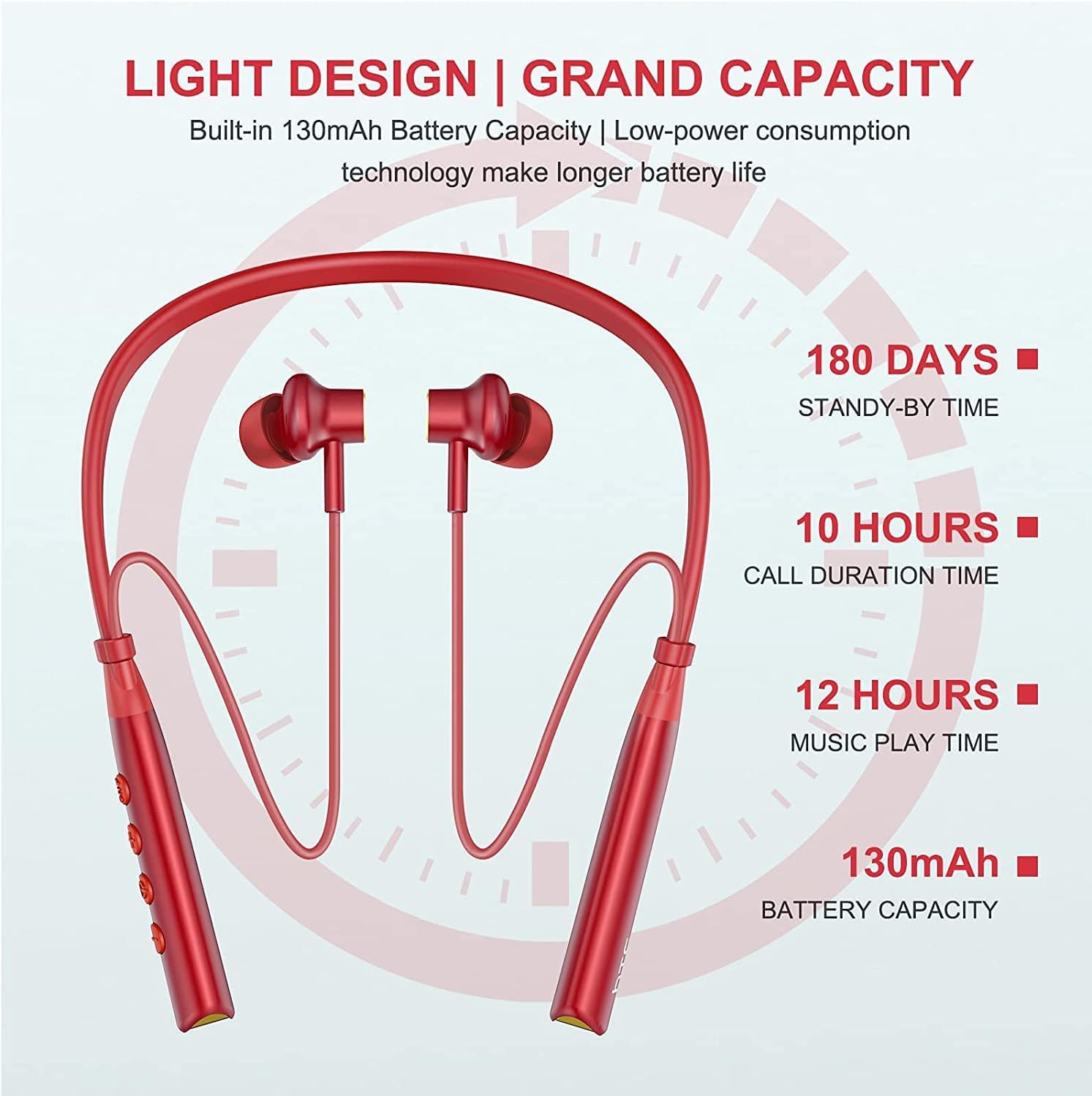
Image: Visual representation of battery specifications, including 180 days standby, 10 hours call duration, 12 hours music playtime, and 130mAh battery capacity.
Warranty sy fanohanana
HTC products are manufactured to the highest quality standards. For warranty information or technical support, please refer to the official HTC website or contact your local customer service representative. Keep your purchase receipt for warranty claims.
Product Video Guide
Video: An official product video demonstrating the features and usage of the HTC Wireless Neckband Bluetooth Headphones, including pairing, controls, and comfort.


