Vita ny vokatraview
The Mesqool Digital Alarm Clock is a versatile device designed to enhance your living space with its multi-functional display and convenient features. It provides accurate time, date, temperature, and humidity readings, along with dual alarm capabilities and charging ports for your electronic devices.

Figure 1: Mesqool Digital Alarm Clock with charging capabilities.
Inona no ao anaty boaty
- Famantaranandro fanairana nomerika hazo
- US AC Power Adapter
- Cable chargeur
- Boky torolalana

Sary 2: Ny votoatin'ny fonosana.
Endri-javatra fototra
- Fampisehoana lehibe: An 8.7-inch screen clearly displays time, date, and day of the week.
- Fanaraha-maso ny maripana sy ny hamandoana: Assists in monitoring indoor environment conditions.
- Loud Alarm with Snooze: Adjustable alarm volume from 65dB to 120dB with a 9-minute snooze function.
- Fikirana fanairana maro: Four alarm modes available: Every day, Weekend, Weekdays, or One Time Alarm. Supports dual alarm settings.
- USB and Type-C Charging Ports: Equipped with both USB and Type-C ports to charge two electronic devices simultaneously.
- 5 Levels Dimmer: Easily adjust display brightness with five levels to suit various lighting conditions.
- Design stylish: Features a wood grain pattern and metal buttons for a modern aesthetic.
- Power Cord Operated with Battery Backup: Primarily AC powered, with 2x AAA batteries (not included) for memory backup during power outages.
Lahatsary 1: Mihoatraview of Mesqool Digital Alarm Clock features, including dual alarm, adjustable brightness, charging ports, and environmental monitoring.
Hametraka
1. Fampifandraisana herinaratra
Connect the provided AC power adapter to the clock's power input port and plug it into a standard wall outlet. The clock is primarily AC powered.

Figure 3: Power connection and battery backup.
2. Fametrahana Backup Battery
For memory backup during power outages, install 2x AAA batteries (not included) into the battery compartment located at the back of the clock. This ensures that time and alarm settings are retained.
Torolàlana miasa
1. Fametrahana Ora sy Daty
- Tsindrio ny DATE button to cycle through date display modes (e.g., MM-DD-YYYY).
- Tsindrio ny TIME 12/24H bokotra hifamadihana eo amin'ny endriky ny ora 12 ora sy 24 ora.
- Mba hametra ny fotoana, tsindrio ary hazòny ny TIME 12/24H button until the hour digits flash. Use the +HOUR SY -MIN buttons to adjust the hour and minute. Press SNOOZE/OK hanamafisana ny toe-javatra tsirairay.
- To set the date, press and hold the DATE button until the year digits flash. Use the +HOUR SY -MIN buttons to adjust the year, month, and day. Press SNOOZE/OK hanamafisana ny toe-javatra tsirairay.

Figure 4: Multiple display styles and unit switching.
2. Fametrahana fanairana
The clock supports dual alarms (ALM1 and ALM2).
- Tsindrio ny ALM1 or ALM2 button to select the alarm you wish to set.
- Press and hold the selected alarm button (e.g., ALM1) until the alarm time flashes. Use +HOUR SY -MIN to set the desired alarm time. Press SNOOZE/OK hanamafy.
- After setting the time, the alarm mode will flash. Use +HOUR or -MIN to select one of the four alarm modes:
- Alahady: Misy feo fanairana isan'andro.
- Alatsinainy-Zoma: Alarm sounds on weekdays only.
- Asabotsy-masoandro: Alarm sounds on weekends only.
- Indray mandeha: Alarm sounds once.
- To turn an alarm ON/OFF, short press the corresponding ALM1 or ALM2 bokotra. Hisy kisary fanairana hiseho/hanjavona eo amin'ny efijery.

Figure 5: Dual alarm settings and modes.
3. Adjusting Brightness (Dimmer)
Tsindrio ny DIMMER button to cycle through 5 levels of display brightness. Select the level that best suits your environment and preference.

Figure 6: Display brightness adjustment.
4. Fanitsiana ny hamafin'ny fanairana
Tsindrio ny VOL DST button to adjust the alarm volume. The volume can be set between 65dB and 120dB across 5 levels.

Figure 7: Alarm volume adjustment and snooze button.
5. Function Snooze
Rehefa maneno ny fanairana dia tsindrio ny lehibe SNOOZE/OK button on top of the clock to activate the snooze function. The alarm will pause for 9 minutes and then sound again.
6. Fampisehoana ny mari-pana sy ny hamandoana
The clock displays indoor temperature and humidity. Press the °F/°C bokotra hifamadihana eo amin'ny mari-pana Fahrenheit sy Celsius.
7. Famandrihana fitaovana elektronika
Utilize the USB and Type-C charging ports located at the back of the clock to charge your smartphones, tablets, or other compatible electronic devices.

Figure 8: USB and Type-C charging ports in use.
fikarakarana
- Diovy amin'ny lamba malefaka sy maina ny famantaranandro. Aza mampiasa mpanadio na solvents mikikisana.
- Fadio ny mampiseho ny famantaranandro amin'ny mari-pana tafahoatra, tara-masoandro mivantana, na hamandoana be.
- Ensure proper ventilation around the clock, especially if using the charging ports for extended periods.
Fanamboarana
| OLANA | Antony mety hitranga | vahaolana |
|---|---|---|
| Foana na manjavozavo ny fampisehoana. | Tsy misy herinaratra, tsy misy herinaratratage, or brightness set too low. | Check power adapter connection. Ensure batteries are installed for backup. Press the DIMMER bokotra hampitombo ny famirapiratana. |
| Tsy maneno ny fanairana. | Alarm is off, volume is too low, or incorrect alarm mode. | Ensure the alarm is activated (icon visible). Increase alarm volume using VOL DST. Verify the alarm mode (Mon-Sun, Mon-Fri, etc.) is correctly set. |
| Diso ny ora/daty. | Not set correctly or power interruption without battery backup. | Follow the "Setting Time and Date" instructions to reset. Install fresh AAA batteries for backup. |
| Fitaovana tsy mi-charge. | Incorrect cable, device not compatible, or clock not powered. | Ensure correct USB/Type-C cable is used. Verify the clock is powered on. Check device compatibility. |
fepetra arahana
- marika: Mesqool
- Laharana modely: Sary MQL-CR1019
- Karazana fampisehoana: Hafanàm-po
- Haben'ny vokatra: 8.07" W x 3.62" H
- Loharano herinaratra: Corded Electric (AC Adapter included)
- Backup bateria: 2 x AAA bateria (tsy tafiditra)
- Vola fanairana: 65dB - 120dB (5 levels)
- Famirapiratry ny fampisehoana: 5 ambaratonga azo amboarina
- seranan-tsambo fiampangana: 1 x USB, 1 x Type-C
- Fitaovana: Plastic (wood grain finish)
- Endri-javatra manokana: Calendar Display, Temperature Display, Humidity Display, Dual Alarm, Large Screen Display, Snooze
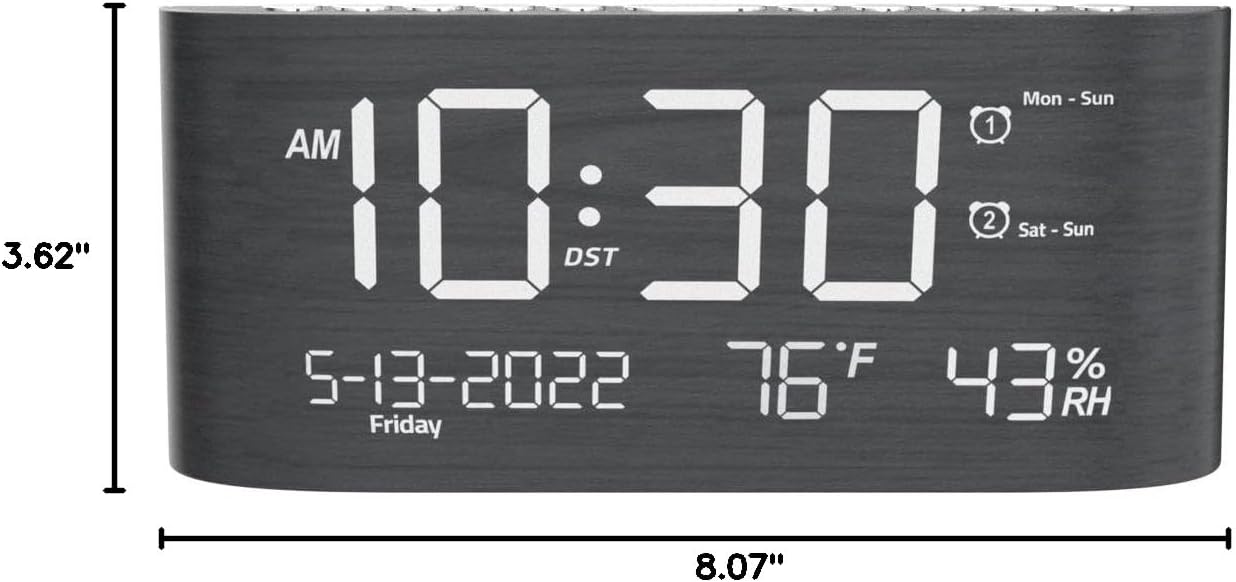
Sary 9: Ny refin'ny vokatra.
Warranty sy fanohanana
This Mesqool product comes with a 2 Years Exchange Warranty. For any support inquiries, troubleshooting assistance, or warranty claims, please refer to the official Mesqool webtranokala na mifandray mivantana amin'ny serivisy mpanjifany.
Azo alaina ny dika elektronika amin'ity boky torolalana ho an'ny mpampiasa ity: Download User Manual (PDF)


