1. Fampidirana
The Elcometer 311 FNF Model T is an advanced automotive refinish paint meter designed for fast and accurate measurement of paint thickness on both steel and aluminum substrates. This robust device provides reliable readings in both mils and microns, making it an essential tool for automotive professionals and enthusiasts. Its ergonomic design, durable construction, and wireless connectivity enhance user experience and data management.
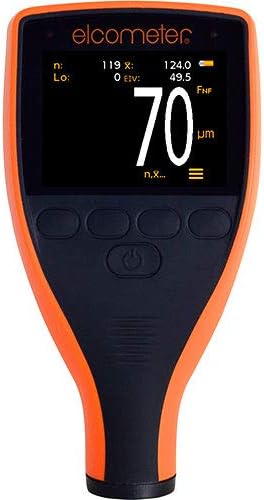
This image shows the Elcometer 311 FNF Model T paint meter from the front. The device has an orange and black casing with a digital display showing a measurement of 70 micrometers. Below the screen are several control buttons.
Lafin-javatra fototra:
- Fast Reading Rate: Achieves 60+ readings per minute, significantly reducing inspection times.
- Dual Unit Measurement: Easily switch between mils and microns with a push of a button.
- Raiki-pitia endrika: Dust and waterproof equivalent to IP64, suitable for various environmental conditions.
- Durable Display: Scratch, solvent, and water-resistant color display for enhanced protection.
- Ergonomic fampiononana: Designed for maximum comfort during extended use.
- Automatic Display Rotation: Ensures readability on horizontal and vertical surfaces.
- Ambient Light Sensor: Adjusts display brightness for optimal visibility in any lighting.
- Fifandraisana Bluetooth: Wirelessly connect to inspection apps or ElcoMaster for seamless reporting.
2. Fametrahana
2.1 Famoahana
Carefully remove the Elcometer 311 FNF Model T from its packaging. Inspect the device for any signs of damage. Retain the packaging for future storage or transport.
2.2 Fametrahana bateria
The Elcometer 311 requires 2 AA batteries, which are included. To install:
- Tadiavo eo amin'ny lamosin'ilay fitaovana ny fonon'ny efitrefitra bateria.
- Sokafy na esory ny fonony mba hanokafana azy.
- Ampidiro ny bateria AA 2, hiantohana ny polarity marina (+/-) araka ny voalaza ao anaty efitrano.
- Soloy tsara ny fonon'ny efitrefitra bateria.
2.3 Herin'ny voalohany
Press and hold the power button (usually located centrally below the screen) until the display illuminates. The device will perform a brief self-test before entering measurement mode.
2.4 Fifandraisana Bluetooth
The Elcometer 311 features Bluetooth connectivity for data transfer to compatible inspection apps or ElcoMaster software. To connect:
- Hamarino tsara fa mandeha ny Bluetooth amin'ny findainao na takelakao.
- Open the ElcoMaster app or your preferred inspection application.
- Follow the app's instructions to search for and pair with the Elcometer 311. The meter's Bluetooth indicator will typically illuminate when connected.

This diagram shows the Elcometer 311 paint meter on the left, with a measurement of 120 micrometers. To its right, a smartphone is displayed, also showing a measurement of 120.0 micrometers, demonstrating the meter's Bluetooth connectivity and data transfer capability to a mobile device.
3. Torolàlana miasa
3.1 Mandray refy
To obtain an accurate paint thickness reading:
- Ensure the meter is powered on.
- Place the probe of the Elcometer 311 firmly and flatly onto the painted surface you wish to measure.
- Hold the meter steady. The reading will appear almost instantly on the display.
- Lift the meter from the surface to prepare for the next reading. The fast reading rate allows for quick successive measurements.


Left: A hand is shown holding the Elcometer 311 paint meter against the silver painted surface of a car, near the headlight. The meter's display shows a reading of 5.5, indicating a paint thickness measurement. Right: This image features a hand holding the Elcometer 311 paint meter against a dark, possibly black, painted surface. The meter's screen clearly shows a reading of 4.5 mils, indicating the paint thickness.
3.2 Changing Measurement Units (Mils/Microns)
The Elcometer 311 allows you to switch between mils and microns. Refer to your device's specific button layout for the 'Units' or 'Mode' button. Typically, a short press of this button will toggle between the two measurement units.
3.3 Understanding Readings
The display will show the measured paint thickness. The unit (mils or µm/microns) will be indicated next to the numerical value. The automatic rotating display ensures the reading is always upright, regardless of the meter's orientation. The ambient light sensor adjusts screen brightness for optimal visibility.
The device is designed to operate reliably in both wet and dry conditions due to its IP64 dust and waterproof rating.
4. Fikojakojana
4.1 Fanadiovana
The Elcometer 311 features a scratch, solvent, and water-resistant display. To clean the device:
- Fafao ny ivelany amin'ny malefaka, damp lamba.
- For stubborn marks, use a mild, non-abrasive cleaning solution.
- Avoid using harsh chemicals or abrasive materials that could damage the casing na fampisehoana.
- Ensure the probe tip is clean and free of debris for accurate measurements.
4.2 Fanoloana bateria
When the battery indicator on the display shows low power, replace the AA batteries as described in Section 2.2. Always use fresh, high-quality batteries.
4.3 Fitehirizana
Store the Elcometer 311 in a cool, dry place away from direct sunlight and extreme temperatures. If storing for extended periods, it is recommended to remove the batteries to prevent leakage.
5. Famahana olana
This section addresses common issues you might encounter with your Elcometer 311.
| OLANA | Antony mety hitranga | vahaolana |
|---|---|---|
| Tsy mandeha ny metatra. | Batterie maty na diso napetraka. | Soloy ny bateria, hiantohana ny polarity marina. |
| Vakiteny tsy marina. | Dirty probe tip; incorrect calibration; surface irregularities. | Clean probe tip; perform calibration (refer to full manual for calibration steps); ensure surface is clean and flat. |
| Olana amin'ny fifandraisana Bluetooth. | Bluetooth not enabled on device/phone; meter out of range; app issues. | Ensure Bluetooth is on for both devices; move meter closer to phone/tablet; restart app or meter. |
| Manjavozavo na tsy azo vakiana ny fampisehoana. | Low battery; extreme lighting conditions. | Replace batteries; allow ambient light sensor to adjust, or move to a more suitable lighting environment. |
6. Famaritana
Detailed specifications for the Elcometer 311 FNF Model T:
| famaritana | antsipirihany |
|---|---|
| mpanamboatra | Elcometer |
| Marika | Elcometer |
| Lanja entana | 5.5 ounces (156 grama) |
| Ny refin'ny vokatra | 5.55 x 2.87 x 1.46 santimetatra (14.1 x 7.3 x 3.7 cm) |
| Laharana modely | 311 |
| Mpanamboatra Part Number | A311CFNFTI |
| vatoaratra | Batterie AA 2 ilaina (tafiditra) |
| Endri-javatra manokana | Waterproof (IP64 equivalent) |
| Daty misy voalohany | Septambra 7, 2015 |
7. Warranty sy fanohanana
7.1 Fampahalalana momba ny fiantohana
Specific warranty terms for the Elcometer 311 FNF Model T are typically provided with the product at the time of purchase or can be found on the official Elcometer website. Please refer to your product documentation or visit the manufacturer's website for detailed warranty coverage and registration information.
7.2 Fanohanana ny mpanjifa
For technical assistance, troubleshooting beyond this manual, or service inquiries, please contact Elcometer customer support directly. You can find contact information and additional resources on the official Elcometer webtranokala:
You may also visit the Elcometer store on Amazon for product information and related accessories: Elcometer Amazon Store