1. Fampidirana
This manual provides comprehensive instructions for the installation, operation, and maintenance of your COUGAR Archon 2 RGB Mid Tower Case. Please read this manual carefully before beginning installation to ensure proper setup and to maximize the performance and longevity of your product.

Sary 1.1: Angled view of the COUGAR Archon 2 RGB Mid Tower Case, showcasing the tempered glass side panel and front RGB fans.
2. Toetran'ny vokatra
The COUGAR Archon 2 RGB Mid Tower Case is designed for PC enthusiasts seeking a balance of aesthetics, airflow, and functionality. Key features include:
- Elegant Design with Tempered Glass: A sleek black finish combined with a tempered glass side panel allows for a clear view of internal components and RGB lighting.
- Optimized Airflow: Supports multiple fan configurations and includes three pre-installed 120mm ARGB fans at the front for efficient cooling.
- Compatibility malalaka: Accommodates Mini ITX, Micro ATX, and ATX motherboards.
- Ample Storage Options: Provides bays for both 3.5" HDDs and 2.5" SSDs.
- Fampidirana/Famoahana eo anoloana mora ampiasaina: Features USB 3.0 and USB 2.0 ports for easy peripheral connectivity.
- Fanaraha-maso jiro RGB: Integrated ARGB fans offer customizable lighting effects.

Sary 2.1: Eo anoloana view of the COUGAR Archon 2 RGB case, highlighting the three pre-installed ARGB fans.
3. Torolàlana fananganana
Follow these steps to properly install your components into the COUGAR Archon 2 RGB case.
3.1. Lisitry ny fanamarinana mialoha ny fametrahana
- Ensure you have all necessary components: motherboard, CPU, RAM, GPU, power supply, storage drives, and appropriate tools (screwdriver, zip ties).
- Miasa amin'ny toerana madio sy tsy misy static. Eritrereto ny mampiasa fehikibo hato-tanana anti-static.
3.2. Manokatra ny raharaha
- Carefully remove the tempered glass side panel by unscrewing the thumbscrews located at the rear of the case. Set the panel aside on a soft, flat surface to prevent scratches.
- Remove the opposite metal side panel by unscrewing its thumbscrews and sliding it backward.
3.3. Fametrahana Motherboard
- Apetraho ao amin'ny fisokafana aorian'ny boaty ny ampinga I/O (raha tsy efa miraikitra amin'ny motherboard-nao).
- Align your motherboard with the standoffs inside the case. Ensure all standoffs match the screw holes on your motherboard.
- Ampifandraiso amin'ny visy omena ny motherboard. Aza terena loatra.
3.4. Fametrahana ny singa famatsiana herinaratra (PSU)
- Tadiavo ny faritra fametrahana PSU eo amin'ny farany ambany amin'ny boaty.
- Slide your PSU into the designated bay from the rear of the case, ensuring the fan faces downwards for optimal cooling (if the case has a bottom vent).
- Ampifandraiso amin'ny visy avy ao aorian'ny boaty ny PSU.
3.5. Fametrahana ny kapila fitahirizana
The Archon 2 RGB supports both 3.5" HDDs and 2.5" SSDs.
- For 3.5" HDDs: Locate the drive cage usually beneath the PSU shroud. Slide the HDD into the drive bay and secure it with screws.
- For 2.5" SSDs: Mount SSDs to the designated mounting points on the back of the motherboard tray or within the drive cage, securing them with screws.
3.6. Fametrahana Karatra Fanitarana (GPU)
- Esory avy ao ambadiky ny boaty ny fonon'ny slot PCIe ilaina.
- Insert your graphics card or other expansion cards into the appropriate PCIe slot on the motherboard.
- Secure the card with screws to the case.
3.7. Cable Management and Front Panel Connections
Route all power and data cables neatly behind the motherboard tray. Connect the front panel I/O cables (USB, audio, power switch, reset switch, LED indicators) to their respective headers on the motherboard according to your motherboard manual.

Figure 3.1: Dimensions of the COUGAR Archon 2 RGB case, useful for planning component fit and space.
4. Torolàlana miasa
4.1. Powering On
Once all components are installed and cables are connected, replace both side panels. Connect your monitor, keyboard, mouse, and power cable to the PSU. Press the power button on the top panel of the case to start your system.
4.2. Fanaraha-maso ny jiro RGB
The pre-installed ARGB fans are typically controlled via a dedicated button on the case's front I/O panel or through your motherboard's RGB software (if connected to an ARGB header). Refer to your motherboard manual for software-based control options.
5. Fikojakojana
Ny fikojakojana tsy tapaka dia manampy amin'ny fiantohana ny fahombiazana tsara indrindra sy ny faharetan'ny singa ao amin'ny PC-nao.
- Fanadiovana vovoka: Periodically clean dust filters (if present) and internal components using compressed air. Ensure the system is powered off and unplugged before cleaning.
- Fitantanana tariby: Ensure cables are neatly routed to avoid obstructing airflow.
- Fanaraha-maso mpankafy: Check fans for dust buildup or obstructions that could impede their operation.
6. Famahana olana
Raha sendra olana ianao dia jereo ireto dingana famahana olana mahazatra ireto:
- Tsy mandeha ny rafitra:
- Check all power connections, including the PSU to the wall outlet, PSU to motherboard (24-pin and CPU 8-pin), and front panel power switch header.
- Hamarino tsara fa eo amin'ny toerana 'ON' ny switch PSU.
- Tsy mihodina ny mpankafy / Tsy mandeha ny RGB:
- Verify fan power cables are securely connected to the motherboard or fan controller.
- Check ARGB headers for proper connection to the motherboard or RGB controller.
- Ensure RGB software or case button is correctly configured.
- Tsy misy vokatra aseho:
- Confirm the monitor cable is connected to the graphics card (not the motherboard integrated graphics, unless no dedicated GPU is present).
- Avereno apetraka ny karatra grafika sy ny môdely RAM.
7. Famaritana
Detailed specifications for the COUGAR Archon 2 RGB Mid Tower Case:
| endri-javatra | antsipirihany |
|---|---|
| Anarana modely | ARCHON 2 RGB |
| Karazana tranga | Mid Tower |
| Mifanaraka amin'ny motherboard | Mini-ITX, Micro-ATX, ATX |
| refy (LxWxH) | 14.96 x 8.27 x 18.5 santimetatra (380 x 210 x 470 mm) |
| Lanja entana | 11.37 kilao (5.17 kg) |
| KEVITRA | Metaly, Glass Tempered |
| loko | Mainty |
| Mpankafy efa napetraka | 3 x 120mm ARGB fans (Front) |
| Fanohanana mpankafy (eo anoloana) | 3 x 120mm na 2 x 140mm |
| Ports I/O | 1 x USB 2.0, 2 x USB 3.0, Audio In/Out |
| Karazana fametrahana ny famatsiana herinaratra | Tendrombohitra ambany |
| Fomba fampangatsiahana | Air |
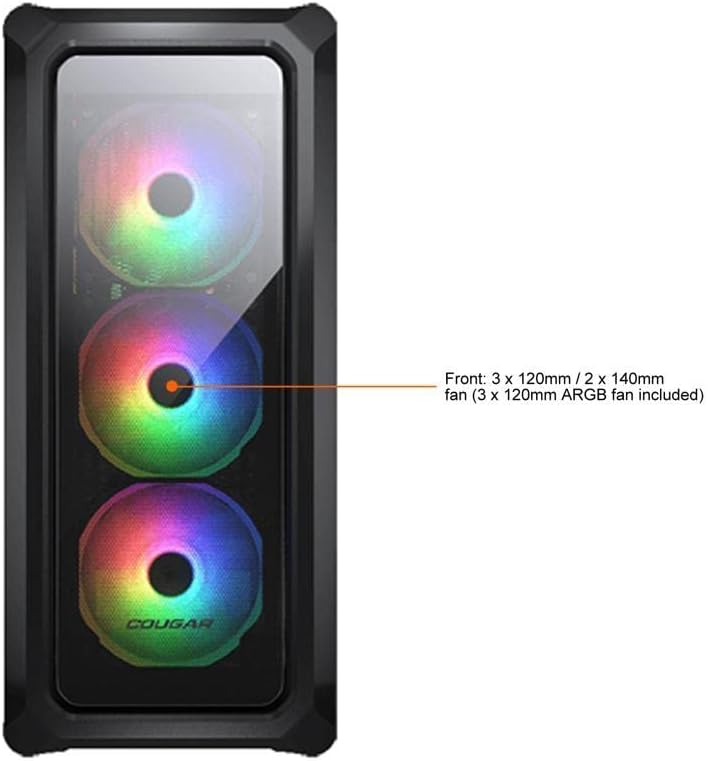
Figure 7.1: Front panel fan configuration and size options for the COUGAR Archon 2 RGB case.
8. Warranty sy fanohanana
Raha mila fanazavana momba ny antoka sy ny fanohanana ara-teknika, dia jereo azafady ny COUGAR ofisialy. webtranokala na mifandray amin'ny departemantan'ny serivisy mpanjifany. Tehirizo ny porofon'ny fividiananao ho an'ny fitakiana fiantohana.
COUGAR Official Webtranokala: cougargaming.com


