1. Fampidirana
Misaotra anao nividyasing the JCPOWER JC1800.5 5-Channel Amplifier. Ity boky torolalana ity dia manome fampahalalana tena ilaina ho an'ny fametrahana araka ny tokony ho izy, ny fampandehanana ary ny fikojakojana ny anao amplifier. Please read this manual thoroughly before attempting to install or operate the unit to ensure optimal performance and safety.
The JC1800.5 is designed to deliver high-quality audio performance for your vehicle's sound system, featuring a 5-channel configuration for versatile speaker and subwoofer setups.
2. Torolàlana momba ny fiarovana
Araho ireto fepetra fiarovana manaraka ireto mandritra ny fametrahana sy ny fampiasana azy:
- Fametrahana matihanina naroso: Installation of this product requires experience with electrical wiring and car audio systems. Professional installation is highly recommended.
- Atsaharo ny bateria: Always disconnect the vehicle's negative battery terminal before starting any installation work to prevent electrical shorts.
- Wiring mety: Ensure all wiring is correctly connected and insulated to prevent short circuits and damage to the amplifier or vehicle's electrical system. Use appropriate gauge wires as specified.
- Mametraka: Tendrombohitra ny amplifier securely in a dry, well-ventilated area, away from direct sunlight, heat sources, and moisture. Ensure adequate airflow around the unit to prevent overheating.
- Fiara: Always use fuses of the specified rating. Never replace a fuse with one of a higher amperage or bypass the fuse.
- Haben'ny volume: Prolonged exposure to high volume levels can cause hearing damage. Adjust the volume to a comfortable level.
- Fandroahana hafanana: ny amplifier generates heat during operation. Do not cover the amplifier or obstruct its heat sinks.
3. Ny votoatin'ny fonosana
Hamarino fa misy ny entana rehetra ao anaty fonosana:
- JCPOWER JC1800.5 5-Channel AmpLifer
- User Manual (ity antontan-taratasy ity)
- Fametrahana Hardware (screws)
- Spare Fuses (if included)

Figure 3.1: JCPOWER JC1800.5 Amplifier in its retail packaging.
4. Fametrahana sy fametrahana
Ny fametrahana araka ny tokony ho izy dia zava-dehibe amin'ny fampandehanana sy ny faharetan'ny fiainanao amplifier. Refer to the diagram below for connection points.
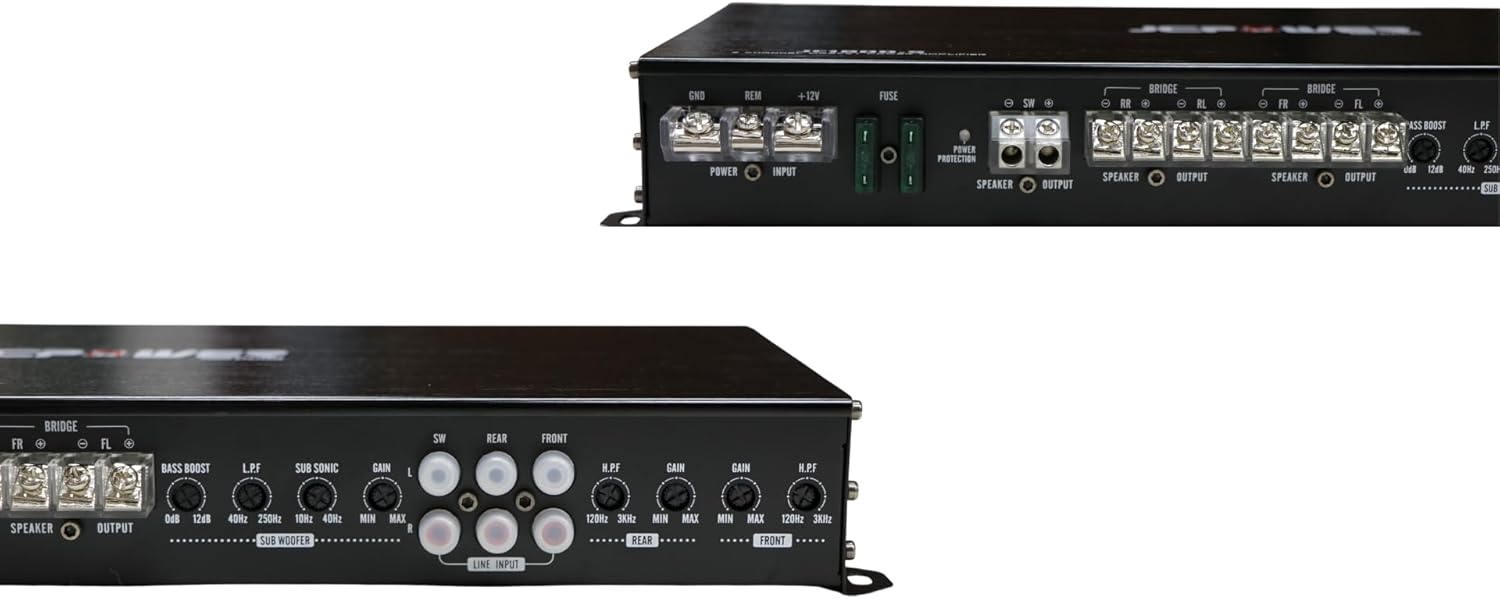
Figure 4.1: Rear panel connections and controls of the JCPOWER JC1800.5 ampLifer.
4.1. Fifandraisana herinaratra
- tany (GND): Connect a heavy-gauge wire (minimum 8 AWG, preferably 4 AWG) from the amplifier's GND terminal to a clean, unpainted metal point on the vehicle's chassis. Ensure a solid, low-resistance connection.
- Lavitra (REM): Connect a 18 AWG wire from the ampny terminal REM an'ny lifier mankany amin'ny fivoahan'ny lavitr'ezaka amin'ny lohanao. Ity tariby ity dia mamadika ny amplifier on and off with your car stereo.
- +12V (Hery): Connect a heavy-gauge wire (minimum 8 AWG, preferably 4 AWG) from the amplifier's +12V terminal directly to the positive terminal of the vehicle's battery. Install an in-line fuse holder within 18 inches (45 cm) of the battery, using a fuse of appropriate amperage (refer to specifications).
4.2. Fifandraisana amin'ny mpandahateny
The JC1800.5 is a 5-channel amplifier. Channels 1-4 are typically used for full-range speakers, and Channel 5 (Subwoofer channel) is for a subwoofer.
- Connect your front speakers to the FR+ and FR- terminals and FL+ and FL- terminals.
- Connect your rear speakers to the RR+ and RR- terminals and RL+ and RL- terminals.
- Connect your subwoofer to the SW+ and SW- terminals.
- Ensure correct polarity (+ to + and - to -) for all speaker connections. Incorrect polarity can lead to poor sound quality.
- Bridging (Channels 1-4): Channels 1-4 can be bridged to power two speakers at higher power. Refer to the amplifier's specifications for minimum impedance when bridging. Connect the speaker to the FL+ and FR- terminals for one bridged channel, and RL+ and RR- for the other.
4.3. Input Connections (RCA)
Ampifandraiso ny tariby RCA avy amin'ny lohanao alohan'nyamp outputs to the corresponding RCA input jacks on the amplifier (FRONT, REAR, SUBWOOFER). Ensure a secure connection.
5. Fampandehanana sy fanitsiana
After installation, carefully adjust the ampfirafitry ny hazavana (Lifier) mba hahazoana fampisehoana feo tsara indrindra.
5.1. Mahazo fanitsiana
Mifanaraka amin'ny amplifier's input sensitivity to the output of your head unit. It is tsy fanaraha-maso ny feo.
- Avereno ny amplifier's GAIN controls to their minimum (counter-clockwise) position.
- Set your head unit's volume to about 75-80% of its maximum.
- Ampitomboy miadana ny amplifier's GAIN control until you hear slight distortion, then back it off slightly until the sound is clear.
- Repeat for FRONT, REAR, and SUBWOOFER channels independently.
5.2. Crossover Settings (LPF/HPF)
Ny "crossovers" tafiditra ao anatiny dia ahafahanao mandefa elanelana matetika voafaritra tsara mankany amin'ny fanamafisam-peonao.
- LPF (Low Pass Filter): Used for subwoofers. This allows frequencies ETSY AMBANY the set point to pass through. Adjust the LPF for the subwoofer channel (typically 80Hz-120Hz) to blend with your main speakers.
- HPF (Sivana Avo Avo): Used for full-range speakers. This allows frequencies AMBONY the set point to pass through. Adjust the HPF for the FRONT and REAR channels (typically 80Hz-100Hz) to prevent low frequencies from distorting smaller speakers.
5.3. Bass Boost
The BASS BOOST control (on the subwoofer channel) provides an increase in output at a specific low frequency. Use sparingly, as excessive bass boost can lead to distortion and potential speaker damage.
6. Fikojakojana
Ny fikojakojana tsy tapaka dia miantoka ny faharetan'ny fampiasanao sy ny fahombiazany ampLifer.
- Fanadiovana: Fafao tsy tapaka ny amplifier's exterior with a soft, dry cloth. Do not use harsh chemicals or abrasive cleaners. Ensure ventilation fins are free of dust and debris.
- Fifandraisana: Jereo indraindray ny fifandraisana rehetra amin'ny herinaratra, ny ground, ny remote, ary ny fanamafisam-peo mba hahazoana antoka fa mafy tsara izy ireo ary tsy misy harafesina.
- Tontolo iainana: Ataovy azo antoka ny amplifier remains in a dry, well-ventilated environment. Avoid exposing it to extreme temperatures or moisture.
7. Famahana olana
Raha sendra olana amin'ny tenanao ianao amplifier, jereo ireto olana sy vahaolana mahazatra ireto:
| OLANA | Antony mety hitranga | vahaolana |
|---|---|---|
| Tsy misy jiro / jiro LED maty | Fuse nitsoka Ratsy ny fifandraisana amin'ny herinaratra/tany Tsy misy famantaran-jiro mandeha lavitra | Jereo sy soloy fuse Hamarino tsara fa azo antoka tsara ny fifandraisana rehetra amin'ny herinaratra sy ny tany Jereo ny fifandraisana tariby lavitra sy ny fivoahan'ny head unit |
| No Sound / Protection LED On | Short circuit Mihoatra ny hafanana Low voltage | Check speaker wiring for shorts Ensure adequate ventilation; allow amplifier to cool Check battery and charging system |
| Feo diso | Avo loatra ny tombony Fikirakirana crossover tsy mety Ny tsy fitovian'ny impedance fanamafisam-peo | Ahena ny fametrahana ny tombony Adjust LPF/HPF settings Verify speaker impedance is within amplifier's limits |
| Engine Noise (Whine) | Ratsy fifandraisana tany RCA cables routed near power wires Faulty RCA cables | Improve ground connection Reroute RCA cables away from power wires Replace RCA cables |
8. Famaritana
Key technical specifications for the JCPOWER JC1800.5 ampLitera:
- fantsona: 5
- RMS Power Output (4 ohm): 35 W x 4 CH + 250 W x 1 CH
- RMS Power Output (2 ohm): 50 W x 4 CH + 500 W x 1 CH
- Bridged Power Output (4 ohm): 100 W x 2 CH (for channels 1-4)
- Herin'ny Output Total: 250 Watts (as per product data, likely peak or combined)
- Karazana fametrahana: Tendrombohitra Mahaleo Tena
- Lanja vokatra: 3 kg
- Ny haben'ny fonosana: 47.6 x 22.2 x 7 cm
- Laharana modely: JC1800.5
9. Warranty sy fanohanana
JCPOWER products are designed and manufactured to the highest quality standards. This product is covered by a limited warranty against defects in materials and workmanship. The specific terms and duration of the warranty may vary by region and retailer.
For warranty service, technical support, or further inquiries, please contact your authorized JCPOWER dealer or visit the official JCPOWER webtranokala momba ny fifandraisana.
Azafady, tehirizo ny porofon'ny fividiananao ho an'ny fitakiana fiantohana.


