1. Fampidirana
The RCYAGO BLE-9909 is a multi-parameter smart tester designed for precise measurement of pH, Total Dissolved Solids (TDS), Electrical Conductivity (EC), Salinity, and Temperature. This device integrates Bluetooth connectivity, allowing seamless data synchronization with the YINMIK mobile application for enhanced data management and analysis. It is suitable for various applications including domestic drinking water, hydroponics, laboratory testing, and aquariums.

Figure 1: RCYAGO BLE-9909 Smart Tester in operation.
2. Toetran'ny vokatra
- Multi-Parameter Measurement: Measures pH, TDS (ppm), EC (conductivity), Salinity (ppt), and Temperature.
- Fifandraisana Bluetooth: Compatible with the YINMIK mobile application for real-time data transmission and control.
- Cloud-Based Data Management: Enables easy saving, management, and sharing of test data, preventing data loss.
- Kalibration mandeha ho azy: Features a 5-point calibration method for pH (Asian standard: pH 4.00, pH 6.86, pH 9.18; EU standard: pH 7.00, pH 10.01) ensuring high accuracy.
- High Sensitivity Glass Probe: Provides a full measurement range of 0-14 pH with 0.01 pH resolution.
- Fampisehoana feno: Large LCD screen displays multiple parameters simultaneously. App control allows for backlight adjustment.
- Customizable Limits: The mobile application allows setting upper and lower limits for pH and EC. Abnormal values are highlighted in red.
3. Vokatra singa
Familiarize yourself with the components of your BLE-9909 tester:

Sary 2: Nipoaka view of the BLE-9909 tester and its components.
- 3*1.5V Button Battery: Loharano herinaratra ho an'ny fitaovana.
- Fampisehoana backlit: LCD screen for reading measurements.
- Data Hold/Temperature Unit Conversion Key: Button to hold readings or switch temperature units.
- Function Conversion/Calibration Key: Button to switch measurement modes or initiate calibration.
- lakile ON/OFF: bokotra herinaratra.
- Immersion Line: Indicates the minimum immersion depth for accurate readings.
- Satroka fiarovana: Covers and protects the electrodes when not in use.
- Probe avo lenta: Contains the sensors for measurement.

Sary 3: antsipirihany view of the BLE-9909 electrodes.
- TDS/EC/Salinity Sensor: Measures Total Dissolved Solids, Electrical Conductivity, and Salinity.
- External Reference: Reference electrode for stable measurements.
- Temperature Sensor: Measures the temperature of the solution.
- Glass PH Sensor: High-sensitivity sensor for pH measurements.
4. Fametrahana
4.1 Fametrahana bateria
- Unscrew the battery compartment cap at the top of the device (refer to Figure 2).
- Insert three 1.5V button batteries, ensuring correct polarity.
- Securely screw the battery compartment cap back on.
4.2 Mobile App Connection (YINMIK App)
The BLE-9909 connects to your smartphone via Bluetooth for advanced features and data management.
- Download the "YINMIK" mobile application from your device's app store (iOS App Store or Google Play Store).
- Ataovy azo antoka fa alefa amin'ny findainao ny Bluetooth.
- Turn on the BLE-9909 tester by pressing the "ON/OFF" key.
- Open the YINMIK app. The app will automatically search for and connect to the BLE-9909 device.
- Once connected, the app will display real-time measurement data.

Figure 4: Bluetooth data synchronization with the YINMIK mobile app.
5. Torolàlana miasa
5.1 Fandrefesana
- Esory ny satroka fiarovana amin'ny electrode.
- Sasao amin'ny rano madio ny elektrôda ary fafao moramora amin'ny lamba famaohana madio.
- Immerse the electrode into the solution to be tested, ensuring the immersion line is covered.
- Gently stir the solution and wait for the reading to stabilize on the LCD screen.
- Read the displayed values. The device will show pH, TDS/EC/Salinity, and Temperature.
- After measurement, rinse the electrode thoroughly with distilled water and replace the protective cap.
5.2 Switching Measurement Modes
Press the "MODE/CAL" key to cycle through different measurement parameters (pH, TDS, EC, Salinity). The active parameter will be indicated on the display.
5.3 Data Hold and Temperature Unit Conversion
Press the "HOLD/TEMP" key to hold the current reading on the display. Press it again to release. Long-press the "HOLD/TEMP" key to switch between Celsius (°C) and Fahrenheit (°F) temperature units.
6. calibration
Regular calibration ensures the accuracy of your pH measurements. The BLE-9909 supports a 5-point pH calibration.
6.1 Required Calibration Solutions
- Asian Standard: pH 4.00, pH 6.86, pH 9.18
- EU Standard: pH 7.00, pH 10.01
6.2 Fomba fanaovana calibration
- Prepare the calibration buffer solutions (e.g., pH 6.86, pH 4.00, pH 9.18 for Asian standard).
- Turn on the tester and ensure it is in pH measurement mode.
- Kobanina amin'ny rano voadio ny electrode ary asio maina.
- Immerse the electrode into the first calibration solution (e.g., pH 6.86).
- Press and hold the "MODE/CAL" key until "CAL" appears on the display. The device will automatically recognize the buffer solution.
- Wait for the reading to stabilize and for the device to confirm calibration for that point.
- Remove the electrode, rinse with distilled water, and blot dry.
- Repeat steps 4-6 for the remaining calibration solutions in sequence.
- Once all points are calibrated, the device will automatically exit calibration mode.
Fanamarihana: For best accuracy, calibrate regularly, especially after prolonged storage or if readings appear inconsistent.
7. Data Management and App Features
The YINMIK mobile application provides comprehensive data management and additional control features.
- Fampisehoana angona amin'ny fotoana tena izy: View miaraka eo amin'ny efijerin'ny findainao ireo masontsivana rehetra voarefy.
- Data logging: Automatically save measurement data to the cloud, accessible anytime.
- Takelaka data Review: Browse past measurements, including time and date stamps.
- Fanairana azo zahana: Set upper and lower limits for pH and EC. The app will display values in red if they exceed these limits (see Figure 5).
- Fanaraha-maso backlight: Adjust the backlight of the device's LCD screen directly from the app.
- Fizarana angona: Easily share your test results.
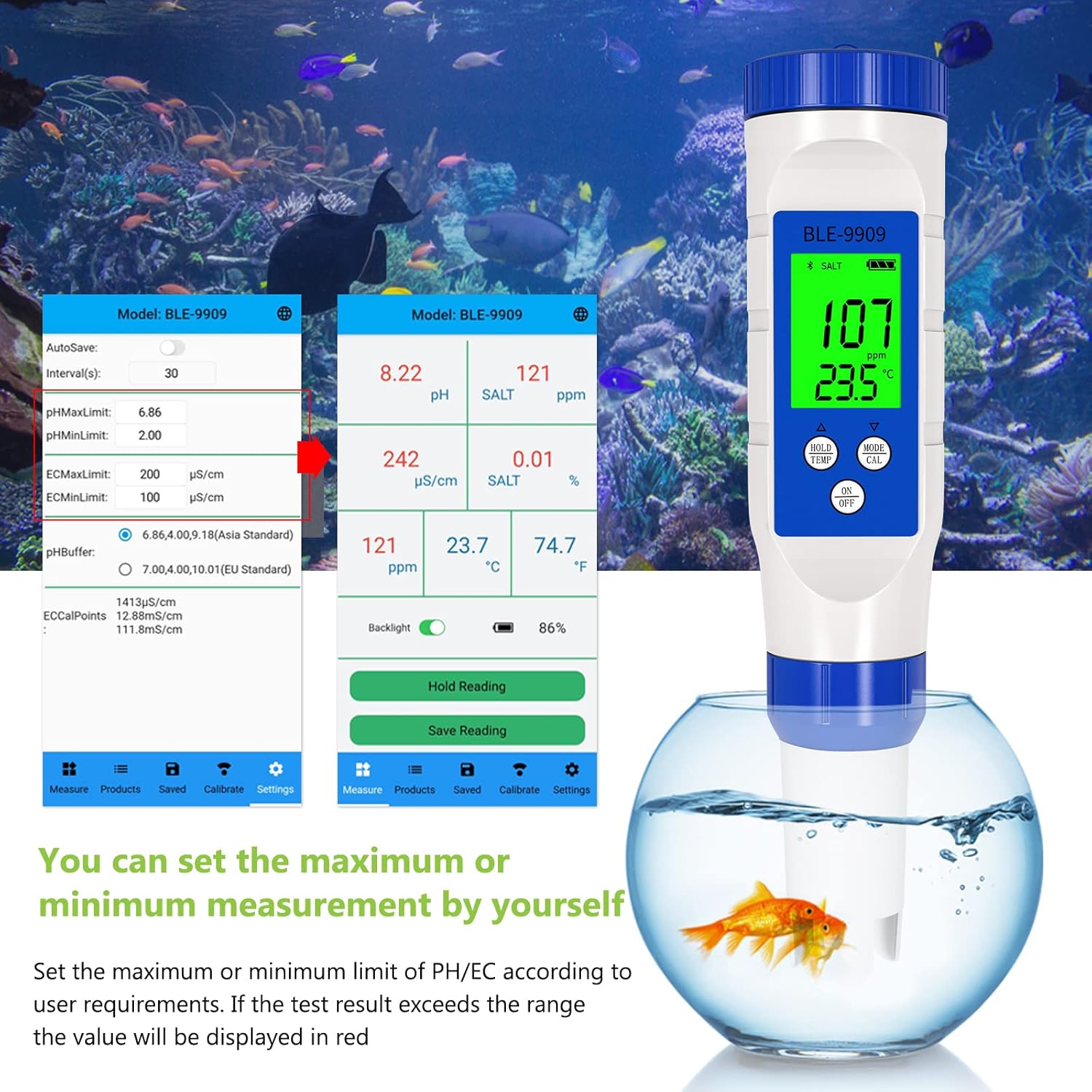
Figure 5: Setting custom measurement limits within the YINMIK app.
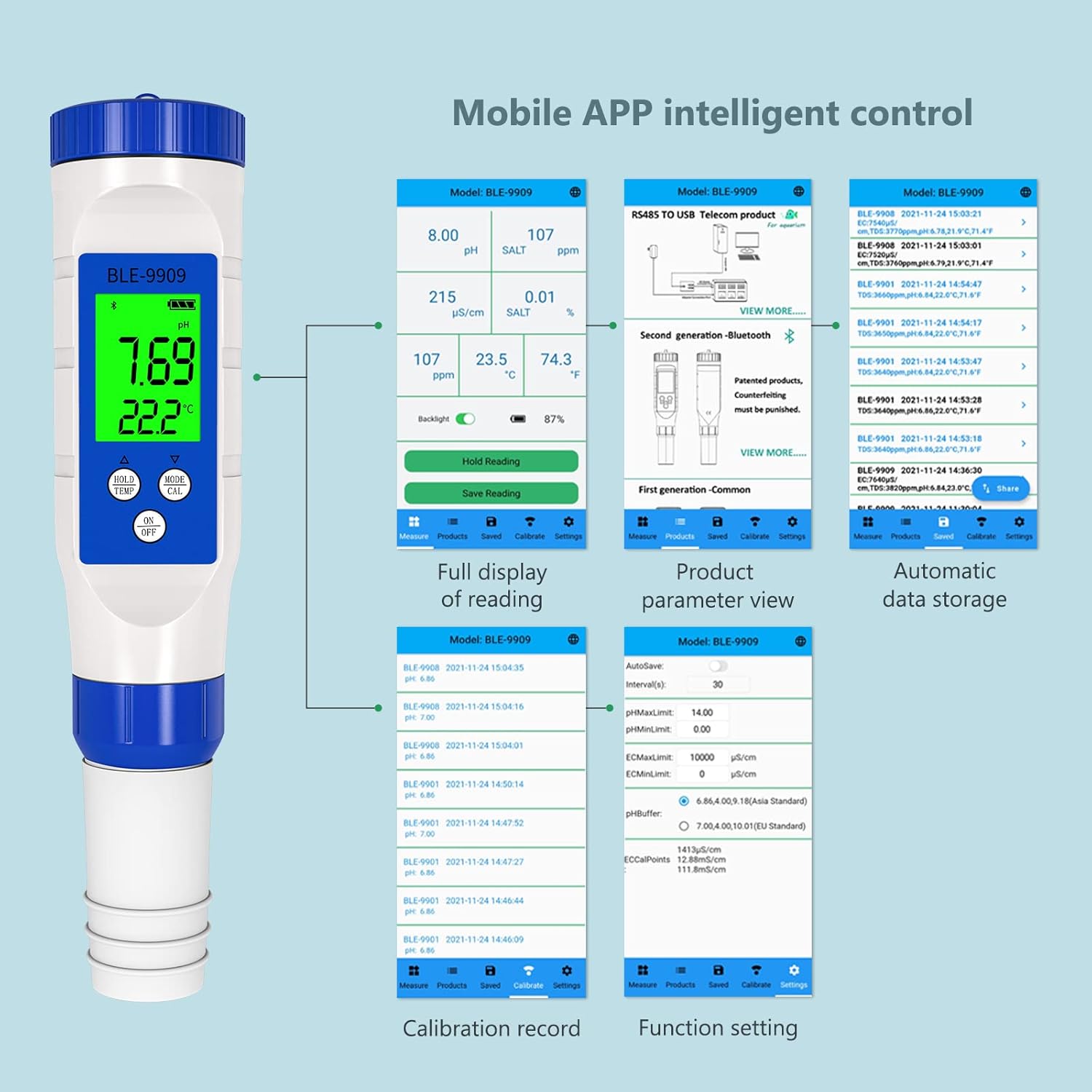
Sary 6: Tapitraview of YINMIK app features including data display, settings, and historical records.
8. Fikojakojana
8.1 Electrode Cleaning
After each use, rinse the electrode thoroughly with distilled or deionized water to prevent contamination and buildup. Do not wipe the glass bulb, as this can cause static electricity and damage the sensor. Gently blot dry with a lint-free tissue.
8.2 Fitehirizana
Always replace the protective cap after use. Ensure the sponge inside the cap remains moist with a few drops of pH storage solution or 3M KCl solution to keep the electrode hydrated. Never store the electrode dry or in distilled water, as this can shorten its lifespan.
8.3 Fanoloana bateria
When the display becomes dim or the device fails to power on, replace the batteries as described in Section 4.1.
9. Famahana olana
| OLANA | Antony mety hitranga | vahaolana |
|---|---|---|
| Vakiteny tsy marina | Electrode not calibrated; dirty electrode; expired calibration solution; damaged electrode. | Calibrate the device (Section 6); clean the electrode (Section 8.1); use fresh calibration solutions; replace electrode if damaged. |
| Tsy mandeha ny fitaovana | Bateria ambany na maty; diso fametrahana bateria. | Replace batteries (Section 8.3); ensure correct battery polarity (Section 4.1). |
| Olana amin'ny fifandraisana Bluetooth | Bluetooth off on phone; app not open; device too far from phone; interference. | Ensure Bluetooth is on; open YINMIK app; bring device closer to phone; restart both device and app. |
| Readings fluctuate excessively | Electrode not fully immersed; air bubbles on electrode; solution not stable; damaged electrode. | Ensure immersion line is covered; gently tap electrode to remove bubbles; wait for solution to stabilize; replace electrode if necessary. |
10. Famaritana
| fikirana | sarobidy |
|---|---|
| Laharana modely | BLE-9909 |
| Marika | RCYAGO |
| lafiny | 23.8 x 8 x 5.21 cm |
| lanja | 168 g |
| Fandrefesana ny pH | 0.00 - 14.00 pH |
| pH fanapahan-kevitra | 0.01 pH |
| Fandrefesana mari-pana | Typically 0-60°C |
| Loharanon-kery | 3 x 1.5V Button Batteries |
| fifandraisana | Bluetooth (YINMIK Mobile App) |
11. Warranty sy fanohanana
For warranty information, technical support, or service inquiries, please contact RCYAGO customer service through the official website or your point of purchase. Please have your model number (BLE-9909) and purchase date available when contacting support.
Mpanamboatra: RCYAGO
First Available Date on Amazon.es: 24 Desambra 2021


