1. Vokatra mihoatraview
The Anderic OEM NSRCFNA21 Smart Remote is an original equipment manufacturer (OEM) replacement remote control specifically designed for various Insignia TV models. This remote provides seamless functionality and user-friendly operation, ensuring reliable control over your television.
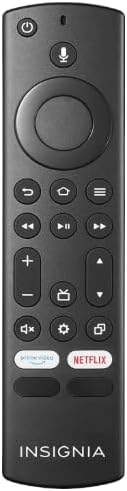
Sary 1.1: The Anderic OEM NSRCFNA21 Smart Remote. This image displays the front view of the black remote control, featuring various buttons for power, voice control, navigation, volume, channel, and dedicated streaming service buttons.
Ny endri-javatra fototra dia ahitana:
- Original Quality: An authentic OEM product, ensuring performance and reliability comparable to the remote originally supplied with your TV.
- Famolavolana mora ampiasaina: Intuitive buttons and controls for easy navigation, volume adjustment, channel changes, and access to various TV functions.
- Fampisehoana azo antoka: Provides a stable and responsive connection for accurate command execution.
2. Setup and Pairing Instructions
To ensure proper functionality, the remote control must be paired with your Insignia TV. Follow these steps carefully:
- Reset TV: Unplug your Insignia TV from its power source. Wait for approximately 30 seconds.
- Power On TV: Plug the TV back into the power source and turn it on. Allow the TV to fully boot up.
- Manomboka mampiaraka: Once the TV has completely booted up and is displaying content, press and hold the an-trano button on the Anderic NSRCFNA21 remote control for up to 30 seconds.
- Remote Update (if prompted): Your TV may display a message indicating that the remote needs an update. If prompted, allow the TV to proceed with the update. This process may take 1 to 3 minutes to complete.
- Fanamarinana: After the update (if any) and pairing process, test the remote's functions (e.g., volume, channel, navigation) to confirm successful pairing.
If the remote does not pair after following these steps, repeat the process or refer to the troubleshooting section.
3. Fampandehanana ny Remote Control
The Anderic NSRCFNA21 remote control features an intuitive layout for easy operation of your Insignia TV. Below are the general functions of the primary buttons:
- Bokotra hery: Mandeha na mamono ny fahitalavitra.
- bokotra fanaraha-maso feo: Activates voice commands for searching content or controlling the TV.
- Navigation Pad (Directional Buttons and Select): Ampiasaina hivezivezena amin'ny menus sy hisafidy zavatra.
- bokotra an-trano: Returns to the TV's main home screen.
- bokotra miverina: Miverina amin'ny efijery na sakafo teo aloha.
- Menu/Options Button: Accesses additional menu options or settings.
- Vola miakatra/midina: Adjusts the TV's audio volume.
- Fantsona ambony/midina: Manova fantsona fahitalavitra.
- Bika matoanteny Mutes or unmutes the TV's audio.
- Bokotra Settings: Manokatra ny menio firafitry ny fahitalavitra.
- Bokotra Fidirana/Loharano: Changes the TV's input source (e.g., HDMI 1, HDMI 2).
- Dedicated Streaming Service Buttons: Provides quick access to popular streaming applications (e.g., Amazon Prime Video, Netflix).
4. Mifanaraka
The Anderic OEM NSRCFNA21 Smart Remote is compatible with the following Insignia TV models:
- NS24DF310NA21
- NS39DF310NA21
- NS50DF710NA21
- NS55DF710NA21
This remote also replaces the following models:
- NSRCFNA19 Rev B Fire
- NSRCFNA19revB
- NSRCFNA21 Fire
- NSRCFNA21 Rev E
- NSRCFNA21-Rev-E
Ensure your TV model is listed above for optimal performance.
5. Fikojakojana
Proper maintenance can extend the life and functionality of your remote control.
- Fanoloana bateria: The remote requires two AAA batteries. Replace batteries when the remote's responsiveness decreases or it stops functioning. Ensure correct polarity when inserting new batteries.
- Fanadiovana: Use a soft, dry cloth to clean the remote's surface. Avoid using liquid cleaners or abrasive materials, as these can damage the remote.
- fitahirizana: Tehirizo ao amin'ny toerana maina ny fanaraha-maso lavitra, lavitry ny mari-pana tafahoatra sy ny tara-masoandro mivantana.
6. Famahana olana
If you encounter issues with your Anderic NSRCFNA21 Smart Remote, try the following troubleshooting steps:
- Lavitra tsy mamaly:
- Check the batteries. Replace them with fresh AAA batteries, ensuring correct polarity.
- Ataovy azo antoka fa tsy misy sakana eo anelanelan'ny lavitr'ezaka sy ny sensor an'ny fahitalavitra.
- Avereno andramana indray ny dingana fampiarahana araka ny voalaza ao amin'ny Fizarana 2.
- Fampandehanana tsy tapaka:
- Mety hidika izany fa ambany ny herin'ny bateria. Soloy ireo bateria.
- Ensure you are within the effective range of the TV's sensor.
- Pairing Fails:
- Confirm your TV model is listed in the compatibility section (Section 4).
- Ensure the TV is fully booted up before attempting to hold the Home button.
- Try unplugging the TV for a longer period (e.g., 1-2 minutes) before plugging it back in and re-attempting pairing.
If problems persist after attempting these steps, contact customer support for further assistance.
7. Famaritana
| Marika | Anderika |
| Laharana modely | NSRCFNA21 Rev B |
| Fitaovana mifanentana | Insignia Televisions |
| Loharanon-kery | Batterie AAA 2 (ilaina) |
| Lanja entana | 1.76 oz |
| Ny haben'ny fonosana | 6.3 x 2.95 x 0.67 santimetatra |
| loko | Mainty |
| mpanamboatra | Dan's Electronics Etc., Inc. |
8. Warranty sy fanohanana
For warranty information or technical support, please contact the manufacturer, Anderic (Dan's Electronics Etc., Inc.). Refer to the product packaging or the official Anderic webtranonkala raha mila fanazavana fanampiny momba ny fifandraisana sy ny fepetran'ny garantie.
Afaka mitsidika ny Anderic Store on Amazon raha mila fanazavana fanampiny.


