1. Fampidirana
Thank you for choosing the SUITU Portable Cordless Handheld Vacuum Cleaner, Model ST-8001. This manual provides essential information for the safe and efficient operation, maintenance, and troubleshooting of your new vacuum cleaner. Please read it thoroughly before first use and keep it for future reference.
This vacuum cleaner is designed for both wet and dry cleaning tasks in various environments, including cars, homes, and offices. It features a powerful 10000Pa suction, a 120W motor, and a washable HEPA filter for effective cleaning.
2. Ny votoatin'ny fonosana
Carefully unpack your SUITU Portable Cordless Handheld Vacuum Cleaner and check for the following items:
- SUITU Portable Cordless Handheld Vacuum Cleaner (Main Unit)
- Crevice Nozzle
- Nozzle borosy
- Wide Mouth Nozzle
- USB Charging Cable
- Washable HEPA Filter (pre-installed)
- Additional HEPA Filter (may vary by package)
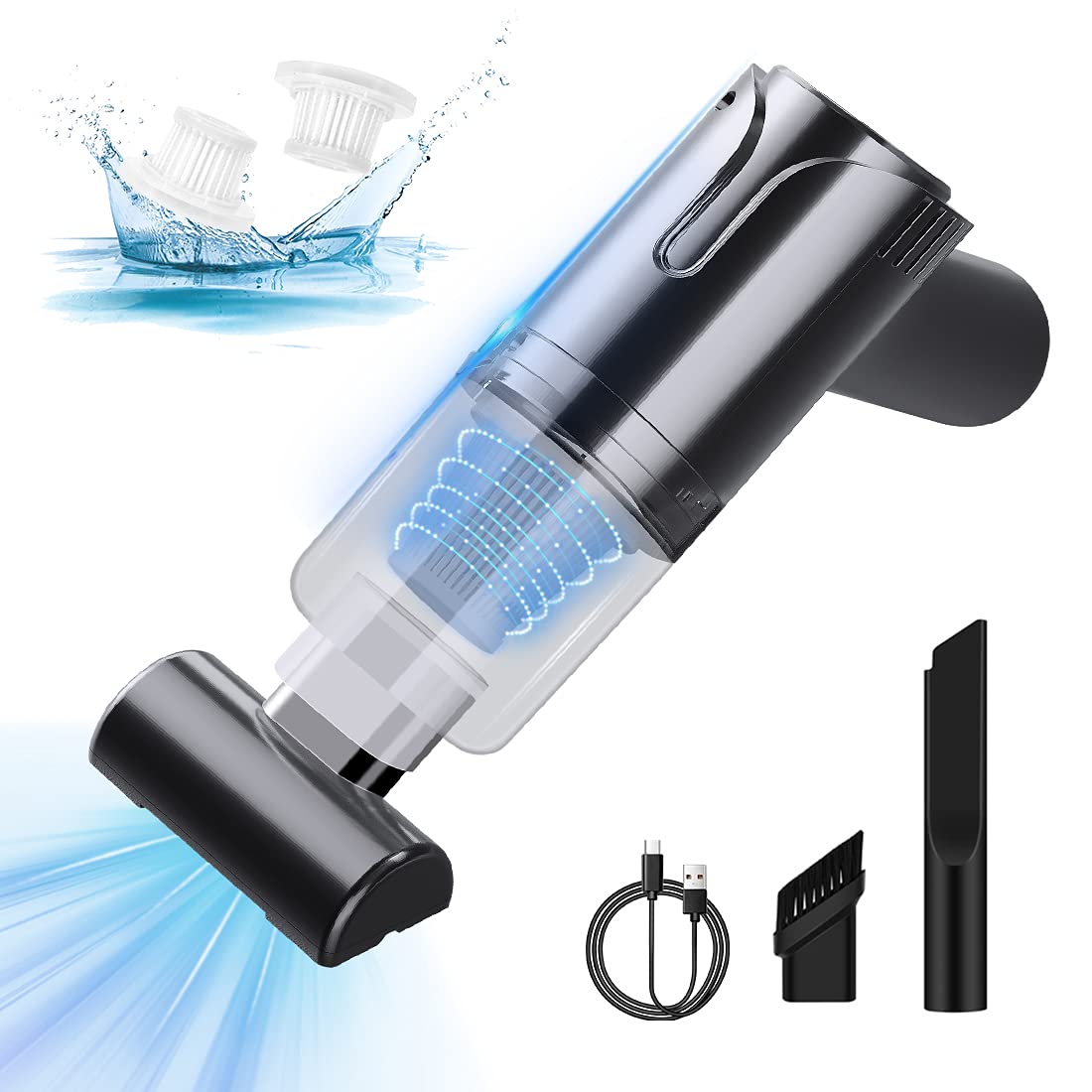
3. Vokatra mihoatraview
Familiarize yourself with the main components of your vacuum cleaner:
- Vatana fototra: Contains the motor, battery, and control buttons.
- Dust Collection Cup: Fitoeran-javatra mangarahara ho an'ny fanangonana poti-javatra.
- Sivana HEPA: Located inside the dust collection cup, filters fine particles.
- Bokotra hery: Mampandeha sy manafoana ny "aspirateur".
- seranan-tsambo fiampangana: Seranan-tsambo USB ho an'ny famandrihana ny fitaovana.
- Nozzle Release Button: For detaching and attaching different nozzles.
4. Fametrahana
4.1. Fametrahana voalohany
Before first use, fully charge the vacuum cleaner. Connect the provided USB charging cable to the vacuum's charging port and to a compatible USB power source (e.g., car USB port, wall adapter, power bank, laptop). The charging time is approximately 3.5 hours for a full charge, providing up to 60 minutes of continuous use.

4.2. Fametahana ireo "nozzles"
Select the appropriate nozzle for your cleaning task. Align the nozzle with the vacuum's suction opening and push firmly until it clicks into place. To remove, press the nozzle release button and pull the nozzle off.
Video 1: This video demonstrates the assembly of the vacuum cleaner with its various attachments and shows its application in both dry and wet cleaning scenarios.
5. Torolàlana miasa
5.1. Mamelona/Mamono
Press the power button located on the handle to turn the vacuum cleaner on. Press it again to turn the device off.
5.2. Dry Cleaning
For general dry debris like dust, crumbs, or pet hair, use the wide mouth nozzle for larger areas or the brush nozzle for upholstery and delicate surfaces. The crevice nozzle is ideal for tight spaces and corners.

5.3. Wet Cleaning
The vacuum cleaner is suitable for absorbing small amounts of liquid spills. Use the crevice nozzle for precise liquid pickup. Ensure the dust collection cup is not overfilled with liquid to prevent damage to the motor. After wet cleaning, empty and thoroughly dry the dust cup and filter.
5.4. Fampiasana Scenarios
This versatile vacuum is designed for various cleaning tasks:
- Fiara anatiny: Easily clean car seats, floor mats, dashboards, and hard-to-reach areas like cup holders and door pockets.
- Trano: Ideal for quick clean-ups of spills, crumbs on tables, pet hair on furniture, or dust on shelves.
- Birao: Keep your workspace tidy by vacuuming desks, keyboards, and office chairs.


6. Fikojakojana
6.1. Emptying the Dust Collection Cup
Regularly empty the dust collection cup to maintain optimal suction power. To empty, twist or press the release button on the dust cup to detach it from the main body. Dispose of the collected debris and reattach the cup securely.
6.2. Cleaning the HEPA Filter
The HEPA filter is washable and reusable. After detaching the dust cup, carefully remove the HEPA filter. Rinse it under running water until clean. Allow the filter to air dry completely before reinserting it into the dust cup. Do not use the vacuum with a wet filter. Replace the filter if it becomes damaged or excessively clogged.
6.3. Fikarakarana ankapobeny
Fafao amin'ny lamba malefaka ny ivelan'ny vacuum cleaner, damp cloth. Do not use harsh chemicals or abrasive cleaners. Store the vacuum in a cool, dry place away from direct sunlight.
7. Famahana olana
If you encounter any issues with your vacuum cleaner, refer to the following common problems and solutions:
| OLANA | Antony mety hitranga | vahaolana |
|---|---|---|
| Tsy misy herinaratra/Tsy mirehitra | Lany ny bateria. | Esory tanteraka ny mpanadio banga. |
| Herin'ny suction ambany | Dust collection cup is full. | Empty the dust collection cup. |
| Herin'ny suction ambany | Tsentsina ny sivana HEPA. | Diovy na soloy ny sivana HEPA. |
| Herin'ny suction ambany | Nozzle or suction inlet is blocked. | Remove any obstructions from the nozzle or inlet. |
| Mijanona tampoka ny banga | Kety ny bateria. | Avereno amboary ny mpanadio banga. |
| Mijanona tampoka ny banga | Overheating due to prolonged use or blockage. | Turn off the vacuum, clear any blockages, and allow it to cool down before resuming use. |
8. Famaritana
Key technical specifications for the SUITU Portable Cordless Handheld Vacuum Cleaner ST-8001:
- marika: SUITU
- Anaran'ny modely: ST-8001
- Loharano herinaratra: Battery Powered
- Herin'ny maotera: 120W (0.161 horsepower)
- Herin'ny setroka: 10000Pa
- Karazana sivana: Filter HEPA
- Fiainana bateria: Hatramin'ny 60 minitra
- Ora famandrihana: Tokony ho 3.5 ora
- Haben'ny vokatra: 9.61" L x 2.83" W x 6.18" H
- Lanja entana: 1.41 kg
- Ambaratonga tabataba: 55 desibela
- Fomba fanaraha-maso: Kitiho / Kitiho
- Teknolojia fifandraisana: USB
- loko: Mainty

9. Fampahalalana momba ny fiantohana
This product comes with a standard manufacturer's warranty. Please refer to the warranty card included in your package or contact customer support for specific details regarding warranty coverage and terms.
10. Fanohanana ny mpanjifa
For any questions, technical assistance, or service requests, please contact SUITU customer support through the retailer where you purchased the product or visit the official SUITU webtranokala momba ny fifandraisana.


