1. Fampidirana
This manual provides detailed instructions for the setup, operation, and maintenance of your CHERRY DW 9100 Slim Wireless Keyboard and Mouse Set. This rechargeable desktop set offers both 2.4 GHz wireless and Bluetooth connectivity, featuring a slim design and silent keystroke SX Scissor Mechanism for comfortable and efficient use in various environments.

Image 1.1: The CHERRY DW 9100 Slim Wireless Keyboard and Mouse Set, including the USB nano receiver.
2. Ny votoatin'ny fonosana
Azafady, jereo ny votoatin'ny fonosana rehefa mivoaka ny boaty mba hahazoana antoka fa misy ny singa rehetra:
- CHERRY DW 9100 Slim Wireless Keyboard
- CHERRY DW 9100 Slim Wireless Mouse
- USB Nano mpandray
- USB-C Charging Cable
- User Manual (ity antontan-taratasy ity)
3. Fametrahana
3.1 Famandrihana ny fitaovana
Both the keyboard and mouse are equipped with rechargeable lithium batteries.
- Ampifandraiso amin'ny seranana USB-C eo amin'ny fitendry sy ny totozy ny tariby famandrihana USB-C nomena.
- Connect the other end of the cable to a powered USB port (e.g., computer, USB wall adapter).
- The status LED on each device will indicate the charging status. A full charge is indicated when the LED changes color or turns off (refer to Section 4.3 for LED indicators).
3.2 Connecting via 2.4 GHz Wireless
For a stable and fast wireless connection, use the included USB nano receiver.
- Locate the USB nano receiver.
- Ampidiro ao amin'ny seranana USB misy ao amin'ny solosainao ny mpandray USB nano.
- On both the keyboard and mouse, locate the connectivity switch. Set the switch to the 2.4 GHz position (often indicated by a receiver icon or "RF").
- Tokony hifandray ho azy amin'ny solosainao ireo fitaovana.
3.3 Mampifandray amin'ny alalan'ny Bluetooth
The set supports Bluetooth connectivity for devices that have Bluetooth capabilities.
- On both the keyboard and mouse, locate the connectivity switch. Set the switch to the Bluetooth position (often indicated by a Bluetooth icon).
- On your computer or device, open the Bluetooth settings.
- Initiate the pairing process on your device. The keyboard and mouse should appear in the list of discoverable devices (e.g., "CHERRY DW 9100 Keyboard", "CHERRY DW 9100 Mouse").
- Select each device to pair them. Follow any on-screen prompts, such as entering a pairing code for the keyboard.
Fanamarihana: The keyboard and mouse can be paired with multiple Bluetooth devices. Use the connectivity switch to toggle between paired devices or 2.4 GHz mode.
4. Torolàlana miasa
4.1 Fampiasa kitendry
The CHERRY DW 9100 Slim Keyboard features a full-size layout with an SX Scissor Mechanism for silent and precise keystrokes.
- Standard Keys: All standard alphanumeric and symbol keys function as expected.
- Fanalahidin'ny asa (F1-F12): These keys may have secondary functions (e.g., media control, volume, brightness) accessible by pressing the Fn key simultaneously. Refer to your operating system's settings for specific function key behavior.
- Keypad nomerika: Provides dedicated number entry.

Sary 4.1: Side profile of the CHERRY DW 9100 Slim Keyboard, highlighting its thin design.

Image 4.2: Visual representation of the CHERRY SX Scissor Mechanism, responsible for silent and precise keystrokes.
4.2 Ny asan'ny totozy
The CHERRY DW 9100 Slim Mouse features 6 buttons and a scroll wheel for versatile navigation.
- Tsindrio havia/havanana: Standard mouse buttons.
- Kodiaran'ny horonam-boky: Ho an'ny fikorisa mitsangana sy ho toy ny bokotra tsindrio afovoany.
- Bokotra sisiny: Typically used for forward/backward navigation in web navigateur.
- DPI Switch: A button, usually near the scroll wheel, allows adjustment of the mouse's sensitivity (DPI - Dots Per Inch). Pressing this button cycles through different DPI settings, indicated by the mouse's status LED.

Sary 4.3: Ambony view of the CHERRY DW 9100 Slim Mouse, showing the left/right click buttons, scroll wheel, and DPI switch.
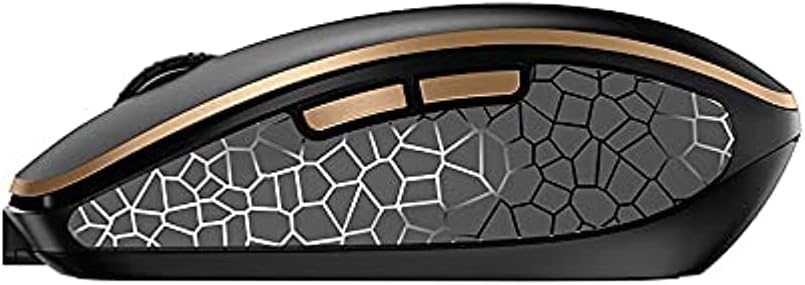
Sary 4.4: lafiny view of the CHERRY DW 9100 Slim Mouse, illustrating the ergonomic design and side buttons.
4.3 Toetra LED
Both the keyboard and mouse feature status LEDs to provide information on battery level, charging status, and mouse resolution.
- Batterie ambany: The LED will flash or illuminate in a specific color (e.g., red) when the battery level is low, indicating that charging is required.
- famandrihana: The LED will illuminate while charging and typically change color or turn off when fully charged.
- Mouse Resolution (DPI): When adjusting the DPI, the mouse LED may briefly flash to indicate the current setting.
5. Fikojakojana
5.1 Fanadiovana
Mba hihazonana ny fahombiazan'ny fitaovanao sy ny endriny:
- Esory amin'ny solosainao ireo fitaovana alohan'ny hanadiovana azy.
- Mampiasà lamba malefaka sady tsy misy loko kely dampasiana rano na vahaolana fanadiovana malefaka.
- Avoid using harsh chemicals, abrasive cleaners, or solvents, as these can damage the surfaces.
- Ho an'ny fitendry, ampiasao rivotra voaporitra mba hanesorana ny vovoka sy ny poti-javatra eo anelanelan'ny fanalahidy.
5.2 Fikarakarana bateria
The integrated lithium batteries are designed for long-term use.
- Avereno ampiasaina ny fitaovana rehefa miseho ny famantarana ny bateria ambany.
- Avoid fully discharging the batteries frequently to prolong their lifespan.
- If storing the devices for an extended period, charge them to approximately 50% before storage.
6. Famahana olana
If you encounter issues with your CHERRY DW 9100 Slim set, refer to the following common solutions:
6.1 Olana mifandray
- No Connection (2.4 GHz):
- Ensure the USB nano receiver is securely plugged into a working USB port.
- Verify the keyboard and mouse connectivity switches are set to the 2.4 GHz toerana.
- Andramo ampidirina amin'ny seranana USB hafa ny mpandray.
- Ensure the devices are sufficiently charged.
- Tsy misy fifandraisana (Bluetooth):
- Ensure the keyboard and mouse connectivity switches are set to the Bluetooth toerana.
- Confirm Bluetooth is enabled on your computer/device.
- Remove previous pairings from your device's Bluetooth settings and attempt to re-pair.
- Ensure the devices are sufficiently charged.
6.2 Olana momba ny herinaratra sy ny famandrihana
- Fitaovana tsy misy fiampangana:
- Check that the USB-C charging cable is properly connected to both the device and the power source.
- Try a different USB-C cable or a different USB power source.
- Hamarino tsara fa miasa ny loharanon-jiro.
- Fohy ny fiainana bateria:
- Ensure devices are fully charged before use.
- Battery life can vary based on usage patterns.
6.3 Olana amin'ny fanaraha-maso ny totozy
- Inaccurate or No Tracking:
- Hamarino tsara fa madio sy tsy misy loto ny sensor-n'ny totozy.
- Use the mouse on a suitable surface (e.g., mouse pad). Highly reflective or transparent surfaces may cause issues.
- Adjust the DPI setting using the DPI switch on the mouse.
7. Famaritana
| endri-javatra | antsipirihany |
|---|---|
| Laharana modely | JD-9100US-2 |
| Ny refin'ny vokatra | 17.32 x 5.12 x 0.59 santimetatra |
| Lanja entana | 2.35 kg |
| vatoaratra | Rechargeable Lithium (USB-C) |
| Teknolojia fifandraisana | Bluetooth, 2.4 GHz Radio Frequency (USB) |
| Endri-javatra manokana | Rechargeable, Silent Keystroke (SX Scissor Mechanism) |
| Fitaovana mifanentana | Solosaina manokana |
| mpanamboatra | SERIZY |
Note on Batteries: The product description indicates USB-C rechargeable lithium batteries. The specification "1 AA batteries required. (included)" in the source data appears to be a discrepancy. Please rely on the USB-C rechargeable feature for this model.
8. Warranty sy fanohanana
CHERRY products are manufactured to high-quality standards. For detailed warranty information, including terms and conditions, please refer to the official CHERRY webtranonkala na ny karatra fiantohana miaraka amin'ny vokatrao.
For technical support, troubleshooting assistance beyond this manual, or to inquire about replacement parts, please visit the official CHERRY support portal or contact their customer service directly.
- Official CHERRY Webtranokala: www.cherry.de/en/ (or regional equivalent)
- Fanohanana ny mpanjifa: Jereo ny webtranokala ho an'ny antsipiriany momba ny fifandraisana.


