Sava lalana
Thank you for choosing the BYTECH BYLTTY10101 Adjustable View Laptop Stand. This manual provides essential information for the proper setup, operation, and maintenance of your new laptop stand. Designed for versatility and ergonomics, this stand helps elevate your laptop to an optimal viewing height, promoting better posture and reducing neck and eye strain. Its adjustable design also aids in improving airflow around your device, contributing to better cooling performance.
Torolàlana fametrahana
1. Famoahana
Carefully remove the laptop stand from its packaging. Ensure all components are present. The package should contain the adjustable laptop stand unit.
2. Initial Deployment
The BYTECH BYLTTY10101 laptop stand comes in a compact, folded state. To deploy it:
- Gently unfold the two main support arms outwards until they form an 'X' shape.
- Extend the lower support arms that will hold the laptop's base.
- Ensure all hinges are fully extended and locked into place for stability.
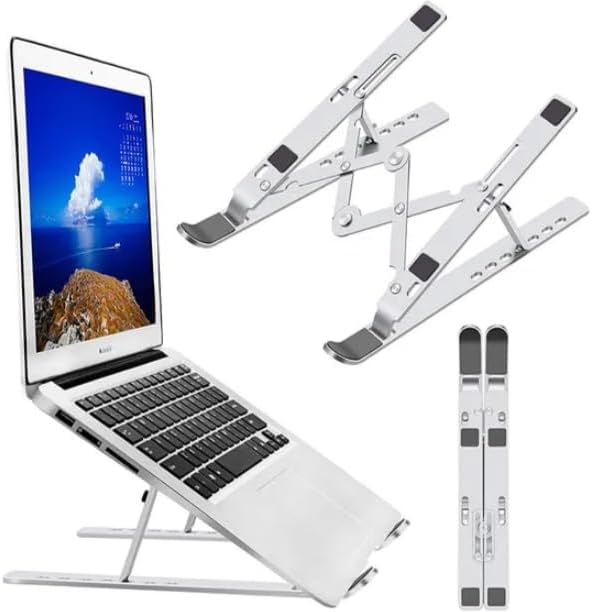
Image: The BYTECH BYLTTY10101 Adjustable View Laptop Stand shown in its fully deployed configuration with a laptop, alongside its folded state for portability.
Torolàlana miasa
1. Adjusting Height and Angle
The stand features multiple adjustment points to achieve your desired height and viewing angle. Locate the adjustable hinges on the stand. Gently press the release buttons or levers (if present) and adjust the arms to the desired height and angle. Release the buttons/levers to lock the stand into position. Ensure both sides are adjusted symmetrically for stability.
2. Placing Your Laptop
Once the stand is set to your preferred height and angle, carefully place your laptop onto the support arms. Ensure the laptop's rubber feet or base rests securely on the stand's anti-slip pads to prevent sliding. The front lip of the stand will hold the laptop in place.
fikarakarana
1. Fanadiovana
To clean your laptop stand, use a soft, damp cloth. For stubborn marks, a mild soap solution can be applied to the cloth, then wipe the stand clean. Avoid using abrasive cleaners or solvents, as these may damage the finish or anti-slip pads.
2. fitahirizana
When not in use, the stand can be folded back into its compact form for easy storage. Store it in a dry place away from extreme temperatures.
Fanamboarana
| OLANA | Antony mety hitranga | vahaolana |
|---|---|---|
| Mahatsiaro ho tsy marin-toerana na mangozohozo ny fijoroana. | Hinges not fully locked; uneven surface; laptop not centered. | Ensure all hinges are securely locked. Place the stand on a flat, stable surface. Center your laptop on the stand. |
| Laptop slides on the stand. | Anti-slip pads are dirty or worn; laptop not properly seated. | Clean the anti-slip pads with a damp cloth. Ensure the laptop's base is fully resting on the pads and against the front lip. |
| Difficulty adjusting the stand. | Hinges are stiff. | Apply gentle, even pressure when adjusting. Avoid forcing the hinges. If very stiff, a small amount of silicone lubricant (not oil-based) can be applied to the hinge points, but this is rarely needed. |
fepetra arahana
| endri-javatra | antsipirihany |
|---|---|
| Laharana modely | BYLTTY10101 |
| Marika | Bytech |
| Fitaovana mifanentana | solosaina |
| Karazana fametrahana | Tabletop |
| Endri-javatra manokana | Adjustable |
| loko | Mainty |
| Lanja entana | 1 kilao (eo ho eo. 0.45 kg) |
| Ny haben'ny fonosana | 12 x 5 x 1 santimetatra (tokony ho 30.5 x 12.7 x 2.5 cm) |
Warranty sy fanohanana
For warranty information or technical support, please refer to the warranty card included with your product or visit the official Bytech website. You may also contact Bytech customer service directly for assistance with product inquiries, troubleshooting, or replacement parts.
Webtranokala: www.bytechintl.com (Fanamarihana: Ity dia toerana fitehirizana URL, please refer to your product's official documentation for the correct support contact.)


