Sava lalana
This manual provides comprehensive instructions for the FANTECH GP12 Revolver USB Gaming Controller. Please read this manual carefully before using the product to ensure proper operation and to maximize your gaming experience.
Vita ny vokatraview
The FANTECH GP12 Revolver is a wired gaming controller designed for an immersive gaming experience on PC and PS3. It features a familiar console-like layout and dual vibration feedback motors.
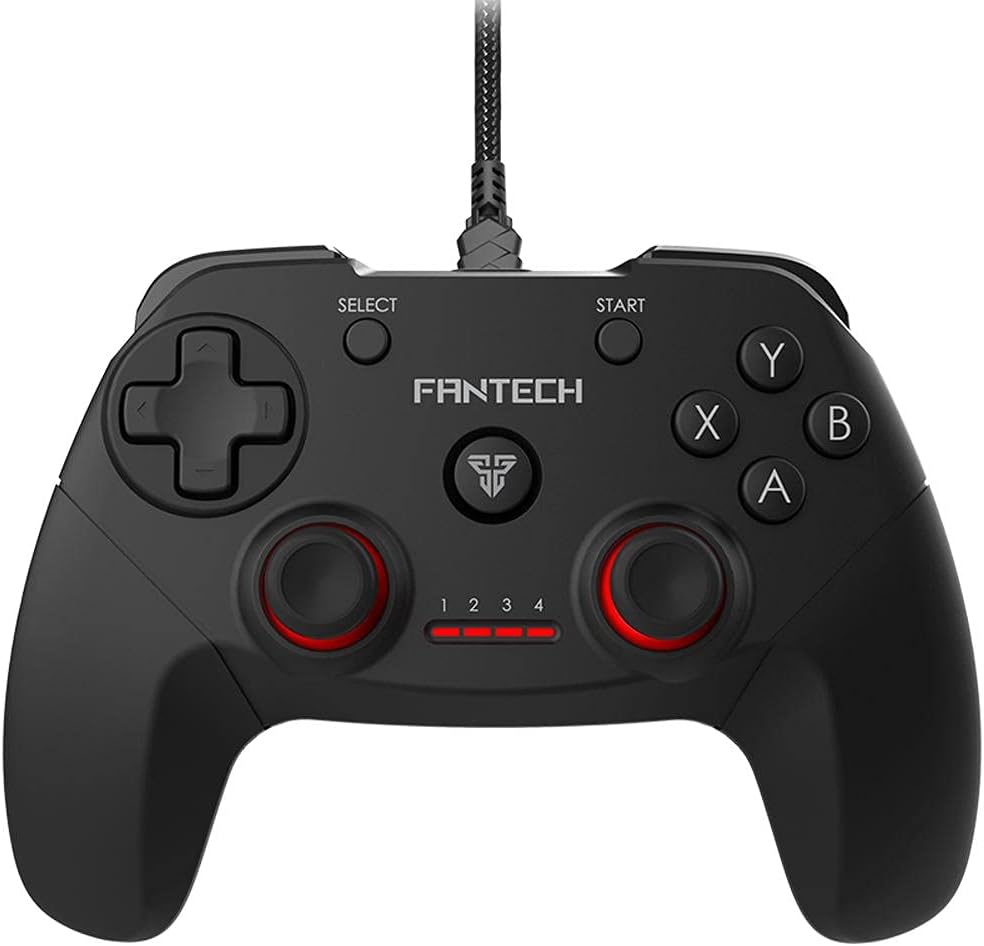
Sary: Front view of the FANTECH GP12 Revolver USB Gaming Controller, showcasing ny endrika ergonomika sy ny fametrahana bokotra.
Lafin-javatra fototra:
- Familiar Console-Like Layout: Designed for intuitive control, allowing users to pick up and play without a steep learning curve. The controller's shape and button placement mimic traditional console gamepads.
- Dual Vibration Feedback Motors: Provides tactile feedback for in-game actions, enhancing immersion with every hit, crash, and explosion. The motors are strategically placed to deliver realistic sensations.
- Wide Game Compatibility: Compatible with thousands of games on PC and PS3, offering full control across various genres. Simply plug and play to enjoy your favorite titles.
- Ergonomic grip: Crafted for comfortable long-term gaming sessions, reducing hand fatigue.
- 17 Bokotra: Comprehensive button layout for versatile control, including action buttons, directional pad, analog sticks, and shoulder buttons.
- Fifandraisana an-tariby: Reliable USB connection with a 1.8-meter cable, ensuring stable and lag-free gameplay.

Image: A user's hands comfortably gripping the FANTECH GP12 Revolver controller, demonstrating its ergonomic design for extended gameplay.

Image: The FANTECH GP12 Revolver controller with visual representations of vibration waves emanating from its sides, illustrating the dual vibration feedback feature.

Image: A person using the FANTECH GP12 Revolver controller while gaming on a PC setup, highlighting its compatibility with various gaming platforms.
Hametraka
Mampifandray ny Controller:
- Locate an available USB port on your PC or PlayStation 3 console.
- Insert the USB connector of the FANTECH GP12 Revolver controller firmly into the USB port.
- The system will automatically detect and install the necessary drivers. This process may take a few moments.
- Once installed, the controller's indicator lights will illuminate, signifying it is ready for use.
Note: For optimal performance, ensure your operating system (Windows 7, Windows 10, or PS3) is up to date.
Torolàlana miasa
Fanaraha-maso fototra:
The GP12 Revolver features a standard gamepad layout. Familiarize yourself with the button assignments for your specific game.
- Directional Pad (D-Pad): Ampiasaina amin'ny fampidirana lalana mazava tsara, matetika amin'ny fihetsehana na fitetezana amin'ny menio.
- Analog Sticks: Provide 360-degree movement and camera control. Pressing them down often activates additional functions (L3/R3).
- Bokotra hetsika (A, B, X, Y): Primary interaction buttons for in-game actions such as jumping, attacking, or confirming selections.
- Shoulder Buttons (L1, R1) and Triggers (L2, R2): Located on the top of the controller, used for various actions like aiming, firing, or special abilities.
- bokotra START: Typically used to pause games or access in-game menus.
- Bokotra SELECT: Often used for map access, inventory, or other secondary functions.
Hevitra hovitrovitra:
The dual vibration motors provide immersive feedback during gameplay. This feature is automatically activated in games that support vibration. You will feel vibrations during impacts, explosions, and other significant in-game events.
fikarakarana
- Fafao amin'ny lamba malefaka sy maina ny fitaovana fanaraha-maso mba ho madio.
- Aza avela hirehitra amin'ny mari-pana tafahoatra, hamandoana, na tara-masoandro mivantana ny fitaovana fanaraha-maso.
- Do not use abrasive cleaners or solvents on the controller.
- Store the controller in a safe place when not in use to prevent damage to the cable or buttons.
Fanamboarana
Controller tsy mamaly:
- Ensure the USB cable is securely connected to both the controller and the device (PC/PS3).
- Andramo ampifandraiso amin'ny seranana USB hafa ny mpanara-maso.
- Avereno indray ny PC na PS3-nao.
- Verify that the game you are playing supports gamepad input.
Tsy miasa ny hovitrovitra:
- Hamarino tsara fa manohana ny valin-kafatra amin'ny hovitrovitra ilay lalao lalaovinao.
- Jereo ny fikirana ao anatin'ny lalao mba hahazoana antoka fa mandeha ny hovitrovitra.
- Hamarino tsara fa mifandray tsara ny mpanara-maso.
Tsy miasa tsara ireo bokotra:
- Ataovy azo antoka fa tsy misy poti-javatra mipetraka eo ambanin'ireo bokotra.
- Test the controller with another game or on a different device to isolate the issue.
fepetra arahana
Detailed technical specifications for the FANTECH GP12 Revolver USB Gaming Controller:

Image: Diagram showing the dimensions (154mm x 113mm x 58mm) and key technical specifications of the FANTECH GP12 Revolver controller.
| endri-javatra | antsipirihany |
|---|---|
| Marika | Fantech |
| MODELY | GP12 Revolver |
| Type | Gamepad tariby |
| fifandraisana | USB |
| bokotra | 17 pcs |
| Valin-kafatra hovitrovitra | Yes (Dual Motors) |
| Ny halavan'ny tariby | 1.8 metatra |
| refy (L x W x H) | 154 x 113 x 58 mm (eo ho eo) |
| lanja | 170 grama (eo ho eo) |
| loko | Black / Grey |
| Platforms mifanentana | PC, PlayStation 3 (PS3) |
| Rafitra fiasana | Windows 7, Windows 10, PS3 |
Warranty & Support
For warranty information and technical support, please refer to the warranty card included with your product or visit the official Fantech website. Tehirizo ny porofon'ny fividiananao ho an'ny fitakiana fiantohana.
If you encounter any issues not covered in this manual, please contact Fantech customer support for assistance.


