1. Fampidirana
Thank you for choosing the EDIS 40W Speakers, Model EA014. This manual provides essential information for the safe and efficient use of your new speaker system. Please read this manual thoroughly before installation and operation, and retain it for future reference.
2. Information momba ny fiarovana
Mba hiantohana ny fampandehanana azo antoka sy hisorohana ny fahasimbana dia tandremo ireto fepetra manaraka ireto:
- Do not expose the speakers to water or moisture.
- Aza sakanana ny fisokafan'ny rivotra.
- Place the speakers on a stable surface to prevent falling.
- Ampiasao fotsiny ny adaptatera herinaratra omena miaraka amin'ilay fitaovana.
- Arovy amin'ny ankizy.
- Tapaho ny herinaratra mandritra ny tafio-drivotra na rehefa tsy ampiasaina mandritra ny fotoana maharitra.
3. Ny votoatin'ny fonosana
Azafady, jereo fa misy ny entana rehetra ao anaty fonosanao:
- EDIS 40W Speakers (2 units)
- Fanaraha-maso lavitra lavitra
- Cable herinaratra
- tariby fampifandraisana audio
- User Manual (ity antontan-taratasy ity)
4. Vokatra mihoatraview
The EDIS 40W Speakers are designed to deliver clear audio. They feature a robust design with a steel grille for protection and offer multiple input options.
4.1 Speaker Units

Sary 1: Eo anoloana view of the EDIS 40W Speakers. Each speaker unit features two drivers and a protective steel grille.
4.2 Fanaraha-maso lavitra
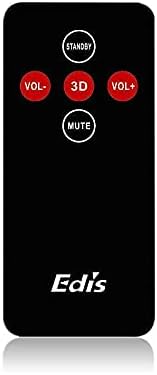
Figure 2: The infrared remote control for the EDIS 40W Speakers. It includes buttons for power, volume adjustment, 3D audio mode, and mute.
4.3 Media Player Panel

Figure 3: The integrated USB and SD Card Media Player panel. This panel allows direct playback from USB drives and SD/MMC memory cards.
5. Fametrahana
Follow these steps to set up your EDIS 40W Speakers:
- Fametrahana: Position the speakers on a flat, stable surface or mount them securely to a wall. Ensure adequate space for ventilation.
- Mampifandray Loharanon-peo: Connect your audio source (e.g., computer, TV, interactive whiteboard) to the speaker system using the appropriate audio cables.
- Fampifandraisana herinaratra: Connect the power cable to the main speaker unit and then plug it into a standard electrical outlet.
- Herim-batana: Press the power button on the main speaker unit or the 'STANDBY' button on the remote control to turn on the speakers.
6. Torolàlana miasa
Your EDIS 40W Speakers can be operated using the integrated controls or the infrared remote control.
6.1 Mampiasa ny Remote Control
- MIATO: Press to turn the speakers on or off (standby mode).
- VOL+: Ampitomboy ny feo.
- VOL-: Ahena ny feo.
- Mute: Ampiheno na atsaharo ny famoahana feo.
- 3D: Activate or deactivate the 3D audio effect.
6.2 Using the Media Player Panel
Insert a USB drive or SD/MMC card into the respective slot on the media player panel.
- MODE: Press to switch between input sources (e.g., AUX, USB, SD Card).
- PREVIOUS (◀◀): Mandehana any amin'ny lalana teo aloha.
- PLAY/PAUSE (►▌▌): Alefaso na atsaharo ny lalana ankehitriny.
- NEXT (►►): Mitsambikina mankany amin'ny lalana manaraka.
- LED: Indicates power status or playback activity.
7. Fikojakojana
Proper maintenance ensures the longevity of your speakers:
- Fanadiovana: Use a soft, dry cloth to clean the speaker surfaces. Do not use liquid cleaners or abrasive materials.
- fitahirizana: Raha mitahiry ny fanamafisam-peo mandritra ny fotoana maharitra dia tapaho amin'ny herinaratra izy ireo ary tehirizo ao amin'ny toerana mangatsiatsiaka sy maina.
- rivotra: Ensure that the speaker's ventilation openings are not obstructed to prevent overheating.
8. Famahana olana
If you encounter issues with your EDIS 40W Speakers, refer to the following common problems and solutions:
| OLANA | Antony mety hitranga | vahaolana |
|---|---|---|
| Tsy misy hery | Power cable not connected; power outlet not working | Jereo ny fifandraisan'ny tariby herinaratra; andramo mampiasa faladia hafa. |
| Tsy misy feo | Volume too low; incorrect input source; audio cable loose/faulty | Increase volume; press MODE to select correct input; check audio cable connections. |
| Tsy mandeha ny fanaraha-maso lavitra | Batteries depleted; obstruction between remote and speaker; remote not pointed correctly | Replace remote batteries; remove obstructions; point remote directly at the speaker's IR receiver. |
| Tsy mandeha ny karatra USB/SD | NIERITRERITRA file format; card/drive not inserted correctly; corrupted media | antoka files are compatible (e.g., MP3); reinsert media; try a different USB drive/SD card. |
9. Famaritana
| endri-javatra | famaritana |
|---|---|
| Marika | EDIS |
| Laharana modely | EA014 |
| Herin'ny Famoahana Speaker Max | 40 Watts |
| loko | grey |
| Lanja entana | 8 kg |
| Fomba fanaraha-maso | mitokana |
| Teknolojia fifandraisana | Wired |
| Loharanon-kery | Corded Electric |
| Audio Output Mode | Nanodidina |
| Karazana fametrahana | Mitsangana amin'ny gorodona |
| KEVITRA | HAZO |
| Karazana mpandahateny | ivelan'ny trano |
| Endri-javatra manokana | AmpLifer |
| Fitaovana mifanentana | Ny fitaovana rehetra |
| Fanamboarana fantsona manodidina ny feo | 2 |
10. Warranty sy fanohanana
Raha mila fanazavana momba ny antoka sy ny fanohanana ny mpanjifa, azafady mba jereo ireo antontan-taratasy nomena tamin'ny fotoana nividianana na mifandraisa amin'ny mpivarotra anao. Tazomy ny porofon'ny fividiananao ho an'ny fangatahana antoka rehetra.


