Sava lalana
Thank you for choosing the Opal Selfie Stick OP-Sel-BT-01. This manual provides essential information for the safe and effective use of your device. Please read it thoroughly before operation and retain it for future reference.
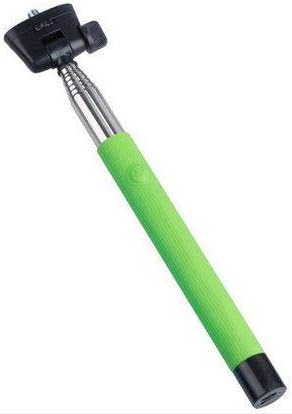
Sary 1: The Opal Selfie Stick OP-Sel-BT-01 in green, showing its extendable arm, phone holder, and comfortable grip.
Endriky ny vokatra
- loko: Maitso
- Fitaovana fototra: vy
- Fahafahana enta-mavesatra: 500 g
- Fifandraisana: Wireless (Bluetooth)
- Rafitra mifanentana: Android 3.0 sy ambony, iOS 4.0 sy ambony
Hametraka
- Unfold the Selfie Stick: Gently pull the phone holder section upwards to extend the stick.
- Adjust Phone Holder: Sokafy ny finday clamp and securely place your smartphone within it. Ensure the phone is centered and stable. The clamp is designed to hold various phone sizes.
- Herim-batana: Locate the power button (if applicable, usually on the handle) and press it to turn on the selfie stick. An indicator light may illuminate.
Torolàlana miasa
Pairing Bluetooth
- Ensure the selfie stick is powered on and in pairing mode (indicator light may flash rapidly).
- Ao amin'ny findainao, mandehana mankany Fikirana > Bluetooth.
- Alefaso ny Bluetooth ary tadiavo ireo fitaovana azo ampiasaina.
- Select "Opal OP-Sel-BT-01" or a similar name from the list of devices.
- Once paired, the indicator light on the selfie stick may turn solid or turn off, indicating a successful connection.
Maka sary / horonan-tsary
- Sokafy ny fampiharana fakantsarin'ny findainao.
- Ampitomboy amin'ny halavanao ny selfie stick.
- Position your phone for the desired shot.
- Tsindrio ny bokotra fanakatonana eo amin'ny tahon'ny selfie stick mba haka sary na hanombohana/hampijanona ny fandraketana horonan-tsary.
fikarakarana
- Fanadiovana: Fafao amin'ny lamba malefaka sy maina ny tehina selfie. Aza mampiasa mpanadio na solvents mikikisana.
- fitahirizana: Store the device in a cool, dry place away from direct sunlight and extreme temperatures. Retract the stick fully before storage.
- Fikarakarana bateria: If the selfie stick has a rechargeable battery, ensure it is charged periodically even when not in use to maintain battery health.
Fanamboarana
| OLANA | Antony mety hitranga | vahaolana |
|---|---|---|
| Tsy afaka mampiaraka amin'ny telefaona | Selfie stick not in pairing mode; Bluetooth off on phone; battery low. | Ensure stick is on and in pairing mode. Turn phone's Bluetooth off/on. Charge the selfie stick. |
| Shutter button not working | Not paired; camera app settings. | Verify successful Bluetooth pairing. Check camera app settings for volume button shutter control. |
| Phone not stable in clamp | Phone not centered; clamp not fully secured. | Re-position phone to be centered. Ensure clamp is firmly gripping the phone. |
fepetra arahana
- Modely: OP-Sel-BT-01
- marika: Opal
- loko: Maitso
- Fitaovana fototra: vy
- Fahafahana enta-mavesatra: 500 g
- Fifandraisana: Wireless (Bluetooth)
- Rafitra fandidiana tohanana: Android 3.0+, iOS 4.0+
- ASIN: B091DBB122
- Daty misy voalohany: 30 Martsa 2021
Warranty sy fanohanana
For information regarding warranty coverage or technical support, please refer to the documentation included with your purchase or visit the official Opal website. Mety hiovaova arakaraka ny faritra sy ny mpivarotra ny fepetran'ny fiantohana manokana.
Information momba ny fiarovana
- Do not expose the device to extreme temperatures, moisture, or direct sunlight for prolonged periods.
- Arovy amin'ny ankizy.
- Aza manandrana manala na manova ny fitaovana. Mety hanafoana ny antoka izany ary hiteraka fahasimbana.
- Ensure your phone is securely fastened in the clamp before extending the stick.


