1. Fampidirana
The Tycon TPSC2440NMPPT is an advanced Maximum Power Point Tracking (MPPT) solar charge controller designed for efficient battery charging from solar panels. It automatically adjusts to 12V or 24V battery systems and supports various battery types including Flooded, AGM, GEL, and Lithium, with a customizable USER setting. This controller features an integral LCD display for monitoring key system parameters.
2. Torolàlana momba ny fiarovana
Please read and understand all instructions before installation and operation. Failure to follow these instructions may result in electric shock, fire, or severe injury.
- Ataovy azo antoka fa ny wiring rehetra dia polarized tsara ary mifandray tsara.
- Do not disassemble or attempt to repair the controller. Refer to qualified service personnel.
- Apetraho ao amin'ny faritra misy rivotra tsara ny controller, lavitry ny fitaovana mora mirehitra sy ny entona manimba.
- Always disconnect the battery and solar panel before installing or moving the controller.
- Manaova fitaovana fiarovana manokana (PPE) sahaza mandritra ny fametrahana.
- The controller is designed for indoor use or protected outdoor environments (IP32 rating). Avoid direct exposure to water.
3. Vokatra mihoatraview
The TPSC2440NMPPT controller is equipped with several features to optimize solar charging and battery management:
- Teknolojia MPPT: Mampitombo ny fijinjana herinaratra avy amin'ny panneaux solaire.
- Auto-Ranging Voltage: Compatible with 12V or 24V battery arrays.
- Multimode Load Operation: Offers 5 selectable modes for load control.
- Soft Start Load Output: Powers high capacitive loads safely.
- Automatic Battery Equalization: Performs 30-day equalization for optimal battery health.
- Conformal Coated Electronics: Provides environmental protection.
- TVS Lightning Protection: Enhances durability against electrical surges.
- Integral LCD Display: Mampiseho Vola Batterietage, Capacity, Charging Capacity, Temperature, Load Current, and Solar Current.
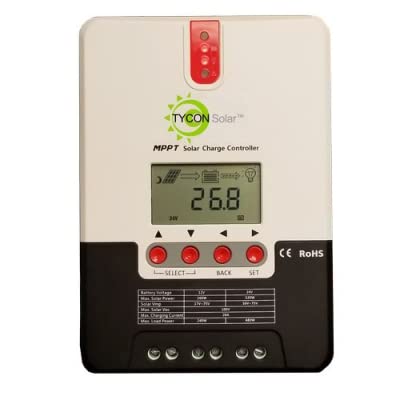
Sary 1: Eo anoloana view of the Tycon TPSC2440NMPPT Solar MPPT Battery Charging Controller, showing the LCD display and connection terminals.
4. Fametrahana sy fametrahana
Araho ireto dingana ireto mba hametrahana araka ny tokony ho izy:
- Mametraka: Choose a suitable location for mounting the controller. Ensure good ventilation and protection from direct sunlight and moisture.
- Fifandraisana bateria: Connect the battery to the controller's battery terminals first. Ensure correct polarity (+ to + and - to -). The controller will automatically detect the battery voltage (12V na 24V).
- Fifandraisana amin'ny tontolon'ny masoandro: Connect the solar panel array to the controller's solar input terminals. Observe correct polarity. Ensure the open-circuit voltage of the solar array does not exceed the controller's maximum input voltage (110V at 25°C).
- Fifandraisana amin'ny enta-mavesatra (tsy voatery): If using the load output, connect your DC loads to the controller's load terminals. Do not exceed the rated load current (20A Max).
- Temperature Sensor: Connect the included battery temperature probe cable to the designated port on the controller. Place the sensor near the battery for accurate temperature compensation.
- Herim-batana: Once all connections are secure, the controller will power on and begin operation.
5. Torolàlana miasa
The integral LCD display provides real-time information about your solar charging system. Use the buttons (if present, assuming standard UP/DOWN/SET) to navigate through the display menus and adjust settings.
5.1 Fampahalalana momba ny fampisehoana LCD
- Battery Voltage: Voltage ny bateria mifandray.
- Fahaizana bateria: Estimated state of charge.
- Fahafahana mamaly: Current power being delivered to the battery.
- Temperature bateria: Temperature measured by the external probe.
- Load Current: Current being drawn by connected DC loads.
- Solar Current: Current being generated by the solar panels.
5.2 Fikirana karazana bateria
The controller supports Flooded, AGM, GEL, and Lithium battery types. A USER setting allows for custom charge parameters. Refer to the on-screen menu for selecting and configuring the battery type.
5.3 Load Operation Modes
The controller offers 5 selectable load operation modes. Consult the device's menu for details on each mode and how to select them, typically involving timed operation or dusk-to-dawn control.
6. Fikojakojana
Ny fikojakojana tsy tapaka dia miantoka ny fahombiazana tsara indrindra sy ny faharetan'ny fitaovana fanaraha-maso ny fiampangana masoandro anao.
- Jereo ny fifandraisana: Hamarino tsindraindray ny fifandraisana amin'ny tariby rehetra sao henjana sy harafesina.
- Fanaraha-maso madio: Keep the controller clean and free of dust. Use a dry cloth for cleaning. Do not use liquids.
- Fahasalamana bateria: Monitor bateria voltage and capacity on the LCD. Ensure batteries are properly maintained according to their manufacturer's guidelines.
- rivotra: Ataovy azo antoka fa tsara ventilated ny faritra fametrahana mba hisorohana ny hafanana be loatra.
7. Famahana olana
| OLANA | Antony mety hitranga | vahaolana |
|---|---|---|
| Tsy misy fampisehoana/Tsy misy herinaratra | Loose battery connection; Battery voltage too low; Blown fuse (external, if applicable). | Check battery connections and polarity. Charge battery if voltage is below operating threshold. Check and replace any external fuses. |
| Tsy misy famandrihana masoandro | Solar panel not connected; Incorrect polarity; Insufficient sunlight; Damaged solar panel/wiring. | Verify solar panel connections and polarity. Ensure panels are receiving adequate sunlight. Inspect panels and wiring for damage. |
| Tsy mandeha ny entana | Load disconnected; Overload; Short circuit; Battery voltage ambany loatra. | Check load connections. Reduce load if exceeding 20A. Check for short circuits. Ensure battery is sufficiently charged. |
| Vakiteny tsy marina | Loose connections; Faulty sensor. | Check all wiring connections. Ensure temperature sensor is properly connected and placed. |
8. Famaritana
- Modely: TPSC2440NMPPT
- Auto Voltage: 12V/24V (System)
- Ampeto: 40A
- Enta-mavesatra amin'izao fotoana izao: 20A Max
- Enta-mavesatra ambony indrindra: 10,000uF
- Fampidirana Solar Max Voltage: 110V (25°C), 90V (25°C)
- Max Power Point Range: 2VDC to 75VDC (Battery Volts)
- Fahavitan'ny fiovam-po: 96% Typ.
- MPPT Tracking Efficiency: 99%
- Fanjifana tena: 1W
- Fanonitra ny maripana: -3.0mV/°C/Sela
- Haben'ny Wire Max: 8 AWG
- BOKYtage and Current Accuracy: +/-2%
- Fandehanana: Tany ratsy
- Fiarovana ny tontolo iainana: IP32
- Haben'ny vokatra: 12 x 9 x 6 santimetatra
- Lanja entana: 5.16 kg
- Karazana fampisehoana: LCD


