1. Vokatra mihoatraview
The Sharp Digital Clock is designed for simplicity and convenience, featuring a clear green LED display and dual USB FastCharge ports for charging your devices. It includes an alarm function and a battery backup system to retain settings during power outages.

Sary 1: Eo anoloana view of the Sharp Digital Clock, highlighting the large green LED display and dual USB charging ports.
2. Torolàlana fananganana
2.1 Fampifandraisana herinaratra
Connect the provided power adapter to the DC IN jack located at the back of the clock. Plug the other end into a standard electrical outlet. The display will illuminate, and the clock will be ready for time setting.
2.2 Famerenana bateria (tsy voatery)
For battery backup functionality, which retains time and alarm settings during a power outage, install two (2) AAA batteries (not included) into the battery compartment located on the bottom of the unit. During battery backup, the display will go blank to conserve power, but settings will be preserved.
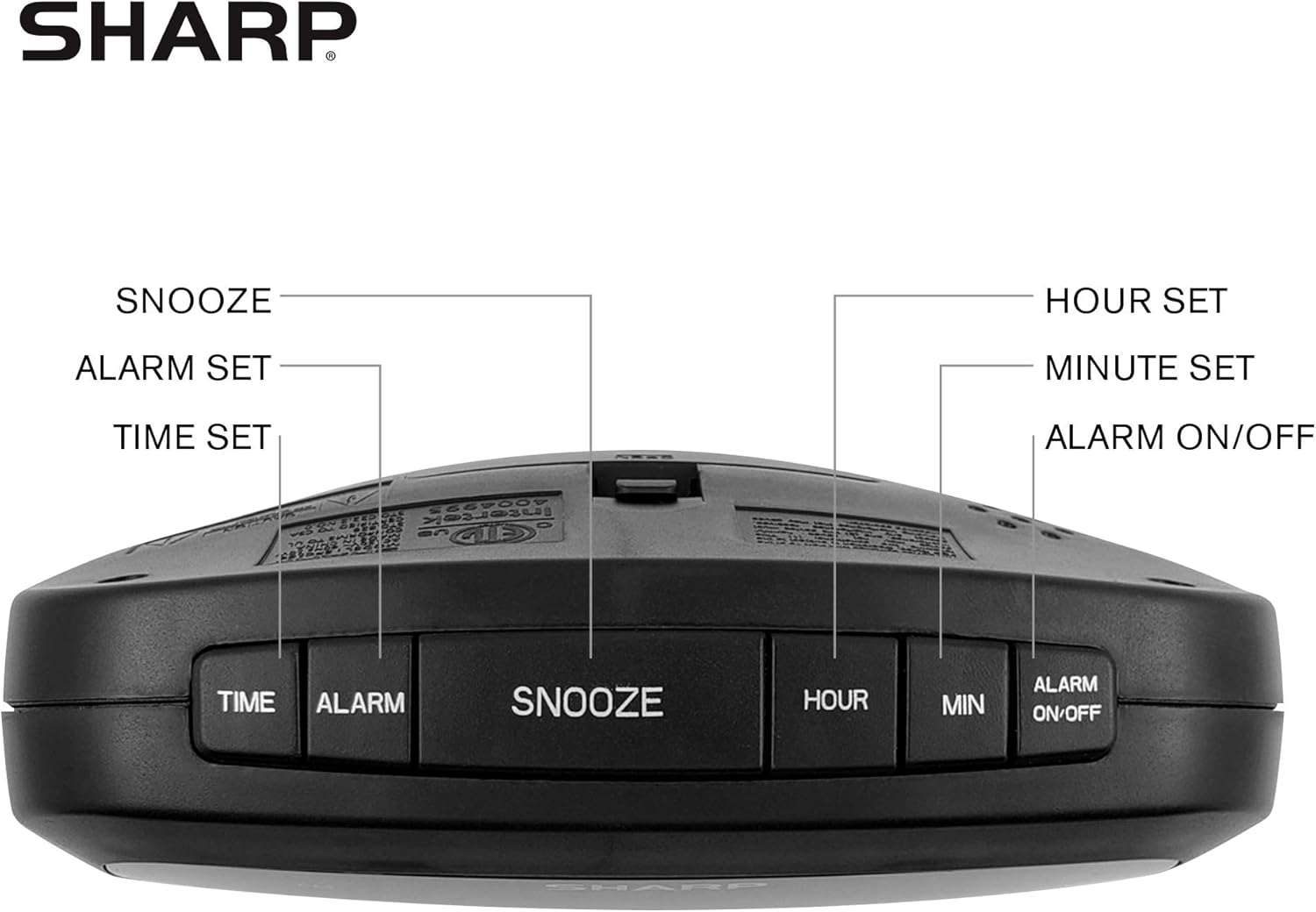
Figure 2: Underside of the clock with the battery compartment visible, requiring 2 AAA batteries for backup.
3. Torolàlana miasa
The clock features intuitive top-mounted buttons for easy operation.

Figure 3: Top panel of the clock with clearly labeled buttons for time, alarm, snooze/dimmer, hour, minute, and alarm on/off.
3.1 Mametra ny fotoana
- Tsindrio ary hazòny ny Time bokotra mandra-pahatongan'ny isa ora manomboka mamiratra.
- Tsindrio ny HOUR button to adjust the hour. Pay attention to the PM indicator if setting a PM time.
- Tsindrio ny MIN bokotra hanitsiana ny minitra.
- Tsindrio ny Time bokotra indray hanamafy sy hitsitsy ny fotoana.
3.2 Fametrahana ny fanairana
- Tsindrio ary hazòny ny fanairana tsindrio ny bokotra mandra-panombohan'ny firedaredan'ny isa famantarana ny ora fanairana.
- Tsindrio ny HOUR bokotra hanitsiana ny ora fanairana.
- Tsindrio ny MIN bokotra hanitsy ny minitra fanairana.
- Tsindrio ny fanairana bokotra indray hanamafisana sy hitahiry ny fotoana fanairana.
- Mba hampavitrika na hanafoana ny fanairana, tsindrio ny ALARM ON / OFF button. An alarm indicator light will appear on the display when the alarm is active.
3.3 Snooze and Dimmer Function
- Rehefa maneno ny fanairana dia tsindrio ny lehibe SNOOZE / DIMMER button to temporarily silence the alarm for a few minutes.
- To adjust the brightness of the green LED display, repeatedly press the SNOOZE / DIMMER button when the alarm is not sounding. Cycle through bright, medium, and low brightness settings.
3.4 Using the USB Charging Ports
The clock is equipped with two 2 AMP USB charging ports on the front, allowing you to conveniently charge your smartphone or other USB-powered devices directly from the clock.

Figure 4: The clock demonstrating its dual USB charging capability with two smartphones connected.
- Simply connect your device's USB charging cable to one of the USB ports on the front of the clock.
- Ensure your device is compatible with 2 AMP charging for optimal speed.
4. Fikojakojana
To ensure the longevity and proper functioning of your Sharp Digital Clock, follow these simple maintenance guidelines:
- Fanadiovana: Wipe the clock with a soft, dry cloth. Do not use abrasive cleaners, waxes, or solvents as they may damage the finish.
- Fametrahana: Apetraho eo amin'ny toerana marin-toerana sy fisaka ny famantaranandro, lavitry ny tara-masoandro mivantana, ny loharano mafana ary ny hamandoana be loatra.
- Fanoloana bateria: If using the battery backup, replace the AAA batteries annually or when the clock consistently loses time during power interruptions.
5. Famahana olana
| OLANA | Antony mety hitranga | vahaolana |
|---|---|---|
| Banga ny fampisehoana famantaranandro. | Tsy misy hery na hery outage. | Ensure the power adapter is securely plugged into the clock and a working electrical outlet. If there was a power outage, check if backup batteries are installed and functional. |
| Tsy maneno ny fanairana. | Tsy napetraka na tsy mandeha ny fanairana. | Verify that the alarm time is correctly set and that the alarm indicator light is visible on the display (press ALARM ON/OFF). |
| Ny seranan-tsambo USB dia tsy mameno fitaovana. | Device incompatibility or faulty cable. | Ensure your device is compatible with USB charging. Try a different USB cable. Confirm the clock is powered on. |
| Mamirapiratra/manja loatra ny fampisehoana. | Mila fanitsiana ny famirapiratana. | Press the SNOOZE/DIMMER button repeatedly to cycle through brightness levels (bright, medium, low). |
6. Product Specifications
- marika: Sharp
- Modely: B08H3STVWG
- Karazana fampisehoana: Digital Green LED
- Loharano herinaratra: Corded Electric
- Backup bateria: 2 x AAA bateria (tsy tafiditra)
- Port USB: 2x2 AMP USB FastCharge Ports
- Haben'ny vokatra: 5.95" W x 2.3" H
- Lanja entana: 9.59 oz
- loko: Green Led
- Fitaovana: plastika
- UPC: 049353005089
7. Warranty sy fanohanana
This Sharp Digital Clock comes with a limited warranty. For detailed warranty information, product support, or to purchase accessories, please visit the official Sharp webtranokala na mifandray amin'ny serivisy mpanjifany. Azonao atao ihany koa ny mitsidika ny Sharp Store amin'ny Amazon.
Azafady, tehirizo ny tapakila fividiananao ho an'ny fitakiana fiantohana.


