1. Torolàlana manan-danja momba ny fiarovana
Please read all instructions carefully before using the Taurus Rapidissimo Clean Pro steam cleaner. Failure to follow these instructions may result in electric shock, fire, or serious injury.
- Always ensure the appliance is unplugged from the power outlet before filling with water, cleaning, or performing maintenance.
- Aza atsoboka ao anaty rano na ranon-javatra hafa ny fitaovana, ny tadin-jiro.
- Keep the steam cleaner out of reach of children and pets.
- Exercise extreme caution when using steam. Steam is hot and can cause burns. Keep hands, face, and other body parts away from the steam nozzle.
- Aza sokafana ny sarom-drano raha mbola mafana na misy tsindry ny fitaovana. Avela hangatsiaka tanteraka izy vao fenoina.
- Use only tap water. Do not add cleaning solutions, perfumes, or other chemicals to the water tank, as this can damage the appliance and void the warranty.
- Do not direct steam at electrical appliances, power outlets, or other electrical components.
- Raha simba ny tadin-jiro, dia tsy maintsy soloin'ny mpanamboatra, mpiasan'ny serivisy, na olona mahafeno fepetra mitovy amin'izany mba hisorohana ny loza.
2. Vokatra mihoatraview ary Components
The Taurus Rapidissimo Clean Pro is a powerful handheld steam cleaner designed for effective, chemical-free cleaning. It operates at 1050W and generates 3 bar pressure for thorough sanitization.

Image: The Taurus Rapidissimo Clean Pro steam cleaner shown with its full set of accessories, including various nozzles, brushes, and cloths.
Ahitana Accessories:
- Hose azo itarina
- Glass Accessory (Window Squeegee)
- Conical Nozzle
- Angled Nozzle
- Boribory boribory
- Mop Pad / Cloth
- Kaopy fandrefesana
- lantonoara
- Upholstery Cloth
- Steam Head Attachment
- Scrapper
- Crevice Nozzle
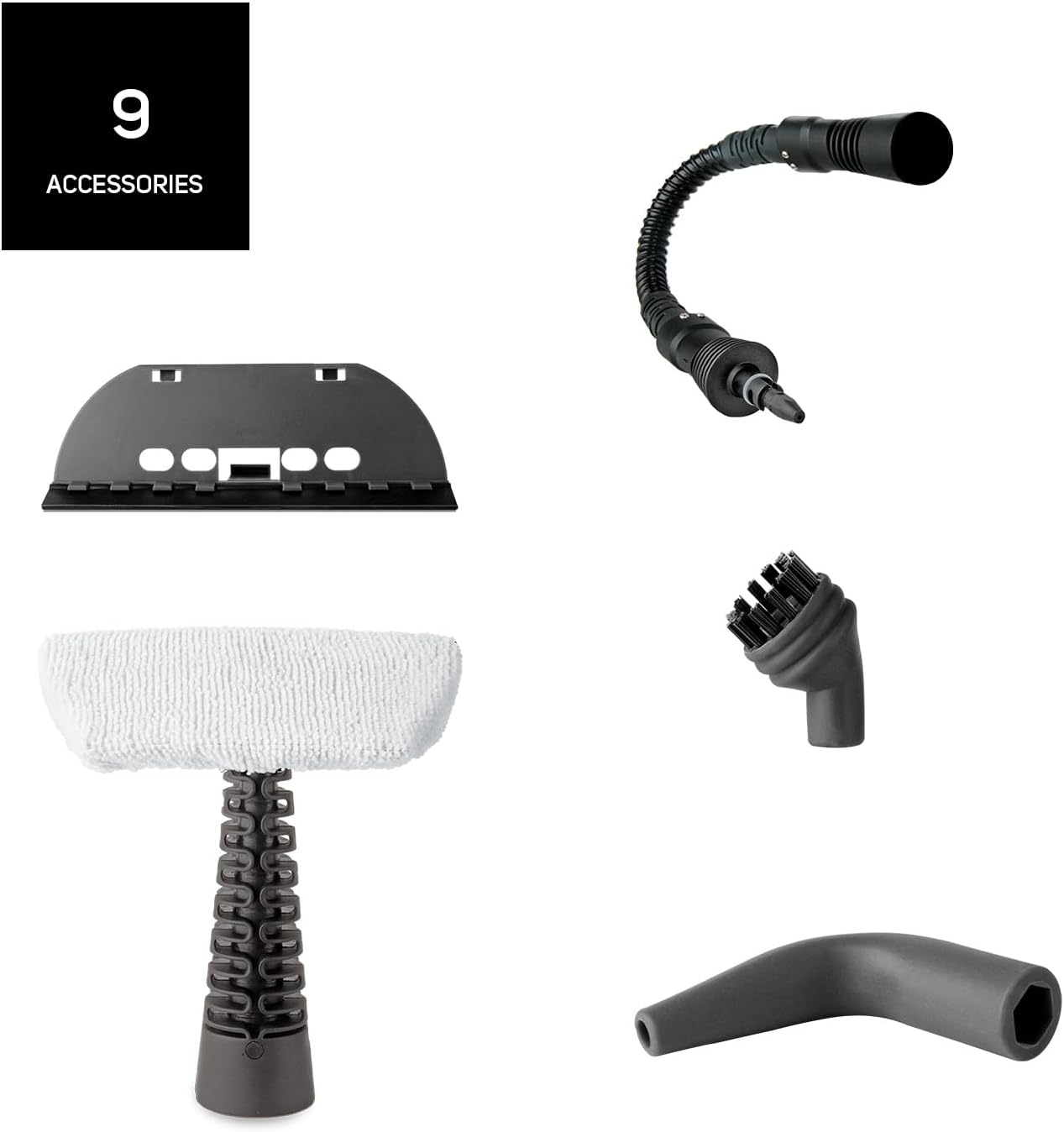
Sary: A antsipirihany view of the nine distinct accessories provided with the steam cleaner, designed for various cleaning tasks.
3. Fametrahana
- Esory ny fitaovana: Carefully remove the steam cleaner and all accessories from the packaging.
- Fenoy ny fitoeran-drano (Fill the Water Tank): Unscrew the safety cap of the water tank. Using the provided measuring cup and funnel, fill the tank with up to 350 ml of clean tap water. Do not overfill. Screw the safety cap back on tightly.
- Attach Desired Accessory: Select the appropriate nozzle or brush for your cleaning task and securely attach it to the steam cleaner. For extended reach, connect the extendable hose first, then the desired accessory.
- Mifandray amin'ny hery: Plug the power cord into a suitable grounded electrical outlet. The indicator light will illuminate, signaling that the unit is heating up.
- Fotoana fanafanana: The steam cleaner will be ready for use in approximately 3 minutes. The indicator light will change or turn off when the optimal pressure is reached.
4. Torolàlana miasa
Once the steam cleaner is heated and ready, you can begin cleaning. The unit provides 3 bar pressure and a steam flow of 30 g/min for effective cleaning.
- Initiate Steam: Press and hold the steam trigger to release steam. For continuous steam, some models may have a lock button on the trigger.
- Fanadiovana ambonin'ny: Direct the steam nozzle towards the surface you wish to clean. Move the nozzle slowly over the area to allow the steam to penetrate and loosen dirt.
- Mampiasa Accessories:
- Borosy boribory: Ideal for scrubbing stubborn dirt on tiles, grout, and oven racks.
- Conical/Angled Nozzle: Perfect for reaching tight corners, crevices, and detailed cleaning.
- Glass Accessory: Use for streak-free cleaning of windows, mirrors, and other glass surfaces.
- Mop Pad/Upholstery Cloth: Attach to the steam head for cleaning larger flat surfaces like floors, countertops, upholstery, and car seats.
- Famafana madio: After steaming, wipe the treated surface with a clean, dry cloth to remove loosened dirt and moisture.
- Famenoana: If the steam output decreases significantly or stops, the water tank may be empty. Unplug the appliance and allow it to cool down for several minutes before carefully unscrewing the safety cap and refilling.

Image: A collage demonstrating the versatility of the steam cleaner, showing it cleaning oven racks, upholstery, and wall tiles.

Image: The steam cleaner being used on a sofa, illustrating its effectiveness against bacteria and viruses through steam.
5. Fikojakojana
Ny fikojakojana tsy tapaka dia miantoka ny faharetan'ny fampiasanao ny mpanadio etona sy ny fahombiazany tsara indrindra.
- Fanadiovana ny ivelany: After each use, ensure the appliance is unplugged and cooled. Wipe the exterior with a soft, damp lamba. Aza mampiasa mpanadio abrasive na solvents.
- Emptying the Water Tank: After each use, unplug the appliance and allow it to cool completely. Carefully unscrew the safety cap and empty any remaining water from the tank. This helps prevent mineral buildup.
- Fanadiovana Accessories: Wash removable accessories (brushes, cloths) with warm, soapy water and rinse thoroughly. Allow them to air dry completely before storing.
- Fanalana kesika: Depending on your water hardness, mineral deposits may build up inside the tank over time. If you notice reduced steam output, descaling may be necessary. Consult the manufacturer's full manual for specific descaling instructions, typically involving a diluted vinegar solution.
- fitahirizana: Tehirizo ao amin'ny toerana mangatsiaka sy maina, lavitry ny tara-masoandro mivantana ary tsy azon'ny ankizy atao ny mpanadio etona sy ny kojakojany.
6. Famahana olana
If you encounter issues with your steam cleaner, refer to the following common problems and solutions:
| OLANA | Antony mety hitranga | vahaolana |
|---|---|---|
| Tsy misy etona na etona kely dia kely | Foana ny fitoeran-drano Tsy ampy hafanana ny fitaovana Fiangonan'ny mineraly (habeny) | Refill water tank (after cooling) Wait for 3 minutes until indicator light signals readiness Perform descaling procedure (refer to full manual) |
| Ny rano mitete avy amin'ny nozzle | Accessory not securely attached Overfilling the water tank Tsy mafana tanteraka ny fitaovana | Ensure accessory is firmly clicked into place Do not exceed the MAX fill line Wait for the appliance to reach full operating temperature |
| Tsy mandeha ny jiro famantarana | Ny fitaovana dia tsy tafiditra Olana fivoahana herinaratra Ny tsy fahombiazan'ny fitaovana | Jereo ny fampifandraisana herinaratra Andramo ny fivoahan'ny herinaratra amin'ny fitaovana hafa Mifandraisa amin'ny fanohanana mpanjifa |
Raha mbola mitohy ny olana rehefa avy nanandrana ireo vahaolana ireo dia mifandraisa amin'ny fanohanana mpanjifa Taurus.
7. Famaritana
- Anaran'ny modely: Rapidissimo Clean Pro
- marika: TAURUS
- Wattage: 1050 W
- Fanerena etona: 3 bar
- Steam Flow: 30 g/min
- Haben'ny Tanky rano: 350 ml
- Fotoana fanafanana: Tokony ho 3 minitra
- Lanja entana: 1.6 kg
- Antony endrika: Handheld
- Halavan'ny tariby: 3 meters (extra long)
- loko: Manga
- Endri-javatra manokana: Quick heating, improved performance, high steam flow

Image: A close-up of the steam cleaner's nozzle releasing powerful steam, highlighting its 3.5 bar pressure capability.
8. Warranty sy fanohanana
For detailed warranty information, please refer to the warranty card included with your product or visit the official Taurus website. Tehirizo ny porofon'ny fividiananao raha misy fitakiana fiantohana.
If you require technical assistance, spare parts, or have any questions not covered in this manual, please contact Taurus customer support through their official channels. Contact information can typically be found on the product packaging or the manufacturer's website.


