1. Fampidirana
This manual provides detailed instructions for the safe and efficient use of your Maxcom MM471 Senior Portable Phone. Designed with ease of use in mind, this device features large characters, big buttons, and an ergonomic design, making it ideal for seniors. Please read this manual thoroughly before operating your phone.

Sary 1: Eo anoloana view of the Maxcom MM471 Senior Portable Phone.
2. Fametrahana
2.1 Ny votoatin'ny fonosana
Ataovy azo antoka fa misy ny entana rehetra ao anaty fonosana:
- Maxcom MM471 Senior Portable Phone
- Batterie
- Charging Adapter
- User Manual
2.2 Fampidirana ny karatra SIM sy ny bateria
The Maxcom MM471 supports dual SIM cards. Follow these steps to install your SIM card(s) and battery:
- Turn off the phone and disconnect it from any power source.
- Esory tsara ny fonony ao aorian'ny finday.
- Ampidiro ao amin'ny toerana voatondro ny karatra SIM-nao, ary mitodika midina ireo tariby volamena.
- Ampidiro ny bateria, ary ataovy izay hahazoana antoka fa mifanaraka tsara ireo fifandraisana.
- Avereno apetraka amin'ny toerany ny fonony aoriana mandra-pikitikitika tsara azy.

Sary 2: Miverina view with battery and SIM card area.
2.3 Famandrihana ny bateria
Before first use, fully charge the phone's battery:
- Connect the charging adapter to the phone's charging port or place the phone in its charging dock.
- Ampidiro amin'ny fivoahana herinaratra ny adaptatera.
- Ny famantarana ny bateria eo amin'ny efijery dia hampiseho ny sata famandrihana.
- Rehefa feno tanteraka dia tapaho ny charger.
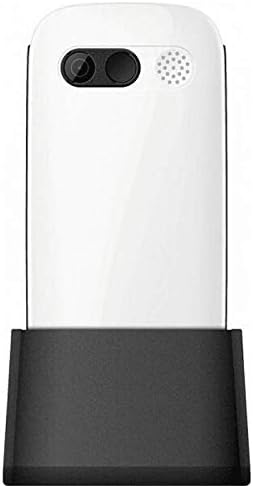
Figure 3: Phone in charging dock.
3. Torolàlana miasa
3.1 Mamelona/Mamono
- Hamelona: Tsindrio ary hazòny ny Hery/Atsaharo ny antso bokotra mandra-pahazava ny efijery.
- Mamono: Tsindrio ary hazòny ny Hery/Atsaharo ny antso button until the power-off options appear, then select 'Power Off'.
3.2 Fiantsoana
- Avy amin'ny efijery fandraisana, ampidiro ny laharan-telefaona amin'ny fampiasana ny fitendry.
- Tsindrio ny ANTSO button (green button) to initiate the call.
- Mba hamarana ny antso dia tsindrio ny Hery/Atsaharo ny antso button (red button).
3.3 Fandraisana antso
- When a call comes in, the phone will ring and display the caller's number or name.
- Tsindrio ny ANTSO button (green button) to answer.
- Raha handà ny antso dia tsindrio ny Hery/Atsaharo ny antso button (red button).
3.4 Sending and Receiving Messages
- Navigate to the 'Messages' menu from the main screen.
- Select 'New Message' to compose a text message.
- Enter the recipient's number and your message.
- Tsindrio ny 'Alefaso'.
- Received messages will appear in your 'Inbox'.
3.5 Managing Contacts
The phonebook can store up to 300 names.
- Go to the 'Contacts' or 'Phonebook' menu.
- Select 'Add New Contact' to save a new number.
- Enter the name and phone number, then save.
- To call a contact, select their name from the list and press the ANTSO bokotra.
3.6 Mampiasa Bluetooth
To connect to Bluetooth devices:
- Mandehana any amin'ny 'Fikirana' > 'Bluetooth'.
- Alefaso "Ampandehano" ny Bluetooth.
- Safidio 'Hitady ny devices' to find available Bluetooth accessories.
- Select the desired device and pair them.
3.7 Fampiasana ny jiro
Misy jiro tafiditra ao anatin'ny finday mba hanamorana ny fampiasana azy.
- To turn on the flashlight, locate the dedicated flashlight button (if available) or access it through the 'Tools' menu.
- Press the button or select the option again to turn it off.
4. Fikojakojana sy fikarakarana
To ensure the longevity and optimal performance of your Maxcom MM471 phone, follow these maintenance guidelines:
- Fanadiovana: Mampiasà lamba malefaka sy maina hanadiovana ny velaran'ny finday. Fadio ny mampiasa ranoka fanadiovana na fitaovana marokoroko.
- Temperature: Aza atao amin'ny mari-pana tafahoatra (mafana na mangatsiaka) na tara-masoandro mivantana mandritra ny fotoana maharitra ny finday.
- Hamandoana: Keep the phone dry. Do not immerse it in water or expose it to high humidity.
- fitahirizana: When not in use for a long time, store the phone in a cool, dry place with the battery partially charged.
- Fiantraikany: Aza ariana ny telefaonina na iharan'ny fiantraikany mahery vaika.
5. Famahana olana
If you encounter issues with your phone, refer to the table below for common problems and solutions:
| OLANA | Antony mety hitranga | vahaolana |
|---|---|---|
| Tsy mandeha ny finday | Lany ny bateria na tsy napetraka tsara. | Fenoy ny bateria. Hamarino tsara fa tafiditra tsara ny bateria. |
| Tsy afaka manao na mandray antso | No network signal, SIM card not inserted, or SIM card faulty. | Check network coverage. Reinsert SIM card(s). Contact your service provider. |
| Ratsy kalitao antso | Weak network signal, interference. | Mifindra any amin'ny faritra misy jiro tsara kokoa. Fadio ny sakana. |
| Lany haingana ny bateria | Excessive usage, background applications, old battery. | Ahena ny famirapiratry ny efijery. Akatona ireo rindranasa tsy ampiasaina. Eritrereto ny hanolo ny bateria raha efa antitra ilay izy. |
| Keypad tsy mamaly | Software glitch, physical damage. | Restart the phone. If the problem persists, contact support. |
6. Famaritana ara-teknika
Key technical details of the Maxcom MM471 Senior Portable Phone:
- Modely: MM471
- marika: Maxcom
- loko: White
- Fifandraisana: Bluetooth
- Fanohanana SIM: Dual SIM
- Capacity boky finday: 300 names
- Fotoam-pitenenana: Hatramin'ny 14 ora
- Interface: Buttons ara-batana
- Endri-javatra manokana: Large characters, Big buttons, Ergonomic design, Speaker, Flashlight
7. Fampahalalana momba ny fiantohana sy fanohanana
For detailed warranty information, please refer to the warranty card included with your product or visit the official Maxcom website. For technical support or service inquiries, please contact your retailer or the manufacturer's customer service department.


