Sava lalana
Misaotra anao nividyasing the Altec Lansing AL-5003 Multimedia DJ Trolly Speaker. This speaker is designed to deliver powerful audio for various applications, including parties and surround sound systems. Featuring wireless connectivity, a built-in trolley for portability, and multiple input options, the AL-5003 offers a versatile audio experience. Please read this manual carefully to ensure proper setup, operation, and maintenance of your speaker.
Torolàlana manan-danja momba ny fiarovana
- Read these instructions thoroughly before operating the speaker.
- Tehirizo ity boky ity ho fanondroana ho avy.
- Do not expose the speaker to rain or moisture.
- Aza sakanana izay fisokafan'ny rivotra.
- Aza apetraka eo akaikin'ny loharanon'ny hafanana toy ny radiatera, rejistra hafanana, fatana, na fitaovana hafa (anisan'izany amplifiers) izay mamokatra hafanana.
- Arovy ny tadin-jiro mba tsy ho voahitsakitsaka na voatsindrona, indrindra eo amin'ny plugs, ny fitoeran'entana mora, ary ny toerana hivoahana amin'ny fitaovana.
- Mampiasà fametahana/fanampiana voafaritry ny mpanamboatra ihany.
- Esory ity fitaovana ity mandritra ny oram-baratra na rehefa tsy ampiasaina mandritra ny fotoana maharitra.
- Alefaso amin'ny mpiasan'ny serivisy mahafeno fepetra ny serivisy rehetra.
Fonosana fonosana
Azafady, jereo ny fonosana ho an'ireto zavatra manaraka ireto:
- Altec Lansing AL-5003 Multimedia DJ Trolly Speaker
- Tady herinaratra
- Fanaraha-maso lavitra
- User Manual
- Auxiliary Cable (may vary by region)
Vita ny vokatraview
The AL-5003 speaker features a robust design with integrated wheels and a handle for easy transport. It includes a powerful 10-inch speaker and a 1-inch tweeter, providing clear and dynamic sound. The control panel is located on the top of the unit, offering easy access to various functions.
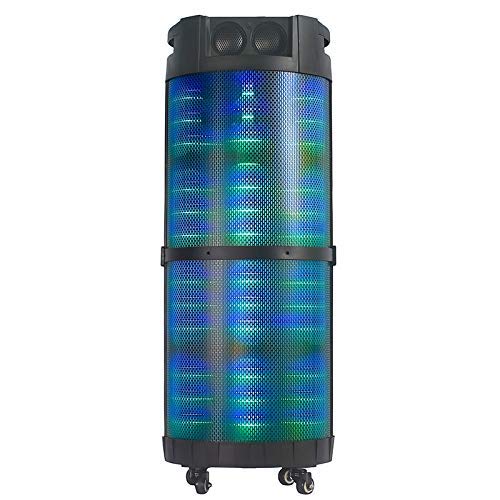
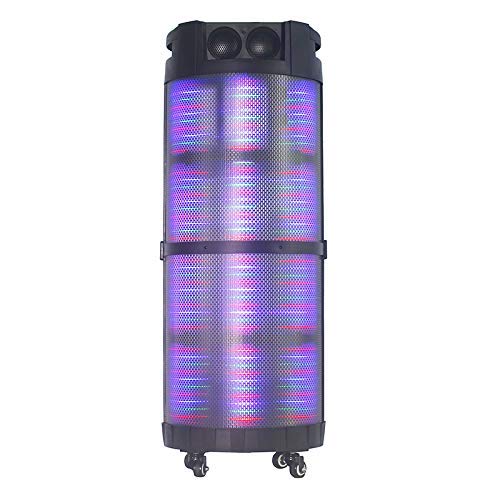
Sary 1: anoloana view of the Altec Lansing AL-5003 speaker, showcasing its cylindrical design and illuminated grille. The speaker features a sturdy build with integrated wheels at the base for portability.
Control Panel sy Connections
The top panel of the speaker houses the main controls and input/output ports.
Sary 2: Avy any ambony view of the AL-5003 speaker, highlighting the control panel with various buttons and knobs, along with the top-mounted speakers. This view also shows the integrated handle for easy transport.
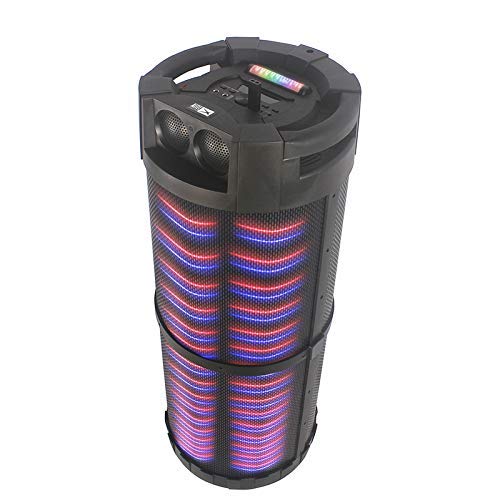
Sary 3: zorony view of the AL-5003 speaker, providing a perspective of its overall structure, including the side grille and the top control area. The dynamic lighting effects are visible through the mesh.
Common controls include Power, Volume, Mode selection, Play/Pause, Track Skip, and inputs for USB, Auxiliary, and potentially Microphone (if available on the model).
Torolàlana fametrahana
- Famoahana: Carefully remove the speaker and all accessories from the packaging. Retain the packaging for future transport or storage.
- Fametrahana: Place the speaker on a stable, flat surface. Ensure there is adequate ventilation around the unit. For optimal sound, position the speaker in a central location within the listening area.
- Fampifandraisana herinaratra: Connect the provided power cord to the AC input on the speaker and then plug it into a standard wall outlet (AC 100-240V, 50/60Hz).
- Initial Charge (if applicable): If the speaker has an internal battery (Lead Acid battery mentioned in specs), it is recommended to fully charge it before first use. The charging indicator light will typically show charging status.
- Herim-batana: Press the Power button on the control panel or remote control to turn on the speaker.
Torolàlana miasa
1. Mode Bluetooth
- Ampidiro ny Bluetooth: Turn on the speaker. Press the "Mode" button on the control panel or remote until "Bluetooth" or "BT" is displayed (or indicated by a blue LED). The speaker will enter pairing mode, indicated by a flashing light or audible prompt.
- Mampifandray amin'ny fitaovana: On your mobile device (smartphone, tablet, laptop), go to Bluetooth settings and enable Bluetooth. Hitady ny available devices. You should see "AL-5003" or "Altec Lansing" in the list. Select it to pair.
- Fanamafisana ny fifandraisana: Once successfully paired, the speaker will emit a confirmation sound, and the Bluetooth indicator light will become solid.
- Playback: Start playing audio on your connected device. Use the speaker's volume controls or your device's volume controls to adjust the sound level. Use the Play/Pause, Next, and Previous buttons on the speaker or remote to control playback.
2. Auxiliary (AUX) Mode
- Connect AUX Cable: Insert one end of a 3.5mm auxiliary cable into the AUX input port on the speaker. Connect the other end to the headphone jack or audio output of your external audio device (e.g., MP3 player, laptop).
- Safidio ny fomba AUX: Press the "Mode" button on the speaker or remote until "AUX" is displayed or indicated.
- Playback: Play audio from your connected device. Adjust volume using both the speaker's controls and your device's volume.
3. USB Playback Mode
- Ampidiro ny kapila USB: Ampidiro USB flash drive misy feo MP3 files ao amin'ny seranana USB eo amin'ny fanamafisam-peo.
- Fidio ny fomba USB: The speaker may automatically switch to USB mode. If not, press the "Mode" button until "USB" is displayed or indicated.
- Playback: Hanomboka handefa feo ho azy ny fanamafisam-peo files from the USB drive. Use the Play/Pause, Next, and Previous buttons to control playback.
4. Karaoke Function (if applicable)
If your AL-5003 model includes a microphone input, you can use it for karaoke:
- Ampifandraiso amin'ny mikrôfôna: Plug a wired microphone into the designated microphone input jack.
- Ahitsio Volume: Use the dedicated Microphone Volume knob (if present) to adjust the microphone's volume.
- Fanaraha-maso Akon (Echo Control): Some models may have an Echo knob to add an echo effect to the microphone audio.
5. Fiasa fanaraha-maso lavitra
The included remote control provides convenient access to all major functions:
- Hery: Turn the speaker On/Off.
- Fomba: Switch between Bluetooth, AUX, USB, and other available modes.
- Volume +/-: Amboary ny volume master.
- Play/Pause: Atombohy na atsaharo ny playback.
- Teo aloha/Manaraka: Mitsambikina mankany amin'ny lalana teo aloha na manaraka.
- EQ: Misafidiana presets equalizer samihafa (raha misy).
- Mangina: Mute or unmute the audio.
fikarakarana
- Fanadiovana: Mampiasà lamba malefaka sy maina hanadiovana ny ivelany amin'ny fanamafisam-peo. Aza mampiasa ranoka fanadiovana na fitaovana mikikitra.
- fitahirizana: Rehefa tsy ampiasaina mandritra ny fotoana maharitra, dia tehirizo ao amin'ny toerana mangatsiatsiaka sy maina ny mpandahateny, lavitry ny tara-masoandro mivantana sy ny hafanana tafahoatra.
- Fikarakarana bateria: If the speaker has a built-in rechargeable battery, avoid fully discharging it frequently. For long-term storage, charge the battery to approximately 50-70% every few months to prolong its lifespan.
- rivotra: Ataovy azo antoka fa tsy voasakana ny fisokafan'ny rivotra mba hisorohana ny hafanana be loatra.
Fanamboarana
| OLANA | Antony mety hitranga | vahaolana |
|---|---|---|
| Tsy misy hery | Power cord not connected; Power outlet not working; Speaker is off; Battery drained. | Ensure power cord is securely connected. Try a different outlet. Press the Power button. Charge the battery. |
| Tsy misy feo | Volume too low; Incorrect mode selected; Device not connected properly; Mute function active. | Increase volume on speaker and source device. Select the correct input mode (Bluetooth, AUX, USB). Reconnect device. Check if mute is active on remote. |
| Tsy fahombiazana ny fampiarahana Bluetooth | Speaker not in pairing mode; Device Bluetooth off; Speaker too far from device; Interference. | Ensure speaker is in Bluetooth pairing mode. Turn on Bluetooth on your device. Move device closer to speaker. Turn off other Bluetooth devices nearby. |
| Tsy mandeha ny playback USB | Tsy tafiditra tsara ny kapila USB; Tsy mifanaraka file endrika; simba ny kapila USB. | Avereno ampidirina ny kapila USB. Ataovy azo antoka fa files are in MP3 format. Try a different USB drive. |
| Tsy mandeha ny fanaraha-maso lavitra | Batteries drained; Obstruction between remote and speaker; Remote not pointed at sensor. | Replace remote control batteries. Remove any obstructions. Point remote directly at the speaker's IR sensor. |
fepetra arahana
| endri-javatra | antsipirihany |
|---|---|
| Anarana modely | Altec Lansing AL-5003 Multimedia DJ Trolly Speaker |
| Karazana mpandahateny | Sound manodidina |
| Endri-javatra manokana | Wireless |
| Fampiasana soso-kevitra | For Surround Sound Systems, Party |
| Fitaovana mifanentana | Gaming Console, Karaoke Machine, Laptop, MP3 Player, Smartphone, Tablet |
| Fanamboarana fantsona manodidina ny feo | 1.0 |
| Fomba fanaraha-maso | mitokana |
| Wireless Communication Technology | Bluetooth |
| Haben'ny mpandahateny | 10 santimetatra |
| Loharanon-kery | Corded Electric |
| Savaivony Tweeter | 1 santimetatra |
| Mifanaraka amin'ny fidirana feo | Auxiliary, USB |
| Fifandraisana amin'ny mpandahateny | Wired (for power), Wireless (Bluetooth) |
| Audio Wattage | 100 Watts |
| Famoronana sela bateria | Asidra firaka |
| Karazana fametrahana | Mitsangana amin'ny gorodona |
Warranty sy fanohanana
Altec Lansing products are manufactured to the highest quality standards. For information regarding warranty coverage, technical support, or service inquiries, please refer to the warranty card included with your product or visit the official Altec Lansing website. Please have your model number (AL-5003) and purchase details ready when contacting support.
Webtranokala: www.alteclansing.com (This is a generic link, actual link might vary by region)


