Sava lalana
This manual provides detailed instructions for the assembly, operation, and maintenance of your RFIVER TF3001 TV Floor Stand. Please read these instructions carefully before installation to ensure safe and correct usage. This stand is designed for televisions ranging from 32 to 65 inches, with a maximum VESA pattern of 400x400mm and a weight capacity of up to 35 kg (77 lbs).
Information momba ny fiarovana
- Aza mihoatra ny lanja ambony indrindra 35 kg (77 lbs).
- Hamarino tsara fa mifanaraka amin'ny lamina VESA an'ny fahitalavitrao (100x100mm hatramin'ny 400x400mm).
- Apetraho eo amin'ny toerana malefaka sy madio foana ny fitoeran-javatra mba hisorohana ny fikikisana.
- Verify all screws and bolts are securely tightened before placing the TV on the stand.
- Arovy ny ankizy sy ny biby fiompy mandritra ny fivoriambe.
- Do not attempt to modify the stand in any way.
Fonosana fonosana
Please check that all components are present and undamaged before beginning assembly. If any parts are missing or damaged, contact customer support.
- Tsato-panohanana lehibe
- Tobin'ny Glass Tempered
- TV Mounting Bracket
- VESA Adapter Plates (if applicable)
- Hardware Kit (screws, washers, spacers, nuts)
- Cable Management Clips
- Fitaovana fanamboarana (ohatra, lakile Allen)
- Boky torolalana
Torolàlana fametrahana
Follow these steps carefully for proper assembly.
Step 1: Assemble the Base and Support Pole
Attach the main support pole to the tempered glass base using the provided hardware. Ensure the pole is securely fastened to the base for stability.

Image: The assembled RFIVER TF3001 TV Floor Stand, ready for TV mounting.
Step 2: Determine VESA Pattern and Attach Brackets to TV
Identify your TV's VESA mounting pattern (the distance between the mounting holes on the back of your TV). Select the appropriate screws, washers, and spacers from the hardware kit. Attach the TV mounting brackets to the back of your television. Ensure the brackets are level and securely tightened.

Sary: Eksample of VESA mounting holes on a TV back panel.

Image: VESA compatibility chart and stand dimensions.
Step 3: Mount the TV to the Stand
Carefully lift the TV (with assistance if necessary) and hook the attached brackets onto the mounting plate of the stand. Ensure the TV is centered and level. Secure the TV using the safety lock mechanism to prevent accidental dislodgement.

Image: Detail of the safety lock for securing the TV.
Torolàlana miasa
Fanitsiana ny haavony
The TV stand allows for height adjustment between 1000mm and 1300mm. To adjust the height, loosen the securing bolts on the main support pole, carefully raise or lower the TV to the desired position, and then securely tighten the bolts. Always ensure the TV is stable after adjustment.

Image: Illustration of the height adjustment mechanism.
Fampiasa mihodinkodina
The TV mounting bracket can swivel 60 degrees (30 degrees left and 30 degrees right) to provide optimal viewing angles. Gently rotate the TV to your preferred position. No tools are required for this adjustment.
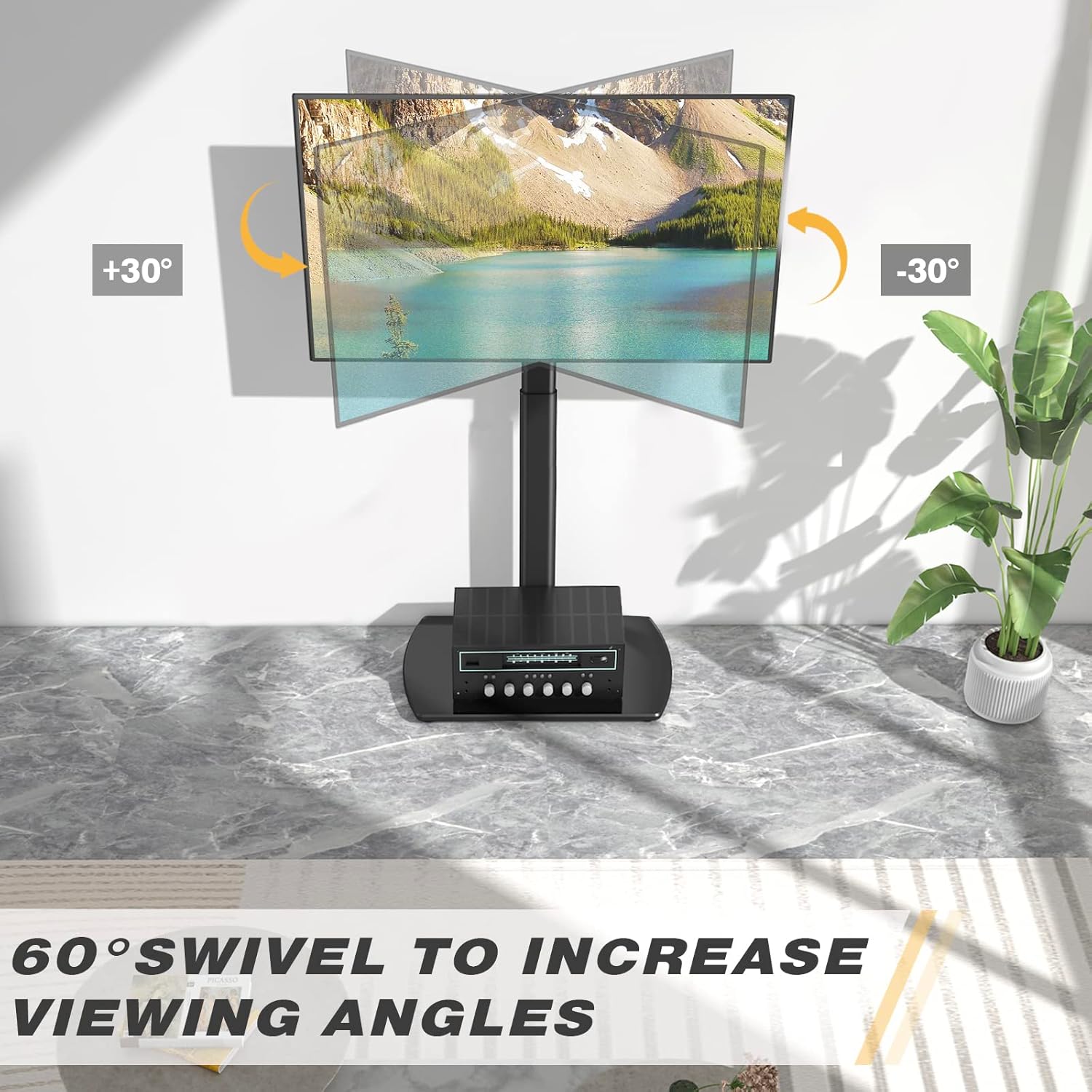
Image: Visual representation of the 60-degree swivel range.

Image: Close-up of the swivel joint.
Fitantanana tariby
Utilize the integrated cable management clips on the rear of the main support pole to organize and conceal TV cables. This helps maintain a tidy appearance and prevents cable clutter.

Image: Cable management clips on the stand's pole.
fikarakarana
- Fanadiovana: Fafao ny fijoroana amin'ny malefaka, damp lamba. Halaviro ny fanadiovana na solvents izay mety hanimba ny famaranana.
- Fanamarinana ara-potoana: Jereo tsy tapaka ny visy sy ny visy rehetra mba hahazoana antoka fa mbola mafy tsara izy ireo. Avereno henjanina raha ilaina.
- Fikarakarana ny fotony fitaratra: The tempered glass base is durable but can be scratched. Use coasters for items placed on it and avoid dropping heavy objects.
Fanamboarana
| OLANA | Antony mety hitranga | vahaolana |
|---|---|---|
| Tsy mitovy lenta ny fahitalavitra. | Mounting brackets are not aligned or tightened unevenly. | Re-check the alignment of the TV mounting brackets and ensure all screws are tightened evenly. |
| Mahatsiaro ho tsy milamina ny fijoroana. | Loose connections or uneven floor surface. | Verify all assembly bolts are securely tightened. Ensure the stand is placed on a flat, stable surface. Check non-slip feet. |
| Tsy azo apetraka ny fahitalavitra. | Incorrect VESA pattern or TV size/weight. | Confirm your TV's VESA pattern and weight are within the stand's specifications (Max VESA 400x400mm, Max 35kg/77lbs). |
fepetra arahana
| marika: | RFIVER |
| Modely: | TF3001 |
| Haben'ny fahitalavitra mifanentana: | 32-65 santimetatra |
| Max VESA Compatibility: | 400x400mm (also supports 100x100, 100x200, 200x100, 200x200, 300x200, 200x300, 300x300, 400x200, 400x300) |
| Max Weight capacity: | 35 kg (77 lbs) |
| Haavo fanitsiana isan-karazany: | 1000mm - 1300mm |
| Zoro mihodina: | ±30 degre (60 degre amin'ny fitambarany) |
| Fitaovana: | Vy misy firaka, fitaratra voatetika |
| loko: | Mainty |
| Ny haben'ny vokatra (L x W x H): | 55 x 38 x 130 cm (approximate, at max height) |
| Lanja vokatra: | 8.8 kg |
Warranty sy fanohanana
RFIVER products are designed for durability and performance. For any questions, missing parts, or support needs, please contact RFIVER customer service. Please retain your proof of purchase for warranty claims.
For further assistance, please visit the official RFIVER webtranokala na mifandraisa amin'ny fantsona fanohanana ny mpanjifany.