1. Fampidirana
The LAUNCH CRP239 is an intelligent and networkable automotive diagnostic tool designed for passenger cars. It offers comprehensive OBD II full functionality and rapid testing capabilities for four major vehicle systems: Engine, Automatic Transmission (A/T), Anti-lock Braking System (ABS), and Supplemental Restraint System (SRS). Additionally, the CRP239 includes advanced reset functions such as Oil Reset, Steering Angle Reset, Brake-Pad Reset, Battery Matching, Throttle Adaptation, and Diesel Particulate Filter (DPF) Regeneration, catering to the needs of professional technicians and DIY enthusiasts.
2. Information momba ny fiarovana
Always observe the following safety precautions when operating the LAUNCH CRP239:
- Ensure the vehicle's ignition is off before connecting or disconnecting the diagnostic tool.
- Aza ampiasaina amin'ny toerana mando na akaikin'ny ranon-javatra na entona mora mirehitra ny fitaovana.
- Manaova fitaovana fiarovana manokana sahaza azy, toy ny solomaso fiarovana, rehefa miasa amin'ny fiara.
- Refer to the vehicle's service manual for specific diagnostic procedures and safety warnings.
- Keep the tool away from strong magnetic fields.
- Only use the provided cables and accessories.
3. Ny votoatin'ny fonosana
Hamarino fa misy ny entana rehetra ao anaty fonosana:
- LAUNCH CRP239 Main Unit
- Cable Diagnostic OBD II
- USB Cable
- User Manual
- Carrying Case

Figure 3.1: Contents of the LAUNCH CRP239 package, showing the diagnostic tool, cables, and storage case.
4. Vokatra mihoatraview
The LAUNCH CRP239 features a robust design with a 5.0-inch 720p touch screen for intuitive navigation. It includes physical buttons for common operations and a durable rubber exterior for protection.

Sary 4.1: Eo anoloana view of the LAUNCH CRP239, highlighting the touch screen display and navigation buttons.
4.1. Ireo singa
- 5.0-inch Touch Screen: High-resolution display for clear data presentation and touch input.
- Bokotra fitetezana: Directional pad, OK button, and Return button for menu navigation.
- OBD II Connector: Standard 16-pin connector for vehicle communication.
- Port USB: For connecting to a computer for updates or data transfer.
- Tondro hery: LED light indicating power status.
5. Fametrahana
Follow these steps for initial setup of your LAUNCH CRP239:
- Ampidiro ny fitaovana: Connect the CRP239 to a power source using the provided USB cable to ensure the internal 4000mAh lithium-polymer battery is fully charged before first use.
- Herim-batana: Tsindrio ary hazòny ny bokotra herinaratra hamelomana ny fitaovana.
- Fifantenana fiteny: On the initial setup screen, select your preferred language. The device supports multilingual operation.
- Fifandraisana Wi-Fi: Navigate to the 'Settings' menu and select 'Wi-Fi'. Connect to an available wireless network to enable online updates and diagnostic report sharing.
- Fanavaozana rindrambaiko: It is recommended to perform a software update immediately after connecting to Wi-Fi to ensure you have the latest features and vehicle coverage. Navigate to the 'Update' section and follow the on-screen prompts.

Figure 5.1: The LAUNCH CRP239 with its diagnostic cable connected, ready for vehicle communication.
6. Torolàlana miasa
The LAUNCH CRP239 provides a comprehensive suite of diagnostic functions. Below are instructions for common operations.
6.1. Fifandraisana amin'ny fiara
- Locate the vehicle's 16-pin OBD II diagnostic port (usually under the dashboard).
- Hamarino tsara fa MATY ny jiron'ny fiara.
- Connect the OBD II diagnostic cable to the vehicle's OBD II port and to the CRP239.
- Turn the vehicle's ignition to the ON position (engine off). The CRP239 will power on automatically.
6.2. Main Menu Navigation
Avy amin'ny menio lehibe, afaka miditra amin'ny asa isan-karazany ianao:
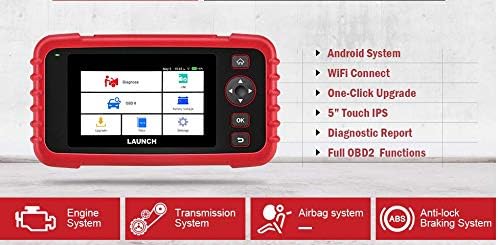
Figure 6.1: The main menu interface of the LAUNCH CRP239, providing access to all primary functions.
- Diagnose: For full system diagnostics (Engine, A/T, ABS, SRS).
- Izaho/M: Readiness status for emissions.
- OBD II: Standard OBD II functions (read/clear DTCs, live data, freeze frame, O2 sensor test, etc.).
- Mamerina: Access various maintenance reset functions.
- Battery Voltage: Displays real-time vehicle battery voltage.
- Fanavaozana: For software and firmware updates via Wi-Fi.
- Data: Review saved diagnostic data and reports.
- Fikirana: Configure device settings such as language, Wi-Fi, and display.
6.3. Fanaovana fitiliana diagnostika
- Avy amin'ny sakafo fototra, safidio "Diagnose".
- The tool will attempt to automatically identify the vehicle via VIN scan. If unsuccessful, you may need to manually select the vehicle make, model, and year.
- Choose the system you wish to diagnose (e.g., Engine, Transmission, ABS, SRS).
- Select "Read Fault Codes" ny view Diagnostic Trouble Codes (DTCs).
- Select "Clear Fault Codes" to erase DTCs after repairs have been made. Caution: Clearing codes without addressing the underlying issue will result in the codes reappearing.
- Select "Read Data Stream" ny view live sensor data.
6.4. Using Reset Functions
The CRP239 supports several common maintenance reset functions:
- Famerenana menaka: Mamerina ny fampahatsiahivana momba ny faharetan'ny androm-piainan'ny menaka rehefa avy nanolo menaka.
- Famerenana ny zoro familiana: Resets the steering angle sensor after alignment or component replacement.
- Brake-Pad Reset (EPB): Mamerina amin'ny laoniny ny rafitra frein fijanonana elektronika rehefa avy nanolo ny takelaka frein.
- Fampifanarahana ny bateria (BMS): Registers a new battery with the vehicle's Battery Management System.
- Fampifanarahana ny Throttle: Relearns the throttle body position after cleaning or replacement.
- Fanavaozana DPF: Manomboka ny dingana fanavaozana ny sivana particulate Diesel.
To use a reset function, select "Reset" from the main menu, then choose the desired function and follow the on-screen instructions.
6.5. Fanavaozana rindrambaiko
The CRP239 supports one-click Wi-Fi updates for software and vehicle coverage, ensuring you always have the latest diagnostic capabilities.
- Hamarino tsara fa mifandray amin'ny tambajotra Wi-Fi milamina ny fitaovana.
- Avy amin'ny sakafo fototra, safidio "Update".
- The device will check for available updates. Select the updates you wish to install and confirm.
- Allow the update process to complete without interruption. The device may restart during this process.

Figure 6.2: The update screen on the LAUNCH CRP239, showing available software updates for various vehicle brands.
6.6. Diagnostic Report Generation
The CRP239 can automatically generate diagnostic reports, which can be shared via email.
- After completing a diagnostic session, the tool will prompt you to generate a report.
- Confirm to generate the report.
- Mandehana mankany amin'ny "Data" menu ho view saved reports.
- Select a report and choose the option to share via email. Ensure your Wi-Fi is connected and email settings are configured in the 'Settings' menu.
7. Fikojakojana
Proper maintenance ensures the longevity and optimal performance of your LAUNCH CRP239:
- Fanadiovana: Mampiasà lamba malefaka sy maina hanadiovana ilay fitaovana. Aza mampiasa mpanadio abrasive na solvents.
- fitahirizana: Store the device in its carrying case in a cool, dry place when not in use. Avoid extreme temperatures.
- Fikarakarana bateria: Charge the battery regularly, even if the device is not in frequent use, to maintain battery health. Avoid fully discharging the battery for extended periods.
- Cable Inspection: Periodically inspect the diagnostic and USB cables for any signs of damage. Replace damaged cables immediately.
8. Famahana olana
This section addresses common issues you might encounter with the LAUNCH CRP239.
| OLANA | Antony mety hitranga | vahaolana |
|---|---|---|
| Tsy mandeha ny fitaovana. | Low battery; faulty connection to vehicle. | Charge the device fully. Ensure the OBD II cable is securely connected to both the CRP239 and the vehicle. Check vehicle's ignition is ON. |
| Cannot communicate with vehicle. | Incorrect vehicle protocol; faulty OBD II port; damaged cable. | Verify vehicle compatibility. Check the vehicle's OBD II port for power. Try a different vehicle or cable if available. Ensure vehicle ignition is ON. |
| Tsy nahomby ny fanavaozana ny rindrambaiko. | Fifandraisana Wi-Fi tsy marin-toerana; tsy ampy ny toerana fitahirizana. | Ensure a strong and stable Wi-Fi connection. Check available storage space on the device. Restart the update process. |
| Tsy mamaly ny efijery. | Fahadisoana amin'ny rindrambaiko; fahasimbana ara-batana. | Perform a soft reset by holding the power button until the device restarts. If the issue persists, contact customer support. |
9. Famaritana
| endri-javatra | antsipirihany |
|---|---|
| MODELY | CRP239 (CREADER PROFESSIONAL 239) |
| miseho | 5.0-inch 720p Touch Screen |
| Batterie | 4000mAh Rechargeable Lithium Polymer (misy) |
| fifandraisana | OBD II, Wi-Fi, USB |
| Sarona fiara | Domestic, Asian, European vehicles (1996 and newer OBD2) |
| Supported Systems | Engine, Automatic Transmission (A/T), ABS, SRS |
| Asa manokana | Oil Reset, Steering Angle Reset, Brake-Pad Reset (EPB), Battery Matching (BMS), Throttle Adaptation, DPF Regeneration |
| lafiny | 32.4 x 25.4 x 8 cm (fonosana) |
| Lanja entana | 560 g |
| Fitaovana ivelany | fingotra |
10. Fampahalalana momba ny fiantohana
The LAUNCH CRP239 comes with a standard manufacturer's warranty. For specific warranty terms and conditions, please refer to the warranty card included in your product package or visit the official Launch website. Tehirizo ny tapakila fividiananao ho porofon'ny fividianana ho an'ny fitakiana fiantohana.
Mety misy safidy fanampiny amin'ny fiantohana avy amin'ny mpamatsy antoko fahatelo. Ohatra,ample, 1-Year and 2-Year Extended Warranties by Salama Care are offered for this product.
11. Fanohanana
For technical assistance, product inquiries, or support, please contact Launch customer service through their official website or the contact information provided in your product documentation. Ensure you have your product model number (CRP239) and serial number ready when contacting support.
Raha mila loharano fanampiny dia tsidiho ny Launch Official Webtoerana.


