1. Fampidirana
Misaotra anao nividyasing the Lenco SPR-100BK Splash-Proof Bluetooth Speaker. This portable speaker delivers powerful sound with strong bass and features FM radio, USB, SD card playback, and integrated light effects. Designed for durability, it is splash-proof, making it suitable for various environments. This manual provides essential information for safe and optimal use of your device.
2. Torolàlana manan-danja momba ny fiarovana
- Aza apetraka amin'ny hafanana tafahoatra, ny tara-masoandro mivantana, na ny hamandoana be ny fitaovana.
- Ensure the charging port cover is securely closed when near water to maintain splash-proof integrity.
- Aza disassemble na ovaina ny fitaovana. Alefaso amin'ny mpiasa mahay ny serivisy rehetra.
- Ampiasao ihany ny tariby famandrihana voalaza.
- Arovy amin'ny sahan'andriamby mahery ilay fitaovana.
- Fadio ny milatsaka na mametraka ilay fitaovana amin'ny fiantraikany mahery vaika.
3. Vokatra mihoatraview
Familiarize yourself with the components of your Lenco SPR-100BK speaker.
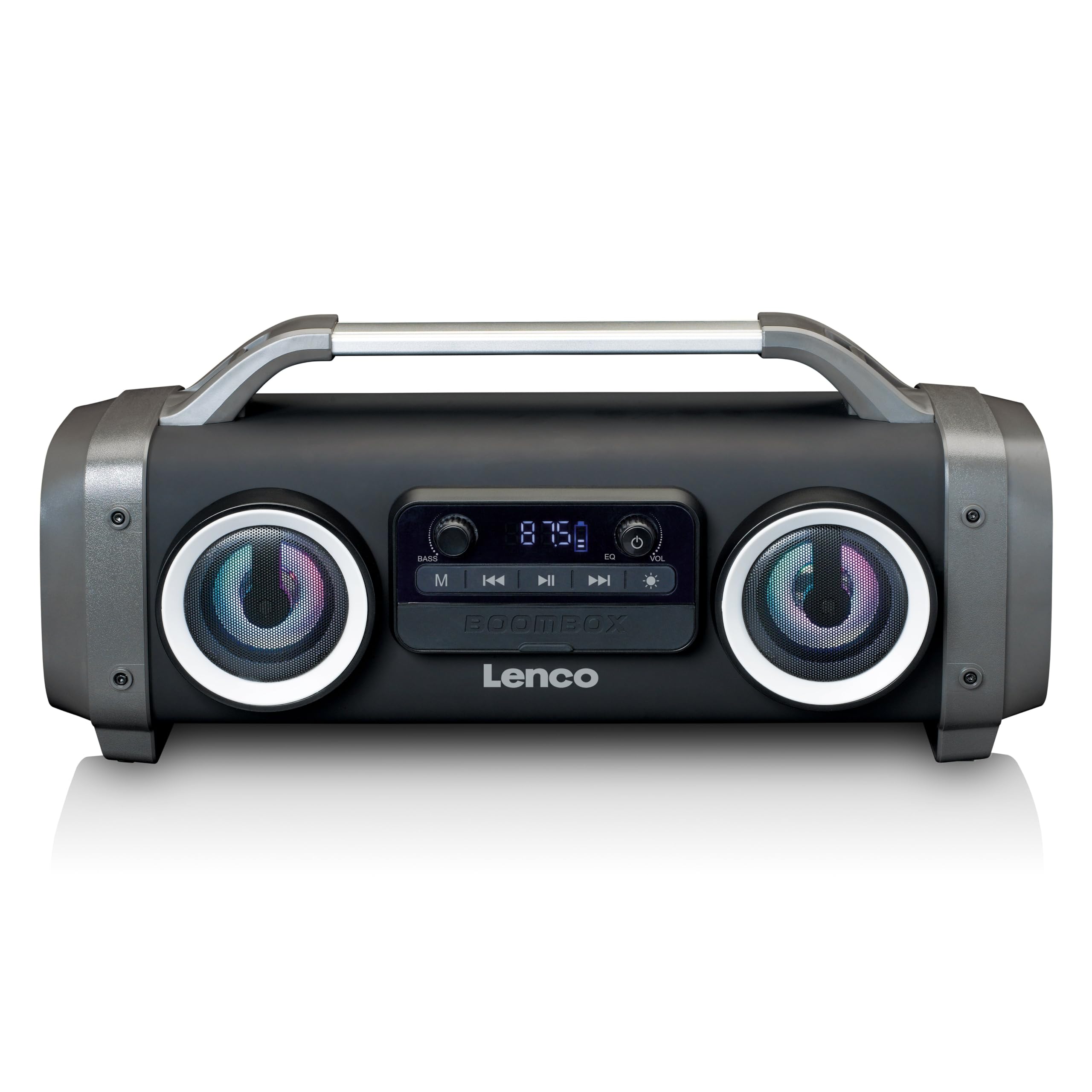
Sary 1: Eo anoloana view of the Lenco SPR-100BK speaker, showing the main speaker grille, control panel, and integrated light effects.
3.1 Fanaraha-maso sy seranan-tsambo
- Bokotra hery: Mamelona na mamono ny fanamafisam-peo.
- Button Mode: Mifamadika eo amin'ny fomba Bluetooth, Radio FM, USB, SD, ary AUX.
- bokotra Play/Pause: Mandefa na mampiato ny feo.
- Knob fanaraha-maso ny feo: Mampifanitsy ny haavon'ny master.
- Bass Boost Knob: Manitsy ny haavon'ny bass.
- Bokotra vokatry ny hazavana: Cycles through or turns off light effects.
- Port USB: Ho an'ny famerenana ny rakitra ao amin'ny flash drive USB.
- Slot karatra SD: Ho an'ny playback karatra SD.
- AUX Input (3.5mm): Mba hampifandraisana ireo fitaovana audio ivelany.
- Charging Port (Mini USB): Ho an'ny famandrihana ny bateria anatiny.
4. Fametrahana
4.1 Famoahana
Carefully remove the speaker and all accessories from the packaging. Ensure the following items are present:
- Lenco SPR-100BK Bluetooth Speaker
- USB Charging Cable
- 3.5mm Audio Cable (AUX cable)
- User Manual
4.2 Famandrihana ny bateria
- Locate the Mini USB charging port on the speaker.
- Ampifandraiso amin'ny seranana famandrihana an'ny fanamafisam-peo ny tariby famandrihana USB nomena.
- Connect the other end of the USB cable to a compatible USB power adapter (5V/1A, not included) or a computer's USB port.
- Hirehitra ny jiro famantarana ny famandrihana, matetika mena, mandritra ny famandrihana. Ho faty na hiova loko (ohatra, manga) izy io rehefa feno ny famandrihana.
- A full charge takes approximately 4-5 hours and provides up to 15 hours of playback (without light effects).
4.3 Herin'ny voalohany
Tsindrio ary hazòny ny Bokotra Hery for a few seconds until the speaker powers on and you hear an audible prompt or see the display light up.
5. Fampandehanana
5.1 Power On/off
- Mba hampandeha: Tsindrio ary hazòny ny Bokotra Hery.
- Mba hamonoana ny herinaratra: Tsindrio ary hazòny ny Bokotra Hery indray.
5.2 Fifandraisana Bluetooth
- Alefaso ny fanamafisam-peo. Hiditra ho azy amin'ny fomba fampiarahana Bluetooth izy io, asehon'ny jiro LED mirehitra.
- Alefaso ny Bluetooth amin'ny findainao (smartphone, tablette, sns.).
- Hitady ny ireo fitaovana Bluetooth azo ampiasaina ary safidio ny "SPR-100BK"avy amin'ny lisitra.
- Rehefa mifandray dia hamoaka feo fanamafisana ny fanamafisam-peo, ary hijanona tsy hiredareda ny LED.
- True Wireless Stereo (TWS): If you have two SPR-100BK speakers, you can pair them for stereo sound.
- Ataovy azo antoka fa samy mandeha sy amin'ny fomba Bluetooth ny mpandahateny roa.
- On one speaker (the master), press and hold the Button Mode until you hear a TWS pairing prompt.
- The two speakers will automatically connect. Once connected, pair your device to the master speaker as described above.
Radio 5.3 FM
- Tsindrio ny Button Mode repeatedly until you select FM Radio mode.
- To auto-scan and save stations: Press and hold the bokotra Play/Pause. The speaker will scan for available FM stations and save them automatically.
- To switch between saved stations: Use the Previous/Next Track Buttons (if available, otherwise it will cycle through automatically).
- Fanamarihana: For better FM reception, ensure the included 3.5mm audio cable is plugged into the AUX input, as it acts as an external antenna.
5.4 USB / SD Card Playback
- Insert a USB flash drive or an SD card (with supported audio files) ao amin'ny seranana/slot mifandraika amin'izany.
- The speaker will automatically switch to USB or SD mode and begin playback. If not, press the Button Mode hisafidianana ny loharano marina.
- Ampiasao ny bokotra Play/Pause SY Previous/Next Track Buttons hifehy ny playback.
5.5 AUX Input
- Connect one end of the supplied 3.5mm audio cable to the AUX input on the speaker.
- Ampifandraiso amin'ny jack écouteur na ny fivoahana feo amin'ny fitaovana ivelany ny tendrony hafa.
- Tsindrio ny Button Mode hisafidianana ny fomba AUX.
- Hifehy ny playback sy ny feo avy amin'ny fitaovana ivelany.
5.6 Vokatry ny hazavana
Tsindrio ny Button Effect Light to cycle through different light modes or to turn the lights off. The speaker features 12 color light effects.
5.7 Fanitsiana feo
- Boky: Rotate ny Knob fanaraha-maso ny volume to increase or decrease the overall sound level.
- Bass: Rotate ny Bass Boost Knob to adjust the intensity of the bass.
6. Fikojakojana
6.1 Fanadiovana
Wipe the speaker with a soft, dry cloth. Do not use abrasive cleaners, waxes, or solvents. For stubborn dirt, a slightly damp cloth can be used, ensuring all port covers are sealed.
6.2 Fikarakarana bateria
- Mba hanalavana ny androm-piainan'ny bateria dia fenoy tanteraka ny fanamafisam-peo alohan'ny hampiasana azy voalohany.
- Fadio ny tatatra tanteraka ny bateria matetika.
- If storing the speaker for an extended period, charge it to about 50% every few months.
6.3 Fitehirizana
Tehirizo ao amin'ny toerana mangatsiaka sy maina ny fanamafisam-peo, lavitry ny tara-masoandro mivantana sy ny mari-pana tafahoatra.
7. Famahana olana
| OLANA | Antony mety hitranga | vahaolana |
|---|---|---|
| Tsy mandeha ny fanamafisam-peo. | Lany ny bateria. | Ampidiro ny fanamafisam-peo amin'ny alalan'ny tariby USB nomena. |
| Tsy misy feo. | Ambany loatra ny feo; diso ny fomba voafantina; tsy mifandray ny fitaovana. | Increase volume; press Mode button to select correct source; ensure Bluetooth device is paired or AUX cable is connected. |
| Tsy nahomby ny fampiarahana Bluetooth. | Tsy ao amin'ny "pair mode" ny "hauteur"; lavitra loatra ny fitaovana; misy fanelingelenana. | Ensure speaker is in Bluetooth pairing mode (flashing LED); move device closer; turn off other Bluetooth devices. |
| Ratsy fandraisana radio FM. | No external antenna; weak signal. | Plug in the 3.5mm AUX cable to act as an antenna; try moving the speaker to a different location. |
| USB/SD playback not working. | sokafana file endrika; karatra/kapila tsy tafiditra tsara; simba files. | antoka files are in a supported format (e.g., MP3); reinsert the USB drive/SD card; try a different drive/card. |
8. Famaritana
| Laharana modely | SPR-100BK |
| Marika | Lenco |
| Famoahana herinaratra | 25 Watts RMS |
| fifandraisana | Bluetooth, USB, Karatra SD, Fidirana AUX 3.5mm |
| Karazana bateria | Lithium-ion (4400mAh) |
| Time Playback | Up to 15 hours (reduced with light effects) |
| Fampidirana fiampangana | 5V/1A (Mini USB) |
| Endri-javatra manokana | Splash-proof design, Integrated light effects, FM Radio, TWS function |
| refy (L x W x H) | 60 x 60 x 85 cm |
| lanja | 2 kg |
Fanamarihana: Ny fanondroana dia mety hiova tsy misy fampandrenesana mialoha.
9. Warranty sy fanohanana
9.1 Fampahalalana momba ny fiantohana
This Lenco product is covered by a warranty for a period of 2 taona on parts from the date of purchase. This warranty covers manufacturing defects and workmanship under normal use. It does not cover damage caused by misuse, accidents, unauthorized modifications, or normal wear and tear.
9.2 Fanavaozana rindrambaiko
Software updates for this product are guaranteed until 13 aprily 2030.
9.3 Fanohanana ny mpanjifa
For technical assistance, warranty claims, or product inquiries, please contact Lenco customer support through their official website or the retailer where the product was purchased. Please have your model number (SPR-100BK) and proof of purchase ready.
Lenco ofisialy Webtranokala: www.lenco.com


