Sava lalana
This instruction manual provides detailed information on the installation, operation, and maintenance of your Blaupunkt DENVER 212 DAB BT car radio. Please read this manual thoroughly before using the device to ensure proper functionality and to prevent damage. Keep this manual for future reference.

Image: Blaupunkt DENVER 212 DAB BT product banner.
Information momba ny fiarovana
- Ataovy izay hametrahana azy tsara ataon'ny matihanina mahafeno fepetra mba hisorohana ny loza ateraky ny herinaratra na ny fahasimbana amin'ny fiaranao.
- Aza mampiasa ny fitaovana amin'ny fomba izay manelingelina anao amin'ny fiara. Ataovy laharam-pahamehana hatrany ny fiarovana ny lalana.
- Fadio ny mampiseho ny fitaovana amin'ny mari-pana tafahoatra, tara-masoandro mivantana, na ny hamandoana.
- Use only approved accessories and parts.
- Disconnect the vehicle's battery before installation to prevent short circuits.
Fonosana fonosana
Hamarino fa misy ny entana rehetra ao anaty fonosana:
- Blaupunkt DENVER 212 DAB BT Car Radio Unit
- Fametahana
- Wiring Harness (ISO connector)
- DAB+ Antenna (if included with specific models)
- Microphone ivelany
- Disassembly Keys
- User Manual (ity antontan-taratasy ity)
Vita ny vokatraview
The Blaupunkt DENVER 212 DAB BT is a 1-DIN car radio featuring DAB+ digital radio, Bluetooth hands-free calling, and media streaming. It offers a robust design and short installation depth for versatile vehicle compatibility.

Image: Front panel of the Blaupunkt DENVER 212 DAB BT, showing display, control knobs, and buttons.
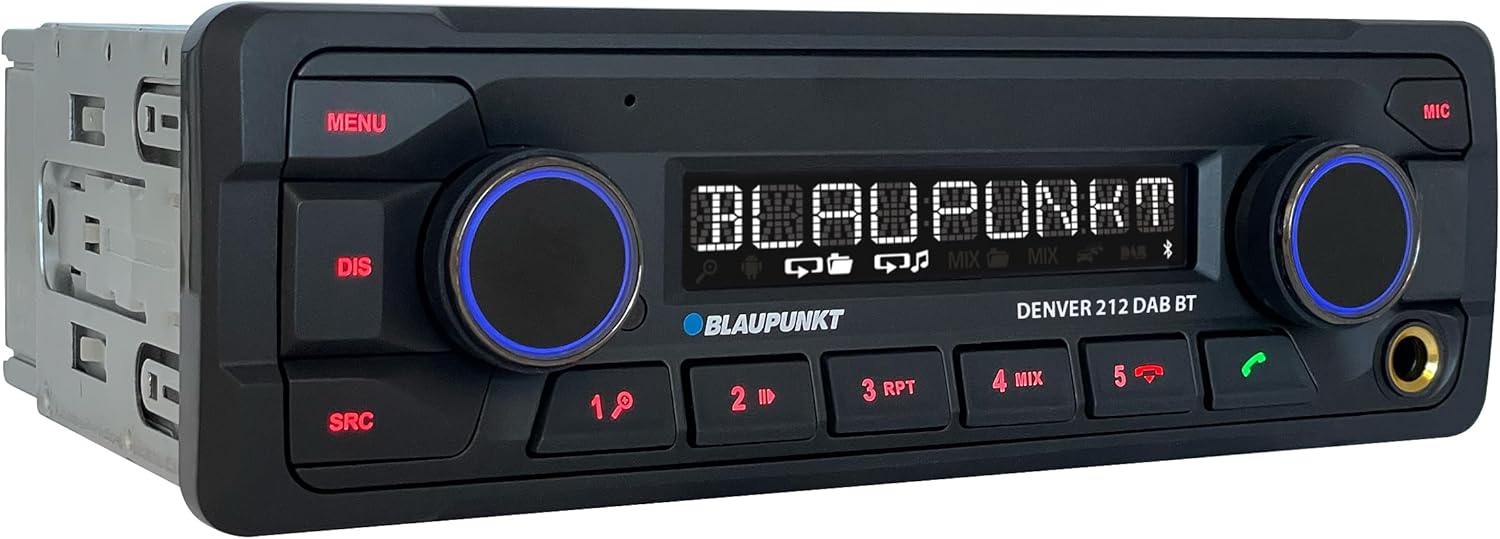
Sary: Angled view of the Blaupunkt DENVER 212 DAB BT, highlighting its compact design.
Fanaraha-maso ny tontonana anoloana:
- Bokotra MENU: Miditra amin'ny fikirana sy safidy amin'ny rafitra.
- DIS Button: Changes display information.
- Bokotra SRC: Selects audio source (Radio, DAB, Bluetooth, USB, AUX).
- Volume Knob (Left): Adjusts audio volume. Press to mute/unmute.
- Selection Knob (Right): Mijery ireo menio ary mifantina ireo safidy.
- Bokotra efa voafaritra mialoha (1-6): Store and recall radio stations, control media playback.
- Call Buttons (Green/Red): Answer/end Bluetooth calls.
- Port USB: Ampifandraiso ireo fitaovana fitahirizana USB ho an'ny famerenan'ny haino aman-jery.
- Fidirana AUX (Jack 3.5mm): Ampifandraiso ny loharanom-peo ivelany.
Fametrahana sy fametrahana
Dingana fametrahana:
- Fiomanana: Esory ny terminal négatif amin'ny bateria-n'ny fiaranao.
- Mametraka: Insert the supplied mounting frame into the vehicle's 1-DIN opening. Bend the tabs to secure it.
- Wiring: Connect the wiring harness according to the diagram below. Ensure all connections are secure.
- Antenna fifandraisana: Connect the FM antenna and the DAB+ antenna (if applicable) to the corresponding inputs on the rear of the radio.
- Fifandraisana mikrofona: Connect the external microphone to the designated input for optimal hands-free call quality.
- Insert Unit: Slide the radio unit into the mounting frame until it clicks into place.
- Fanamarinana farany: Avereno ampifandraiso amin'ny bateria ny fiara ary andramo ilay fitaovana.
Wiring Diagram (General):
| Loko tariby | asa |
|---|---|
| MAVO | Constant 12V (Bateria) |
| MENA | Mivadika 12V (Ignition) |
| Mainty | tany |
| Manga | Antenna herinaratra / Amplifier Remote |
| Voasary/fotsy | hazavana |
| Speaker Wires (e.g., White, Grey, Green, Purple pairs) | Connect to vehicle speakers (Front Left, Front Right, Rear Left, Rear Right) |
| Fampidirana fanaraha-maso ny familiana | Connect to vehicle's steering wheel control interface (if applicable) |
Note: Specific wire colors may vary. Always refer to your vehicle's wiring diagram and the radio's included diagram for precise connections.

Image: The Blaupunkt DENVER 212 DAB BT car radio seamlessly integrated into a vehicle's dashboard.
Torolàlana miasa
1. Asa fototra:
- Herim-batana / maty: Press the volume knob (left) briefly to turn the unit on. Press and hold to turn off.
- Fanaraha-maso ny feo: Rotate the volume knob (left) to adjust the sound level.
- Fantenana loharano: Tsindrio ny SRC button repeatedly to cycle through available audio sources (FM, DAB, Bluetooth Audio, USB, AUX).
- Menu Navigation: Tsindrio ny sakafo button to enter the main menu. Use the right knob to navigate and select options.
2. Radio (FM/DAB+):
- Selecting Radio Mode: mpanao gazety SRC until FM or DAB is selected.
- Tuning mandeha ho azy: In FM/DAB mode, press and hold the right knob or seek buttons (if available) to automatically search for stations.
- Bika matoanteny Briefly press the right knob or seek buttons to fine-tune frequencies.
- Mitahiry preset: Tune to a desired station, then press and hold one of the numeric preset buttons (1-6) until you hear a confirmation beep.
- Mahatsiarova preset: Briefly press a numeric preset button (1-6) to recall a stored station.
3. Bluetooth Operation:
- Manambatra fitaovana:
- Ataovy azo antoka fa mandeha ny Bluetooth amin'ny findainao.
- Select "Bluetooth" as the source on the car radio. The display will show "PAIRING".
- On your mobile device, search for Bluetooth devices and select "BLAUPUNKT DENVER".
- Hamafiso ny fampiarahana amin'ny fitaovana roa raha misy amporisihina.
- Antso tsy misy tanana:
- Mamaly antso: Tsindrio ny bokotra antso maitso.
- Famaranana antso: Press the red call button.
- Fiantsoana: Dial from your phone; audio will transfer to the car radio.
- Fandefasana feo Bluetooth: Once paired, select "Bluetooth Audio" as the source. Play music from your mobile device, and it will stream through the car radio. Use the preset buttons (e.g., 4 for MIX, 5 for RPT) for playback control (play/pause, skip tracks).
4. USB and AUX Input:
- Playback USB: Insert a USB storage device into the front USB port. The unit will automatically switch to USB mode and begin playback.
- AUX Input: Connect an external audio device (e.g., MP3 player) to the 3.5mm AUX input jack using an audio cable. Select "AUX" as the source.
5. Sound Settings (Equalizer):
- Tsindrio ny sakafo button, then navigate to "AUDIO" or "EQ" settings.
- Adjust bass, treble, balance, and fader settings to your preference.
- Pre-set equalizer modes (e.g., Pop, Rock, Classic) may be available.
Video: Efa tapitraview of the Blaupunkt DENVER 212 DAB BT car radio's features and basic operation.
fikarakarana
- Fanadiovana: Use a soft, dry cloth to clean the unit's front panel. Do not use abrasive cleaners or solvents.
- Port USB: Arovy amin'ny vovoka sy potipoti-javatra ny seranan-tsambo USB.
- Fanavaozana ny mikirao praogramanao: Check the official Blaupunkt webtranokala tsindraindray ho an'ny fanavaozana firmware misy ho an'ny modelyo.
Fanamboarana
| OLANA | Antony mety hitranga | vahaolana |
|---|---|---|
| Tsy misy hery | Blown fuse; incorrect wiring (constant/switched 12V); loose connection. | Check vehicle fuses and the radio's fuse. Verify wiring connections, especially constant and ignition power. Ensure the unit is properly seated. |
| Tsy misy feo | Volume too low; mute activated; incorrect speaker wiring; ampolana momba ny liifier. | Increase volume. Check if mute is active. Verify speaker connections. If an external ampRehefa ampiasaina ny herinaratra, jereo ny herinaratra sy ny fifandraisany. |
| Fandraisana radio ratsy (FM/DAB) | Antenna not connected; damaged antenna; weak signal area. | Ensure antenna is securely connected. Check antenna for damage. Consider a stronger antenna or signal booster if in a weak signal area. For DAB+, ensure the DAB antenna is correctly installed and positioned. |
| Olana amin'ny fifandraisana Bluetooth | Device not in pairing mode; incorrect wiring (ignition+ and constant+); interference. | Ensure both devices are in pairing mode. Delete previous pairings and try again. Verify that the constant 12V and switched 12V wires are correctly connected to the radio, as improper wiring can affect Bluetooth stability. Move away from other Bluetooth devices. |
| USB tsy fantatra | sokafana file format; USB drive not formatted correctly; damaged USB drive. | Ataovy azo antoka ny feo files are in supported formats (e.g., MP3, WMA). Format the USB drive to FAT32. Try a different USB drive. |
fepetra arahana
| endri-javatra | antsipirihany |
|---|---|
| Marika | BLAUPUNKT |
| Laharana modely | Denver 212 DAB BT |
| loko | Mainty |
| Teknolojia fifandraisana | Bluetooth, USB |
| Karazana mpampitohy | 3.5 mm Jack, USB |
| Endri-javatra manokana | DAB, RDS, Equalizer, Bluetooth Hands-free |
| Fitaovana mifanentana | finday avo lenta |
| Total seranan-tsambo USB | 1 |
| Audio Output Mode | Stereo |
| Fanamboarana fantsona manodidina ny feo | 4.0 |
| Ny refin'ny vokatra | 12D x 17.8W x 5.2H santimetatra |
| mpanamboatra | Blaupunkt |
| Fividianana kojakoja | 1 taona |
Warranty sy fanohanana
This Blaupunkt product comes with a manufacturer's warranty. For specific warranty terms and conditions, please refer to the warranty card included with your product or visit the official Blaupunkt website. For technical support, troubleshooting assistance, or spare parts inquiries, please contact Blaupunkt customer service through their official channels.
Amin'ny ankapobeny dia azo ampiasaina mandritra ny herintaona manomboka amin'ny datin'ny fividianana ny piesy fanolo.
Official Blaupunkt Webtranokala: www.blaupunkt.com


