Sava lalana
The Retekess TT106 Wireless Tour Guide System is designed for clear and stable audio transmission in various settings such as churches, schools, factories, and guided tours. This system includes one transmitter and fifteen ear-hook receivers, providing efficient one-way communication. Operating on the 2.4GHz frequency, it ensures reliable performance with an impressive operating range and long battery life.
Inona no ao anaty boaty
Upon opening your Retekess TT106 package, you should find the following components:
- 1x TT106 Transmitter
- 15x TT106 Receivers
- 1x mikrô Lavalier
- 16x Lanyards
- 1x 32-Slot Charging Case
- Tariby USB 16x
- 1x English Manual

Image: All components included in the Retekess TT106 Wireless Tour Guide System package, laid out on a white background.
Vita ny vokatraview
The Retekess TT106 system consists of a transmitter for the speaker and multiple ear-hook receivers for the audience. Both units are designed for ease of use and portability.
Transmitter (TT106)
- Aseho: Shows channel ID, battery status, and signal strength.
- Fanaraha-maso: Power/Confirm, Volume Up/ID Setting, Volume Down/ID Setting, Mute, Pair.
- Seranana: MIC input, AUX input, DC 5V charging port.
Receiver (TT106)
- Design: Lightweight ear-hook design (0.04lb) for comfortable wear.
- Fanaraha-maso: Power Switch, Volume Up, Volume Down.
- Seranana: Mini USB Charging Port.
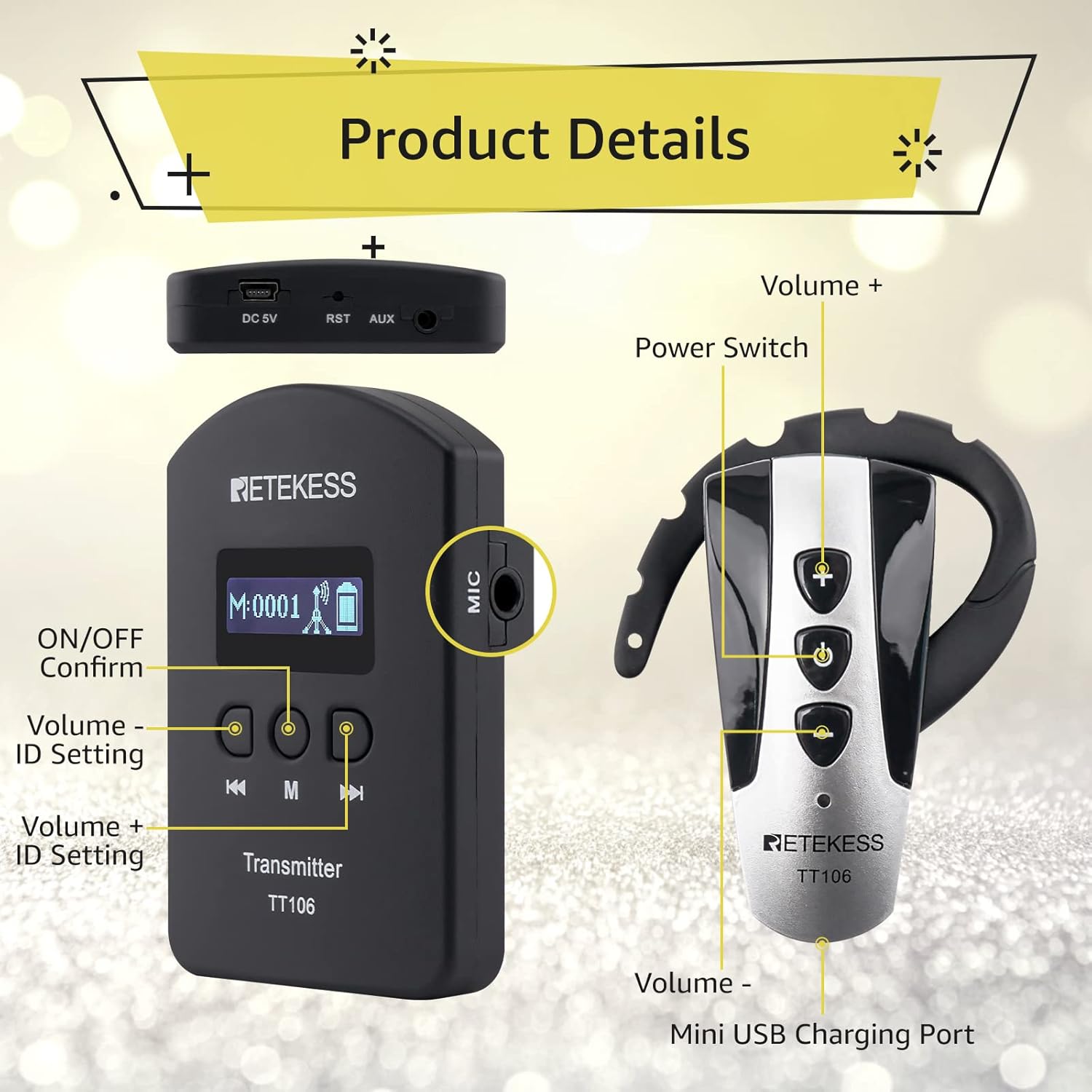
Image: Close-up of the Retekess TT106 transmitter and receiver, highlighting buttons for volume, power, ID setting, and ports for microphone, AUX, and charging.

Image: The AUX input jack on the Retekess TT106 transmitter, allowing connection to external audio sources like phones or MP3 players.
Torolàlana fametrahana
Follow these steps to set up and pair your Retekess TT106 system for optimal performance.
1. Connecting Microphone and Ear-hook Receiver
- Connect the lavalier microphone to the MIC input port on the transmitter.
- The ear-hook receivers are ready to use as they are.
2. Mamelona/Mamono
- Mpampitatra: Long press the 'M' button for 2 seconds to power on. Long press the 'Power' button for 5 seconds to power off.
- Mpandray: Long press the 'Power' button for 2 seconds to power on. Long press the 'Power' button for 5 seconds to power off.
3. Pairing (ID Matching)
To ensure all receivers are on the same channel as the transmitter, follow these ID matching steps:
- Alefaso ny émetteur.
- Press the 'M' button and the 'Right' button simultaneously for 2 seconds on the transmitter until the ID number flashes. This puts the transmitter into ID matching mode.
- On each receiver, press the 'Left' button and the 'Middle' button simultaneously until the 'EXMAX' icon appears on the screen. Release the 'Middle' button, and the ID number '00' will be displayed.
- The receiver will automatically enter wireless ID receiving mode and match the transmitter's ID. The antenna icon on the receiver will flash, then become stable once paired.
- Repeat for all receivers.
- After all devices are paired, turn off all transmitters and receivers. Then turn them back on; they should now be paired and ready for use.
Video: Demonstrates the pairing process for the Retekess TT106 Wireless Tour Guide System, showing how to set the transmitter and receiver IDs.
Torolàlana miasa
The Retekess TT106 system is designed for straightforward operation.
1. Fanitsiana ny volume
- Mpampitatra: Use the 'Volume Up' and 'Volume Down' buttons to adjust the microphone input level.
- Mpandray: Use the '+' and '-' buttons on the ear-hook receiver to adjust the listening volume.
2. Asa moana
- On the transmitter, press the 'Mute' button to temporarily silence the audio transmission. Press again to unmute.
3. Fantenana fantsona
- The system supports 9999 available channels to prevent interference. Channels are typically set during the ID matching process.
4. Dual Transmitter Operation
- The system supports two transmitters operating simultaneously on different channels to meet translation needs in various environments.

Image: The Retekess TT106 transmitter display with icons indicating one-click mute, one-key channel adjustment, and one-key shutdown features.
Vidéo: Vitaview of the functions of the Retekess TT106, demonstrating its capabilities for tour guiding and interpretation.
Video: Highlights the three one-button functions of the RETEKESS TT106 tour guide system for quick and easy operation.
Lahatsary: Fampidirana fohyview asehocasing various scenarios where the Retekess TT106 system can be effectively used.
fikarakarana
To ensure the longevity and optimal performance of your Retekess TT106 system, follow these maintenance guidelines:
- Fanadiovana: Mampiasà lamba malefaka sy maina hanadiovana ireo fitaovana. Fadio ny mampiasa akora simika mahery vaika na fitaovana marokoroko.
- fitahirizana: Store the system in a cool, dry place away from direct sunlight and extreme temperatures. Use the provided charging case for organized storage and protection.
- Fikarakarana bateria: Charge the devices regularly, even if not in frequent use, to maintain battery health. Avoid overcharging or completely draining the batteries for extended periods.
- Fitantanana tariby: Tandremo tsara ny tariby sy ny mpampitohy rehetra mba hisorohana ny fahasimbana.

Image: The portable charging case for the Retekess TT106 system, designed for easy charging and secure storage of multiple units.
Fanamboarana
If you encounter issues with your Retekess TT106 system, try the following solutions:
| OLANA | Antony mety hitranga | vahaolana |
|---|---|---|
| Tsy misy feo avy amin'ny mpandray | Receiver not powered on, low battery, incorrect channel, or out of range. | Ensure receiver is on and charged. Verify channel matches transmitter. Move closer to the transmitter. |
| Poor sound quality/Interference | Interference from other devices, weak signal, or incorrect microphone placement. | Change to a different channel. Ensure transmitter and receiver are within range. Adjust microphone position. |
| Transmitter not transmitting | Transmitter not powered on, low battery, or microphone not connected properly. | Ensure transmitter is on and charged. Check microphone connection. |
| Cannot pair devices | Incorrect pairing procedure or devices are too far apart. | Repeat the ID matching steps carefully. Ensure devices are close during pairing. |
fepetra arahana
- Haben'ny vokatra: 12.2 x 11.22 x 5.51 santimetatra
- Lanja entana: 10.52 kg
- Laharana modely: FF9469D-F9469C-F9469BX5
- Batterie: 16 Lithium Ion bateria ilaina (tafiditra)
- Saran'asa: Haavo 150m/492ft
- Frequency: 2.4GHz
- Faharetan'ny bateria amin'ny mpandefa: Up to 25 hours (1300mAh)
- Faharetan'ny bateria amin'ny mpandray: Up to 23 hours (380mAh)
- fantsona: 9999 fantsona misy
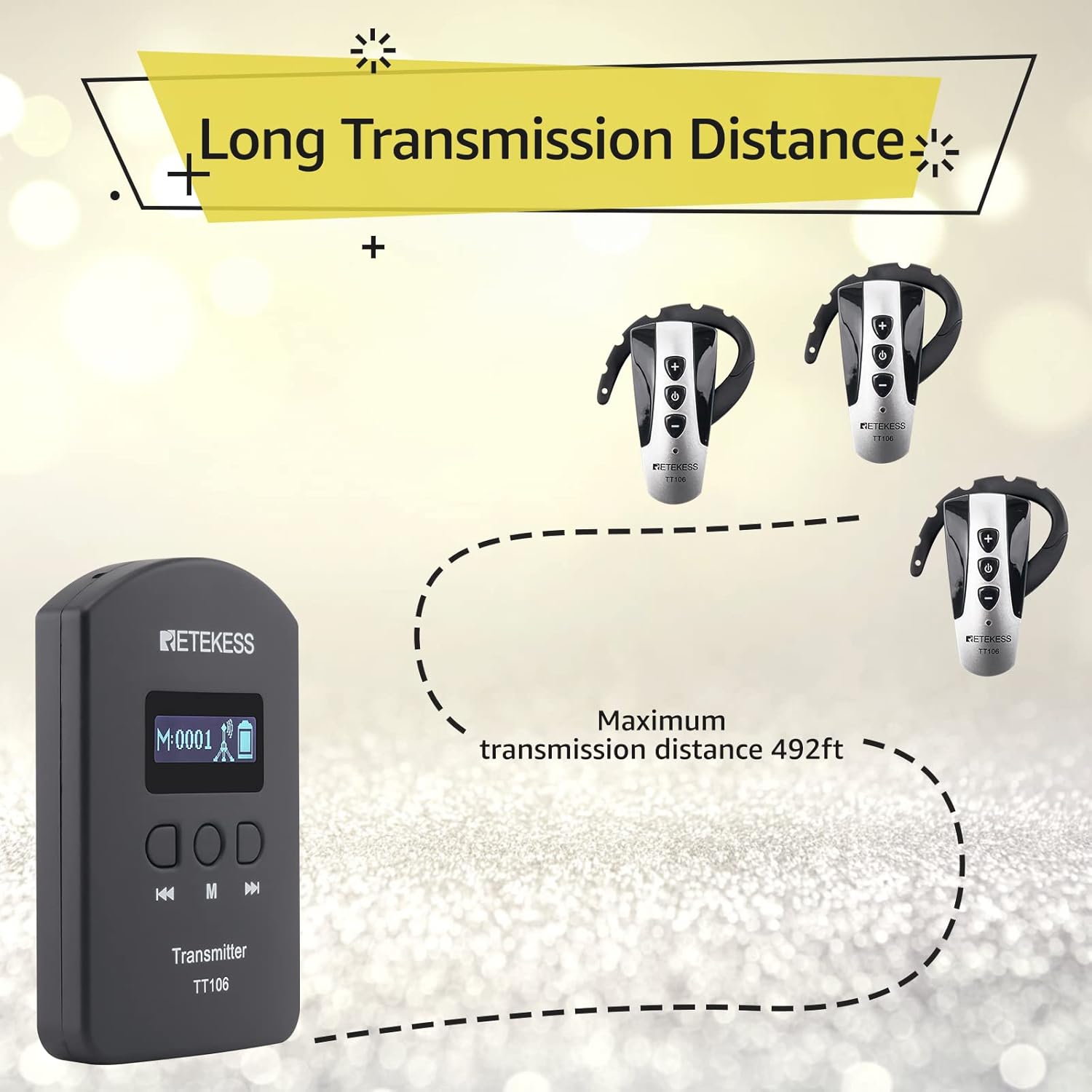
Image: The Retekess TT106 transmitter and ear-hook receiver, showcasing their compact design and overall appearance.

Image: Visual representation of the dimensions for both the Retekess TT106 transmitter and the ear-hook receiver, indicating their compact size.

Image: Illustrates the extended battery life of the Retekess TT106 transmitter (1300mAh, 25h use) and receiver (380mAh, 23h use).
Warranty sy fanohanana
Retekess products are designed for reliability and performance. For any warranty claims or technical support, please refer to the contact information provided in your product packaging or visit the official Retekess website.
- Mpanamboatra: retekess
- Daty misy voalohany: 1 Desambra 2019


