1. Fampidirana
Misaotra anao nividyasing the ICQN IQ M7051N03N 1AA Mini Electric Oven. This manual provides important information for the safe and efficient operation of your appliance. Please read it thoroughly before use and keep it for future reference.
2. Torolàlana manan-danja momba ny fiarovana
Araho hatrany ny fepetra fiarovana fototra rehefa mampiasa fitaovana elektrika mba hampihenana ny mety hisian'ny afo, fahatafintohinana herinaratra ary ratra amin'ny olona.
- Vakio daholo ny torolàlana alohan'ny hampiasana ny lafaoro.
- Aza mikasika faritra mafana. Mampiasà tantana na bokotra.
- Mba hiarovana amin'ny fahatafintohinana elektrika, aza atsoboka ao anaty rano na rano hafa ny tady, ny plugs na ny fitaovana.
- Ilaina ny fanaraha-maso akaiky rehefa misy fitaovana ampiasain'ny ankizy na eo akaikiny.
- Esory amin'ny fivoahana rehefa tsy ampiasaina ary alohan'ny hanadiovana. Avela hampangatsiaka vao apetaka na esorina ny tapany.
- Aza mampiasa fitaovana amin'ny tady na plug simba na rehefa tsy miasa ny fitaovana na simba amin'ny fomba rehetra.
- Mety hiteraka ratra ny fampiasana kojakoja fanampiny tsy atolotry ny mpanamboatra fitaovana.
- Aza mampiasa any ivelany.
- Aza avela hihantona eo amin'ny sisin'ny latabatra na ny kaontera ny tady na hikasika ireo faritra mafana.
- Aza apetraka eo ambony na akaikin'ny entona mafana na fandoroana herinaratra, na ao anaty lafaoro mafana.
- Mila fitandremana fatratra rehefa mamindra fitaovana misy menaka mafana na rano mafana hafa.
- Raha hanapaka ny fifandraisana dia atodiho amin'ny "off" ny fanaraha-maso rehetra, dia esory amin'ny fivoahan'ny rindrina.
- Aza mampiasa fitaovana ho an'ny hafa noho ny fampiasana.
- Ny sakafo be loatra na kojakoja vy dia tsy tokony ampidirina ao anaty lafaoro fanasan-damba satria mety hiteraka afo na mety hitera-doza.
- A fire may occur if the oven is covered or touching flammable material, including curtains, draperies, walls, etc., when in operation.
- Aza mametraka ireto fitaovana manaraka ireto ao anaty lafaoro: taratasy, baoritra, plastika, na fitaovana hafa izay tsy natao manokana hampiasaina ao anaty lafaoro.
- Aza mitahiry fitaovana, ankoatra ny kojakoja atolotry ny mpanamboatra, ao anatin'ity lafaoro ity rehefa tsy ampiasaina.
- Aza rakofana amin'ny foil metaly ny lovia na ny ampahany amin'ny lafaoro. Hiteraka overheating ny lafaoro izany.
3. Vokatra mihoatraview
The ICQN IQ M7051N03N 1AA is a versatile 60-liter mini electric oven designed for various cooking needs. It features interior lighting, a turbo fan for convection cooking, and multiple cooking functions.

Sary 3.1: Eo anoloana view of the ICQN Mini Electric Oven, showcasing its compact design and interior capacity with a roasted chicken.
3.1 Ny singa sy ny fanaraha-maso

Sary 3.2: antsipirihany view of the oven's control panel, including the timer, temperature setting, and cooking function selector dials.
- Dial fameram-potoana: Sets cooking time from 0 to 90 minutes.
- Temperature Dial: Manitsy ny mari-pana manomboka amin'ny 40°C ka hatramin'ny 230°C.
- Dial miasa: Selects various cooking modes (e.g., Upper Heating, Lower Heating, Convection).
3.2 Dimensions and Features
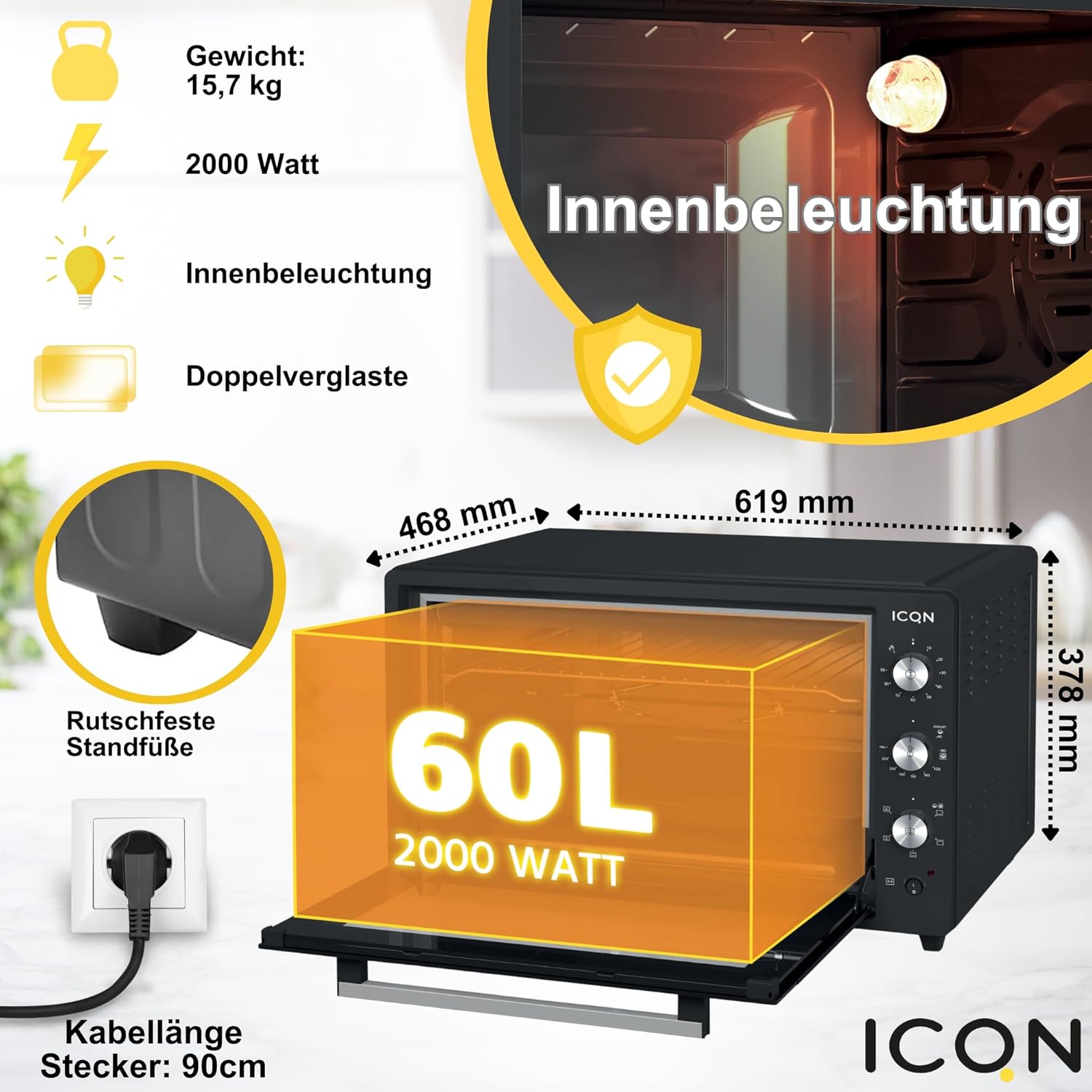
Figure 3.3: Key specifications and features of the oven, including its dimensions (468mm x 619mm x 378mm), 15.7 kg weight, 2000 Watt power, interior lighting, double-glazed door, non-slip feet, and 90cm cable length.
- fahafahana: 60 litatra
- Hery: 2000 Watts
- BOKYtage: 230V
- Ny haben'ny vokatra (L x W x H): Eo amin'ny 61.9 sm eo ho eo x 46.8 sm x 37.8 sm eo ho eo
- Lanja: 15.7 kg
- Endri-javatra manokana: Interior Lighting, Turbo Fan (Circular Air), Timer with Automatic Shut-off, Enamel Baking Tray, Easy to Clean, Double-Glazed Door.
3.3 Fitaovana tafiditra ao
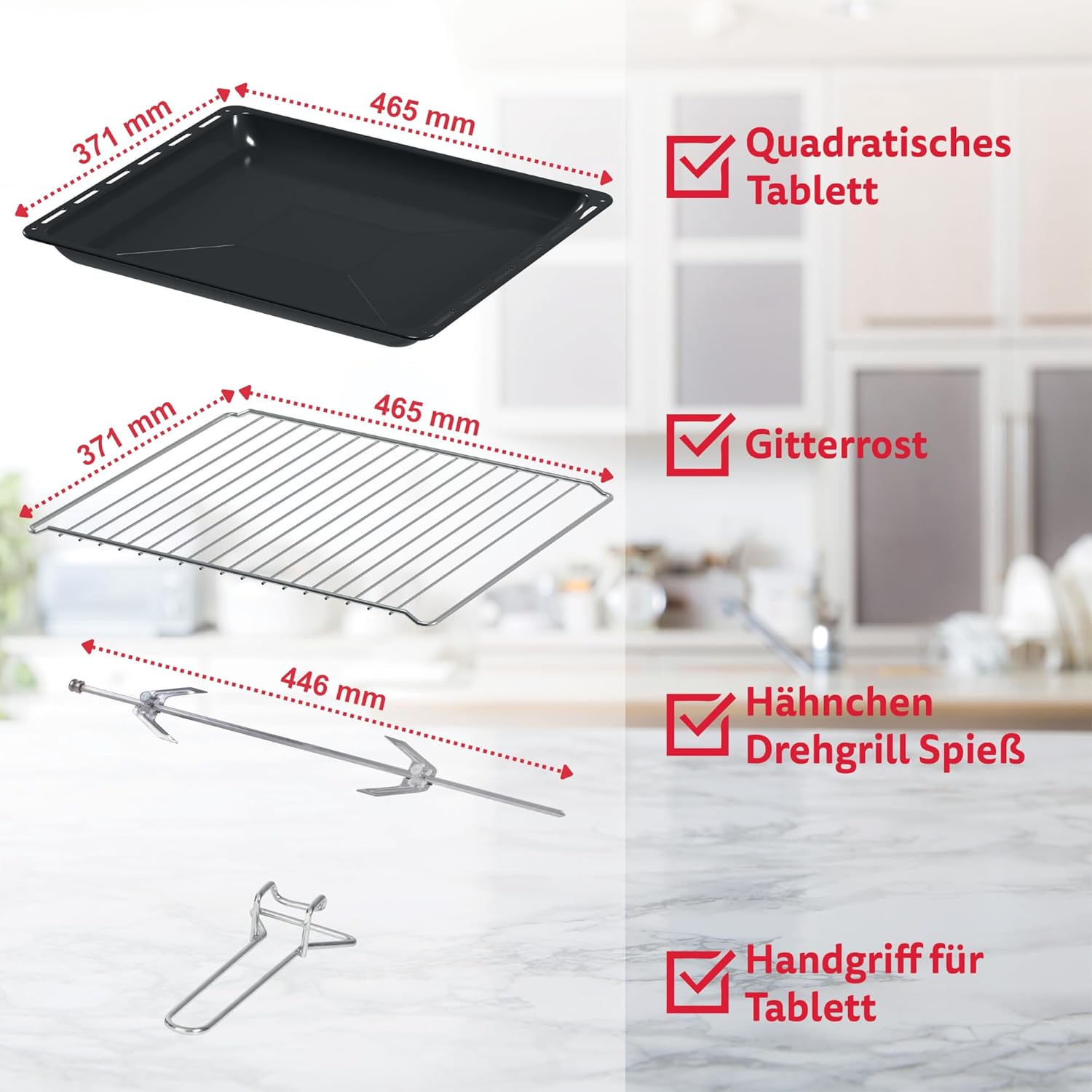
Figure 3.4: Standard accessories provided with the oven, including a square baking tray, a wire rack, a rotisserie spit for roasting, and a handle for safe removal of hot trays.
- Square Baking Tray
- Rakotra tariby
- Rotisserie Mandrora
- Tray Tanana
4. Fametrahana sy fampiasana voalohany
4.1 Famoahana
- Remove all packaging materials from the oven and its accessories.
- Jereo raha misy fahasimbana mandritra ny fitaterana. Aza ampiasaina raha simba.
- Ensure all listed accessories are present.
4.2 Fametrahana
- Apetraho eo amin'ny toerana marin-toerana, mahatanty hafanana ary mitovy lenta ny lafaoro.
- Ensure adequate ventilation around the oven (at least 10-15 cm clearance on all sides).
- Do not place near flammable materials like curtains or walls.
- Ensure the power cord can reach a standard mains socket without tension.
4.3 Alohan'ny hampiasana azy voalohany
- Fafao amin'ny doka ny atiny sy ny kojakojaamp lamba sy savony malefaka. Amainina tsara.
- For the first use, operate the oven empty for about 15 minutes at maximum temperature (230°C) with the convection fan on. This will burn off any manufacturing residues and odors. A slight smoke or odor is normal during this process. Ensure the area is well-ventilated.
- Allow the oven to cool completely before its first actual use for cooking.
5. Torolàlana miasa
5.1 Fampandehanana ankapobeny
- Place food on the appropriate accessory (baking tray or wire rack).
- Slide the accessory into the desired rack position. The oven has 4 levels for flexible placement.

Figure 5.1: Illustration of the four available rack levels within the oven cavity, allowing for versatile cooking and baking.
- Close the oven door. The double-glazed door helps maintain temperature and safety.

Sary 5.2: akaiky view highlighting the double-glazed oven door, which provides improved insulation and safety.
- Set the desired cooking function using the Function Dial.
- Set the desired temperature using the Temperature Dial.
- Set the cooking time using the Timer Dial. The oven will automatically turn off when the timer reaches zero.
5.2 Asa mahandro sakafo
The oven offers 6 different cooking functions to suit various recipes:

Figure 5.3: Visual representation of the oven's six distinct heating modes, including top heat, bottom heat, combined heat, and convection options.
- Upper Heating: Ideal for browning and grilling the top of dishes.
- Fanafanana ambany: Best for baking bases, pizzas, or slow cooking.
- Upper and Lower Heating: Standard baking mode for most dishes.
- Lower Heating + Hot Air Function (Convection): For even cooking from the bottom with fan assistance, good for pastries.
- Upper and Lower Heating + Hot Air Function (Convection): All-around even cooking, suitable for roasting and baking multiple items simultaneously.
- Fampiasana Grill: Intense top heat for grilling meats, vegetables, or toasting.
5.3 Rotisserie Function
To use the rotisserie for roasting poultry or larger cuts of meat:
- Skewer the food securely onto the rotisserie spit.
- Insert the spit into the designated rotisserie slots inside the oven.
- Select the appropriate heating function (e.g., Upper and Lower Heating + Hot Air Function or Grill Function).
- Turn the rotisserie switch (if available on your model) to activate rotation.
- Set temperature and time as required.
6. Fanadiovana sy Fikojakojana
Regular cleaning ensures optimal performance and extends the life of your oven. Always unplug the oven and allow it to cool completely before cleaning.
- Fanadiovana anatiny: The enamelled interior is designed for easy cleaning. Wipe with a damp cloth and mild detergent. For stubborn stains, use a non-abrasive oven cleaner suitable for enamelled surfaces.
- Fanadiovana ivelany: Fafao ny ivelany amin'ny malefaka, damp lamba. Aza mampiasa mpanadio abrasive na scourers.
- Accessories: Wash the baking tray, wire rack, and rotisserie spit in warm soapy water. They are generally dishwasher safe, but hand washing is recommended to preserve their finish.
- Tavoahangy potika (Crumb Tray): Regularly remove and clean the crumb tray located at the bottom of the oven to prevent grease buildup and potential fire hazards.
- Varavarana fitaratra: The double-glazed door can be disassembled for thorough cleaning of the inner glass panels. Refer to the specific instructions in your full manual for this procedure.
- AZA atsoboka ao anaty rano na ranon-javatra hafa ny vatan'ny lafaoro, ny tady, na ny plug.
7. Famahana olana
| OLANA | Antony mety hitranga | vahaolana |
|---|---|---|
| Tsy mandeha ny lafaoro. | Tsy tafiditra ao; hery outage; tsy napetraka ny fameram-potoana. | Ensure plug is securely in outlet; check household fuse/breaker; set the timer dial to desired cooking time. |
| Sakafo tsy mahandro. | Incorrect rack position; uneven food placement; fan not active (if convection desired). | Adjust rack position; arrange food evenly; ensure convection function is selected if needed. |
| Setroka be loatra mandritra ny fiasana. | Raraka ny sakafo; miangona ny menaka; may vokatry ny fampiasana voalohany. | Clean interior thoroughly; ensure crumb tray is clean. If first use, ensure ventilation. If persistent, unplug and contact support. |
| Oven door does not close properly. | Obstruction; door hinge issue. | Check for any food debris or accessories blocking the door. If hinges are damaged, contact customer service. |
If the problem persists after trying these solutions, please contact ICQN customer support.
8. Famaritana ara-teknika
| endri-javatra | famaritana |
|---|---|
| Marika | ICQN |
| Laharana modely | Sary IQ M7051N03N 1AA |
| loko | Grey rehetra |
| fahafahana | 60 litatra |
| Hery / Wattage | 2000 Watts |
| BOKYtage | 230V |
| Haben'ny vokatra (L x W x H) | 46 x 61 x 37 cm (approx. 61.9 x 46.8 x 37.8 cm from image) |
| Lanja entana | 15.7 kg |
| KEVITRA | Glass (door), Enamelled interior |
| Auto Shutoff | Yes (Timer function) |
| Endri-javatra manokana | Mini Oven with Circular Air (Convection), Timer function, Enamel Baking Tray, Easy to clean, Double-Glazed Door |
9. Warranty sy fanohanana
ICQN products are manufactured to high-quality standards. For warranty information and customer support, please refer to the warranty card included with your purchase or visit the official ICQN website. Tehirizo ny porofon'ny fividiananao raha misy fitakiana fiantohana.
For technical assistance or service, please contact:
ICQN Customer Service: support@icqn.com (Eksample email, actual contact info may vary)
Webtranokala: www.icqn.com (Eksample website, actual contact info may vary)


