1. Fampidirana
The NEDIS VEXT3470AT HDMI Audio Extractor allows you to separate audio signals from an HDMI source and output them to an audio system, while simultaneously passing the video signal to a display. This device is designed to integrate modern HDMI sources with audio systems that may not have HDMI inputs, providing both digital (Toslink) and analog (L/R stereo) audio outputs.
It supports 3D video and amplifies the digital video signal for reliable transmission.
2. Information momba ny fiarovana
- Vakio tsara ireto torolalana ireto alohan'ny hampiasana azy.
- Arovy amin'ny rano sy ny hamandoana ary ny hafanana tafahoatra ny fitaovana.
- Aza manandrana manokatra na manamboatra ilay fitaovana. Alefaso amin'ny mpiasa mahay ny serivisy rehetra.
- Ampiasao fotsiny ny adaptatera herinaratra omena. Ny fampiasana adaptatera diso dia mety hanimba ny fitaovana ary hanafoana ny antoka.
- Hamarino tsara ny rivotra manodidina ny fitaovana mba hisorohana ny hafanana be loatra.
- Tapaho ny fampifandraisana herinaratra mandritra ny oram-baratra na rehefa tsy ampiasaina mandritra ny fotoana maharitra.
3. Ny votoatin'ny fonosana
Azafady mba jereo tsara ny ao anaty fonosana mba hahazoana antoka fa eo daholo ny entana rehetra ary ao anatin'ny toe-javatra tsara:
- NEDIS VEXT3470AT HDMI Audio Extractor
- Power Adapter
- User Manual (ity antontan-taratasy ity)
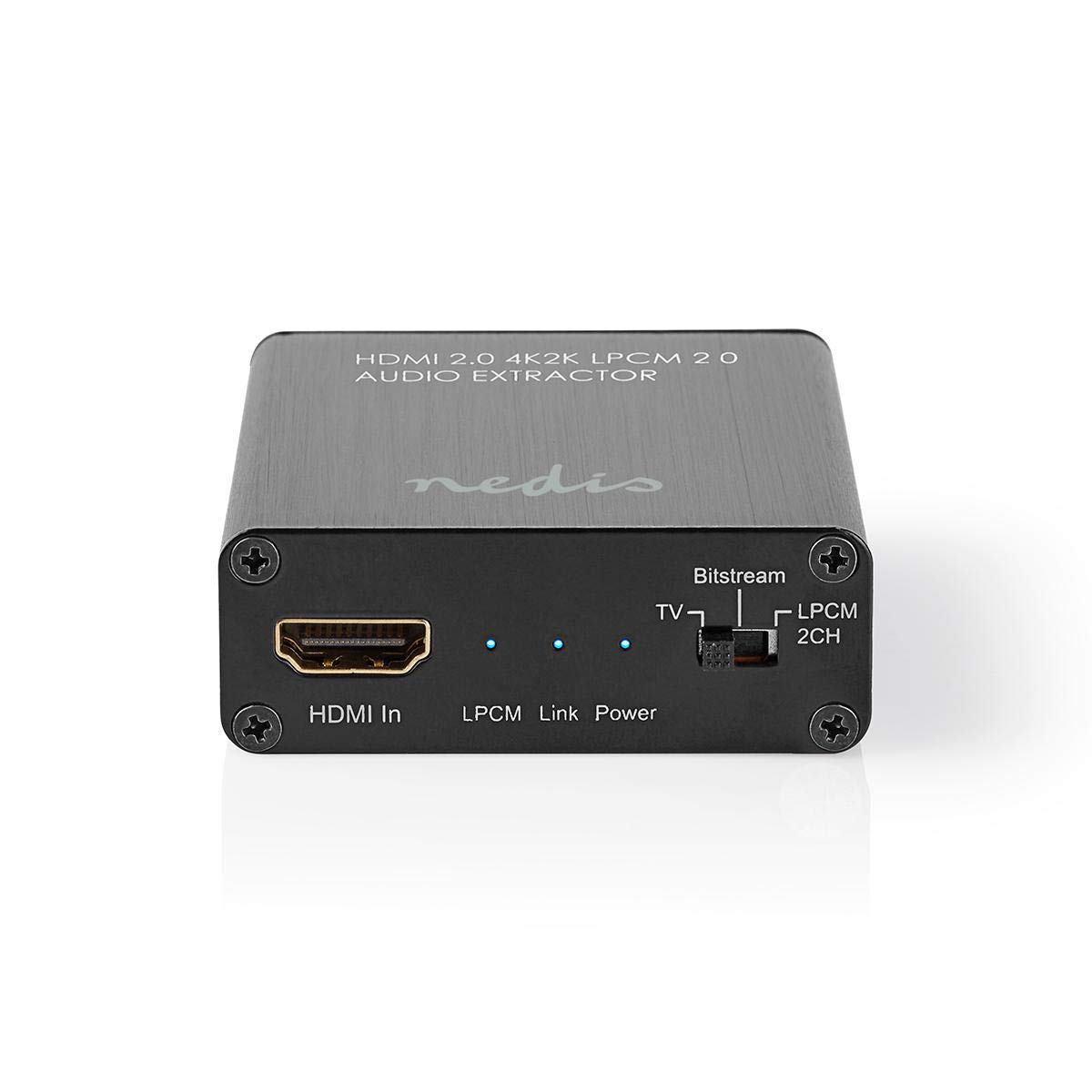
Image: The NEDIS VEXT3470AT HDMI Audio Extractor unit shown alongside its power adapter.
4. Vokatra mihoatraview
Familiarize yourself with the ports and indicators on the HDMI Audio Extractor:
4.1 Input Side
Image: Close-up of the input side of the audio extractor, showing the HDMI In port, LPCM, Link, and Power indicator LEDs, and the Audio Mode Switch.
- HDMI amin'ny: Connect your HDMI source device (e.g., DVD/Blu-ray player, game console).
- LPCM LED: Indicates when LPCM audio format is detected.
- Rohy LED: Indicates an active HDMI connection.
- Hery LED: Mirehitra rehefa mandeha ny fitaovana.
- Audio Mode Switch:
- Bitstream: For multi-channel audio formats like Dolby Digital or DTS.
- TV: Passes audio directly from the HDMI source to the TV.
- LPCM 2CH: For 2-channel stereo audio output via L/R analog and Toslink.
4.2 Output Side

Image: Close-up of the output side of the audio extractor, showing the 5V/DC power input, Optical (Toslink) audio output, HDMI Out port, and L/R analog audio outputs.
- 5V/DC: Power input port. Connect the provided power adapter here.
- Optical: Digital audio output (Toslink). Connect to an audio receiver or soundbar.
- HDMI mivoaka: Connect to your TV or display.
- L/R: Analog stereo audio output. Connect to an amplifier or stereo system using RCA cables.
5. Torolàlana fananganana
Follow these steps to connect your HDMI Audio Extractor:
- Mamono fitaovana: Ensure all devices (HDMI source, TV, audio system) are powered off before making connections.
- Ampifandraiso ny Loharano HDMI: Connect an HDMI cable from your source device (e.g., Blu-ray player) to the HDMI In port on the audio extractor.
- Connect Display: Ampifandraiso amin'ny tariby HDMI hafa avy amin'ny HDMI Out port on the audio extractor to your TV or display.
- Connect Audio System:
- For digital audio, connect an optical Toslink cable from the Optical port on the extractor to your audio receiver or soundbar.
- For analog stereo audio, connect RCA cables from the L/R ports on the extractor to your stereo ampLifier na mpiteny mavitrika.
- Hery mampifandray: Plug the provided power adapter into the 5V/DC port on the extractor, then plug the adapter into a power outlet. The Power LED should illuminate.
- Power On Devices: Power on your TV/display, audio system, and then your HDMI source device.
6. Torolàlana miasa
Once connected, operate the device as follows:
- Safidio ny fomba Audio: Ampiasao ny Audio Mode Switch on the input side to select the desired audio output format:
- Bitstream: For multi-channel audio (e.g., Dolby Digital, DTS) to be passed through the Optical output. Your audio receiver must support these formats.
- TV: Passes the audio directly to the TV via HDMI. Audio extraction via Optical/L/R may be limited or unavailable in this mode, depending on the source and TV capabilities.
- LPCM 2CH: Converts multi-channel audio to 2-channel LPCM for output via Optical and L/R analog ports. This is suitable for stereo systems or when your receiver does not support Bitstream formats.
- Fanamarinana famantarana:
- ny Power LED tokony ho eo.
- ny Rohy LED should be on when an active HDMI signal is detected from the source.
- ny LPCM LED will illuminate if the audio signal is in LPCM format.
- Adjust Audio System: Ensure your audio receiver or soundbar is set to the correct input (Optical or Analog L/R) and volume.
7. Fikojakojana
To ensure the longevity and optimal performance of your HDMI Audio Extractor:
- Fanadiovana: Mampiasà lamba malefaka sy maina hanadiovana ilay fitaovana. Aza mampiasa mpanadio rano na aerosol.
- fitahirizana: Tehirizo ao amin'ny toerana mangatsiatsiaka sy maina ny fitaovana rehefa tsy ampiasaina.
- Fikarakarana: Fadio ny milatsaka na mametraka ilay fitaovana amin'ny fiantraikany mahery vaika.
8. Famahana olana
Raha sendra olana ianao dia jereo ity torolàlana momba ny famahana olana manaraka ity:
| OLANA | Antony mety / Vahaolana |
|---|---|
| Tsy misy Output Video |
|
| Tsy misy Audio Output |
|
| Power LED dia maty |
|
| Intermittent Audio/Video |
|
9. Famaritana
Key technical specifications for the NEDIS VEXT3470AT HDMI Audio Extractor:
- Laharana modely: VEXT3470AT
- marika: NEDIS
- Fampidirana: 1x HDMI
- Output: 1x HDMI, 1x Optical (Toslink), 1x L/R Stereo (RCA)
- Dikan-teny HDMI: Compatible with HDMI 2.0 (implied by 4K2K support in product name)
- Fanapahan-dahatsary: Up to 4K (4K2K)
- Fanohanana 3D: ENY
- Endri-peo: LPCM 2.0, Bitstream (Dolby Digital, DTS pass-through)
- Herin'aratra: 5V DC (amin'ny alàlan'ny adaptatera tafiditra)
- refy (L x W x H): Manodidina ny 7.7 x 6.4 x 2.3 cm
- Lanja: 240g ny
- loko: Anthracite (Black)
- Firenena nihaviana: CHINE
10. Warranty sy fanohanana
NEDIS products are manufactured to high quality standards. In the unlikely event of a defect during the warranty period, please contact your retailer for support. The warranty period is subject to local consumer laws and regulations.
For technical assistance or further inquiries, please refer to the support information provided by your retailer or visit the official NEDIS website.