Sava lalana
The Traceable Excursion-Trac Data Logger Thermometer is designed for precise temperature monitoring and data recording. This device simultaneously displays current, minimum, and maximum temperatures, and features a rolling memory for extensive data storage. It is equipped with a submersible probe and offers customizable alarm functions to ensure critical temperature conditions are maintained and recorded.
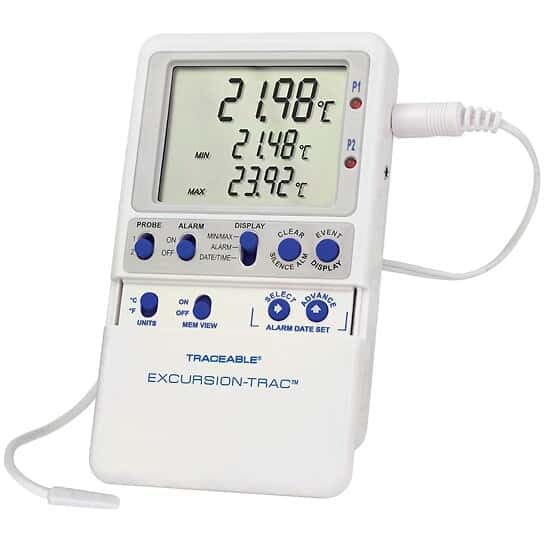
Image: The Traceable Excursion-Trac Data Logger Thermometer, showing its digital display and connected bullet probe.
Fonosana fonosana
Hamarino fa misy ny entana rehetra rehefa voavaha:
- Traceable Excursion-Trac Data Logger Thermometer Unit
- Bullet Probe with 10-ft (3-m) Cable
- USB Flash Drive
- Flip-Open Stand
- Hook-and-Loop Strips
- Magnetic Strips
- Wall-Mount Receptacle
- Batteries (pre-installed or separate)
- NIST-Traceable Calibration Certificate with Data
Hametraka
- Fametrahana bateria: If batteries are not pre-installed, open the battery compartment on the back of the unit and insert the specified batteries, observing correct polarity.
- Probe fifandraisana: Connect the bullet probe cable to the designated port on the thermometer unit. Ensure a secure connection.
- Fametrahana voalohany: Position the thermometer unit using the flip-open stand for a benchtop, or utilize the hook-and-loop strips, magnetic strips, or wall-mount receptacle for secure placement. The 10-ft (3-m) submersible micro-cable allows the probe to be placed in the desired monitoring location, even permitting doors to close over the cable.
- Herim-batana: Press the power button (if available) or ensure the unit is active. The display should illuminate, showing current temperature readings.
Torolàlana miasa
Fampandehanana fototra
- Aseho: The LCD simultaneously shows the current temperature, minimum recorded temperature (MIN), and maximum recorded temperature (MAX).
- Fizarana: Use the 'UNITS' button to toggle between Celsius (°C) and Fahrenheit (°F) temperature scales.
- fahatsiarovana View: The 'MEM VIEW' function allows review ny angona voatahiry.
Data logging
- The device features rolling memory, capable of retaining the most recent 525,600 temperature observations.
- Famindrana angona: To transfer recorded data, insert the provided USB flash drive into the unit's USB port. The data will be saved as a CSV file, accessible on any computer without special software.
- Clear Memory: After downloading data and alarm events, the memory can be cleared to continue recording new data. Refer to the device's specific buttons (e.g., 'CLEAR') for this function.
Fampiasa fanairana
- The thermometer allows setting limits for and storing up to 10 unique alarm events.
- Fametrahana fanairana: Use the 'ALARM' and 'SELECT/ADVANCE' buttons to set desired high and low temperature alarm thresholds.
- Smart-Alarm Function: The Smart-Alarm provides both visual and audible alerts. It continues to alert even if conditions return to the normal temperature range, ensuring that any excursion is noted.
- Fanairana mangina: An 'ALARM SILENCE' button is available to temporarily mute audible alerts.
fikarakarana
- Fanadiovana: Fafao madio amin'ny doka ilay fitaovanaamp cloth. Do not submerge the main unit in water. The bullet probe is submersible and can be cleaned as needed.
- Fanoloana bateria: When the battery indicator appears or the unit fails to power on, replace the batteries. Refer to the battery compartment for the correct battery type.
- Fikarakarana fikarohana: Handle the probe and its cable with care to prevent damage. Avoid sharp bends or excessive pulling on the cable.
Fanamboarana
| Olana | Antony mety hitranga | vahaolana |
|---|---|---|
| Tsy mandeha ny fitaovana na foana ny efijery. | Batterie maty na tsy voapetraka tsara. | Soloy ny bateria, hiantohana ny polarity marina. |
| Famakiana mari-pana tsy marina. | Tsy mifandray tsara na simba ny probe. | Ensure probe is securely connected. Inspect probe and cable for visible damage. |
| Data not transferring to USB drive. | USB drive not properly inserted or full. | Re-insert USB drive. Ensure the drive has sufficient space. Try a different USB drive if available. |
| Alarm not sounding or not clearing. | Alarm settings incorrect or alarm silenced. | Verify alarm thresholds. Check if the alarm has been manually silenced. |
fepetra arahana
| endri-javatra | antsipirihany |
|---|---|
| Laharana modely | Excursion-Trac |
| Temperature Range | –58 to 158 Degrees Fahrenheit (-50 to 70 Degrees Celsius) |
| vahaolana | 0.01 degre |
| araka ny marina | 0.25 degre Celsius |
| Fahaizana mirakitra angona | 525,600 temperature observations (rolling memory) |
| fifandraisana | USB (for CSV data transfer) |
| Karazana fampisehoana | LCD |
| Endri-javatra manokana | Alarm (Smart-Alarm function) |
| Karazana fikarohana | Bullet Probe, Submersible, 10-ft (3-m) cable |
| KEVITRA | plastika |
| Fikarakarana vokatra | Fafao madio |
| Certification | NIST-traceable calibration |
Fanohanana sy fiantohana
For technical assistance, product inquiries, or warranty information, please contact the manufacturer, Cole-Parmer, or visit their official website. Specific warranty details were not provided in the product data.
Mpanamboatra: COLE-PARMER
marika: Azo soratana
Fanohanana an-tserasera: www.coleparmer.com


