1. Fampidirana
This manual provides detailed instructions for the installation, operation, and maintenance of your Aerocool Streak Mid-Tower ATX PC Gaming Case. Designed for both new and experienced PC builders, the Streak case offers a compact design with a polished aluminum front panel, vibrant RGB lighting, and a full tempered glass side panel to showcase your components. It supports various cooling configurations to ensure optimal performance for your system.
2. Information momba ny fiarovana
Please read and understand all safety instructions before installing or operating the PC case. Failure to do so may result in personal injury or damage to the product.
- Esory amin'ny faladiany foana ny herinaratra alohan'ny hanaovana fametrahana na fikojakojana.
- Be aware of sharp edges inside the case. Handle components with care to avoid cuts.
- Arovy amin'ny ankizy ireo singa madinika sy visy.
- Hamarino tsara ny fiorenana mba hisorohana ny fahatafintohinana elektrika.
- Do not expose the case to water or excessive humidity.
3. Ny votoatin'ny fonosana
Hamarino fa misy ny entana rehetra ao anaty fonosana:
- Aerocool Streak Mid-Tower ATX PC Gaming Case
- Accessory box (screws, standoffs, cable ties, etc.)
- User Manual (ity antontan-taratasy ity)
4. Case Components Overview
Familiarize yourself with the various parts of your Aerocool Streak case.

Sary 4.1: zorony view of the Aerocool Streak PC case, showcasing the RGB front panel and tempered glass side panel.

Sary 4.2: Mijoro ambony midina view of the Aerocool Streak PC case, highlighting the top panel and front I/O ports.
4.1 Seranana I/O eo anoloana
The front I/O panel provides convenient access to essential connections.
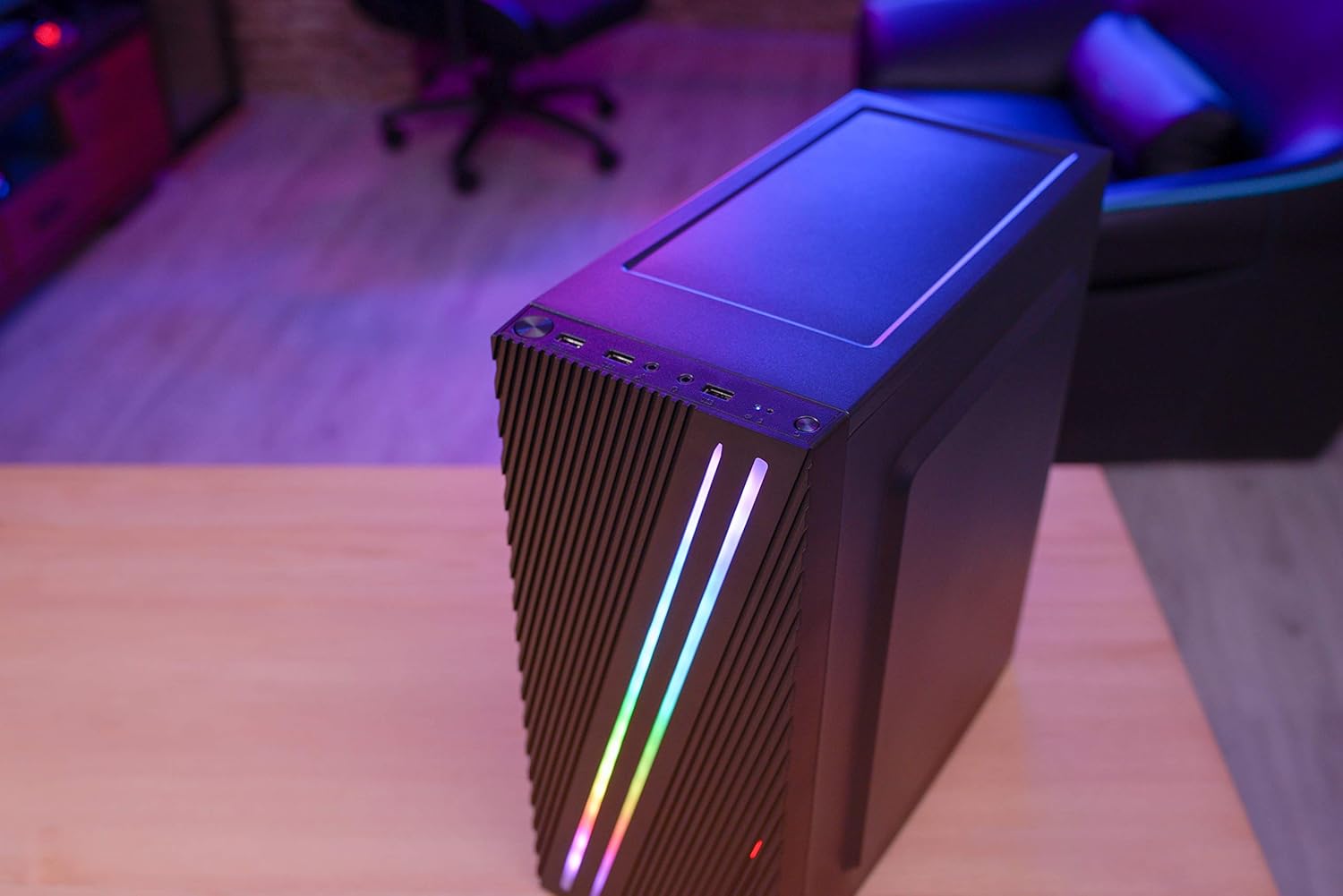
Sary 4.3: Close-up of the front I/O panel, showing the power button, LED control button, USB 3.0 port, two USB 2.0 ports, and HD audio/microphone jacks.
- Bokotra hery: To turn the system on/off.
- Bokotra fanaraha-maso LED: To cycle through RGB lighting modes.
- USB 3.0 Port (x1): Ho an'ny famindrana angona haingam-pandeha.
- Port USB 2.0 (x2): Ho an'ny fitaovana USB mahazatra.
- HD Audio & Mic Jacks: Mba hampifandraisana ny écouteur sy ny mikrôfôna.
4.2 Firafitry ny Atitany
The interior is designed for efficient component installation and cable management.

Sary 4.4: anaty view of the Aerocool Streak PC case, showing the motherboard tray, drive bays, and cable routing cutouts.
5. Fametrahana sy fametrahana
Follow these steps to assemble your PC components within the Aerocool Streak case.
5.1 Fanomanana
- Sokafy ny fonosan'ny boaty ary esory ny akora rehetra ilaina amin'ny fonosana.
- Apetraho eo amin'ny toerana fisaka sy marin-toerana ny fonony.
- Gather necessary tools: Phillips head screwdriver, cable ties (included in accessory box).
- Remove the tempered glass side panel by unscrewing the four thumb screws.
5.2 Fametrahana Motherboard
The Aerocool Streak supports ATX, Micro-ATX, and Mini-ITX motherboards.

Sary 5.1: Diagram illustrating the compatible motherboard sizes (Mini-ITX, Micro-ATX, ATX) within the case.
- Install the necessary motherboard standoffs into the motherboard tray according to your motherboard's form factor.
- Place your motherboard carefully onto the standoffs, aligning the screw holes.
- Ampifanaraho amin'ny visy omena ny motherboard.
5.3 Fametrahana Unite famatsiana herinaratra (PSU).
The case features a bottom-mount PSU design.
- Ampidiro ao amin'ny toerana voatondro ho azy eo amin'ny farany ambany amin'ny boaty ny PSU.
- Secure the PSU to the case rear with screws.
5.4 Fametrahana ny kapila fitahirizana
Install your 2.5" SSDs and 3.5" HDDs.
- SSD 2.5": Mount SSDs to the designated 2.5" drive trays or mounting points on the motherboard tray.
- Kapila mafy 3.5": Apetraho ao anatin'ny tranom-pitaovana eo ambanin'ny fonosan'ny PSU ny HDD.
5.5 Expansion Card Installation (Graphics Card, etc.)
The case supports high-end graphics cards up to 335mm in length.
- Esory avy ao ambadiky ny boaty ny fonon'ny slot PCIe ilaina.
- Insert your expansion card into the corresponding PCIe slot on the motherboard.
- Apetaho amin'ny visy ny karatra.
5.6 Fametrahana ny Rafitra Fampangatsiahana
The Aerocool Streak supports both air and liquid cooling solutions.

Sary 5.2: Diagram showing air cooling options, including front 120mm fans (optional) and a rear 80mm fan (included).

Sary 5.3: Diagram illustrating liquid cooling support, specifically a 240mm radiator at the front (optional).
- Fampangatsiahana rivotra: The case supports up to two 120mm fans at the front (optional) and includes one 80mm fan at the rear.
- Mangatsiaka ranon-javatra: A 240mm radiator can be installed at the front of the case (optional).
- Install fans or radiators into their respective mounting points and secure them with screws.
5.7 Fitantanana tariby
Utilize the cable routing cutouts and tie-down points behind the motherboard tray to organize cables for improved airflow and aesthetics.
- Route all power and data cables through the designated cutouts.
- Use cable ties to bundle and secure cables neatly.
6. Torolàlana miasa
6.1 Famelomana ny Rafitrao
- Hamarino tsara fa tafapetraka tsara ny singa rehetra ary mifandray tsara ny tariby rehetra.
- Connect the power cable to your PSU and then to a wall outlet.
- Avadiho amin'ny toerana 'ON' ny bokotra herinaratra eo amin'ny PSU.
- Press the power button on the front I/O panel of the case to start your system.
6.2 Fanaraha-maso ny Jiro RGB
The Aerocool Streak features 18 distinct RGB lighting modes on its front panel.

Sary 6.1: The Aerocool Streak PC case with its vibrant RGB lighting illuminated on the front panel.
- Tsindrio ny Bokotra fanaraha-maso LED on the front I/O panel to cycle through the 18 available lighting modes.
- These modes include 11 RGB flow modes and 7 static color modes.
7. Fikojakojana
Ny fikojakojana tsy tapaka dia manampy amin'ny fiantohana ny faharetan'ny fampiasana sy ny fahombiazan'ny boaty PC-nao.
7.1 Fanadiovana ny boaty
- ivelany: Ampiasao malefaka, damp cloth to wipe down the exterior surfaces. Avoid abrasive cleaners.
- Atitany: Periodically use compressed air to remove dust buildup from inside the case, especially around fans and heatsinks.
7.2 Fikojakojana ny sivana vovoka
The case may include removable dust filters to prevent dust ingress. Clean these filters regularly.
- Locate and carefully remove any dust filters (e.g., top, bottom, front).
- Clean the filters with water and mild soap, or use compressed air.
- Ensure filters are completely dry before re-installing them.
8. Famahana olana
If you encounter issues with your Aerocool Streak case, refer to the following common problems and solutions.
- Tsy mandeha ny rafitra:
- Check all power connections, including the PSU to the wall, PSU switch, and motherboard power cables.
- Ensure the front panel power switch cable is correctly connected to the motherboard.
- RGB lighting is not working:
- Verify that the RGB lighting cables are properly connected to the power supply or motherboard RGB header.
- Press the LED control button to cycle through modes, as it might be on a static black mode.
- Poor airflow/overheating:
- Hamarino tsara fa mihodina tsara ny mpankafy ny boaty rehetra.
- Diovy ny sivana vovoka sy ny singa anatiny.
- Verify proper fan orientation for optimal airflow (intake/exhaust).
9. Famaritana
| endri-javatra | famaritana |
|---|---|
| Anarana modely | Streak |
| Laharana modely | ACCM-PV19012.11 |
| Karazana tranga | Mid-Tilikambo |
| Mifanaraka amin'ny motherboard | ATX, Micro ATX, Mini ITX |
| KEVITRA | Tempered Glass (side panel) |
| loko | Mainty |
| Seranan-tsambo I / O eo aloha | 1x USB 3.0, 2x USB 2.0, HD Audio, Mic, LED Control Button, Power Button |
| RGB jiro | 18 Lighting Modes (11 flow, 7 static) |
| CPU Cooler Clearance | hatramin'ny 151 mm |
| Ny halavan'ny karatra sary | hatramin'ny 335 mm |
| PSU Mounting | Tendrombohitra ambany |
| Fomba fampangatsiahana | Rivotra, Rano |
| Tafiditra mpankafy | 1x 80mm Rear Fan |
| Optional Fan Support | Farany: 2x 120mm |
| Fanohanana Radiator | Front: 1x 240mm (optional) |
10. Warranty sy fanohanana
The Aerocool Streak PC Gaming Case comes with a 2-year warranty on parts. For technical support, warranty claims, or further assistance, please contact your retailer or the official Aerocool support channels. Keep your proof of purchase for warranty validation.


