1. Fampidirana
Misaotra anao nividyasing the Acme Cargo Metal Frame Desk and Hutch. This manual provides essential information for the safe assembly, proper use, and maintenance of your new furniture. Please read these instructions carefully before beginning assembly and retain this manual for future reference.
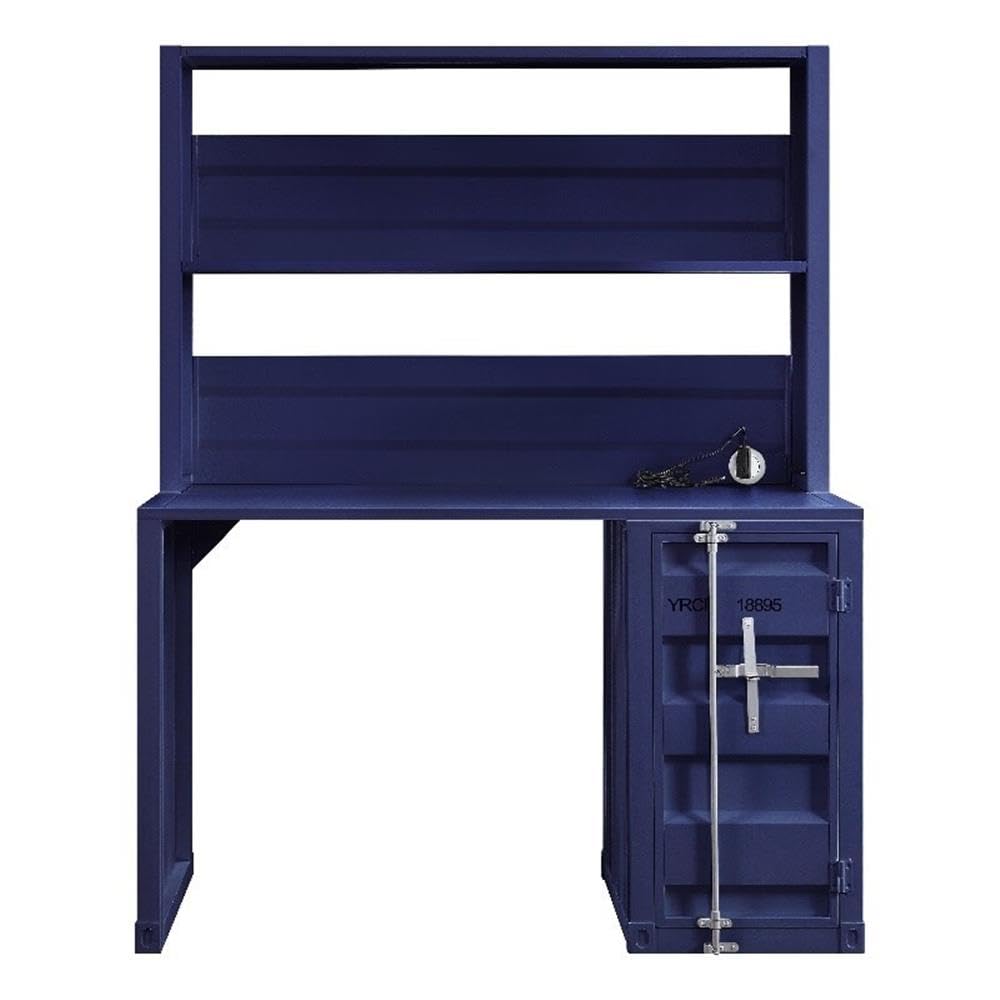
Figure 1: Fully assembled Acme Cargo Metal Frame Desk and Hutch.
The Acme Cargo Desk and Hutch features a robust metal frame design, offering a functional workspace with integrated storage. It includes a rectangular writing desk surface, an overhead hutch with open compartments, and a storage base with a door and internal shelving.
2. Information momba ny fiarovana
FAMPITANDREMANA: Ny tsy fanarahana ireto toromarika fiarovana ireto dia mety hiteraka ratra na fahasimbana amin'ny vokatra.
- Angony eo amin'ny toerana malefaka sy madio foana ny vokatra mba hisorohana ny fikikisana.
- Ataovy azo antoka fa eo daholo ny piesy rehetra ary tsy misy simba alohan'ny hanombohana ny fametrahana azy. Aza manohy ny fametrahana raha misy piesy tsy eo na simba.
- Mila olon-dehibe roa ny fanamboarana. Aza manandrana manamboatra irery.
- Arovy amin'ny ankizy sy ny biby fiompy ireo poti-javatra madinika sy ireo fitaovana famonosana.
- Do not exceed the maximum weight capacity of 208 pounds (94 kg) for the desk surface.
- Do not climb on the desk or hutch.
- Place the desk on a level surface to prevent wobbling and instability.
- Regularly check and tighten all fasteners to ensure stability.
- If the product includes anti-tip hardware, it is highly recommended to install it to prevent tipping, especially in households with children.
3. Ny votoatin'ny fonosana
Before assembly, verify that all components listed below are included in your package. If any parts are missing or damaged, please contact customer support immediately.
- Desk Frame (Left and Right Supports)
- Takelaka birao
- Hutch Frame (Top and Side Panels)
- Hutch Shelves (2)
- Storage Base Unit
- Storage Base Door
- Internal Storage Shelf (1)
- Hardware Pack (screws, bolts, cam locks, hinges, etc.)
- Assembly Tools (Hex Key, etc. - Note: Additional tools like a screwdriver may be required and are not included)
4. Torolàlana momba ny fananganana sy ny fivoriambe
Please follow these steps carefully. Assembly is recommended for two people.
Fitaovana ilaina (tsy tafiditra):
- Phillips Head Screwdriver
- Mallet fingotra (tsy voatery, raha te-hikapoka moramora)
Dingan'ny fivoriambe:
- Esory ary fantaro ny ampahany: Carefully remove all components from the packaging. Lay them out on a clean, soft surface (e.g., carpet or blanket) to prevent scratches. Identify each part using the provided parts list.
- Assemble Desk Base: Attach the left and right desk support frames to the desktop panel using the provided bolts and hex key. Ensure all connections are secure but do not overtighten initially.
- Assemble Storage Base: Attach the storage base unit to the right side of the desktop panel. Secure it with the appropriate fasteners.
- Install Storage Door: Attach the hinges to the storage base door and then to the storage base unit. Ensure the door opens and closes smoothly. Install the internal storage shelf as desired.
- Attach Hutch Frame: Position the hutch frame onto the back of the desktop panel, aligning the pre-drilled holes. Secure the hutch frame to the desktop and the rear of the desk supports using the designated fasteners.
- Install Hutch Shelves: Insert the two hutch shelves into the designated slots or attach them to the hutch frame using the provided hardware.
- Fanamafisana farany: Once all components are assembled, carefully move the desk to its desired location. On a level surface, gradually tighten all bolts and screws until secure. Do not overtighten.
- Fanamarinana ny fahamarinan-toerana: Gently push and pull the desk to ensure it is stable and does not wobble. If wobbling occurs, recheck all connections and ensure the desk is on a level surface.

Figure 2: Storage base with door open, revealing internal shelf.
5. Torolàlana miasa (fampiasana)
Your Acme Cargo Desk and Hutch is designed for versatile use in a home office, dorm, or bedroom.
- Tambonin'ny birao: Use the main desk surface for your computer, writing, or other tasks. Ensure the weight distributed on the surface does not exceed 208 pounds (94 kg).
- Talantalana Hutch: The open hutch shelves are ideal for storing books, decorative items, or small office supplies. Distribute weight evenly and avoid placing excessively heavy items on the upper shelves.
- Storage Base: The enclosed storage base with a door provides discreet storage for files, larger items, or personal belongings. The internal shelf can be used to organize items within the compartment.
- Fitantanana tariby: While not explicitly designed with cable management features, you can use cable ties or adhesive clips (not included) to organize power cords and data cables behind the desk for a tidy workspace.
6. Fikojakojana
Ny fikarakarana araka ny tokony ho izy dia hanalava ny androm-piainan'ny biraonao sy ny endriny.
- Fanadiovana: Kosehina amin'ny lamba malefaka, damp cloth. Avoid abrasive cleaners, harsh chemicals, or solvents, as these can damage the painted finish. Dry immediately with a clean cloth.
- Fanaraha-maso tsy tapaka: Periodically check all bolts, screws, and fasteners to ensure they remain tight. Retighten as necessary to maintain structural integrity and prevent wobbling.
- Aza hamandoana (Avoid Moisture): Do not place hot items directly on the desk surface without protection. Wipe up spills immediately to prevent water damage or staining.
- Fiposahan'ny masoandro: Avoid prolonged exposure to direct sunlight, which can cause fading or discoloration of the finish over time.
7. Famahana olana
| OLANA | Antony mety hitranga | vahaolana |
|---|---|---|
| Mihozongozona na tsy marin-toerana ny latabatra. | Uneven floor surface; loose fasteners; incorrect assembly. | Ensure the desk is on a level surface. Check and tighten all assembly fasteners. Review dingana fivoriambe mba hahazoana antoka ny fametrahana marina. |
| Storage door does not close properly. | Hinges are misaligned or loose; obstruction. | Check hinge alignment and tighten screws. Ensure nothing is obstructing the door's path. |
| Parts appear bent or damaged upon arrival. | Fahasimban'ny fandefasana. | Do not proceed with assembly. Contact customer support immediately with photos of the damage for replacement parts or a return. |
| Missing hardware or components. | Fahadisoan'ny fonosana. | Carefully check all packaging materials. If still missing, contact customer support for replacement parts. |
8. Famaritana
| endri-javatra | antsipirihany |
|---|---|
| marika: | Acme |
| Laharana modely: | AC-37907 |
| Ny haben'ny vokatra (D x W x H): | 24" D x 47" W x 60" H (61 sm D x 119 sm W x 152 sm H) |
| Lanja entana: | 104 kilao (47.2 kg) |
| Fitaovana: | Metal (Frame, Top, Base, Hutch) |
| loko: | Manga |
| Karazana famaranana: | Vita voaloko |
| Soso-kevitra lanja ambony indrindra: | 208 kilao (94 kg) |
| Isan'ny talantalana: | 2 (Hutch) + 1 (Internal Storage) |
| Isan'ny kabinetra: | 1 |
| Fivoriambe ilaina: | ENY |
| Isan'ny olona atolotra ho an'ny fivoriambe: | 2 |

Figure 3: Product dimensions for the Acme Cargo Desk and Hutch.
9. Fampahalalana momba ny fiantohana
This Acme Cargo Metal Frame Desk and Hutch is covered by a Garantie voafetra from the manufacturer. The specific terms and duration of the warranty may vary. For detailed information regarding your product's warranty, including coverage, limitations, and how to make a claim, please refer to the official Acme Furniture webtranokala na mifandray mivantana amin'ny serivisy mpanjifany.
Azafady, tehirizo ny porofon'ny fividiananao raha misy fitakiana fiantohana.
10. Fanohanana ny mpanjifa
If you have any questions, require assistance with assembly, or need to report missing or damaged parts, please contact Acme Furniture customer support:
- Webtranokala: Visit the official Acme Furniture webtranokala ho an'ny FAQs, fisoratana anarana amin'ny vokatra, ary endrika fifandraisana.
- Mpivarotra: If purchased from a retailer, you may also contact their customer service department for assistance.
When contacting support, please have your model number (AC-37907) and proof of purchase readily available.


