Sava lalana
This manual provides essential information for the safe and efficient operation of your HH Electronics Tessen TNP-1201 Speaker Cabinet. Please read this manual thoroughly before using the product to ensure proper setup, operation, and maintenance. Retain this manual for future reference.

Sary 1: Eo anoloana view of the HH Electronics Tessen TNP-1201 Speaker Cabinet, showcasing the protective grille and HH logo.
Torolàlana manan-danja momba ny fiarovana
- Vakio ny toromarika: Vakio sy fantaro ny torolàlana momba ny fiarovana sy ny fampiasana rehetra alohan'ny hampiasana ity vokatra ity.
- Mitazona torolalana: Tehirizo ireto toromarika ireto mba hojerena amin'ny ho avy.
- Tandremo ny fampitandremana: Araho ny fampitandremana rehetra momba ny vokatra sy ao amin'ny toromarika fampandehanana.
- Araho ny toromarika: Araho ny torolàlana momba ny fampiasana sy ny fampiasana rehetra.
- Rano sy hamandoana: Aza mampiasa ity fitaovana ity eo akaikin'ny rano.
- Fanadiovana: Diovy amin'ny lamba maina ihany.
- rivotra: Aza sakanana izay fisokafan'ny rivotra. Apetraho araka ny torolalan'ny mpanamboatra.
- hafanana: Aza apetraka eo akaikin'ny loharanon'ny hafanana toy ny radiatera, rejistra hafanana, fatana, na fitaovana hafa (anisan'izany amplifiers) izay mamokatra hafanana.
- Fiarovana tady herinaratra: Arovy ny tadin-jiro mba tsy ho voahitsakitsaka na voatsindrona, indrindra eo amin'ny plugs, ny fitoeran'entana mora, ary ny toerana hivoahana amin'ny fitaovana.
- Attachments: Mampiasà fametahana/fanampiana voafaritry ny mpanamboatra ihany.
- Mametraka: Ampiasao ihany miaraka amin'ny sarety, fijoroana, tripod, bracket, na latabatra nofaritan'ny mpanamboatra, na amidy miaraka amin'ny fitaovana. Rehefa ampiasaina ny sarety dia mitandrema rehefa mamindra ny fitambaran'ny sarety/fitaovana mba tsy hisian'ny ratra amin'ny fihodirana.
- Esory ny plug: Esory ity fitaovana ity mandritra ny oram-baratra na rehefa tsy ampiasaina mandritra ny fotoana maharitra.
- Serivisy: Alefaso amin'ny mpiasan'ny serivisy mahafeno fepetra ny serivisy rehetra. Ilaina ny serivisy rehefa simba amin'ny fomba rehetra ny fitaovana, toy ny tadin'ny famatsiana herinaratra na ny plug, simba ny ranon-javatra na ny zavatra nianjera tao amin'ny fitaovana, niharan'ny orana na ny hamandoana ny fitaovana, tsy mandeha ara-dalàna. , na efa nariana.
Vita ny vokatraview
The HH Electronics Tessen TNP-1201 is a high-performance speaker cabinet designed for live sound and stage applications. It features robust construction and advanced audio components to deliver clear and powerful sound reproduction.
Lafin-javatra fototra:
- 1 x 12” Precision engineered high efficiency HH woofer with Kevlar fiber reinforced cones, highly detailed mid range for vocal clarity.
- Italian designed LaVoce 1” throat compression drivers, high open area steel grille with acoustic foam backing for maximum protection of drivers without compromising sound.
- High power handling without compression for dynamic performance, High quality, High power passive x-overs, with bi-amp bypass switch.
- 35 mm pole mount, 35° monitor angle, asymmetric profile to prevent standing wave distortion.
- High open area steel grille with acoustic foam backing for maximum protection of drivers without compromising sound.
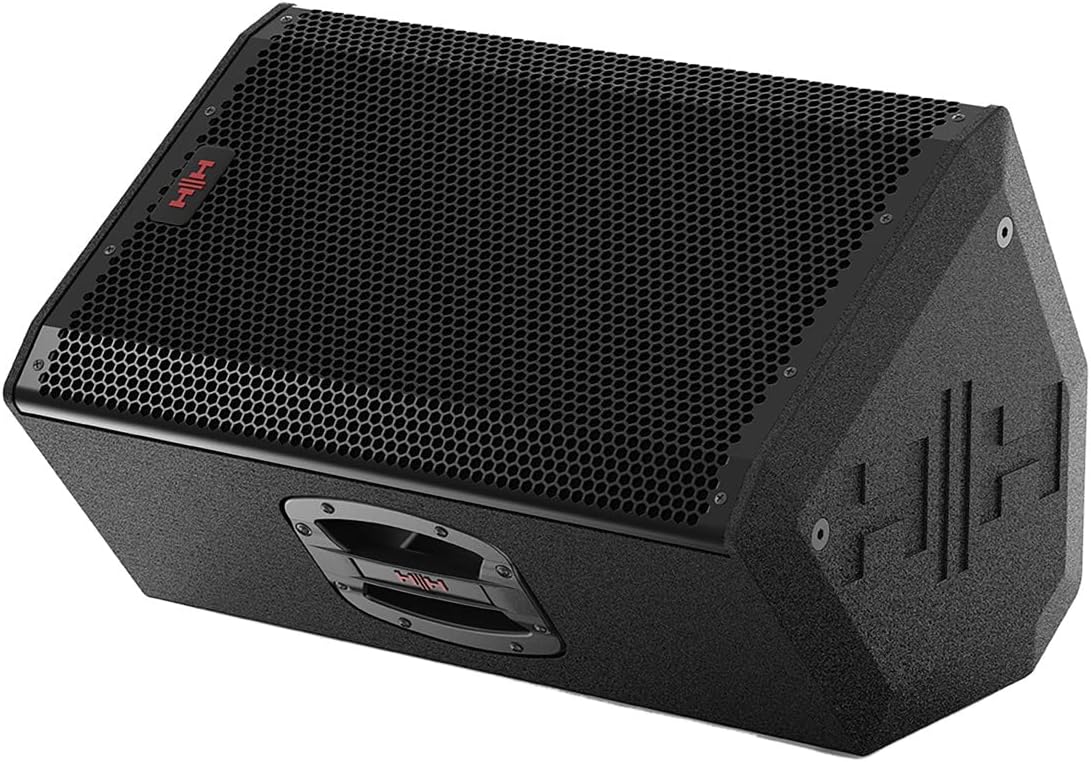
Sary 2: Lafiny mitongilana view of the Tessen TNP-1201 speaker, highlighting its robust grille and cabinet design.
Fananganana sy fifandraisana
Follow these steps to properly set up your Tessen TNP-1201 speaker cabinet:
- Fametrahana: Position the speaker on a stable, flat surface or mount it using a compatible 35mm pole mount. Ensure adequate ventilation around the unit. The asymmetric profile allows for a 35° monitor angle when placed on its side.
- Fampifandraisana herinaratra: Connect the power cord to the AC inlet on the rear panel of the speaker and then to a suitable power outlet. Ensure the power switch is in the OFF position before connecting.
- Fampidirana feo: Connect your audio source (e.g., mixer, instrument) to the input connectors on the rear panel. The TNP-1201 typically uses standard XLR or 1/4" TRS connectors for audio input.
- Output (if applicable): If linking multiple speakers, use the output connectors to send the audio signal to another speaker.
- Herin'ny voalohany: Once all connections are secure, switch the power ON. Start with volume levels at minimum and gradually increase to the desired level.

Sary 3: aoriana view of the Tessen TNP-1201, detailing the input/output panel, power connection, and integrated handles.
Torolàlana miasa
The Tessen TNP-1201 is designed for straightforward operation. Familiarize yourself with the controls on the rear panel:
- Fanaraha-maso ambaratonga fidirana: Adjusts the overall input sensitivity of the speaker. Start low and increase gradually to avoid distortion.
- EQ Controls (if present): Some models may include basic EQ adjustments (e.g., Bass, Treble) to fine-tune the sound to your environment.
- Bi-Amp Bypass Switch: This speaker features a high-quality passive crossover with a bi-amp bypass switch. Consult advanced audio guides if you intend to use bi-amplification. For standard operation, ensure it is set correctly for passive mode.
- Tondro hery: An LED indicator typically illuminates when the unit is powered on.
- Clip/Limit Indicator: This LED illuminates when the input signal is too high, indicating potential distortion. Reduce the input level if this light frequently activates.
Always ensure that the input signal is clean and not overdriven from your source device to achieve optimal sound quality and prevent damage to the speaker.
Fikojakojana sy fikarakarana
Proper maintenance ensures the longevity and performance of your Tessen TNP-1201 speaker cabinet.
- Fanadiovana: Clean the exterior of the cabinet with a soft, dry cloth. Do not use abrasive cleaners, solvents, or waxes. Avoid spraying liquids directly onto the speaker.
- Fikarakarana ny grille: The steel grille with acoustic foam backing protects the drivers. Ensure it remains free of dust and debris. Do not attempt to remove the grille unless necessary for servicing by qualified personnel.
- fitahirizana: When not in use for extended periods, store the speaker in a dry, temperature-controlled environment, away from direct sunlight and extreme temperatures.
- Fanaraha-maso: Periodically inspect the power cord and all cables for any signs of damage. Replace damaged cables immediately.

Sary 4: lafiny view of the Tessen TNP-1201, illustrating its asymmetric cabinet profile designed to prevent standing wave distortion and allow for monitor use.
Fanamboarana
If you encounter issues with your Tessen TNP-1201, refer to the following common problems and solutions:
| OLANA | Antony mety hitranga | vahaolana |
|---|---|---|
| Tsy misy feo |
|
|
| Feo diso |
|
|
| Hum na Buzz |
|
|
If the problem persists after attempting these solutions, please contact HH Electronics customer support or a qualified service technician.
fepetra arahana
Detailed technical specifications for the HH Electronics Tessen TNP-1201 Speaker Cabinet:
| endri-javatra | antsipirihany |
|---|---|
| Marika | HH Electronics |
| Anarana modely | TNP-1201 |
| Karazana mpandahateny | Woofer |
| Haben'ny mpandahateny | 12 santimetatra |
| gazety Ampkarazana lification | Passive (with bi-amp bypass switch) |
| Output Wattage | 800 Watts (Power Handling) |
| Loharanon-kery | Corded Electric |
| Karazana fametrahana | Floor Standing, 35 mm Pole Mount |
| Lanja entana | 33 kg |
| Ny haben'ny fonosana | 23 x 15 x 14 santimetatra |
| mpanamboatra | HH Electronics |
| ASIN | B07RTSFYG4 |
| Daty misy voalohany | 12 Mey 2019 |
| Tsy tantera-drano | DISO |
Warranty Information
HH Electronics products are manufactured to high standards and are warranted against manufacturing defects. Specific warranty terms and conditions may vary by region and retailer. Please retain your proof of purchase. For detailed warranty information, please refer to the official HH Electronics webtranokala na mifandraisa amin'ny mpivarotra nahazo alalana anao.
Fanohanana ny mpanjifa
For technical assistance, service inquiries, or further information regarding your HH Electronics Tessen TNP-1201 Speaker Cabinet, please visit the official HH Electronics webtranonkala na mifandraisa amin'ny sampana fanohanana mpanjifa. Ny antsipirian'ny fifandraisana dia matetika hita ao amin'ny an'ny mpanamboatra webtoerana na ao amin'ny fonosana vokatra.


