1. Vokatra mihoatraview
The Walfront AS804 Digital Sound Level Meter is a high-precision instrument designed for accurate measurement of sound levels in various environments. This device is equipped with a professional sensor to ensure excellent sensitivity and precision, making it suitable for a wide range of applications including vehicle noise testing, industrial equipment noise testing, and home noise assessment.
Key features include a high-intensity backlight screen for clear readings in dim conditions and an automatic shutdown function that conserves battery life by turning off the device after 3 minutes of inactivity.

Figure 1.1: Walfront AS804 Digital Sound Level Meter in operation, held by a hand.
2. Information momba ny fiarovana
Please read and understand all safety instructions before operating the device to ensure safe and proper use.
- Fiarovana ankapobeny: Always operate the device in accordance with the instructions provided.
- Fepetra ara-tontolo iainana: Do not expose the device to extreme temperatures, high humidity, or corrosive environments. Avoid direct sunlight.
- fanoherana ny rano: This device is not waterproof. Avoid contact with liquids.
- Fiarovana ny bateria: Use only the specified battery type. Do not mix old and new batteries or different types of batteries. Dispose of used batteries responsibly according to local regulations.
- Fikojakojana: Aza manandrana manala na manova ny fitaovana. Ampahafantaro ny mpiasa mahafeno fepetra ny fanamboarana rehetra.
- Ankizy: Arovy amin'ny ankizy ny fitaovana.
3. Vokatra singa sy endri-javatra
Familiarize yourself with the main components of your Walfront AS804 Digital Sound Level Meter:
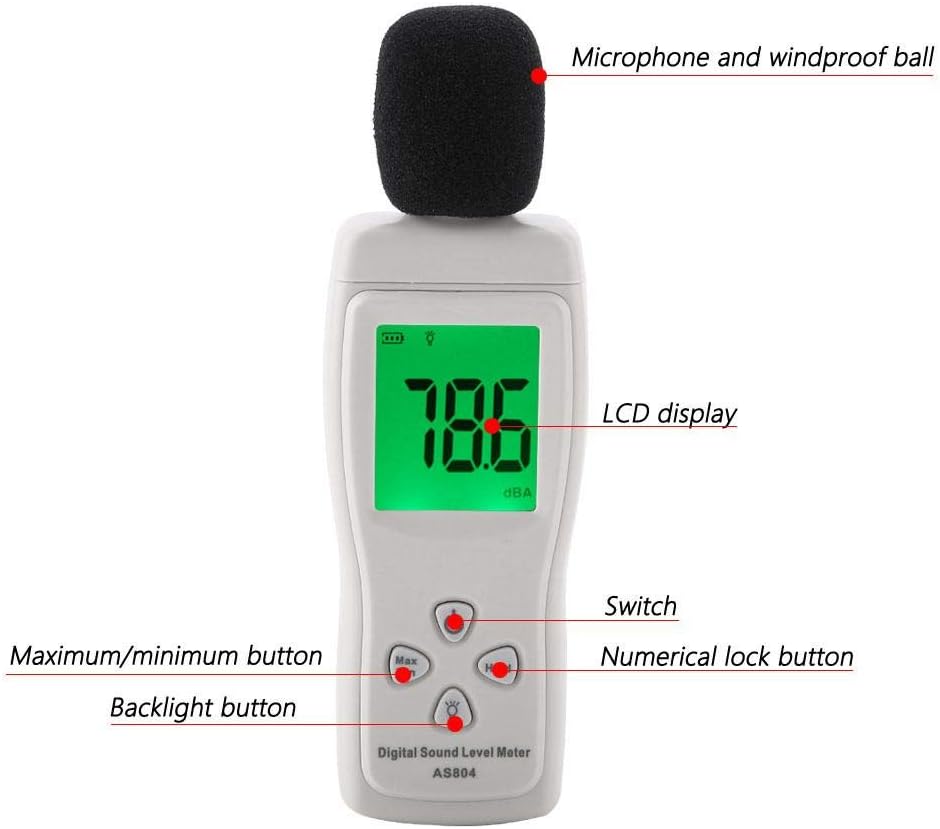
Figure 3.1: Labeled diagram of the Walfront AS804 Digital Sound Level Meter.
- Microphone and Windproof Ball: Captures sound waves. The windproof ball reduces interference from wind noise.
- LCD Display: Shows sound level readings, battery status, and other indicators.
- Power Button (Switch): Mamelona na mamono ny fitaovana.
- Button Max/Min: Toggles between maximum and minimum sound level readings recorded during a measurement session.
- Hold Button (Numerical Lock): Mampijanona ny famakiana ankehitriny eo amin'ny efijery.
- bokotra backlight: Activates or deactivates the display backlight for improved visibility in low-light conditions.

Sary 3.2: akaiky view of the microphone with the windproof ball removed.
4. Fametrahana
4.1 Fametrahana bateria
The Walfront AS804 requires three (3) 1.5V AAA alkaline batteries (not included).
- Tadiavo eo amin'ny lamosin'ilay fitaovana ny fonon'ny efitrefitra bateria.
- Atsofohy midina ny fonony mba hanokafana ny fizarana.
- Ampidiro bateria AAA telo, ary ataovy izay hahazoana antoka fa marina ny polarity (+ sy -) araka ny aseho ao anatin'ilay fitoeran-javatra.
- Soloy ny fonon'ny efitry ny bateria amin'ny alàlan'ny fanosehana azy hiverina amin'ny toerany mandra-pikitika tsara.

Figure 4.1: Open battery compartment for AAA battery installation.
4.2 Mamelona/Mamono
- Hamelona: Tsindrio ny fahefana button (labeled 'Switch' in Figure 3.1). The LCD display will illuminate.
- Mamono: Tsindrio ary hazòny ny fahefana bokotra mandritra ny segondra vitsy mandra-pahafatin'ny fampisehoana.
- Fanakatonana ho azy: The device will automatically power off after approximately 3 minutes of inactivity to conserve battery life.
5. Torolàlana miasa
5.1 Basic Sound Level Measurement
- Ensure batteries are installed and power on the device.
- Hold the sound level meter with the microphone pointed towards the sound source you wish to measure. Ensure no obstructions are blocking the microphone.
- The current sound level in dBA will be displayed on the LCD screen. The reading updates rapidly to show real-time sound fluctuations.

Figure 5.1: The sound level meter in an environment, ready for noise measurement.
5.2 Max/Min Measurement
ny view the maximum or minimum sound level recorded during a measurement session:
- While the device is measuring, press the Max/Min bokotra.
- The display will show the maximum sound level recorded since the device was powered on or the Max/Min function was reset.
- Tsindrio ny Max/Min button again to display the minimum sound level recorded.
- Press it a third time to return to real-time measurement.
5.3 Fihazonana angon-drakitra
Mba hampijanonana ny famakiana ankehitriny eo amin'ny efijery:
- Tsindrio ny MANOHANA button (Numerical Lock). The current reading will remain on the screen.
- Tsindrio ny MANOHANA button again to release the hold and resume real-time measurement.
5.4 Asa jiro miverina
To activate the display backlight for better visibility:
- Tsindrio ny Jiro lamosina button (light bulb icon). The display will illuminate.
- Tsindrio ny Jiro lamosina button again to turn off the backlight.

Figure 5.2: The sound level meter displaying a reading with the backlight activated.
6. Fikojakojana
6.1 Fanadiovana
- Fafao ny fitaovana casing misy lamba malefaka sy maina.
- Do not use abrasive cleaners, solvents, or strong chemicals, as these may damage the casing na singa anatiny.
- Keep the microphone area clean and free from dust or debris.
6.2 Fitehirizana
- When not in use for extended periods, remove the batteries to prevent leakage and damage to the device.
- Tehirizo ao amin'ny toerana mangatsiatsiaka sy maina ny fitaovana, lavitry ny tara-masoandro mivantana sy ny hafanana tafahoatra.
- Keep the device in its original packaging or a protective case to prevent physical damage.
7. Famahana olana
| OLANA | Antony mety hitranga | vahaolana |
|---|---|---|
| Tsy mandeha ny fitaovana. | Maty na diso ny fametrahana ny bateria. | Jereo ny polarité-n'ny bateria. Soloy bateria AAA vaovao. |
| Famakiana tsy marina na miovaova. | Microphone obstructed; strong wind interference; device not stable. | Ensure microphone is clear. Use windproof ball. Hold device steadily. |
| Manjavozavo na banga ny fampisehoana. | Herin'ny bateria ambany. | Soloy bateria. |
| Tsy mamaly ny bokotra. | Mihidy ny fitaovana; misy olana anatiny. | Remove and reinsert batteries to reset the device. |
8. Famaritana
The following are the technical specifications for the Walfront AS804 Digital Sound Level Meter:
- marika: Walfront (Manufacturer: SMART SENSOR)
- Modely: AS804
- Fahamarinana: 1.5 dB
- Saran'ny matetika: 31.5 Hz hatramin'ny 8.5 kHz
- Measuring Level: 30-130 dBA
- fanapahan-kevitra: 0.1 dB
- Fanondroana mihoatra ny sakany: LCD Display
- Time Weighting: fifadian-kanina
- Max/Min Hold: ENY
- Herin'aratra: 3 x 1.5V AAA Alkaline Batteries (not included)
- Microphone: 1/2 inch Electret Condenser Microphone
- Temperature miasa: 0-40 °C (32-104 °F)
- Hamandoana miasa: 10% hatramin'ny 80% RH
- Temperature fitehirizana: -10-60 °C (14-140 °F)
- Hamandoana fitahirizana: 10%-70% RH
- Lanja: Approx. 111g / 3.9oz
- refy: Approx. 155 × 50 × 25mm / 6.1 × 2.0 × 1.0in
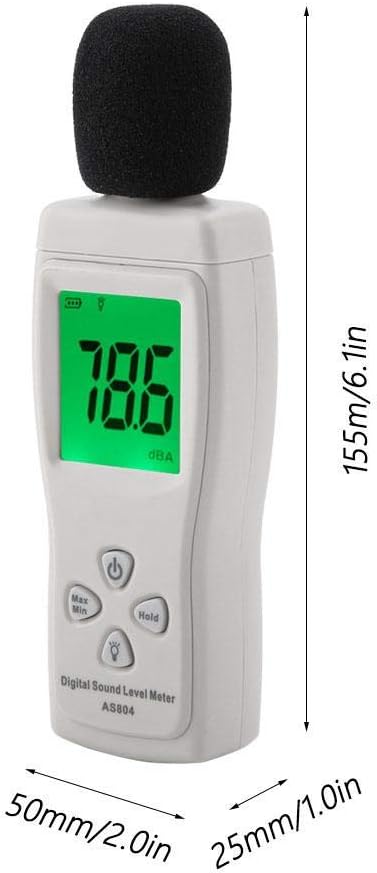
Figure 8.1: Physical dimensions of the Walfront AS804 Digital Sound Level Meter.
9. Warranty sy fanohanana
9.1 Fampahalalana momba ny fiantohana
No specific warranty information is provided within this instruction manual. For details regarding the product warranty, please refer to your purchase documentation, the seller's terms and conditions, or contact the retailer directly.
9.2 Fanohanana ny mpanjifa
For technical assistance, troubleshooting beyond the scope of this manual, or any other product-related inquiries, please contact the retailer from whom you purchased the Walfront AS804 Digital Sound Level Meter. You may also visit the Walfront official website for additional resources if available.
10. Lahatsary vokatra
No relevant official product videos from the seller were found for this model in the provided data.
