1. Fampidirana
This user manual provides detailed instructions for the safe and efficient operation of your Veidoo 10-inch Android Tablet PC. Please read this manual thoroughly before using the device and retain it for future reference. This tablet is designed for various uses, including communication, entertainment, and productivity.

This image shows the Veidoo 10-inch Android Tablet PC. The front of the tablet displays the home screen with the current time, date, and various application icons such as Camera, Gallery, Settings, and Music. The rear of the tablet, visible behind the front, is black with a subtle textured design and features the rear camera module.
2. Information momba ny fiarovana
- Aza apetraka amin'ny hafanana tafahoatra, ny tara-masoandro mivantana, na ny hamandoana be ny fitaovana.
- Fadio ny milatsaka na mametraka ilay fitaovana amin'ny fiantraikany mahery vaika.
- Mampiasà charger sy kojakoja ankatoavin'ny mpanamboatra ihany.
- Aza manandrana manongotra na manamboatra ilay fitaovana. Jereo ny mpiasan'ny serivisy mahafeno fepetra.
- Arovy amin'ny ankizy sy ny biby fiompy ilay fitaovana.
- Ario am-pahamendrehana ny fitaovana sy ny bateriany araka ny fitsipika eo an-toerana.
3. Vokatra mihoatraview
3.1 Toetra ara-batana
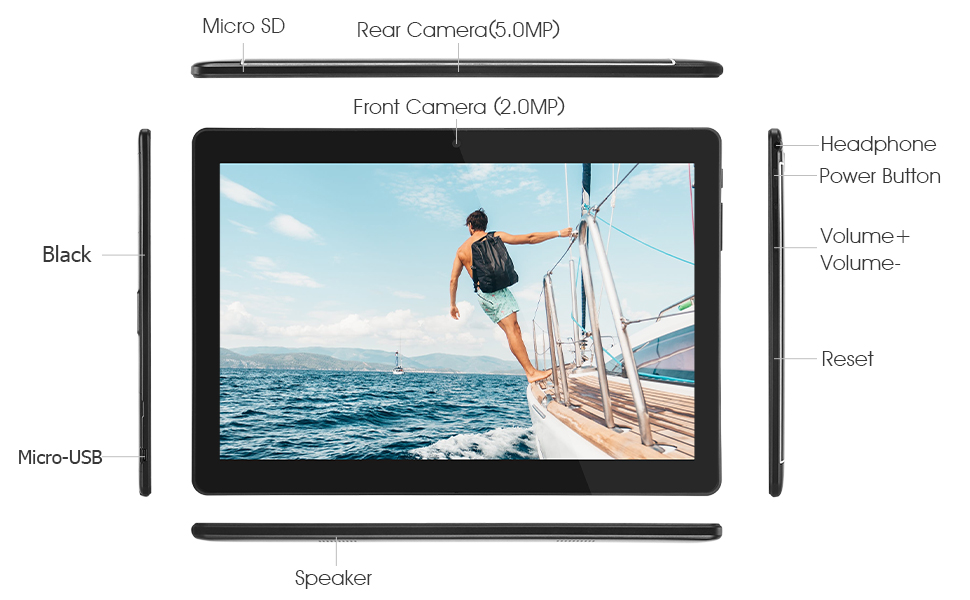
Familiarize yourself with the various ports and buttons on your Veidoo Tablet PC:

This diagram illustrates the various physical components and ports of the Veidoo 10-inch Android Tablet PC. It clearly labels the Micro SD card slot, the 5.0MP rear camera, the 2.0MP front camera, the headphone jack, the power button, the volume up and down buttons, the reset pinhole, the Micro-USB charging port, and the speaker.
- Slot MicroSD: Ho an'ny fitahirizana azo mivelatra.
- Fakantsary aoriana (5.0MP): Ho an'ny fakana sary sy horonan-tsary.
- Camera Front (2.0MP): Ho an'ny antso an-tsary sy selfie.
- Jack finday: Ampifandraiso am-paosy 3.5mm.
- Bokotra hery: Press and hold to power on/off, short press to sleep/wake.
- Botom-peo: Ahitsio ny feo.
- Reset Pinhole: Use a thin object to reset the device if unresponsive.
- Micro-USB Port: Ho an'ny fiampangana sy famindrana angona.
- Mpandahateny: Output audio.
3.2 Ny votoatin'ny fonosana
Ataovy azo antoka fa ao anaty boaty vokatrao ny entana rehetra:

This image displays the items typically found inside the Veidoo 10-inch Android Tablet PC product box. It includes the tablet itself, a black protective case, a power adapter (wall charger), a USB charging and data cable, a service warranty card, and a leaflet containing frequently asked questions and support information.
- Veidoo 10-inch Android Tablet PC
- Power Adapter
- USB Cable
- Protective Case (optional, may vary by package)
- User Manual (ity antontan-taratasy ity)
- Karatra fiantohana serivisy
- FAQ Leaflet
4. Fametrahana
4.1 Famandrihana ny bateria
Before first use, fully charge the tablet. Connect the USB cable to the tablet's Micro-USB port and the other end to the power adapter. Plug the adapter into a wall outlet. The charging indicator will show the charging status. A full charge typically takes 3-4 hours.

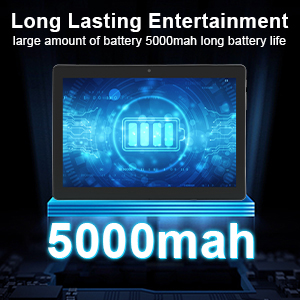
This image focuses on the Veidoo 10-inch Android Tablet PC's battery capacity, prominently displaying a battery icon and '5000mAh'. This signifies the tablet's 5000mAh battery, designed to provide extended usage time for entertainment and productivity.
4.2 Mamelona/Mamono
- Hamelona: Press and hold the Power button until the Veidoo logo appears on the screen.
- Mamono: Press and hold the Power button until a menu appears. Select "Power off" and confirm.
- Matory/Mifohaza: Tsindrio vetivety ny bokotra Hery mba hampatory na hamoha ny takelaka.
4.3 Fampidirana karatra SIM sy Micro SD
The tablet supports dual SIM cards for 3G phone calls and a Micro SD card for expandable storage.
- Locate the SIM/SD card slot on the side of the tablet.
- Carefully open the slot cover.
- Insert the SIM card(s) and/or Micro SD card into the designated slots with the gold contacts facing down. Ensure they are correctly seated.
- Close the slot cover securely.
This image demonstrates the storage capabilities of the Veidoo 10-inch Android Tablet PC, showing multiple applications and content open. It highlights the device's 16GB internal storage (ROM) and its ability to expand storage up to 32GB via a Micro SD card, allowing for amptoerana ho an'ny fampiharana, sary ary horonan-tsary.
4.4 Fametrahana voalohany
Rehefa ampiasaina voalohany ny takelaka dia hitarika anao amin'ny dingana fametrahana voalohany:
- Fidio ny fiteny tianao.
- Mifandray amin'ny tambajotra Wi-Fi.
- Midira amin'ny kaontinao Google na mamorona iray vaovao. Ilaina izany mba hisintonana fampiharana avy amin'ny Google Play Store.
- Amboary ny hidin'ny efijery (PIN, lamina, tenimiafina).
- Review ary manaiky ny fepetra sy fepetra.
5. Fampandehanana ny Tablet
5.1 Fikarohana fototra
- Peho: Misafidiana singa iray na manokatra app.
- Tsindrio & Tazomy: Access context menus or move icons.
- Swipe: Mandehana amin'ny efijery na lisitra.
- Pinch-to-Zoom: Zoom in na out of sary ary web pejy.
5.2 Connectivity (Wi-Fi & Bluetooth)
- Wifi: Mandehana any Settings> Network & Internet> Wi-Fi. Turn Wi-Fi on, select your network, and enter the password.
- Bluetooth: Mandehana any Fikirana > fitaovana mifandray > Bluetooth. Turn Bluetooth on, scan for devices, and pair with your desired accessory.
5.3 Making Phone Calls (3G)
With a valid SIM card inserted, you can make and receive 3G phone calls:

This image shows a group of four individuals participating in a video call using the Veidoo 10-inch Android Tablet PC. This illustrates the tablet's capability for video conferencing and its 3G phone call functionality, allowing users to connect with others remotely.
- Sokafy ny Phone app.
- Dial the number using the keypad or select a contact.
- Tsindrio ny bokotra antso hanombohana ny antso.
5.4 Fampiasana ny fakan-tsary
The tablet is equipped with a front and rear camera for photos and videos.
- Sokafy ny Camera app.
- Mifandimby eo amin'ny fakan-tsary eo aloha sy aoriana amin'ny fampiasana ny kisary fakan-tsary.
- Tsindrio ny bokotra fanakatonana mba haka sary na hanombohana/atsaharo ny firaketana horonantsary.
5.5 Fitantanana fitahirizana
Ianao dia afaka view and manage your tablet's internal and external storage:
- Mandehana any Fikirana > fitahirizana.
- Here you can see storage usage and free up space by deleting unnecessary files or uninstalling apps.
5.6 Installing and Uninstalling Apps
This image features the Veidoo 10-inch Android Tablet PC showcasing its Android 10 operating system with a multitude of application icons. This highlights that the device is GMS (Google Mobile Services) certified, ensuring access to Google Play Store and other Google services.
- Mametraka: Sokafy ny Google Play Store app, search for your desired app, and tap hametraka.
- Esory ny fametrahana: Mandehana any Settings > Apps & notifications > See all apps. Select the app you wish to uninstall and tap esory.
6. Fikojakojana
- Fanadiovana: Mampiasà lamba malefaka sy tsy misy loko mba hanadiovana ny efijery sy ny vatana. Halaviro ny mpanadio na solvents.
- Fanavaozana rindrambaiko: Hamarino tsy tapaka ny fanavaozana ny rafitra ao Fikirana > Rafitra > Fanavaozana ny rafitra mba hiantohana ny fahombiazana sy ny fiarovana tsara indrindra.
- Fikarakarana bateria: To prolong battery life, avoid fully discharging the battery frequently. Store the tablet in a cool, dry place when not in use for extended periods.
- Data Backup: Regularly back up important data to a cloud service or external storage device to prevent data loss.
7. Famahana olana
| OLANA | Vahaolana mety |
|---|---|
| Tsy mandeha ny takelaka | Ensure the battery is charged. Connect the charger and wait a few minutes before attempting to power on. If unresponsive, try pressing the reset pinhole. |
| Tsy mamaly ny efijery | Restart the tablet by holding the Power button. If that doesn't work, use the reset pinhole. Ensure the screen is clean and dry. |
| Tsy afaka mifandray amin'ny Wi-Fi | Check if Wi-Fi is enabled in settings. Ensure the Wi-Fi password is correct. Restart your router and the tablet. |
| Mikorontana na mivaingana ny fampiharana | Close and reopen the app. Clear the app's cache in Fikirana> Fampiharana sy fampandrenesana. Update the app or uninstall and reinstall it. Ensure sufficient storage space. |
| Faharetan'ny bateria | Reduce screen brightness. Close unused apps running in the background. Turn off Wi-Fi, Bluetooth, and GPS when not in use. Limit background data usage. |
8. Famaritana
Key technical specifications for the Veidoo 10-inch Android Tablet PC (Model T10):

This image provides a visual summary of the Veidoo Tablet PC's key specifications. It highlights features such as 1GB RAM, a 2MP front and 5MP rear camera setup, a 10.1-inch IPS HD display with 1280x800 resolution, 16GB of internal storage, Android 10 operating system, Wi-Fi connectivity, a Quad-Core CPU, and dual SIM card support.
| endri-javatra | antsipirihany |
|---|---|
| Anarana modely | Touch (T10) |
| Haben'ny efijery mitsangana | 10.1 santimetatra |
| Fanapahan-tsary | 800 x 1280 (IPS) |
| ram | 1 GB (DDR3 SDRAM) |
| Haben'ny kapila mafy / fahatsiarovana Flash | 16 GB (azo itarina hatramin'ny 32 GB amin'ny alàlan'ny Micro SD) |
| Karazana Wireless | 802.11b, 802.11b/g (Wi-Fi), Bluetooth |
| Salanisan'ny fiainana bateria | 6 Hours (5000mAh Lithium Polymer) |
| Hardware Platform | Android |
| Rafitra fikirakirana | Android 6.0 Marshmallow (GMS Certified) |
| Lanja entana | 2.86 kg |
| Ny refin'ny vokatra | 9.49 x 6.69 x 0.37 santimetatra |
| aoriana Webcam Resolution | 5 MP |
| anoloana Webcam Resolution | 2 MP |
| Isan'ny processeurs | 4 (Quad-Core) |
| Loharanon-kery | Battery Powered, Corded Electric |
9. Warranty sy fanohanana
Your Veidoo Tablet PC comes with a service warranty. Please refer to the included Service Warranty Card for specific terms and conditions, including warranty period and coverage details.
For technical support, troubleshooting assistance, or warranty claims, please contact Veidoo customer service. Contact information can typically be found on the warranty card or the official Veidoo website. When contacting support, please have your model number (T10) and purchase information ready.
You can also visit the official Veidoo store on Amazon for more information and support resources: Veidoo Store


