1. Fampidirana
The Samson AirLine 99m AH9 Headset Wireless System is a compact and versatile wireless microphone solution designed for active performers, presenters, and educators. This system provides high-definition audio transmission without the need for cables or belt packs, offering freedom of movement and ease of use. It operates on a frequency-agile UHF band, ensuring reliable performance across 100 selectable channels.
The system comprises three main components:
- AH9 Micro Transmitter: A lightweight, rechargeable transmitter integrated into the headset.
- AR99m Micro Receiver: A compact receiver with multiple output options for versatile connectivity.
- DE10x Headset Microphone: Low-profile, comfortable headset microphone designed for clear vocal reproduction.
2. Ireo singa ao amin'ny rafitraview

Sary 2.1: The complete Samson AirLine 99m AH9 Headset Wireless System, showing the AR99m receiver, AH9 micro transmitter, and DE10x headset microphone.

Sary 2.2: Akaiky view of the AH9 micro transmitter integrated with the DE10x headset microphone. The green light indicates power status.

Sary 2.3: Top view of the AR99m micro receiver, showing the volume knob, SET button, channel display, and status indicators (READY, IR, PEAK).
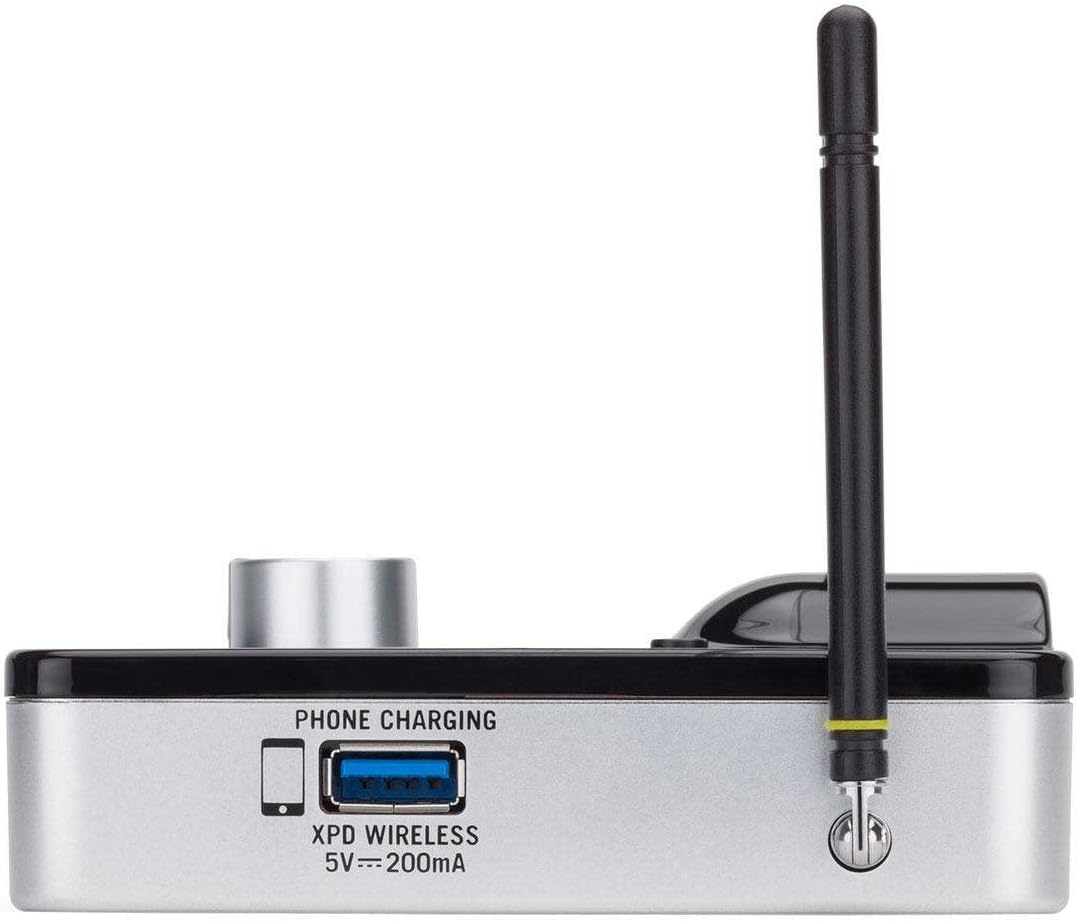
Sary 2.4: sisiny view of the AR99m micro receiver, highlighting the 'PHONE CHARGING' USB port (5V --- 200mA) and antenna connection.

Sary 2.5: zorony view of the AR99m micro receiver, showing the DC IN port, 1/8" unbalanced output, and XLR balanced output.

Sary 2.6: aoriana view of the AH9 micro transmitter, showing the charging contacts and the integrated headset cable connection.

Sary 2.7: aoriana view of the AR99m micro receiver, detailing the DC IN (15V === 600mA), 1/4" unbalanced output, and XLR balanced output ports.

Sary 2.8: The DE10x headset microphone, showing its lightweight design and adjustable ear hooks.
3. Torolàlana fananganana
3.1. Charging the AH9 Micro Transmitter
- Connect the supplied USB charging cable to the AH9 micro transmitter.
- Plug the other end of the USB cable into a standard USB power adapter (not included) or a powered USB port.
- The LED indicator on the AH9 will show charging status. A full charge provides up to 8 hours of operation.
3.2. Connecting the AR99m Micro Receiver
- Connect the included power adapter to the DC IN port (15V === 600mA) on the AR99m receiver.
- Ampidiro amin'ny fivoahana AC ny adaptatera herinaratra.
- Connect the AR99m receiver to your audio mixer, PA system, or recording device using one of the following outputs:
- Mifandanja XLR Output: Ho an'ny fitaovana audio matihanina.
- Unbalanced 1/4" Output: For standard instrument inputs or line-level inputs.
- Unbalanced 1/8" Output: For consumer-grade audio devices or computer inputs.
- Extend the antennas on the AR99m receiver for optimal signal reception.
3.3. Wearing the DE10x Headset Microphone
- Carefully place the headset over your ears, ensuring a comfortable and secure fit.
- Position the microphone element approximately 1-2 inches from the corner of your mouth for best sound quality.
- Use the included windscreens to reduce plosives and wind noise, if necessary.
4. Torolàlana miasa
4.1. Mamelona/Mamono
- AH9 Micro Transmitter: Press and hold the power button on the transmitter until the LED illuminates. Press and hold again to power off.
- AR99m Micro Receiver: Turn the VOLUME knob clockwise to power on. Turn counter-clockwise until it clicks to power off.
4.2. Channel Selection and Pairing
The AirLine 99m system features 100 operating channels across a 24MHz bandwidth.
- Turn on the AR99m receiver. The channel display will show the current channel.
- Tsindrio ny SET button on the AR99m receiver to cycle through available channels. Select a clear channel with no interference.
- Once a channel is selected on the receiver, turn on the AH9 transmitter.
- The AH9 transmitter will automatically scan and pair with the receiver on the selected channel. The 'READY' indicator on the receiver will illuminate when a successful connection is established.
4.3. Fanitsiana ny volume
Ampiasao ny BOKY FAHA- knob on the AR99m receiver to adjust the output level of the wireless system. Start with a low volume and gradually increase it to avoid sudden loud audio.
4.4. Monitoring Signal Status
- READY Indicator: Illuminates when the transmitter and receiver are successfully paired and receiving a signal.
- PEAK Indicator: Illuminates when the audio input from the transmitter is too high, indicating potential clipping. Reduce the input gain on your mixer or adjust the microphone position if this occurs.
- IR famantarana: Used during initial setup for infrared pairing (if applicable, though this model typically auto-pairs).
5. Fikojakojana
- Fanadiovana: Use a soft, dry cloth to clean the surfaces of the transmitter and receiver. Avoid using abrasive cleaners or solvents.
- Fikarakarana bateria: Recharge the AH9 transmitter regularly. For long-term storage, ensure the battery is partially charged (around 50%) to prolong its lifespan.
- fitahirizana: Tehirizo ao amin'ny toerana mangatsiatsiaka sy maina ny rafitra, lavitry ny tara-masoandro mivantana sy ny hafanana tafahoatra.
- Fiara-rivotra: Replace windscreens on the DE10x headset microphone as needed to maintain hygiene and acoustic performance.
6. Famahana olana
| OLANA | Antony mety hitranga | vahaolana |
|---|---|---|
| Tsy misy feo avy amin'ny mpandray |
|
|
| Fisakanana na fialàna an-daharana |
|
|
| Feo tsy marina |
|
|
| Fohy ny fiainana bateria |
|
|
7. Famaritana
| endri-javatra | antsipirihany |
|---|---|
| Laharana modely | SW9A9SDE10-K |
| Channels miasa | 100 (across 24MHz bandwidth) |
| Laharana miasa | Hatramin'ny 300 metatra (tsipika fahitana) |
| AH9 Transmitter Battery Life | Up to 8 hours (Lithium-Ion, rechargeable) |
| AR99m Receiver Outputs | Balanced XLR, Unbalanced 1/4", Unbalanced 1/8" |
| Karazana mikrô | DE10x Headset Microphone |
| Tafiditra Accessories | 4 Windscreens, USB charging cable, Power adapter |
| Lanja entana | 1 kilao |
| Ny refin'ny vokatra | 3 x 3 x 3 santimetatra |
| Karazana fitaovana | plastika |
| Loharanon-kery | Battery Powered |
| Fitaovana mifanentana | Mixers, Audio Interfaces, PA Systems, Computers, Recording Devices |
8. Warranty sy fanohanana
For warranty information and technical support, please refer to the official Samson Technologies webtranokala na mifandray mivantana amin'ny serivisy mpanjifany. Tehirizo ny tapakila fividiananao ho porofon'ny fividianana ho an'ny fitakiana fiantohana.
Loharano an-tserasera: Tsidiho ny Samson Brand Store on Amazon ho fampahalalana fanampiny momba ny vokatra sy fanohanana.


