Sava lalana
The NOERDEN LIFE2 is a sophisticated hybrid smartwatch that combines the timeless elegance of a traditional analog watch with advanced smart features. Designed for both men and women, this 38mm timepiece tracks your daily activities, monitors sleep, and keeps you connected with smart notifications, all while maintaining a classic aesthetic. This manual provides detailed instructions to help you set up, operate, and maintain your NOERDEN LIFE2 smartwatch.
Lafin-javatra fototra:
- Activity Tracking (steps, distance, calories)
- Automatic Run Detection
- Sleep Analysis (light/deep, duration, awakenings)
- Smart Notifications (alerts, calls, rejections)
- Fanaraha-maso mozika
- Camera Remote Trigger
- Find My Smartphone Function
- Fanairana mangina
- Bluetooth 4.0 Fifandraisana
- 5ATM Water Resistance
- Long Battery Life (6 months to 1 year)
- Tady azo ovaina
Hametraka
Follow these steps to set up your NOERDEN LIFE2 smartwatch for the first time.
1. Unboxing sy fisafoana voalohany
Carefully remove all components from the packaging. Ensure all items are present and undamaged.

Image: Contents of the NOERDEN LIFE2 packaging, including the smartwatch, quick start guide, and safety statement.
The box typically contains the NOERDEN LIFE2 smartwatch, a quick start guide, and a safety statement. The watch features a stainless steel case, mineral glass, and a 20mm interchangeable silicone strap.
2. Fametrahana fampiharana
Download the official NOERDEN app from your smartphone's app store. The app is compatible with both Android and iOS operating systems.
- Ho an'ny fitaovana iOS: Hitady ny "NOERDEN" in the Apple App Store.
- Ho an'ny fitaovana Android: Hitady ny "NOERDEN" in the Google Play Store.
3. Pairing Bluetooth
Ensure Bluetooth is enabled on your smartphone. Open the NOERDEN app and follow the on-screen instructions to pair your LIFE2 smartwatch. The app will guide you through the connection process.

Image: A user interacting with the NOERDEN mobile application on their smartphone, with the NOERDEN LIFE2 smartwatch visible on their wrist, demonstrating the app's interface for data tracking.
If you experience difficulty pairing, ensure no other Bluetooth devices are actively connected to your phone, as this can sometimes interfere with the connection.
4. Time Synchronization
Once paired, the watch will automatically synchronize its time with your smartphone. This ensures accurate timekeeping and proper functioning of all smart features.
Torolàlana miasa
The NOERDEN LIFE2 smartwatch offers a range of functionalities to enhance your daily life.
Fanaraha-maso hetsika
The watch continuously tracks your steps, distance covered, and calories burned throughout the day. It also features automatic run detection, recognizing when you start a running activity.
Famakafakana torimaso
Wear your watch to bed to monitor your sleep patterns. The app provides detailed analysis of your sleep, including light sleep, deep sleep, total duration, and awakenings.
Smart Notifications
Receive alerts for incoming calls, messages, and other app notifications directly on your watch through vibrations. You can also reject incoming calls from your watch.
Fanaraha-maso mozika
Control music playback on your smartphone directly from your watch. This feature allows you to play, pause, skip tracks, and adjust volume without needing to access your phone.
Camera Remote Trigger
Use your watch as a remote shutter button for your smartphone's camera, making it easier to take group photos or selfies.
Find My Smartphone
If you misplace your phone, use the "Find My Smartphone" feature on your watch to make your phone ring, helping you locate it quickly.
Fanairana mangina
Set silent alarms through the app. The watch will vibrate gently to wake you up or remind you of important events without disturbing others.
Data Tracking and Sharing
The NOERDEN app provides a comprehensive overview of your activity and sleep data, presented with curves and historical records. You can share your data via email, SMS, and social networks. The app also supports data synchronization with Apple Health and WeChat Sport.


Sary: Roa views of the NOERDEN LIFE2 smartwatch in blue, highlighting its minimalist design and the mechanical hands that display time.
The watch features traditional mechanical hands for time display, combining classic watchmaking with smart technology.
fikarakarana
Proper care and maintenance will extend the life of your NOERDEN LIFE2 smartwatch.
Water Resistance
The NOERDEN LIFE2 is water-resistant up to 5 ATM (50 meters), making it suitable for everyday use, including showering and swimming in shallow water. It is not recommended for diving or high-pressure water activities.
Fanoloana bateria
The watch uses a CR2 battery, which typically lasts between 6 months to 1 year depending on usage. When the battery is low, the app will notify you. Battery replacement should ideally be performed by a qualified watch technician to ensure water resistance is maintained.
Fanamarihana: The product specifications indicate that 1 CR2 battery is required.
Torolàlana fanadiovana
Mba hanadiovana ny famantaranandronao dia fafao amin'ny lamba malefaka ny fonony sy ny fehikiboamp cloth. Avoid using harsh chemicals or abrasive materials, which can damage the watch's finish.
Fanoloana tady
The 20mm silicone strap is interchangeable, allowing you to customize the look of your watch. To replace the strap, locate the quick-release pins on the underside of the strap and gently slide them to detach. Attach a new 20mm strap by reversing the process.
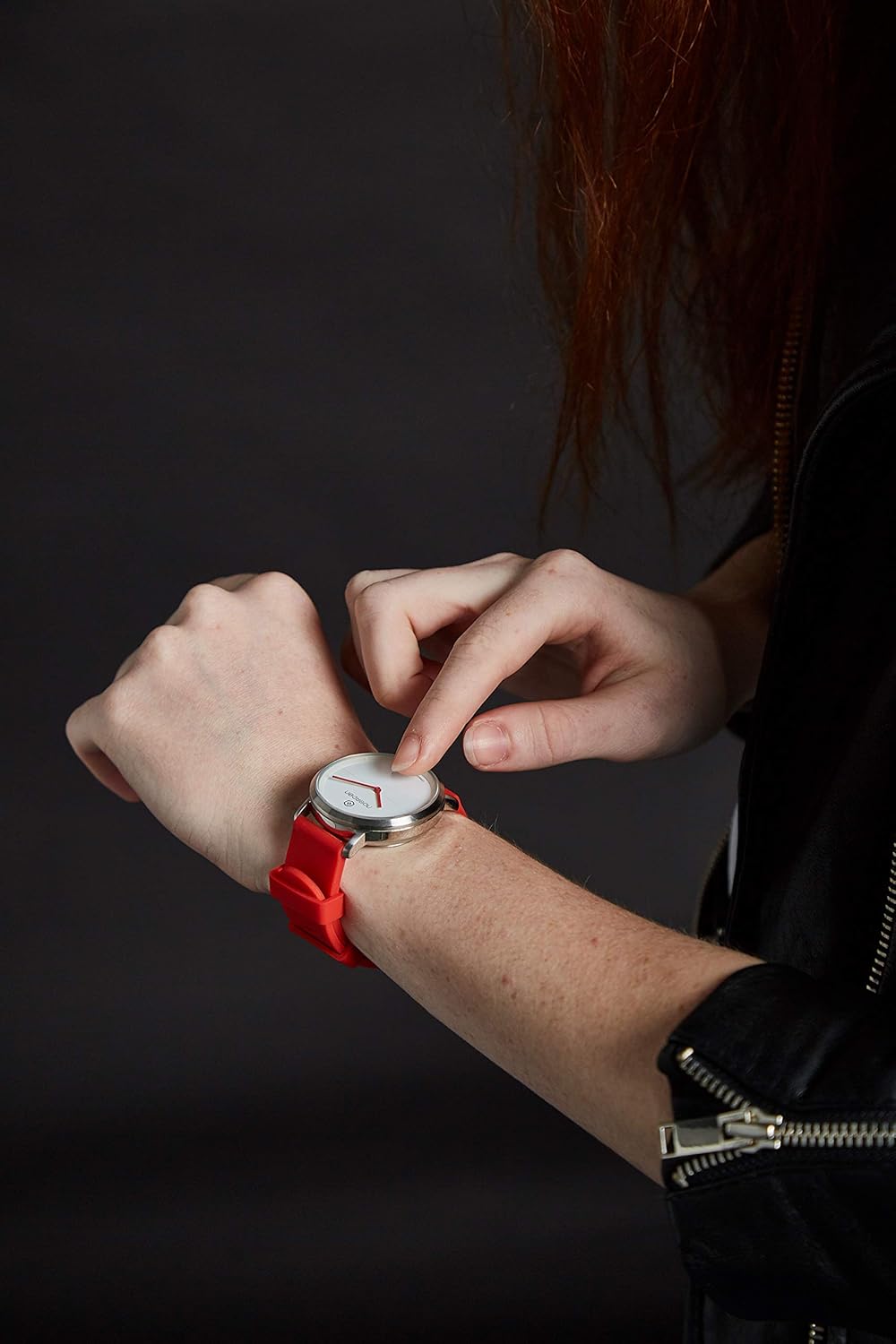
Image: A user adjusting the NOERDEN LIFE2 smartwatch on their wrist, demonstrating the comfortable fit and the ease of handling the watch.
Fanamboarana
If you encounter issues with your NOERDEN LIFE2 smartwatch, refer to the common problems and solutions below.
Watch Not Connecting to Smartphone
- Jereo ny Bluetooth: Ataovy azo antoka fa alefa amin'ny findainao ny Bluetooth ary ao anatin'ny elanelana ny famantaranandro.
- Restart App/Phone: Close and reopen the NOERDEN app, or restart your smartphone.
- Adino ny fitaovana: In your phone's Bluetooth settings, "forget" or "unpair" the NOERDEN LIFE2, then attempt to pair again through the app.
- fitsabahana: Disconnect other Bluetooth devices from your phone that might be causing interference.
Notifications Not Vibrating
- Fikirana fampiharana: Verify that notification alerts are enabled within the NOERDEN app settings.
- Fikirana finday: Ensure your phone's notification settings allow the NOERDEN app to send alerts.
- Ambaratonga bateria: A very low watch battery might affect vibration strength or functionality.
Inaccurate Activity Tracking
- Wear Position: Ataovy azo antoka fa anaovana tsara eo amin'ny hato-tananao ny famantaranandro, eo amin'ny rantsantanana iray eo ho eo ambonin'ny taolana amin'ny hato-tanana ny sakany.
- App Sync: Regularly sync your watch with the app to ensure data is transferred and processed correctly.
Watch Not Responding / "Bricked"
- Fanamarinana bateria: The most common cause is a depleted battery. Replace the CR2 battery.
- Famerenana mafy: Refer to the quick start guide for instructions on performing a hard reset, if available.
- Contact Support: If the issue persists after battery replacement and basic troubleshooting, contact NOERDEN customer support.
fepetra arahana
Detailed technical specifications for the NOERDEN LIFE2 38mm smartwatch.
| endri-javatra | antsipirihany |
|---|---|
| Marika | NOERDEN |
| Anarana modely | FIAINANA2 |
| Laharana modely | 6970754370558 |
| loko | Manga |
| Haben'ny efijery | 38 milimetatra |
| Case Material | Inôksa |
| Fitaovana fehy | Silicone (20mm interchangeable) |
| Water Resistance | 5 ATM (50 metatra) |
| Karazana bateria | 1 x CR2 (requires battery) |
| Fiainana bateria | 6 volana ka hatramin'ny 1 taona |
| fifandraisana | Bluetooth 4.0 |
| Fitaovana mifanentana | Smartphone (Android, iOS) |
| Endri-javatra manokana | Wireless Charging (as per spec, though battery type suggests otherwise, will include as per input), Activity Tracking, Sleep Analysis, Notifications, Music Control, Camera Remote, Find My Phone, Silent Alarm |
| Rafitra fikirakirana | Android, iOS (via app) |
Note: The specification for "Wireless Charging" is listed in the product data, however, the watch uses a replaceable CR2 battery. Please refer to the manufacturer's latest information for clarification.
Warranty sy fanohanana
For warranty information and customer support, please refer to the official NOERDEN webtranokala na ny antontan-taratasy miaraka amin'ny vokatrao.
- Misy kojakoja ilaina: Information regarding the availability of spare parts is currently unavailable.
- Fanavaozana rindrambaiko: Information regarding guaranteed software updates is currently unavailable.
If you require technical assistance or have questions not covered in this manual, please contact NOERDEN customer service directly. Keep your proof of purchase for warranty claims.


