1. Fampidirana
This manual provides detailed instructions for the installation, setup, and operation of your MOES WiFi Smart Wall Touch Light Switch. Please read this manual thoroughly before installation and use to ensure proper function and safety.

Figure 1: MOES WiFi Smart Wall Touch Light Switch (1 Gang, Black)
2. Information momba ny fiarovana
- Fametrahana herinaratra: Installation should only be performed by a qualified electrician or a person with a thorough understanding of electrical wiring.
- Fanapahan-jiro: Always disconnect power at the circuit breaker before installing, removing, or servicing the switch. Failure to do so may result in serious injury or death.
- Wire tsy miandany ilaina: This smart switch requires a neutral wire in your switch box to operate correctly. If you do not have a neutral wire, this switch is not compatible.
- Tambajotra Wi-Fi: Requires a 2.4GHz Wi-Fi network connection. It is not compatible with 5GHz Wi-Fi networks.
- mifanentana: Only compatible with 1 gang switch boxes. Not compatible with standard US 2/3/4 gang switch plates. This switch is not designed for 3-way switch configurations or as a dimmer switch.
- Fampiasana anatiny ihany: Ity fitaovana ity dia natao hampiasaina an-trano amin'ny toerana maina.
- Operating Voltage: Ensure your electrical system operates within the specified voltage range (240 Volts).

Figure 2: Key compatibility and wiring considerations.
3. Ny votoatin'ny fonosana
- MOES WiFi Smart Wall Touch Light Switch (1 Gang)
- User Manual
- Fametrahana screws
4. Toetran'ny vokatra
- Fanaraha-maso mikasika: Features a toughened glass surface for touch operation.
- Feo fanaraha-maso: Compatible with Amazon Alexa (Amazon Echo/Dot/Tap) and Google Assistant for hands-free operation.
- Fanaraha-maso lavitra Wi-Fi: Control the wall switch wirelessly from anywhere using the 'Smart Life' app on your smartphone via Wi-Fi or 4G network. No separate hub is required.
- Fotoana asa: Schedule lights and appliances to turn on/off automatically at specific times.

Figure 3: Smart Switch in a home environment.
5. Famaritana
| famaritana | sarobidy |
|---|---|
| Fomba fiasa | Automatique, Off, Smart Switch |
| Rating amin'izao fotoana izao | 10 Amps |
| Operating Voltage | 240 Volts |
| Karazana fifandraisana | Misokatra mahazatra |
| Karazana mpampitohy | Wireless |
| Terminus | Sokiro |
| Ny refin'ny entana (L x W x H) | 4.7 x 2.9 x 1.5 santimetatra |
| Karazana Circuit | 1-lalana |
| Karazana Actuator | mikasika |
| Fitaovana mifandray | varahina |
| Rating fiarovana iraisam-pirenena | IPX4 |
| Isan'ny toerana | 3 |
| Karazana Controller | Amazon Alexa, Mpanampy Google |
| Fomba fanaraha-maso | mitokana |
| Connectivity Protocol | Wi-Fi (2.4GHz ihany) |
| Wattage | 1000 watts |
| Lanja entana | 7.4 oz |

Figure 4: Product dimensions and wiring terminals.
6. Torolàlana momba ny fametrahana
Alohan'ny hanombohanao:
- Hamarino tsara fa TONGA ny herinaratra eo amin'ny "circuit breaker".
- Confirm your switch box has a neutral wire. This is essential for the smart switch to function.
- Hamarino tsara fa 2.4GHz ny tambajotra Wi-Fi-nao.
- This switch is for 1-gang setups only and is not a dimmer or 3-way switch.
Wiring dingana:
- Turn off power at the circuit breaker for the light switch you are replacing.
- Esory ny takelaka misy rindrina ary mifamadika.
- Identify the wires: Live (usually black), Neutral (usually white), and Load (to the light fixture). A Ground wire (usually green or bare copper) may also be present.
- Connect the wires from your wall box to the corresponding terminals on the MOES Smart Switch:
- N: Connect the Neutral wire (usually white).
- L: Connect the Live wire (incoming power, usually black).
- L1: Connect the Load wire (to the light fixture). For 1-gang switches, only L1 is typically used.
- tany: If present, connect the ground wire to the switch's ground terminal (if available) or safely cap it.
- Ampifandraiso amin'ny rindrina ny switch amin'ny alalan'ny visy omena.
- Attach the glass panel.
- Avereno ny herinaratra amin'ny fiatoana.
After installation, the indicator lights on the switch should blink quickly, indicating it is ready for Wi-Fi connection in Default Normal Mode.

Figure 5: Replacing a traditional switch with the smart touch switch.
7. Fametrahana sy fampiarahana fampiharana
To control your smart switch via smartphone, download the 'Smart Life' app from the App Store (iOS) or Google Play (Android).
- Misintona ary misoratra anarana: Install the 'Smart Life' app and register an account.
- Ampio fitaovana: Open the app, tap '+' or 'Add Device', and select 'Light Switch' or 'Electrical Switch'.
- Hamarino ny satan'ny famantarana: Ensure the indicator light on your switch is blinking quickly. If not, you may need to reset the device.
- Mifandray amin'ny Wi-Fi: Follow the in-app instructions to connect the switch to your 2.4GHz Wi-Fi network. Enter your Wi-Fi password when prompted.
- Fanovana anarana: Once connected, you can rename the switch for easier identification (e.g., "Living Room Light").
Famerenana ny fitaovana:
If the indicator lights are not blinking quickly, or if you need to reset the switch for any reason:
- Press and hold any button on the switch for approximately 20 seconds until the indicator light blinks quickly. This puts the device into Default Normal Mode for Wi-Fi connection.
- If the indicator light blinks very slowly after holding for 20 seconds, it is in AP (Access Point) mode. This is an alternative pairing mode if Default Normal Mode fails.
Video 1: Demonstrates how to reset or unlock the device by pressing and holding a button for 20 seconds, showing the indicator light changes for different pairing modes.
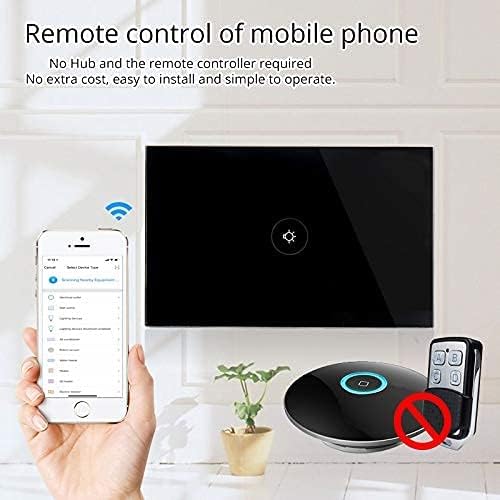
Sary 6: Fanaraha-maso lavitra amin'ny alàlan'ny fampiharana finday.
8. Fampandehanana
Once installed and paired with the 'Smart Life' app, you can operate your switch in several ways:
- Manual Touch: Simply touch the glass panel to turn the connected light or appliance on or off.
- Fanaraha-maso fampiharana: Use the 'Smart Life' app on your smartphone to remotely turn the switch on or off from anywhere with an internet connection.
9. Feo Fanaraha-maso Integration
The MOES Smart Switch is compatible with Amazon Alexa and Google Assistant for convenient voice control.
- Link 'Smart Life' Account: In your Amazon Alexa or Google Home app, search for the 'Smart Life' skill/action and enable it.
- Hiditra: Log in with your 'Smart Life' account credentials.
- Fantaro ny fitaovana: Once linked, ask Alexa or Google Assistant to "Discover devices" or manually initiate device discovery in their respective apps.
- Feo baiko: You can now use voice commands such as "Alexa, turn on [device name]" or "Hey Google, turn off [device name]". Use the names you assigned in the 'Smart Life' app.

Figure 7: Voice control with Alexa and Google Home.
10. Fametrahana fotoana
The 'Smart Life' app allows you to set schedules and timers for your smart switch, automating your lighting or appliances.
- Mamorona fandaharam-potoana: In the 'Smart Life' app, navigate to the device settings and select 'Schedule' or 'Timer'.
- Set On/Off Times: Configure specific times for the switch to turn on or off. You can set daily, weekly, or custom schedules.
- Fiovana mandeha ho azy amin'ny fiposahan'ny masoandro/filentehan'ny masoandro: Some app versions allow for automation based on local sunrise and sunset times.

Figure 8: Setting schedules via the Smart Life app.
11. Famahana olana
| OLANA | Antony mety hitranga | vahaolana |
|---|---|---|
| Tsy mamaly rehefa kasihina ny bokotra. | No power, incorrect wiring, or device locked. | Check circuit breaker. Verify wiring (Live, Neutral, Load). Perform a device reset (hold button for 20 seconds). |
| Tsy afaka mifandray amin'ny Wi-Fi. | Incorrect Wi-Fi band (5GHz), weak signal, incorrect password, or device not in pairing mode. | Ensure your router is broadcasting a 2.4GHz signal. Move closer to the router. Double-check Wi-Fi password. Reset the switch to enter pairing mode (blinking indicator). Try AP mode if normal mode fails. |
| Tsy mandeha ny fifehezana feo. | 'Smart Life' skill not enabled, incorrect device name, or no internet connection. | Ensure the 'Smart Life' skill is enabled and linked in your Alexa/Google Home app. Verify device names match. Check internet connectivity. |
| Switch goes offline frequently. | Weak Wi-Fi signal, network congestion, or router issues. | Improve Wi-Fi signal strength (e.g., Wi-Fi extender). Reduce network congestion. Restart your router. |
12. Fikojakojana
- Fanadiovana: Gently wipe the glass panel with a soft, dry cloth. Avoid abrasive cleaners or solvents.
- Fanavaozana ny mikirao praogramanao: Periodically check the 'Smart Life' app for available firmware updates to ensure optimal performance and security.
13. Warranty sy fanohanana
For warranty information or technical support, please refer to the documentation provided with your purchase or contact MOES customer service directly. Contact details can typically be found on the MOES official website or within the 'Smart Life' app's support section.
Lahatsary 2: Mihoatraview of MOES smart home products and their integration, demonstrating various smart life features like color temperature control, music sync lighting, and smart automation based on environmental sensors.


