1. Vokatra mihoatraview
The Elecom M-FBL01DBXSBK is a 5-button wireless mouse designed for comfortable and quiet operation. It features a Blue LED sensor for versatile surface compatibility and a compact USB receiver.

Image 1.1: Elecom M-FBL01DBXSBK Wireless Mouse with its compact USB receiver.
2. Ny votoatin'ny fonosana
- Elecom M-FBL01DBXSBK Wireless Mouse
- USB Wireless Receiver
- AA Alkaline Battery (for operation confirmation)
- User Manual (ity antontan-taratasy ity)
3. Torolàlana fananganana
3.1. Fametrahana bateria
- Tadiavo eo amin'ny ilany ambanin'ny totozy ny fonon'ny efitrefitra bateria.
- Atsofohy na atsangano ny fonony mba hanokafana ny efitrano.
- Insert one AA alkaline battery, ensuring the positive (+) and negative (-) terminals align correctly with the markings inside the compartment.
- Akatona tsara ny saron'ny efitrefitra bateria.

Image 3.1: The underside of the mouse, indicating the battery compartment and power switch.
3.2. Mampifandray ny USB Receiver
- Remove the compact USB receiver from its storage slot on the underside of the mouse.
- Ampidiro ao amin'ny seranana USB-A misy ao amin'ny solosainao ny mpandray USB.
- Tokony ho hitan'ny solosainao sy hapetrany ho azy ireo mpamily ilaina. Mety haharitra fotoana fohy izany.
3.3. Famelomana ny totozy
After installing the battery and connecting the receiver, locate the power switch on the underside of the mouse and slide it to the 'ON' position. The mouse is now ready for use.
3.4. OS Compatibility
The Elecom M-FBL01DBXSBK Wireless Mouse is compatible with:
- Windows 11, Windows 10, Windows RT8.1, Windows 8.1, Windows 7, Windows Vista
- macOS High Sierra 10.13 sy aoriana
Ensure your operating system is updated to the latest version and any service packs are installed for optimal performance.
4. Fampiasana ny totozy
4.1. Asa fototra
The mouse features five buttons and a scroll wheel:
- Bokotra havia: Fikirakirana voalohany.
- Bokotra havanana: Asa tsindrio faharoa (menin'ny teny manodidina).
- Kodiaran'ny horonam-boky: Antontan-taratasy mihodinkodina sy web pages vertically. Can also be pressed for a middle-click function.
- Bokotra mandroso: Mandrosoa mankany amin'ny web navigateur na file mpikaroka.
- bokotra miverina: Mandeha mihemotra amin'ny web navigateur na file mpikaroka.

Image 4.1: The five buttons of the Elecom M-FBL01DBXSBK mouse, including the scroll wheel.
4.2. Quiet Click Feature
All five buttons incorporate a silent switch mechanism, significantly reducing clicking noise. This allows for quiet operation in various environments.

Image 4.2: The silent switch design minimizes operational noise.
4.3. Blue LED Sensor
The mouse is equipped with a Blue LED optical sensor, which provides accurate tracking on a variety of surfaces, including those with slight unevenness or dust. This enhances usability in diverse settings.

Image 4.3: The Blue LED sensor allows for comfortable use on various surfaces.
4.4. Fifandraisana tsy misy tariby
The mouse utilizes a 2.4 GHz wireless band for stable communication. The effective radio distance is approximately 3 meters (9.8 feet) on magnetic surfaces (e.g., steel desks) and up to 10 meters (32.8 feet) on non-magnetic surfaces (e.g., wooden desks).
4.5. Tondro bateria
An integrated battery indicator light notifies you when the battery level is low, signaling that a replacement is needed.
4.6. Elecom Mouse Assistant Software
Button functions can be customized using the free downloadable Elecom Mouse Assistant software. This allows users to reassign functions to the mouse buttons for improved workflow efficiency.
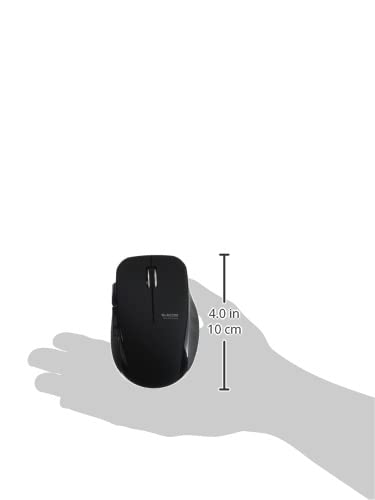
Image 4.4: The Elecom Mouse Assistant software enables button customization.
5. Fikojakojana
5.1. Fanoloana bateria
When the battery indicator signals low power, replace the AA battery with a new AA alkaline, manganese, or NiMH battery. Follow the battery installation steps outlined in Section 3.1.
5.2. Fanadiovana
To clean the mouse, gently wipe its surface with a soft, dry cloth. Avoid using harsh chemicals or abrasive materials, as these can damage the finish. Ensure no liquid enters the mouse.
5.3. Receiver Storage
The USB receiver can be stored inside the mouse body when not in use or during transport. This helps prevent loss of the receiver.
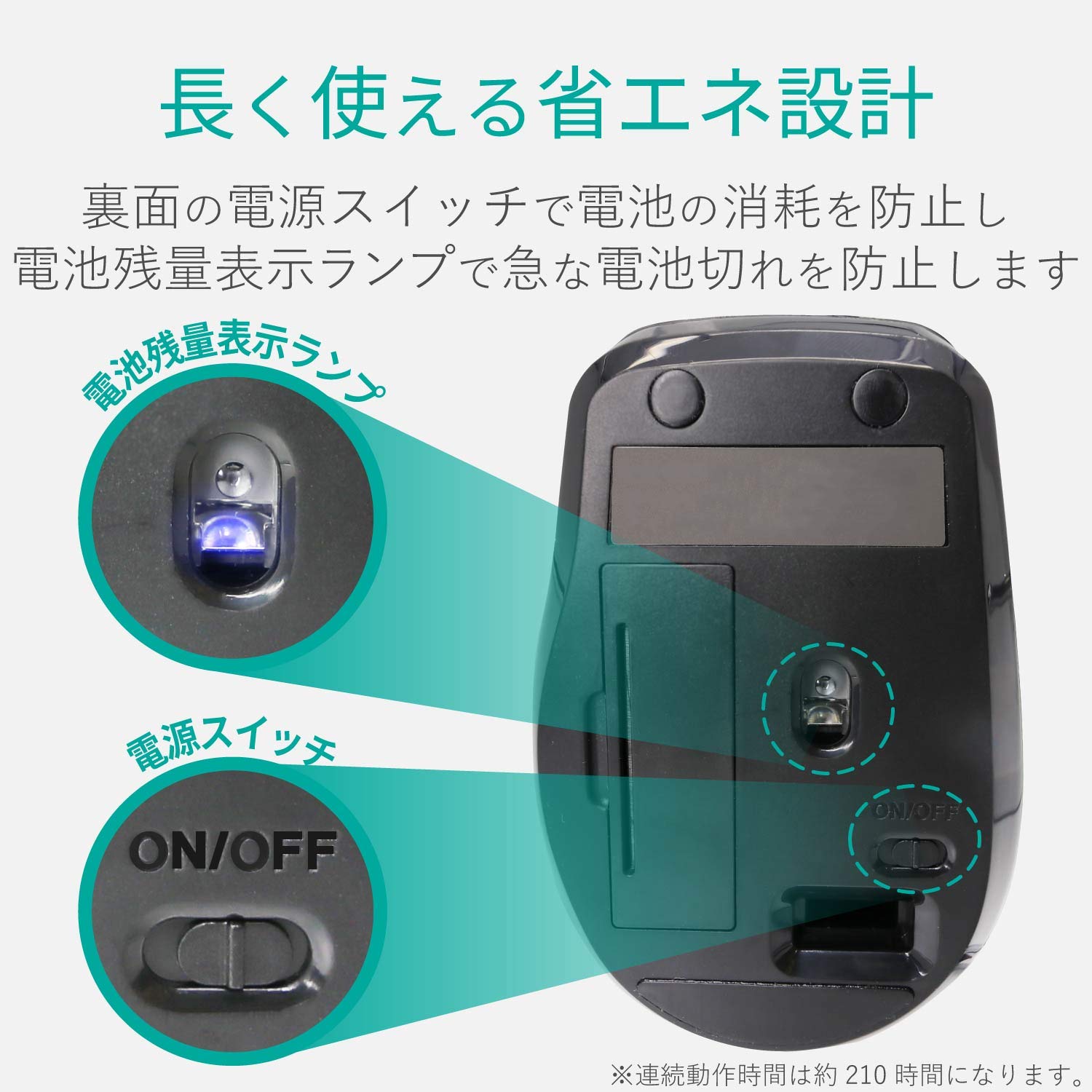
Image 5.1: The compact receiver can be stored within the mouse for convenience.
6. Famahana olana
- Tsy mamaly ny totozy:
- Check if the mouse is powered on (power switch on the underside).
- Ataovy azo antoka fa napetraka tsara ny bateria ary tsy lany. Soloy raha ilaina.
- Hamarino fa tafiditra tsara amin'ny seranan-tsambo USB miasa amin'ny solosainao ny mpandray USB. Manandrama seranan-tsambo USB hafa.
- Avereno indray ny solosainao.
- Fihetsehan'ny cursor tsy ara-dalàna:
- Clean the optical sensor area on the underside of the mouse.
- Ataovy azo antoka fa ampiasainao amin'ny toerana mety ny totozy. Fadio ny toerana taratry ny taratra na mangarahara be.
- Check for interference from other wireless devices. Move the mouse closer to the receiver.
- Buttons not functioning correctly:
- If using Elecom Mouse Assistant, ensure button assignments are correct.
- Reinstall the Elecom Mouse Assistant software if issues persist.
7. Famaritana
| interface tsara | USB |
| Endriky ny mpampitohy | USB-A Male |
| OS mifanentana | Windows 11, 10, RT8.1, 8.1, 7, Vista; macOS High Sierra 10.13+ |
| vahaolana | 1600 isa |
| Fomba fifandraisana | Fomba GFSK |
| Famoahana radio | Bandy 2.4GHz |
| Radio Distance | Magnetic objects: 3m (9.8 ft); Non-magnetic objects: 10m (32.8 ft) |
| Fomba famakiana | Rafitra sensor optika (LED manga) |
| Isan'ny bokotra | 5 (including wheel button) |
| Isan'ny kodiarana | 1 |
| Receiver fitahirizana | ENY |
| Fotoana fiasana mitohy | Approx. 210 ora |
| Fotoana mijoro | Approx. 1666 andro |
| Estimated Battery Usage Time | Approx. 478 andro |
| Power Supply (Main Unit) | 1 AA alkaline, manganese, or NiMH battery |
| Naoty Voltage (Body) | 1.5V |
| loko | Mainty |
| Weight (Mouse) | Approx. 62g (tsy misy bateria) |
| Refy ivelany (Mpandray) | 14.5 x 18.0 x 6.3 mm |
| Lanja (Mpandray) | Approx. 2g |
8. Warranty sy fanohanana
8.1. vanim-potoanan'ny ady
Ity vokatra ity dia miaraka amin'ny fiantohana 6 volana manomboka amin'ny datin'ny fividianana.
8.2. Product Inquiries
For product inquiries or technical support, please contact the Elecom General Information Center:
- TEL: 0570-084-465
- FAX: 0570-050-012
- Reception Time: 10:00 - 19:00 (24/7)


