1. Fampidirana
This manual provides essential information for the safe and efficient operation of your Pyle 40 Inch LED TV with Built-in CD/DVD Player, Model PTVDLED40.5. Please read this manual thoroughly before using the product and retain it for future reference.

Sary: Front view of the Pyle 40 Inch LED TV, showing the screen displaying a landscape, a remote control, and a hand inserting a disc into the side-loading DVD player.
2. Information momba ny fiarovana
FAMPITANDREMANA: AZA ATAOVY NY SAROTRA (NA AVERINA). TSY MISY AZO ATAO ATAO ATAO ATAO. TOROHEVITRA NY SERVICE AMIN'NY OLONA MAHAFIKA.
- Vakio ireto toromarika ireto.
- Tazony ireto toromarika ireto.
- Tandremo ny fampitandremana rehetra.
- Araho ny toromarika rehetra.
- Aza mampiasa ity fitaovana ity eo akaikin'ny rano.
- Diovy amin'ny lamba maina ihany.
- Aza sakanana izay fisokafan'ny rivotra. Apetraho araka ny torolalan'ny mpanamboatra.
- Aza apetraka eo akaikin'ny loharanon'ny hafanana toy ny radiatera, rejistra hafanana, fatana, na fitaovana hafa (anisan'izany amplifiers) izay mamokatra hafanana.
- Aza resy ny tanjona fiarovana ny plug polarized na grounding-karazana. Ny plug polarized dia manana lelany roa izay lehibe kokoa noho ny iray. Ny plug-type dia manana lelany roa ary prong fahatelo. Ny lelany midadasika na ny prong fahatelo dia omena ho fiarovana anao. Raha toa ka tsy mety amin'ny fivoahanao ilay plug nomena, dia manaova elektrisianina hanoloana ny fivoahana efa lany andro.
- Arovy ny tadin-jiro mba tsy ho voahitsakitsaka na voatsindrona, indrindra eo amin'ny plugs, ny fitoeran'entana mora, ary ny toerana hivoahana amin'ny fitaovana.
- Mampiasà fametahana/fanampiana voafaritry ny mpanamboatra ihany.
- Ampiasao ihany miaraka amin'ny sarety, fijoroana, tripod, bracket, na latabatra nofaritan'ny mpanamboatra, na amidy miaraka amin'ny fitaovana. Rehefa ampiasaina ny sarety dia mitandrema rehefa mamindra ny fitambaran'ny sarety/fitaovana mba tsy hisian'ny ratra amin'ny fihodirana.
- Esory ity fitaovana ity mandritra ny oram-baratra na rehefa tsy ampiasaina mandritra ny fotoana maharitra.
- Alefaso amin'ny mpiasan'ny serivisy mahafeno fepetra ny serivisy rehetra. Ilaina ny serivisy rehefa simba amin'ny fomba rehetra ny fitaovana, toy ny tadin'ny famatsiana herinaratra na ny plug, simba ny ranon-javatra na ny zavatra nianjera tao amin'ny fitaovana, niharan'ny orana na ny hamandoana ny fitaovana, tsy mandeha ara-dalàna. , na efa nariana.
3. Ny votoatin'ny fonosana
Hamarino fa ny entana rehetra voatanisa etsy ambany dia tafiditra ao anatin'ny fonosanao:
- Pyle 40 Inch HD LED TV (Model PTVDLED40.5)
- Fomba fanaraha-maso lavitra lavitra
- (2) Batterie AAA ho an'ny fanaraha-maso lavitra
- (2) Base Stands
- Mounting Screws for Base Stands
- Tady herinaratra

Image: Included accessories for the Pyle 40 Inch LED TV, showing the remote control, power cord, two base stands, and screws.
4. Vokatra mihoatraview
4.1 Eo aloha View
Sary: Front view of the Pyle 40 Inch LED TV, showcasing the screen and the Pyle logo.
- Fampisehoana efijery: 40-inch D-LED Backlight display.
- Pyle Logo: Indicates brand.
- IR Sensor: Ho an'ny famantarana lavitra fanaraha-maso.
- Tondro hery: LED light indicating power status.
4.2 Fanaraha-maso an-daniny

Image: Close-up of the side panel controls on the Pyle 40 Inch LED TV, showing buttons for volume, channel, menu, input, and power.
- VOL +/-: Manitsy ny haavon'ny feo.
- CH +/-: Manova fantsona.
- MENU: Miditra amin'ny menio eo amin'ny efijery.
- IMPUT: Mifidy ny loharano fampidirana (HDMI, AV, sns.).
- HERY: Mandeha na mamono ny fahitalavitra.
4.3 Fifandraisana amin'ny tontonana aoriana

Sary: aoriana view of the Pyle 40 Inch LED TV, highlighting the various input and output ports.

Image: Detailed close-up of the input/output ports on the Pyle 40 Inch LED TV, including HDMI, VGA, PC Audio, RF, Earphone, USB, Coaxial, Audio Out, Mini YPbPr, and Video/Audio In (RCA).
- HDMI (x3): High-Definition Multimedia Interface inputs for digital audio/video.
- YPbPr (Component Video): Analog video input (green, blue, red) for high-quality analog video.
- RCA (L/R Audio, Video): Analog audio (white, red) and composite video (yellow) inputs.
- VGA/PC: Video Graphics Array input for connecting a computer.
- PC Audio: Fampidirana feo ho an'ny fifandraisana VGA.
- RF (Antenna): Input for connecting an antenna or cable TV.
- Optical (Digital) Audio Out: Digital audio output for connecting to a soundbar or receiver.
- Headphone: Output audio 3.5mm ho an'ny écouteur.
- USB: For service or media playback (check manual for specific functionality).
- Coaxial: Output feo nomerika.
4.4 Built-in CD/DVD Player
The TV features a side-loading CD/DVD player. Insert discs gently into the slot located on the side of the television.
Sary: Side view of the Pyle 40 Inch LED TV, clearly showing the slot for the built-in CD/DVD player.
5. Fametrahana
5.1 Attaching the Base Stands
- Apetraho amim-pitandremana eo amin'ny toerana malefaka sy madio ny efijery TV mba hisorohana ny fingotra.
- Align each base stand with the corresponding slots on the bottom of the TV.
- Ampifandraiso amin'ny visy omena ny fitoeran-javatra tsirairay. Ataovy azo antoka fa henjana tsara izy ireo.

Image: The Pyle 40 Inch LED TV shown with its two base stands securely attached, ready for placement on a flat surface.
5.2 Fametrahana rindrina (tsy voatery)
The TV is VESA mounting compatible (200mm x 200mm). Remove the base stands if you intend to wall mount the television. Use a VESA-compatible wall mount kit (sold separately) and follow the instructions provided with the wall mount.
WARNING: Wall mounting should be performed by qualified personnel to prevent injury or damage.
5.3 Hery mampifandray
- Connect the power cord to the AC input on the back of the TV.
- Plug the other end of the power cord into a standard electrical outlet (100-240V, 50/60Hz).
5.4 Fampifandraisana ireo fitaovana ivelany
Refer to the "Rear Panel Connections" section for port locations.
- Fitaovana HDMI: Connect HDMI cables from your devices (e.g., Blu-ray player, game console) to the HDMI ports on the TV.
- Component Video (YPbPr) Devices: Connect component video cables (green, blue, red) and RCA audio cables (white, red) from your device to the corresponding inputs.
- Composite Video (RCA) Devices: Connect composite video cable (yellow) and RCA audio cables (white, red) from your device to the corresponding inputs.
- Antenna/Cable: Connect an RF coaxial cable from your antenna or cable wall outlet to the RF input.
- Fifandraisana PC: Connect a VGA cable from your computer to the VGA port and an audio cable from your computer's audio output to the PC Audio input.
6. Fampandehanana
6.1 Power On/off
Tsindrio ny fahefana button on the remote control or the side panel to turn the TV on or off.
6.2 Fanaraha-maso lavitra
Insert two 'AAA' batteries into the remote control, observing polarity. Point the remote control towards the TV's IR sensor.
Image: The full-function remote control for the Pyle 40 Inch LED TV, showing various buttons for power, input, volume, channel, menu, and media playback.
- HERY: Mamono ny TV.
- IMPUT: Misafidy ny loharano ampidirina.
- VOL +/-: Manitsy ny habetsany.
- CH +/-: Manova fantsona.
- MENU: Manokatra ny sakafo fototra.
- Bokotra Fitetezana (Miakatra/Midina/Havia/Ankavanana/OK): Mandehana ny safidy sakafo.
- EXIT/BACK: Exits current menu or goes back.
- Mute: Mampionona/manala feo.
- DVD Controls: Play, Pause, Stop, Fast Forward, Rewind, Next/Previous Track.
- V-CHIP: Accesses V-Chip settings for parental control.
- CC (Fanazavana fohy): Mamelona/mamono ny dikanteny mihidy.
- MATORY: Mametraka ny fameram-potoana torimaso.
6.3 Fifantenana ny Loharano Fidirana
Tsindrio ny fahan'ny button on the remote control to cycle through available input sources (TV, HDMI1, HDMI2, HDMI3, YPbPr, AV, VGA, DVD).
6.4 Using the Built-in CD/DVD Player
- Ataovy azo antoka fa mandeha ny TV.
- Gently insert a compatible disc (DVD, DVD+/-R, DVD+/-RW, CD, CD-R, CD-RW, JPEG) into the side-loading slot with the label facing up.
- The TV should automatically switch to DVD mode. If not, press the fahan'ny tsindrio ny bokotra ary safidio ny "DVD".
- Use the DVD control buttons on the remote control (Play, Pause, Stop, etc.) to manage playback.
6.5 Functions Menu
Tsindrio ny sakafo button to access the on-screen display (OSD) menu. Use the navigation buttons to select and adjust settings.
- Fikirana sary: Adjust brightness, contrast, color, sharpness, and picture modes (Standard, Dynamic, Movie, User).
- Fikirana feo: Adjust bass, treble, balance, and sound modes (Standard, Music, Movie, User).
- Fikirana fantsona: Auto scan for channels, manual tuning, channel list.
- Fikirana ora: Set current time, sleep timer, auto power off.
- Fikirana safidy: Language, V-Chip (parental control), Closed Caption, display modes (16:9, 4:3, Zoom, Cinema).
7. Fikojakojana
- Manadio ny efijery: Fafao moramora amin'ny lamba malefaka tsy misy loko ny efijery. Ho an'ny marika mafy loha, dampen the cloth with a small amount of screen cleaner specifically designed for electronics. Do not spray cleaner directly onto the screen.
- Fanadiovana ny kabinetra: Fafao amin'ny lamba malefaka sy maina ny kabinetra fahitalavitra. Fadio ny mampiasa mpanadio na solvents.
- rivotra: Ataovy azo antoka fa tsy voasakana ny fisokafan'ny rivotra ao ambadiky ny fahitalavitra mba hisorohana ny hafanana be loatra.
- Tady herinaratra: Regularly check the power cord for any damage. If damaged, discontinue use and contact qualified service personnel.
8. Famahana olana
| OLANA | Antony mety hitranga | vahaolana |
|---|---|---|
| Tsy misy hery | Tsy mifandray ny tariby herinaratra; tsy misy herinaratra avy amin'ny faladia. | Ataovy azo antoka fa voafatotra tsara ny tariby herinaratra. Jereo raha mandeha tsara ny faladia amin'ny alàlan'ny fampidirana fitaovana hafa. |
| Tsy misy sary, fa misy feo | Diso ny loharano fidirana voafantina; mivaha ny tariby video. | Tsindrio ny fahan'ny button to select the correct source. Check video cable connections. |
| Tsy misy feo fa misy sary | Volume is muted or too low; incorrect audio cable connection. | Tsindrio ny Mute button or increase volume. Check audio cable connections. |
| Tsy mandeha ny fanaraha-maso lavitra | Maty ny bateria na tsy tafiditra tsara; misy sakana eo amin'ny fanaraha-maso lavitra sy ny fahitalavitra. | Replace batteries. Ensure correct polarity. Remove any obstructions. Point remote directly at the TV's IR sensor. |
| DVD player not reading disc | Disc is dirty, scratched, or incompatible format; disc inserted incorrectly. | Clean the disc. Try a different, known-good disc. Ensure disc is inserted with the label facing up. |
| Poor picture quality from antenna | Weak signal; antenna not positioned correctly. | Adjust antenna position. Perform an auto channel scan. Consider a stronger antenna or signal ampLifer. |
9. Famaritana
| endri-javatra | antsipirihany |
|---|---|
| Laharana modely | PTVDLED40.5 |
| Haben'ny efijery | 40.0 santimetatra (Diagonal) |
| Karazana fampisehoana | D-LED Backlight |
| Asehoy ny fanapahan-kevitra | 1920 x 1080 (HD feno 1080p) |
| Fanohanana famantarana | 1080p, 1080i, 720p, 480p, 480i |
| Fomba fampisehoana | 16:9, 4:3, Zoom, Cinema |
| Viewamin'ny Angle | 178° Vertical, 178° Horizontal |
| Herin'ny Speaker | (2) x 8 Watt, 8Ω |
| Ny tahan'ny fanavaozana | 60Hz |
| TV Tuner | ATSC / NTSC |
| Fotoam-pamaliana | 6ms |
| Max. loko | 16.7M |
| mifanohitra | 5000:1 (50,000:1 Dynamic) |
| ny famirapiratry ny mazava | 250 cd/m2 |
| CD/DVD Disc Support | DVD, DVD+/-R, DVD+/-RW, CD, CD-R, CD-RW, JPEG |
| Fiakarana VESA | 200mm x 200mm |
| fahefana | 100-240V, 50/60Hz |
| refy (L x W x H) | 36.5'' x 3.5'' x 21.9'' (Panel Only) |
| Lanja entana | 16.32 kg |
| Anisan'ny singa | 40'' HD LED TV, Full Function Remote Control |
| Teknolojia fifandraisana | HDMI |
| Fahavitan'ny angovo | Tombanana ny vidin'ny angovo isan-taona: $11.52 |
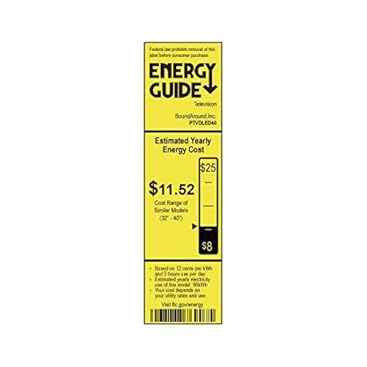
Image: Energy Guide label for the Pyle PTVDLED40 TV, showing an estimated yearly energy cost of $11.52.
10. Warranty & Fanohanana
For warranty information and technical support, please refer to the warranty card included with your product or visit the official Pyle website. Tehirizo ny tapakila fividiananao ho porofon'ny fividianana ho an'ny fitakiana fiantohana.
Raha mila fanazavana fanampiny momba ny serivisy ho an'ny mpanjifa, azonao jerena ihany koa ny Amazon Customer Support page.


