1. Fampidirana
This manual provides essential information for the safe and effective operation of the Mark-10 EKM5-200 Myometer Kit. The EKM5-200 Myometer Kit is designed to facilitate a wide range of strength assessments and ergonomics studies. It features a Series 5 force gauge with a 200 lbF (1,000 N) range, a tabletop mount, a strap, and various accessories. This kit is suitable for ergonomists and other professionals requiring precise force measurement.
2. Information momba ny fiarovana
Please read all instructions carefully before using the EKM5-200 Myometer Kit. Failure to follow these instructions may result in injury or damage to the equipment.
- Ensure the device is used within its specified force capacity of 200 lbF (1,000 N). Exceeding this limit can damage the force gauge.
- Only use the provided AC adapter/charger for powering and charging the device.
- Arovy amin'ny ranon-javatra sy ny mari-pana tafahoatra ny fitaovana.
- Aza manandrana manala na manamboatra ny fitaovana. Ampahafantaro ny mpiasa mahafeno fepetra ny asa fanamboarana rehetra.
- Always secure the force gauge properly when using the tabletop mounting kit to prevent accidental detachment.
- When performing strength assessments, ensure the subject is positioned safely and comfortably.
3. Ny votoatin'ny fonosana
The Mark-10 EKM5-200 Myometer Kit includes the following components:
- M5-200 Advanced Force Gauge
- Carrying Case
- Tabletop Mounting Kit (for vertical or horizontal orientations)
- Adjustable Length Looped Strap
- AC Adapter/Charger (110V)
- MESUR Lite Data Collection Software
- USB Cable
- NIST-traceable Certificate of Calibration with Data
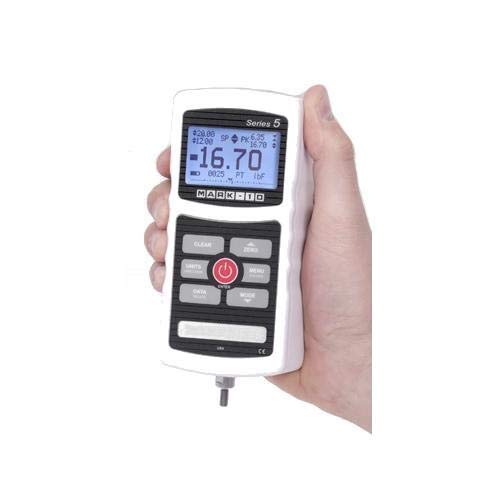
Figure 1: The M5-200 Advanced Force Gauge, a key component of the EKM5-200 kit. It features a digital display and control buttons.
4. Vokatra mihoatraview ary Features
The EKM5-200 Myometer Kit is designed for precise force measurement in various applications. Its core component, the M5-200 force gauge, offers advanced capabilities.
Lafin-javatra fototra:
- Measures real-time, average, and peak pull and push forces.
- Force capacity: 200 lbF (1,000 N).
- Accuracy: ±0.1% of full scale.
- Sampling rate: 7,000 Hz.
- Output options: USB, RS-232, and analog.
- High/low limit indicators for pass/fail and minimum force testing.
- 1,000-point data memory with statistical calculations.
- Data can be bulk downloaded to the included MESUR Lite data collection software.
- Force gauge is compatible with other Mark-10 grips and attachments.
5. Fametrahana
5.1 Charging the Force Gauge
- Connect the AC adapter/charger to the force gauge's power input port.
- Plug the AC adapter into a standard 110V electrical outlet.
- Allow the device to charge fully before initial use. The charging indicator on the gauge will provide status.
5.2 Assembling the Tabletop Mounting Kit
- Identify the components of the tabletop mounting kit.
- Attach the force gauge securely to the mounting bracket. Ensure all fasteners are tightened.
- Mount the assembly to a stable tabletop or surface, ensuring it is firm and does not wobble. The kit supports both vertical and horizontal orientations.
- Attach the adjustable length looped strap to the force gauge or an appropriate attachment point on the mounting kit, depending on the test setup.
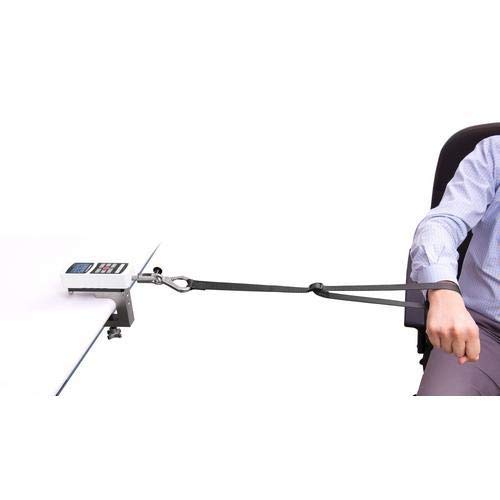
Sary 2: Eksample setup of the EKM5-200 Myometer Kit for an ergonomics study, showing the force gauge mounted on a table and connected to a subject via a strap.
6. Torolàlana miasa
6.1 Mamelona/Mamono
- Mba hampandehanana dia tsindrio ary hazòny ny fahefana bokotra mandra-pahazavan'ny fampisehoana.
- Mba hialana amin'ny herinaratra, kitiho ary hazony ny fahefana bokotra mandra-pamono ny fampisehoana.
6.2 Fandrefesana fototra
- Ensure the force gauge is powered on and properly calibrated (refer to NIST certificate).
- Tsindrio ny ZERO button to tare the current reading before applying any force.
- Apply force to the sensor via the strap or other attachment. The display will show the real-time force.
- The gauge can display peak force, average force, and real-time force. Use the MODE button to cycle through display modes.
- Observe the high/low limit indicators for pass/fail testing, if configured.
6.3 Fifantenana vondrona
Tsindrio ny vondrona button to cycle through available measurement units (e.g., lbF, N, kgF).
7. Fitantanana ny angona
7.1 Internal Data Memory
The M5-200 force gauge can store up to 1,000 data points internally, along with statistical calculations. Refer to the force gauge's dedicated manual for detailed instructions on saving and reviewfamindrana angona mivantana amin'ny fitaovana.
7.2 MESUR Lite Data Collection Software
- Install the MESUR Lite data collection software on your computer using the provided media or by downloading it from the Mark-10 website.
- Connect the force gauge to your computer using the supplied USB cable.
- Launch the MESUR Lite software. The software will detect the connected force gauge.
- Follow the on-screen instructions within MESUR Lite to bulk download stored data, perform real-time data acquisition, and analyze measurements.
8. Fikojakojana
8.1 Fanadiovana
- Wipe the exterior of the force gauge and accessories with a soft, damp lamba.
- Aza mampiasa mpanadio na solvents mikikisana, satria mety hanimba ny endrika ivelany na ny singa anatiny izany.
- Ensure no moisture enters the device's ports.
8.2 Fitehirizana
- When not in use, store the EKM5-200 Myometer Kit in its provided carrying case to protect it from dust, impacts, and environmental factors.
- Tehirizo ao amin'ny toerana mangatsiatsiaka sy maina, lavitry ny tara-masoandro mivantana sy ny hafanana tafahoatra.
8.3 Kalibration
The force gauge comes with a NIST-traceable certificate of calibration. Regular recalibration is recommended to maintain accuracy, especially for critical applications. Refer to Mark-10's guidelines or contact their support for recalibration services.
9. Famahana olana
| OLANA | Antony mety hitranga | vahaolana |
|---|---|---|
| Tsy mandeha ny fitaovana. | Olana amin'ny bateria ambany na ny adaptatera herinaratra. | Connect the AC adapter and charge the device. Ensure the adapter is properly plugged into a working outlet. |
| Vakiteny tsy marina. | Not zeroed before use, or device requires recalibration. | Tsindrio ny ZERO button before measurement. If problem persists, consider recalibration. |
| Cannot connect to MESUR Lite software. | USB cable issue, driver not installed, or software not running. | Ensure USB cable is securely connected. Install necessary drivers. Restart MESUR Lite software and the force gauge. |
| Display shows "OVERLOAD". | Applied force exceeds the device's capacity. | Immediately remove the excessive force. Ensure future measurements stay within the 200 lbF (1,000 N) limit. |
If you encounter issues not listed here or if the suggested solutions do not resolve the problem, please contact Mark-10 technical support.
10. Famaritana
| fikirana | sarobidy |
|---|---|
| MODELY | EKM5-200 |
| Force Capacity | 200 lbF (1,000 N) |
| araka ny marina | ± 0.1% amin'ny ambaratonga feno |
| Sampling Rate | 7,000 Hz |
| Data Memory | 1,000 teboka angona |
| Outputs | USB, RS-232, Analog |
| Fampidirana herinaratra | 110V AC adaptatera |
| mpanamboatra | Marka-10 |
| ASIN | B07D8SFSKC |
| UPC | 666758807621 |
11. Warranty sy fanohanana
11.1 Fampahalalana momba ny fiantohana
For detailed warranty information regarding your Mark-10 EKM5-200 Myometer Kit, please refer to the documentation included with your purchase or visit the official Mark-10 website. Ny fepetran'ny fiantohana dia mazàna mandrakotra ny lesoka amin'ny famokarana mandritra ny fe-potoana voafaritra manomboka amin'ny datin'ny fividianana.
11.2 Fanohanana ara-teknika
Should you require technical assistance, troubleshooting, or service for your EKM5-200 Myometer Kit, please contact Mark-10 customer support.
- Mpanamboatra: Marka-10
- Webtranokala: www.mark-10.com (Miangavy anao hitsidika ilay manam-pahefana website for contact details and the latest support resources.)
When contacting support, please have your model number (EKM5-200) and serial number (if applicable) ready.


