1. Fampidirana
This manual provides comprehensive instructions for the installation, operation, and maintenance of your BlueBird A1390 Automatic Irrigation Tap Programmer. This device is designed to automate your garden watering schedule, ensuring efficient and consistent irrigation. Please read this manual thoroughly before using the product to ensure correct operation and to prevent damage.
2. Information momba ny fiarovana
- Do not immerse the unit in water. The unit is designed to be weather-resistant, but not submersible.
- Use only 1.5V AA alkaline batteries. Do not mix old and new batteries, or different types of batteries.
- Esory ny batterie raha tsy ampiasaina mandritra ny fotoana maharitra ilay fitaovana mba hisorohana ny fivoahana.
- Arovy amin'ny ankizy.
- Aza manandrana manala na manamboatra ny fitaovana samirery. Mifandraisa amin'ny mpiasa mahafeno fepetra hahazoana fanamboarana.
- Ataovy azo antoka ny fifandraisana rehetra mba hisorohana ny fivoahana.
3. Ny votoatin'ny fonosana
Azafady, jereo ny fonosana ho an'ireto zavatra manaraka ireto:
- 1x BlueBird A1390 Automatic Irrigation Tap Programmer
- 1x User Manual (ity antontan-taratasy ity)
Note: 2 AA 1.5V batteries are required for operation and are not included in the package.
4. Vokatra mihoatraview
The BlueBird A1390 features two main rotary dials for setting irrigation frequency and duration, along with a battery indicator and an ON/OFF switch.
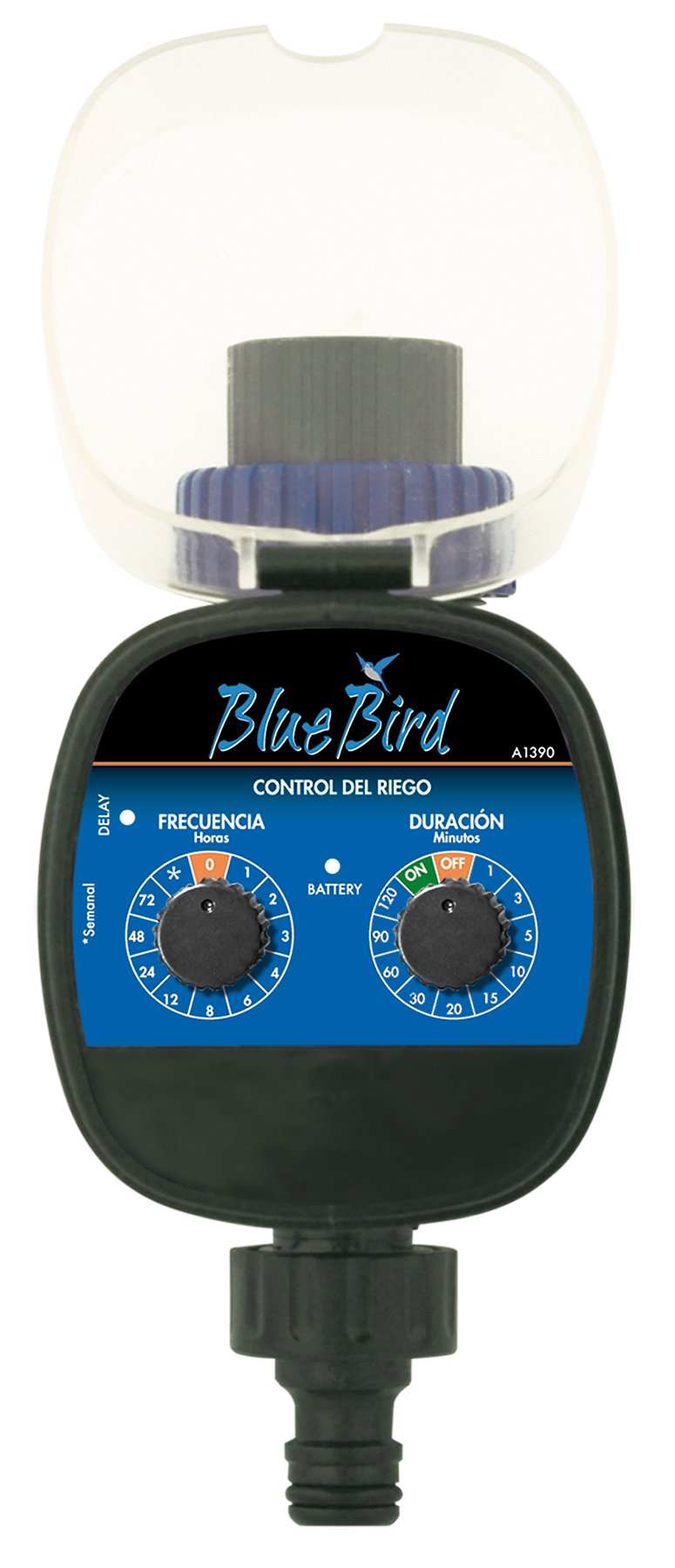
Sary 1: anoloana view of the BlueBird A1390 Irrigation Programmer. The left dial controls irrigation frequency, and the right dial controls irrigation duration. A battery indicator light is located between the dials.
singa:
- Frequency Dial (Frecuencia): Sets how often the irrigation occurs. Options include 0 (off), 1, 2, 3, 4, 6, 8, 12, 24, 48, 72 hours, and a '*' setting for manual or weekly operation.
- Duration Dial (Duración): Sets how long each irrigation cycle lasts. Options include 0 (off), 1, 3, 5, 10, 15, 20, 30, 60, 90, 120 minutes.
- ON / OFF switch: Located on the Duration Dial, allows for manual override or turning the unit off.
- Tondro bateria: A light that indicates battery status.
- Efitra bateria: Located at the rear of the unit (not visible in Figure 1).
- Fidirana/Fivoahana rano: Standard tap and hose connections.
5. Fametrahana
5.1 Fametrahana bateria
- Tadiavo ny fonon'ny efitrefitra bateria ao ambadiky ny fitaovana.
- Remove the cover by twisting or sliding it open.
- Insert two (2) new 1.5V AA alkaline batteries, ensuring correct polarity (+/-).
- Replace the battery compartment cover securely to maintain water resistance.
5.2 Connecting to the Tap
- Ensure your outdoor tap is turned off.
- Screw the BlueBird A1390 programmer onto your tap. Hand-tighten only to prevent damage.
- Connect your garden hose or irrigation system to the outlet of the programmer. Ensure a tight connection to prevent leaks.
- Slowly turn on your outdoor tap. Check for any leaks at the connections.
6. Torolàlana miasa
The BlueBird A1390 is designed for simple, intuitive programming using its two rotary dials.
6.1 Setting Irrigation Frequency
- Rotate ny Frequency Dial (left dial) to your desired irrigation interval.
- Ny fanovana misy dia:
- 0: No irrigation (off).
- 1, 2, 3, 4, 6, 8, 12, 24, 48, 72: Irrigation every X hours.
- *: This setting typically indicates a manual mode or a weekly cycle, depending on the specific model's internal logic. Refer to the example below for common usage.
6.2 Setting Irrigation Duration
- Rotate ny Duration Dial (right dial) to your desired watering time per cycle.
- Ny fanovana misy dia:
- eny; No irrigation.
- ON: Continuous irrigation (use with caution).
- 1, 3, 5, 10, 15, 20, 30, 60, 90, 120: Irrigation for X minutes.
6.3 Eksampny Programming
To water every 6 hours for 10 minutes:
- Set ny Frequency Dial ny 6 (ora).
- Set ny Duration Dial ny 10 (minutes).
The programmer will automatically begin the cycle based on these settings. The first cycle will typically start shortly after programming, or after a short delay.
6.4 Manual ON/OFF
To manually turn on the water, rotate the Duration Dial to the ON position. To stop manual watering, rotate the dial back to NIALA or a timed setting.
7. Fikojakojana
7.1 Fanoloana bateria
When the battery indicator light dims or the unit stops functioning, it's time to replace the batteries. Follow the steps in Section 5.1 for battery installation.
7.2 Fanadiovana
Clean the exterior of the programmer with a damp cloth. Do not use abrasive cleaners or solvents. Ensure no water enters the battery compartment or internal electronics.
7.3 Fitehirizana ririnina
Before the first frost, disconnect the programmer from the tap and hose. Remove the batteries. Store the unit indoors in a dry, frost-free location to prevent damage from freezing water.
8. Famahana olana
| OLANA | Antony mety hitranga | vahaolana |
|---|---|---|
| Unit does not turn on/display. | Batterie maty na diso napetraka. | Soloy ny bateria, hiantohana ny polarity marina. |
| Tsy mikoriana ny rano. | Tap is off; programmer set to '0' or 'OFF'; low water pressure; clogged filter. | Ensure tap is fully open. Check frequency/duration settings. Verify water pressure. Clean any filters. |
| Unit leaks at connections. | Loose connections; missing or damaged washer. | Tighten connections. Check and replace washers if necessary. |
| Irrigation schedule is incorrect. | Incorrect frequency or duration settings. | Re-check and adjust the Frequency and Duration Dials according to your desired schedule. |
9. Famaritana
- Modely: A1390
- marika: BlueBird
- Mpanamboatra: Altadex
- Loharano herinaratra: 2 x AA 1.5V Alkaline Batteries (not included)
- Fanondrahana matetika: 0, 1, 2, 3, 4, 6, 8, 12, 24, 48, 72 hours, or '*' (manual/weekly)
- Faharetan'ny fanondrahana: OFF, ON, 1, 3, 5, 10, 15, 20, 30, 60, 90, 120 minutes
- Haben'ny vokatra: Manodidina ny 19.4 x 10.6 x 10 cm
- Lanja vokatra: Tokony ho 280 g
- GTIN (UPC): 8426375113909
10. Warranty sy fanohanana
This product is covered by a standard manufacturer's warranty. For specific warranty details, please refer to the documentation provided at the time of purchase or contact your retailer. For technical support or inquiries, please contact the seller or manufacturer directly.


