BYTECH Wireless Optical Mouse User Manual
Model: BYTECH Wireless Optical Mouse
Sava lalana
This manual provides detailed instructions for the setup, operation, maintenance, and troubleshooting of your BYTECH Wireless Optical Mouse. Please read this manual thoroughly before using the device to ensure optimal performance and longevity.
Vita ny vokatraview
The BYTECH Wireless Optical Mouse is designed for comfortable and efficient navigation. It features a precise optical sensor, a scroll wheel, and a DPI adjustment button for customizable sensitivity. Its ergonomic design and wireless connectivity provide a clutter-free workspace.

Sary 1: Ambony midina view of the BYTECH Wireless Optical Mouse. The mouse is black with a silver stripe along its sides. A scroll wheel and a DPI button are visible on the top surface.
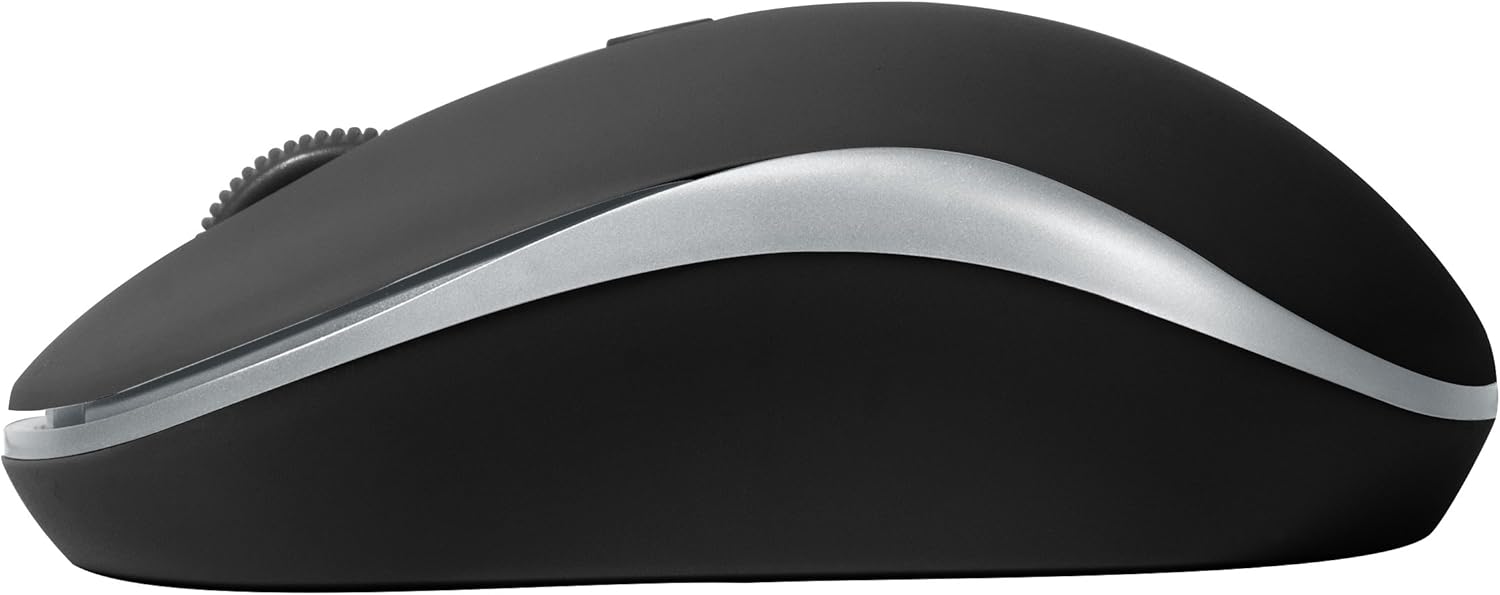
Sary 2: lafiny view of the BYTECH Wireless Optical Mouse. This angle highlights the ergonomic curve and the silver accent line that runs along the side of the mouse.
Hametraka
1. Fametrahana bateria
- Tadiavo ny toerana misy ny bateria eo amin'ny ilany ambany amin'ny totozy.
- Sokafy ny fonon'ny batterie.
- Insert one AA battery (not included) into the compartment, ensuring the correct polarity (+/-) as indicated inside.
- Akatona tsara ny saron'ny efitrefitra bateria.
2. Fifandraisana amin'ny mpandray USB
- Esory amin'ny toerana fitahirizana ny mpandray USB, izay mazàna hita ao anatin'ny fitoeran'ny bateria na eo akaikiny.
- Ampidiro amin'ny seranan-tsambo USB misy amin'ny solosainao na solosainao ny mpandray USB.
- Tokony ho hitan'ny rafitra fiasanao sy hapetrany ho azy ireo mpamily ilaina. Mety haharitra fotoana fohy izany.
3. Powering On
- Locate the On/Off switch on the underside of the mouse.
- Slide the switch to the "On" position. The mouse should now be ready for use.
Torolàlana miasa
Asa fototra
- Tsindrio havia: Tsindrio ny bokotra havia raha hisafidy zavatra, hanokatra rohy, na hampandeha ireo fiasa.
- Tsindrio havanana: Tsindrio ny bokotra havanana mba hanokafana ny menio manodidina na hidirana amin'ireo safidy fanampiny.
- Kodiaran'ny horonam-boky: Ahodino miakatra na midina ny kodiarana mba hivezivezy eo anelanelan'ny antontan-taratasy na web pages. Press the scroll wheel for middle-click functionality (e.g., opening links in new tabs).
Fanitsiana DPI
The mouse features a DPI (Dots Per Inch) button, typically located behind the scroll wheel. Press this button to cycle through different sensitivity settings. Each press will change the cursor speed, allowing you to find the optimal setting for your task.
- Tsindrio ny bokotra DPI once to switch to the next sensitivity level.
- Repeat until you find your preferred cursor speed.
Fomba fitsitsiana herinaratra
To conserve battery life, the BYTECH Wireless Optical Mouse is designed to automatically enter a sleep mode after a period of inactivity. To wake the mouse, simply move it or click any button.
fikarakarana
FANADIOVANA
- Hamarino tsara fa maty ny totozy alohan'ny hanadiovana azy.
- Mampiasà lamba malefaka sady tsy misy loko kely dampasiana rano na vahaolana fanadiovana malefaka.
- Wipe the surface of the mouse gently. Avoid excessive moisture.
- For the optical sensor, use a dry cotton swab to carefully remove any dust or debris.
- Aza mampiasa mpanadio mikikisana, alikaola, na solvents, satria mety hanimba ny velaran-tany ireo.
Fanoloana bateria
When the mouse performance degrades or the cursor becomes erratic, it may be time to replace the battery. Follow the battery installation steps outlined in the "Setup" section.
fitahirizana
When not in use for an extended period, it is recommended to turn off the mouse to conserve battery life. The USB receiver can be stored in its dedicated slot on the mouse's underside to prevent loss.
Fanamboarana
- Tsy mamaly ny totozy:
- Ataovy azo antoka fa mihodina ny totozy.
- Jereo ny haavon'ny bateria ary soloy raha ilaina.
- Verify the USB receiver is securely plugged into a working USB port. Try a different USB port.
- Avereno indray ny solosainao.
- Cursor erratic or jumping:
- Diovy ny sensor optika eo ambanin'ny totozy.
- Ensure you are using the mouse on a suitable surface (non-reflective, non-transparent). A mouse pad is recommended.
- Jereo raha misy fitsabahana elektromagnetika mahery vaika avy amin'ny fitaovana hafa.
- Olana amin'ny fifandraisana:
- Reduce the distance between the mouse and the USB receiver.
- Remove any large metal objects or electronic devices that might be obstructing the wireless signal.
- If using a USB hub, try connecting the receiver directly to the computer.
fepetra arahana
| endri-javatra | antsipirihany |
|---|---|
| Marika | Bytech |
| MODELY | BYTECH Wireless Optical Mouse |
| Teknolojia fifandraisana | Wireless (Receiver USB) |
| Movement Detection Technology | Optical |
| loko | Mainty |
| Loharanon-kery | Battery Powered (1x AA, tsy tafiditra) |
| Fifanarahana amin'ny rafitra fandidiana | macOS, Android (and generally Windows) |
| Lanja entana | 3.56 oz |
| Haben'ny vokatra (LxWxH) | 1 x 1 x 1 santimetatra (Tombanana) |
Fanamarihana: ny mari-pahaizana dia miova tsy misy fampandrenesana.
Warranty sy fanohanana
Bytech products are manufactured to the highest quality standards. For information regarding warranty coverage, technical support, or service, please refer to the warranty card included with your product or visit the official Bytech website. Tehirizo ny tapakila fividiananao ho porofon'ny fividianana ho an'ny fitakiana fiantohana.
For further assistance, please contact Bytech customer support through their official channels.


