1. Vokatra mihoatraview
The Sharp EL-531TG-GY is a scientific calculator designed for students and professionals requiring advanced mathematical functions. It features a 2-line display and Multi-Line Playback, facilitating the input and review of complex equations. This model is suitable for general math, algebra, geometry, trigonometry, statistics, biology, chemistry, and general science applications.
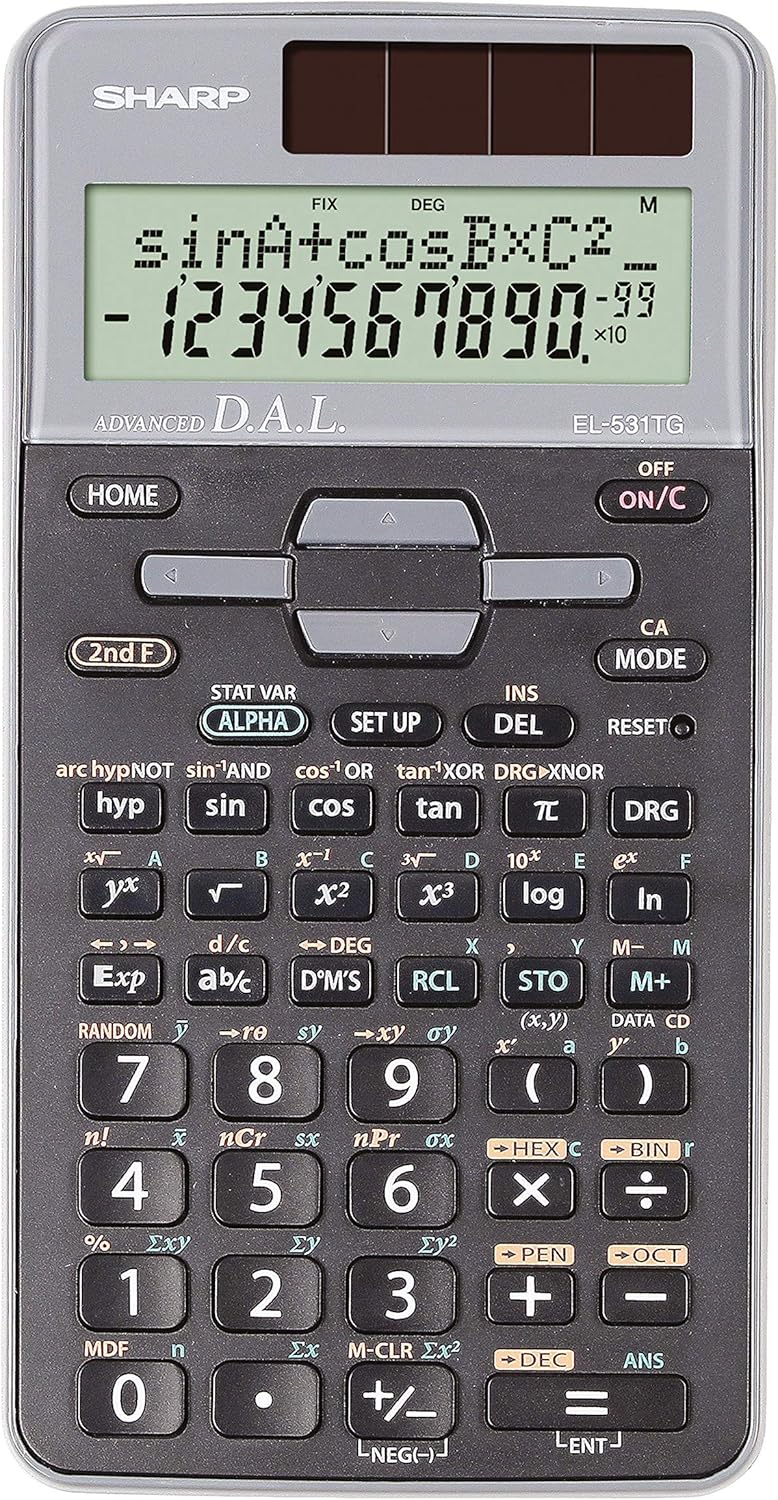
Sary 1: Eo anoloana view of the Sharp EL-531TG-GY Scientific Calculator, showing the display, keypad, and solar panel.
2. Fametrahana sy fampiasana voalohany
2.1 Loharanon-kery
The EL-531TG-GY calculator operates using both solar power and a single LR44 button cell battery. The solar panel provides power in well-lit environments, while the battery ensures operation in low-light conditions or when solar power is insufficient. An LR44 battery is included with the calculator.
2.2 Mampirehitra/Efa
- Mba hanodina ny kajy ON, tsindrio ny ON/C fanalahidy.
- Mba hanodina ny kajy NIALA, tsindrio ny F faharoa lakile arahin'ny NIALA key (which is typically the same as ON/C).
2.3 Initial Display Settings
Upon first use or after a reset, the calculator will typically default to certain settings (e.g., DEG for angle units). Refer to Section 3.3 for details on changing mode settings.
3. Torolàlana miasa
3.1 Asa kajy fototra
Ampidiro isa amin'ny alalan'ny fitendry nomerika. Ampiasao ny +, -, ×, ary ÷ keys for addition, subtraction, multiplication, and division, respectively. Press = mba hahazoana ny vokatra.
3.2 Asa ara-tsiansa
The calculator performs over 273 advanced scientific functions. Many functions are accessed by pressing the F faharoa key before the desired function key.
- Trigonometric Functions: Ampiasao Ny fahotana, Kosy, tan. Inverse functions (sin⁻¹, cos⁻¹, volontany⁻¹) dia azo idirana amin'ny alàlan'ny F faharoa.
- Asa logaritmika: Ampiasao HIDITRA (fototra 10) ary ln (logarithma voajanahary).
- Hery sy fakany: Ampiasao x², √, x³, ³√.
- Ampahany: Ampiasao ny d/c fanalahidy ho an'ny fampidirana sy fiovam-po amin'ny ampahany.
3.3 Mode Settings (DEG/RAD/GRAD)
To change the angle unit mode (Degrees, Radians, Gradians):
- Tsindrio ny DRG fanalahidy.
- Tsindrio imbetsaka DRG to cycle through DEG (Degrees), RAD (Radians), and GRAD (Gradians). The current mode is indicated on the display.
3.4 Asa Fahatsiarovana
Ahitana fiasa fitadidiana ho an'ny fitahirizana sy fahatsiarovana sanda ny kajy.
- STO (Store): mpanao gazety Što followed by a variable key (e.g., A, B) to store the displayed value.
- RCL (Recall): mpanao gazety RCL followed by the variable key to recall the stored value.
- M+ (Memory Plus): Manampy ny sanda aseho amin'ny fahatsiarovana mahaleo tena.
- M- (Fahatsiarovana Minus): Subtracts the displayed value from the independent memory.
3.5 Multi-Line Playback
The 2-line display allows for Multi-Line Playback, enabling users to review previous calculations and expressions. Use the directional arrow keys (up/down) to scroll through past entries and results. This feature is useful for checking work or re-using parts of previous calculations.
4. Fikojakojana
4.1 Fanadiovana
To clean the calculator, wipe the surface gently with a soft, dry cloth. Do not use abrasive cleaners, solvents, or excessive moisture, as these can damage the display or internal components.
4.2 Fanoloana bateria
The calculator uses one LR44 button cell battery. If the display becomes dim or erratic in low-light conditions, the battery may need replacement. To replace the battery:
- Ataovy azo antoka fa maty ny kajy.
- Tadiavo ny toerana misy ny bateria ao ambadiky ny kajy.
- Sokafy tsara ny fonon'ny efitra kely.
- Remove the old LR44 battery and insert a new one, ensuring correct polarity (+/-).
- Akatona tsara ny saron'ny efitrefitra bateria.
4.3 Fitehirizana
When not in use, store the calculator in a cool, dry place away from direct sunlight and extreme temperatures. The hard cover included with the calculator provides protection from scratches and minor impacts.
5. Famahana olana
5.1 Fampisehoana olana
- Asehoy banga na manjavozavo: Ensure sufficient light for the solar panel. If the issue persists, replace the LR44 battery.
- Erratic Display: This may indicate a low battery. Replace the LR44 battery.
5.2 Incorrect Results
- Check Mode Settings: Verify that the angle unit (DEG, RAD, GRAD) is set correctly for trigonometric calculations.
- Input Error: Review your input using the Multi-Line Playback feature to ensure the expression was entered correctly.
- Memory Contents: If using memory functions, ensure the stored values are correct.
5.3 Tsy mamaly ny kajy
Raha tsy mamaly intsony ny kajy dia andramo averina amin'ny laoniny. Tadiavo ny RESET button (often a small recessed button requiring a thin object like a paperclip to press). Pressing this button will clear all memory and return the calculator to its factory default settings.
6. Famaritana

Sary 2: Eo anoloana view of the Sharp EL-531TG-GY Scientific Calculator, illustrating its dimensions.
| endri-javatra | Description |
|---|---|
| Laharana modely | SH-EL531TGGY |
| Karazana fampisehoana | 2-line LCD with Multi-Line Playback |
| asa | Over 273 advanced scientific functions |
| Loharanon-kery | Solar and 1 x LR44 battery (included) |
| KEVITRA | plastika |
| refy (L x W x H) | 16.1 x 8 x 1.5 cm (eo ho eo) |
| lanja | 100 g (eo ho eo) |

Sary 3: lafiny view of the Sharp EL-531TG-GY Scientific Calculator, showing its slim profile.
7. Warranty sy fanohanana
7.1 Fampahalalana momba ny fiantohana
This product is covered by a manufacturer's warranty. Please refer to the warranty card included with your purchase or visit the official Sharp webtranokala momba ny fepetra sy fepetra momba ny fiantohana amin'ny antsipiriany manokana amin'ny faritra misy anao.
7.2 Fanohanana ny mpanjifa
For technical assistance, troubleshooting not covered in this manual, or service inquiries, please contact Sharp customer support. Contact information can typically be found on the Sharp official webtoerana na eo amin'ny fonosana vokatra.


