Sava lalana
This manual provides detailed instructions for the installation, operation, and maintenance of your Hifonics BXX1600.1D Brutus Class D 1600W RMS 1 Ohm Mono Car Subwoofer Ampmpanadio. Azafady vakio tsara ity boky torolalana ity alohan'ny hametrahana na hampiasana azy mba hahazoana antoka fa miasa tsara sy azo antoka.
Fametrahana sy fametrahana
Ny fametrahana araka ny tokony ho izy dia tena ilaina amin'ny fampandehanana tsara indrindra sy ny fiarovana. Ampirisihina ny manam-pahaizana manokana momba ny fametrahana azy.
Wiring Connections
Ensure all power, ground, and remote wires are securely connected. Use appropriate gauge wiring for your installation to prevent overheating and ensure stable power delivery.

Sary: aoriana view of the Hifonics BXX1600.1D amplifier. This image highlights the power input terminals (+12V, REM, GND) on the right, and the mono speaker output terminals on the left. Two 70A fuses are visible between the power and speaker terminals, indicating the amplifier's power handling capabilities.
ny amplifier features zero-gauge power and ground terminals for robust power delivery, and eight-gauge speaker terminals for secure speaker connections. Always disconnect the vehicle's battery before making any electrical connections.
Fametrahana fuse
ny amplifier is equipped with internal fuses to protect against electrical overloads. Ensure these are correctly installed and of the specified rating (70A x 2) before operation.
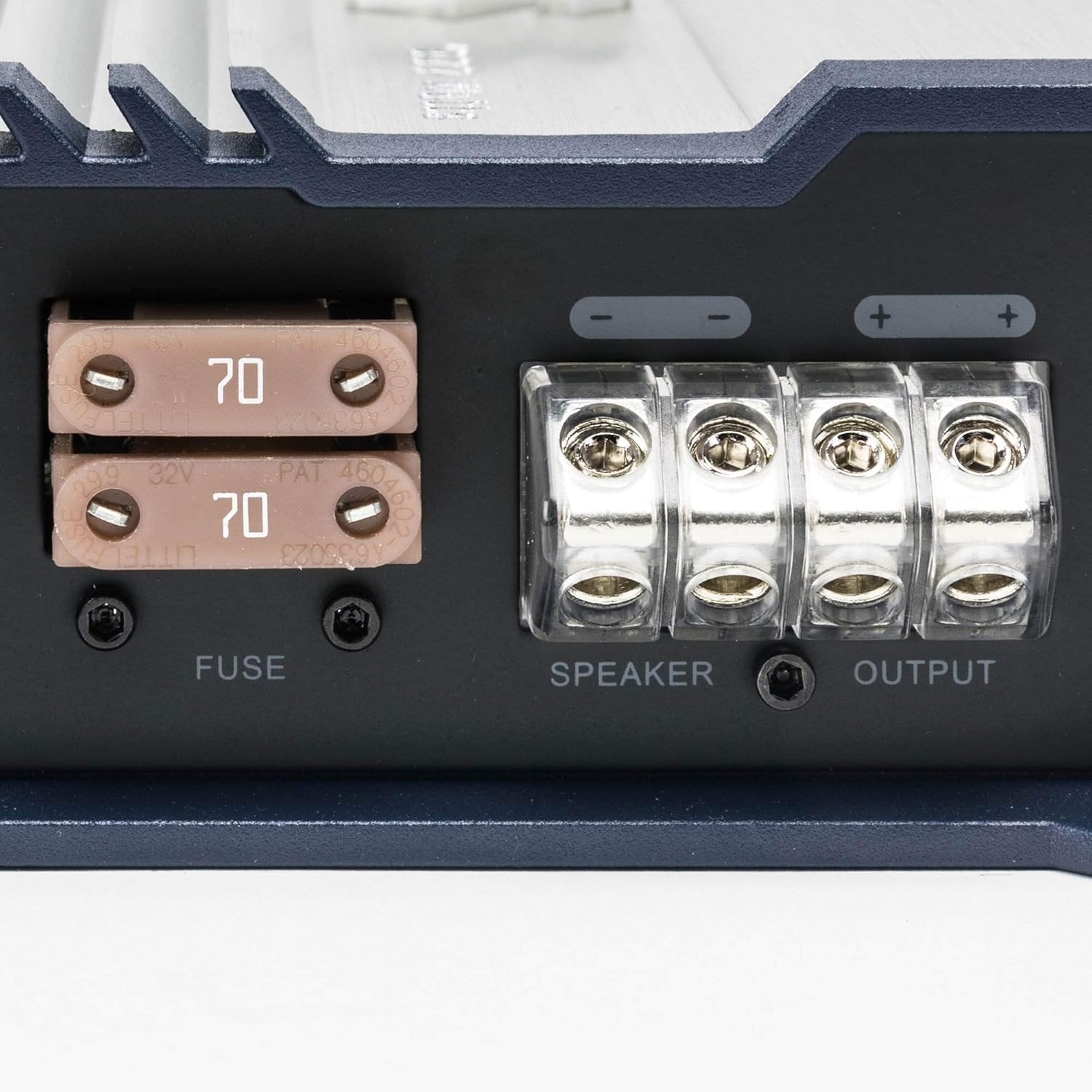
Sary: A close-up view of the Hifonics BXX1600.1D amplifier's fuse compartment and speaker output terminals. Two 70A fuses are clearly visible, along with the robust speaker wire connections labeled "SPEAKER OUTPUT".
Torolàlana miasa
Fantaro ny amplifier's controls to optimize your audio experience.

Sary: anoloana view of the Hifonics BXX1600.1D amplifier's control panel. This image displays the RCA input and output jacks, remote bass knob port, and various adjustment controls including Level, Phase, Bass EQ, Subsonic Filter, and Low-Pass Filter (LPF).
Fanaraha-masoview
- Power/Protect Indicators: LEDs indicating operational status (green for power, red for protection mode).
- lavitra: Port for connecting an optional remote bass level control.
- Input/Output RCAs: For connecting to your head unit and bridging multiple ampmpamonjy aina.
- Fanaraha-maso Manamboatra ny fahatsapana ny fidirana mba hifanaraka amin'ny vokatra azo avy amin'ny head unit-nao.
- LPF (Sivana Ambany): Filters out high frequencies, allowing only low frequencies to pass to the subwoofer.
- Sivana Subsonika: Filters out extremely low frequencies that are inaudible and can damage subwoofers.
- Fifehezana dingana: Adjusts the phase of the subwoofer output (0° to 180°) to match other speakers.
- Bass EQ/Boost: Provides adjustable bass equalization for enhanced low-frequency response.
Power-Up voalohany
After all connections are made, turn on your head unit. The amplifier's power indicator should illuminate green. If the protect indicator lights up, immediately turn off the system and check all connections and wiring for faults.
Fanitsiana Settings
Start with the gain control at its minimum setting. Gradually increase the gain until the desired volume is achieved without distortion. Adjust the LPF, Subsonic Filter, and Phase controls to blend the subwoofer output seamlessly with your main speakers.
fikarakarana
Ny fikojakojana tsy tapaka dia miantoka ny faharetan'ny fampiasanao sy ny fahombiazana tsara indrindra ampLifer.
- Fanadiovana: Tazony ny amplifier clean and free of dust and debris. Use a soft, dry cloth for cleaning. Do not use liquid cleaners.
- rivotra: Ataovy azo antoka ny amplifier has adequate ventilation. Do not block the cooling fins or mount the ampLifier ao amin'ny toerana voahidy tsy misy rivotra tsara.
- Wiring Inspection: Periodically check all wiring connections for tightness and signs of corrosion or damage. Loose connections can lead to poor performance or damage.
- Fanoloana fuse: If a fuse blows, replace it only with a fuse of the exact same type and rating (70A). Using an incorrect fuse can cause severe damage to the amplifier na rafitra elektrika an'ny fiara.
Fanamboarana
Raha sendra olana amin'ny tenanao ianao amplifier, jereo ireto dingana famahana olana mahazatra ireto:
- Tsy misy hery: Hamarino ny fuse herinaratra lehibe, ny fifandraisana amin'ny tany, ary ny tariby mandeha lavitra. Ataovy azo antoka fa ampy ny bateria an'ny fiara.
- Protection Mode (Red LED): This indicates a fault. Check for short circuits in speaker wiring, improper impedance loads, or overheating. Allow the amplifier to cool down if it's hot.
- Tsy misy feo: Verify all RCA input/output connections, speaker wire connections, and head unit settings. Check the gain control and ensure it's not set too low.
- Feo diso: Reduce the gain setting. Check for proper LPF and Subsonic filter settings. Ensure speaker impedance matches the ampny fahaizan'ny lifier.
If problems persist after troubleshooting, consult a qualified car audio technician.
fepetra arahana
| endri-javatra | antsipirihany |
|---|---|
| Laharana modely | BXX1600.1D |
| Hery RMS (1 Ohm) | 1600W |
| KILASY | Kilasy D |
| Type | Mono AmpLifer |
| Ny refin'ny vokatra | 19.5 x 10.2 x 3.6 santimetatra |
| Lanja entana | 11.48 kg |
| mpanamboatra | Hifonika |
| Daty misy voalohany | 18 Janoary 2018 |
Vita ny vokatraview Video
Jereo ity lahatsary ofisialy ity raha mila fanazavana fanampinyview of the Hifonics Brutus Gamma BG Amplifiers, which share similar features and design principles with your BXX1600.1D model.
Video: An official Hifonics video showcasing the Brutus Gamma BG Amplifiers. This video provides visual details and highlights key features, offering insights relevant to the Hifonics BXX1600.1D ampLifer.
Warranty Information
Your Hifonics BXX1600.1D amplifier is covered by a manufacturer's warranty against defects in materials and workmanship. Please refer to the warranty card included with your product for specific terms, conditions, and duration. Keep your proof of purchase for warranty claims.
Fanohanana ny mpanjifa
For technical assistance, troubleshooting, or warranty inquiries, please contact Hifonics customer support through their official website or the contact information provided in your product packaging. You can also visit the Hifonics Store on Amazon ho an'ny loharano fanampiny.


