Propel Zipp Nano 2.0 Drone User Manual
Model: Zipp Nano 2.0
Brand: Propel
1. Fampidirana
This manual provides essential information for the safe and effective operation of your Propel Zipp Nano 2.0 Drone. Please read this manual thoroughly before operating the drone to ensure proper usage and to prevent damage or injury.
The Propel Zipp Nano 2.0 is a high-performance 2.4 GHz indoor/outdoor drone designed for stable flight and exciting aerial maneuvers. It features a built-in 6-axis gyroscopic chip for stability, multiple speed settings, and the ability to perform 360-degree stunt rolls.
2. Fiarovana fiarovana
Always prioritize safety when operating the drone. Failure to follow these guidelines may result in injury or damage to the drone or property.
- Aza mampiasa ny drôna akaikin'ny olona, biby, na sakana.
- Keep hands, hair, and loose clothing away from rotating propellers.
- Ataovy azo antoka fa feno tsara ny bateria-n'ny drôna alohan'ny sidina tsirairay.
- Aza manidina amin'ny rivotra mahery na amin'ny toetr'andro ratsy.
- Supervise children during operation. This product contains small parts and is not suitable for children under 3 years due to choking hazard.
- Aza manandrana manova na manamboatra ny drôna samirery. Mifandraisa amin'ny serivisy ho an'ny mpanjifa raha mila fanampiana.

Image: Back of the product packaging, highlighting features and a warning about small parts.
3. Ny votoatin'ny fonosana
Hamarino fa ao anatin'ny fonosanao ny entana rehetra:
- Propel Zipp Nano 2.0 Drone (Red)
- 2.4 GHz Digital Remote Control
- USB Charging Cable
- Spare Replacement Parts (Propellers)

Image: The Propel Zipp Nano 2.0 Drone and its remote control visible within the clear retail packaging.
4. Fametrahana
4.1 Famandrihana ny bateria Drone
The drone is powered by an internal rechargeable battery. Use the provided USB charging cable to charge the drone.
- Connect the small end of the USB charging cable to the drone's charging port.
- Connect the large end of the USB charging cable to a USB power source (e.g., computer USB port, USB wall adapter).
- Hirehitra ny jiro famantarana ny famandrihana eo amin'ny tariby USB mandritra ny famandrihana ary ho faty rehefa feno ny famandrihana.
- Maharitra 30-45 minitra eo ho eo ny famandrihana. Aza ampitomboina be loatra.
4.2 Fametrahana bateria fanaraha-maso lavitra
The remote control requires 2 "AAA" batteries (not included).
- Tadiavo ny toerana misy ny bateria ao ambadiky ny fanaraha-maso lavitra.
- Sokafy ny fonon'ny batterie.
- Insert 2 "AAA" batteries, ensuring correct polarity (+/-).
- Akatona tsara ny saron'ny efitrefitra bateria.

Image: The remote control for the Propel Zipp Nano 2.0 Drone, showing its various buttons and joysticks.
4.3 Pairing the Drone and Remote Control
To establish a connection between the drone and the remote control:
- Apetraho eo amin'ny toerana fisaka ny drone.
- Turn on the drone by sliding the power switch. The drone's LED lights will flash.
- Alefaso ny fanaraha-maso lavitra.
- Atosika miakatra tanteraka ny joystick (throttle) havia, dia tariho midina tanteraka.
- The drone's LED lights will turn solid, indicating successful pairing.
5. Fampandehanana ny Drone
5.1 Fanaraha-maso ny sidina
Fantaro tsara ny fisehon'ny fanaraha-maso lavitra sy ny asany:
- Joystick havia (Throttle/Yaw):
- Push up to increase altitude (throttle).
- Push down to decrease altitude.
- Push left/right to rotate the drone (yaw).
- Joystick havanana (Pitch/Roll):
- Push up/down to move forward/backward (pitch).
- Push left/right to move left/right (roll).
- Bokotra hafainganam-pandeha: Cycles through 3 different speed settings (slow, medium, high).
- Button fanenjehana: Press to initiate 360-degree stunt rolls (see 5.4).
- T-Mode Button: Activates T-Mode for beginner pilots, providing more stable and controlled flight.
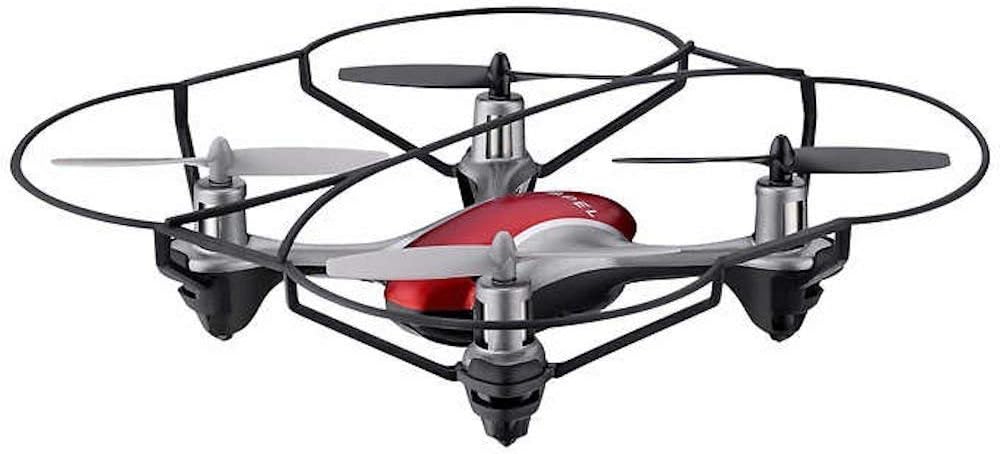
Image: The Propel Zipp Nano 2.0 Drone, showcasing its compact design and propeller guards.
5.2 Fiaingana sy fipetrahana
- Esory: After pairing, slowly push the left joystick (throttle) up to lift off.
- Fipetrahana: Slowly pull the left joystick (throttle) down until the drone lands gently.
5.3 Fihazonana ny haavo
The Zipp Nano 2.0 features an air pressure sensor that helps lock altitude in mid-air, making it easier to control and hover stably.
5.4 360-Degree Stunt Rolls
To perform a stunt roll:
- Ensure the drone is flying at a sufficient height (at least 6-8 feet).
- Press the dedicated Stunt Button on the remote control.
- Immediately push the right joystick in the desired direction (forward, backward, left, or right) to execute the roll.

Sary: Angled view of the Propel Zipp Nano 2.0 Drone, highlighting its sleek design and protective frame.
6. Fikojakojana
- Fanadiovana: Use a soft, dry cloth to clean the drone and remote control. Do not use harsh chemicals or water.
- Fanoloana Propeller: If propellers become damaged, replace them with the provided spare parts. Carefully remove the damaged propeller and snap the new one into place, ensuring correct orientation.
- fitahirizana: When not in use, store the drone and remote control in a cool, dry place away from direct sunlight.
7. Famahana olana
| OLANA | Antony mety hitranga | vahaolana |
|---|---|---|
| Tsy mamaly ny fanaraha-maso lavitra ny drone. | Not paired, low drone battery, low remote control batteries. | Re-pair the drone and remote. Charge drone battery. Replace remote control batteries. |
| Ny drone dia manidina tsy mety na miodina. | Not calibrated on a level surface, damaged propeller, strong wind. | Ensure drone is placed on a flat surface for pairing. Check for damaged propellers and replace if necessary. Fly in calm conditions. |
| Drone does not lift off. | Low drone battery, propellers not spinning correctly. | Charge drone battery fully. Check for obstructions around propellers. |
8. Famaritana
| endri-javatra | antsipirihany |
|---|---|
| Marika | manosika |
| Anarana modely | Propel 2.4 ghz (Zipp Nano 2.0) |
| Teknolojia fifandraisana | Fatran'ny onjam-peo (2.4 GHz) |
| Sahan'asa | Mahatratra 200 metatra |
| Gyroscope | Built-in 6-axis gyroscopic chip |
| Fikirana hafainganam-pandeha | 3 (Slow, Medium, High) |
| Endri-javatra manokana | 360-degree stunt rolls, Altitude Hold, T-Mode for beginners |
| Karazana fitaovana | Plastic, Carbon Fibre |
| Ny refin'ny vokatra | 13.97 x 3.81 x 13.97 cm |
| Lanja entana | 453.59 g (1 kilao) |
| loko | MENA |
| Ambaratonga fahaiza-manao | mpanao voalohany |
9. Warranty sy fanohanana
Propel offers unlimited replacement parts for one year from the date of purchase. For warranty claims, technical support, or to order replacement parts, please refer to the contact information provided on the product packaging or the official Propel website.
Tazomy ny rosia fividiananao ho porofon'ny fividiananao mba hahazoana antoka fa nividy ianao.


