1. Fampidirana
This manual provides instructions for the ROCCAT KONE Aimo Gaming Mouse. The KONE Aimo features an Owl-Eye Optical Sensor, customizable RGB AIMO LED illumination, and 23 programmable keys. It is designed for precision and ergonomic comfort during extended use.
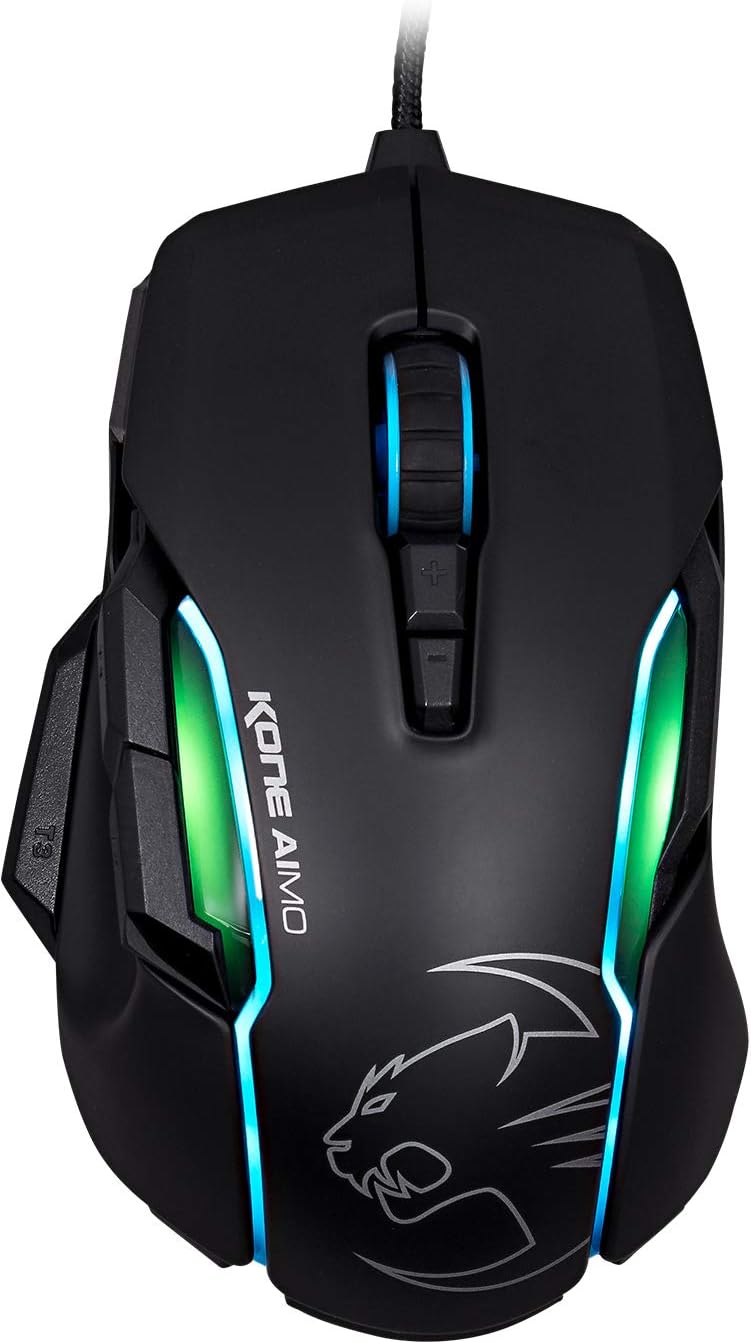
Sary 1: Ambony view of the ROCCAT KONE Aimo Gaming Mouse, showcasing its ergonomic shape and RGB lighting zones.
2. Ny votoatin'ny fonosana
Hamarino fa misy ny entana rehetra ao anaty fonosana:
- KONE AIMO Mouse with Attached Braided USB Cable
- Torolàlana haingana
- ROCCAT Stickers

Figure 2: Retail packaging of the ROCCAT KONE Aimo Gaming Mouse.
3. Fametrahana
- Mampifandray ny totozy (Connect the Mouse): Plug the USB cable of the ROCCAT KONE Aimo mouse into an available USB port on your computer.
- Fametrahana mpamily: Your operating system (Windows 7, 8, 8.1, 10) should automatically detect and install the necessary drivers.
- Install ROCCAT Swarm Software: For full customization of DPI settings, button assignments, and AIMO lighting, download and install the ROCCAT Swarm software from the official ROCCAT website. This software allows you to create and manage profiles.

Figure 3: The ROCCAT KONE Aimo mouse in use on a mouse pad, connected to a computer.
4. Torolàlana miasa
4.1. Bokotra Functions
The KONE Aimo features 23 programmable keys, including a tri-button thumb zone and a 4D tilting Titan wheel. These can be customized via the ROCCAT Swarm software.
- Tsindrio havia/havanana: Fiasan'ny totozy mahazatra.
- Scroll Wheel (4D Titan Wheel): Scrolls vertically and can tilt horizontally for additional functions. Also acts as a clickable button.
- Bokotra fanitsiana DPI: Located above and below the scroll wheel, these buttons allow for on-the-fly DPI sensitivity changes. Settings are configured in the Swarm software.
- Thumb Buttons (T1, T2, T3): Three buttons located on the left side, easily accessible by the thumb. The bottom-most button (T3) is often defaulted to the Easy-Shift[+] function.
- Easy-Shift[+] Button: This exclusive ROCCAT feature doubles the number of programmable functions for other buttons when held down, effectively expanding the total programmable keys.

Sary 4: antsipirihany view of the programmable thumb buttons (T1, T2, T3) on the left side of the mouse.
4.2. AIMO Lighting System
The AIMO lighting system provides intelligent, reactive RGB illumination across four independently configurable LED light zones and the glowing mouse wheel. It can synchronize with other compatible ROCCAT devices and is programmable through the ROCCAT Swarm software.

Figure 5: The KONE Aimo mouse displaying its multi-zone RGB AIMO illumination.
4.3. Owl-Eye Optical Sensor
The mouse is equipped with the ROCCAT Owl-Eye Optical Sensor, a modified PixArt 3361 sensor, offering adjustable DPI from 100 to 12,000. This sensor provides precise tracking and responsiveness. A built-in tracking distance control unit monitors the lift-off distance for enhanced accuracy.

Figure 6: The bottom of the mouse, highlighting the Owl-Eye Optical Sensor.
4.4. Ergonomika
The KONE Aimo features refined ergonomics designed for comfort during extended use. Its shape provides a natural fit for the hand, with a dedicated thumb rest area.

Figure 7: A hand gripping the KONE Aimo mouse, illustrating its ergonomic design.
5. Fikojakojana
- Fanadiovana: Mampiasà lamba malefaka sy maina hanadiovana ny totozy. Ho an'ny loto mafy loha, dia asio kelyamp azo ampiasaina ny lamba, mba hahazoana antoka fa tsy misy hamandoana miditra ao anatin'ireo singa anatiny.
- Fikarakarana sensor: Ataovy madio sy tsy misy vovoka na potipoti-javatra ny sensor optika eo ambanin'ny totozy mba hiantohana ny fahombiazan'ny fanaraha-maso tsara indrindra.
- Fitantanana tariby: Fadio ny fiolahana maranitra na ny fisintonana tafahoatra ny tariby USB voarandrana mba hisorohana ny fahasimbana.
6. Famahana olana
- Tsy mamaly ny totozy:
- Ataovy azo antoka fa tafiditra tsara amin'ny seranana USB miasa ny tariby USB.
- Try a different USB port or another computer to rule out port or system issues.
- Avereno indray ny solosainao.
- Tracking Issues / Inaccurate Movement:
- Diovy ny sensor optika eo amin'ny faran'ny totozy.
- Ensure you are using the mouse on a clean, suitable mouse pad or surface.
- Check DPI settings in the ROCCAT Swarm software.
- RGB Lighting Not Working / Incorrect:
- Verify that the ROCCAT Swarm software is running and updated.
- Check lighting settings within the Swarm software.
- Ataovy azo antoka fa tsy misy rindrankajy mifanohitra izay mifehy ny jiro RGB.
- Tsy miasa ireo bokotra:
- Check button assignments in the ROCCAT Swarm software.
- Ensure the software is not experiencing issues (try restarting it).
7. Famaritana
| endri-javatra | antsipirihany |
|---|---|
| Marika | ROCCAT |
| Laharana modely | ROC-11-815-BK |
| Sensor | Owl-Eye Optical Sensor (modified PixArt 3361) |
| DPI Range | 100 to 12,000 DPI |
| bokotra Programmable | 23 (with Easy-Shift[+]) |
| hazavana | RGBA AIMO LED Illumination (4 independent zones + scroll wheel) |
| fifandraisana | USB (Wired) |
| Fifanarahana amin'ny rafitra fandidiana | Windows 7, Windows 8, Windows 8.1, Windows 10 (32-bit and 64-bit versions) |
| Lanja entana | 11.2 ounces (317.5 grama eo ho eo) |
| Haben'ny vokatra (LxWxH) | 5.12 x 2.95 x 1.57 santimetatra (13 x 7.5 x 4 cm eo ho eo) |
8. Warranty & Fanohanana
For warranty information, technical support, and additional resources, please visit the official ROCCAT website or contact ROCCAT customer service. Keep your proof of purchase for warranty claims.
Azonao atao ihany koa ny mitsidika ny ROCCAT Store on Amazon raha mila fanazavana fanampiny momba ny vokatra.


